By Daniel Rowles, lead trainer at Target Internet and author of Digital Branding (Kogan Page). Last updated: November 2026.
This free GA4 course shows you how to set up key events in Google Analytics 4, the actions on your website or app that matter most to your business, such as purchases, enquiries, sign-ups and downloads. In GA4, everything a user does is an event; a key event is simply an event you mark as important. The course covers why key events matter, how to define them, how to set them up and test them, and what insights they give you.
Key events used to be called goals in Universal Analytics, and then conversions in GA4. Google renamed them key events in March 2024, so if you are following older guides, the screens may look different. Click the image below to start the free course, then read on for a practical summary.

Click the image to start the free GA4 key events course. It takes around 20 minutes.
What are GA4 key events?
GA4 is built around events. Page views, scrolls, clicks, video plays, file downloads and purchases are all recorded as events, many of them automatically without extra code. Most events are useful context, but only a few represent real business value. Key events are the events you choose to highlight because they show someone has done something that matters, such as buying a product, submitting a lead form or starting a free trial.
Marking an event as a key event tells GA4 to treat it as a success measure. It then appears in key event reports, can be used as a metric in explorations, and can be analysed by channel, campaign, landing page and audience. According to Google's documentation, standard GA4 properties can mark up to 30 events as key events, and Analytics 360 properties up to 50.
What is the difference between key events and conversions?
This is one of the most common sources of confusion in GA4. Since the March 2024 change, the two terms mean different things.
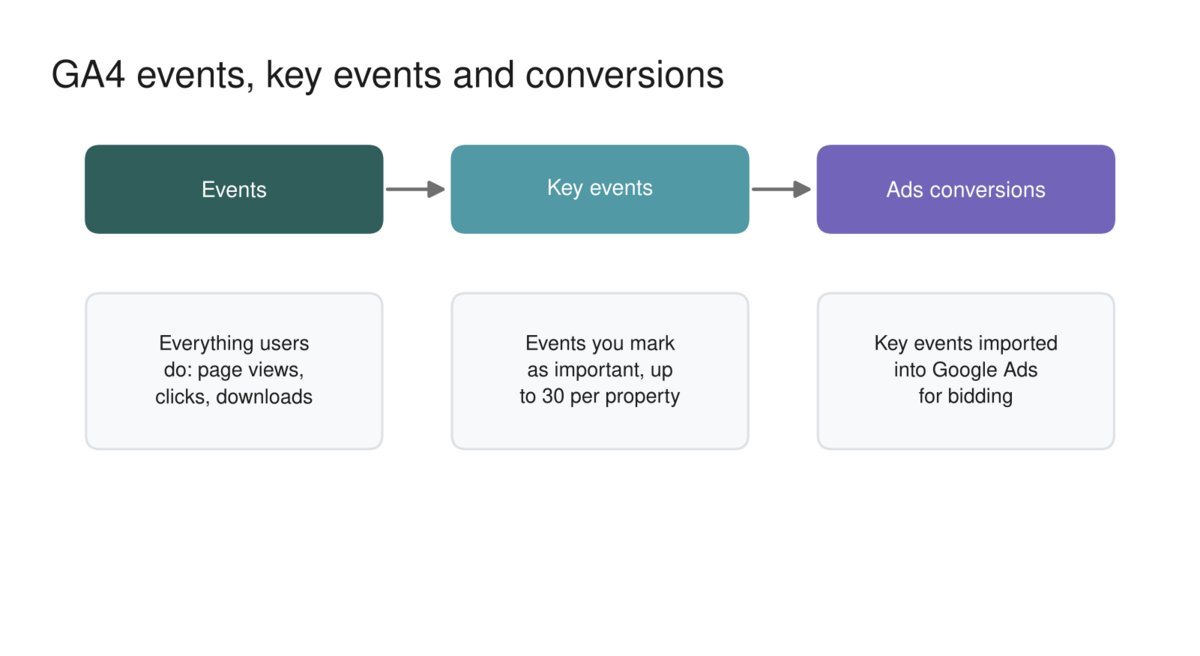
A key event is defined in GA4 and used for reporting and analysis. A conversion now refers to an action measured in Google Ads, which can be used for campaign reporting and automated bidding. You can import GA4 key events into a linked Google Ads account as conversions, but the numbers will rarely match exactly, because the two platforms use different attribution settings and count by different dates. Google explains the differences in its help centre.
The practical lesson is to use key events to understand performance across all channels, and Google Ads conversions to manage and optimise your Google Ads campaigns.
How do you choose the right key events?
Start with your business objectives, not with what is easy to track. Ask what a visitor needs to do for your website to have done its job. For an online shop, that is a purchase. For a B2B business, it may be a demo request, a contact form or a high-value download. For a publisher, it may be a newsletter sign-up.
It also helps to include a small number of micro key events that show progress towards the main goal, such as adding a product to the basket or viewing a pricing page. But be selective. Marking dozens of events as key events makes reports harder to read and dilutes their meaning. Five to ten carefully chosen key events are usually more useful than thirty.
AI can help you build a sensible shortlist.
Copy and paste prompt: "Act as a Google Analytics 4 consultant. Our website is for [type of business] and our main business objectives are [list objectives]. Visitors can [list the main actions possible on the site]. Recommend up to eight GA4 key events, explaining for each how it links to a business objective, whether GA4 tracks it automatically or needs a custom event, and what we should name it. Then suggest which key events, if any, we should import into Google Ads for bidding."
How do you set up and test GA4 key events?
Setting up key events follows a clear sequence, and testing is the step most people skip.
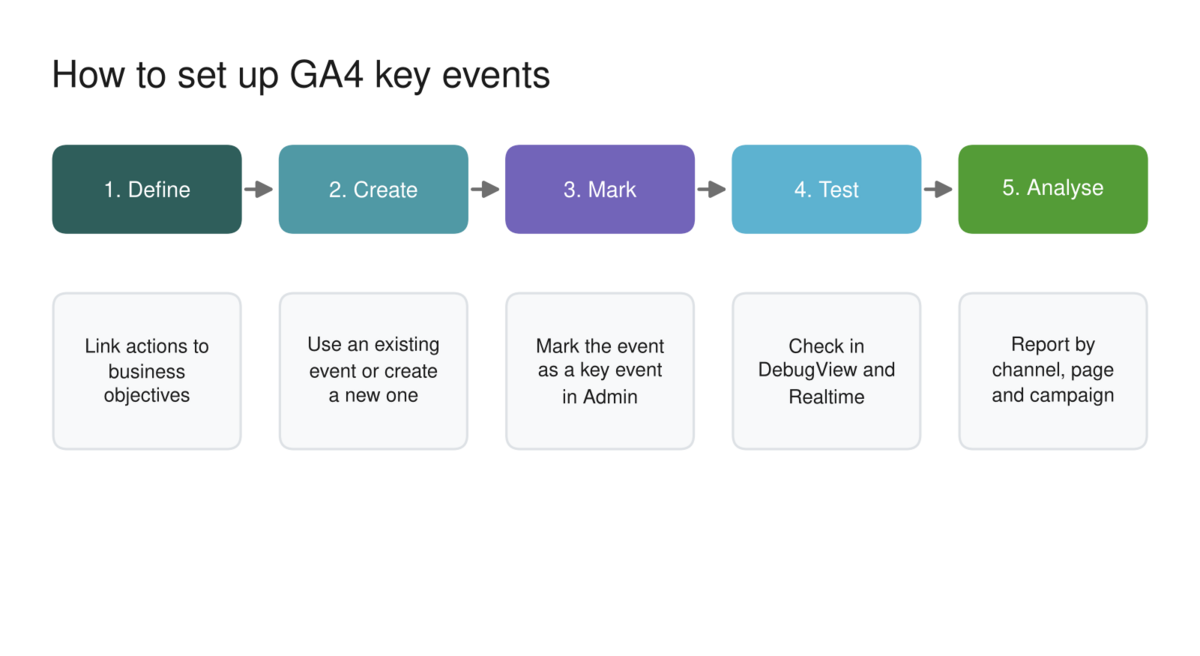
Define. Agree which actions matter and how each links to a business objective.
Create. Check whether GA4 already records the event, for example through enhanced measurement or your ecommerce setup. If not, create it, either in GA4's event settings based on existing events and parameters, or through Google Tag Manager.
Mark. In GA4 Admin, go to the events or key events section and mark the event as a key event. Choose whether it should be counted once per event, which suits purchases, or once per session, which suits actions such as lead forms where repeated submissions in a visit are not extra value.
Test. Use DebugView and the Realtime report to complete the action yourself and confirm the event fires once, with the right parameters. Marking an event as a key event is not retroactive, so it only counts from the point you mark it; testing early avoids losing valuable data.
Analyse. Once data builds up, explore key events by channel, campaign, landing page and device to see what is really driving results.
What insights do key events give you?
Key events turn GA4 from a traffic counter into a decision-making tool. With them in place, you can see which channels and campaigns drive valuable actions rather than just visits, which landing pages convert best, where users drop out of important journeys, and how different audiences behave. You can also compare key event rates over time to measure the impact of changes to your site or campaigns.
The real value comes when you connect key events to wider business objectives. Our digital marketing dashboard framework shows how to link channel KPIs to GA4 key events and business goals. Key events are also essential for measuring influencer, social and content activity, as we explain in our guides to working with Instagram influencers and customer service ROI.
This free course is a sample of the training on the Target Internet platform, which offers interactive courses across digital marketing and AI, including full GA4 training, skills benchmarking to show where your gaps are, accredited certification, over 400 episodes of the Digital Marketing Podcast, and monthly live masterclasses.

Frequently asked questions
Is this GA4 course really free?
Yes. The GA4 key events course is completely free and takes around 20 minutes. You can start it by clicking the course image near the top of this page, with no sign-up required.
What happened to conversions in GA4?
In March 2024, Google renamed GA4 conversions to key events. The word conversion now refers to actions measured in Google Ads. Existing GA4 conversions were automatically carried over as key events.
How many key events can I have in GA4?
Standard GA4 properties can mark up to 30 events as key events, and Analytics 360 properties up to 50. In practice, a smaller number of well-chosen key events is easier to analyse and act on.
Why do GA4 key events and Google Ads conversions show different numbers?
The two platforms use different attribution settings, count by different dates and Google Ads only counts actions linked to ad clicks within its conversion window. Some difference is normal and expected.
Are key events counted retrospectively?
No. Marking an event as a key event only applies from that point forward. That is why it is worth setting up and testing your key events as early as possible.
If you are ready to take a structured approach to building your digital marketing skills, explore Target Internet membership options and discover how the platform's interactive courses, benchmarking tools, podcast, accredited certification and live masterclasses can help you turn analytics into better decisions.
About the author
Daniel Rowles is lead trainer at Target Internet and the author of Digital Branding (Kogan Page). He co-hosts The Digital Marketing Podcast and delivers digital marketing and AI training for organisations around the world, including digital transformation and future skills. You can find out more on his Target Internet profile.
Bibliography
1. Google (2026). [GA4] Mark events as key events. https://support.google.com/analytics/answer/13128484
2. Google (2026). [GA4] Events and key events. https://support.google.com/analytics/answer/13965727