Most marketing teams are now running two search strategies and reporting on one. The optimisation side of AI search has moved fast: structuring content for retrieval, building the authority signals that generative systems trust, marking up entities so machines can recognise them. The measurement side has not kept up. Ask a marketing team how their AI search visibility changed last quarter and the honest answer is usually a shrug, or a number that turns out to describe something else entirely.
That gap matters more than it sounds, because the reporting most teams already have does not simply lack AI data. It actively misleads. Organic clicks fall while visibility rises. AI referrals get filed in three different places and counted as three different things. Traffic that came from an AI assistant arrives as direct and disappears into the largest, least examined bucket in the report. The numbers move, someone asks why, and nobody can answer with confidence.
This guide fixes that. It covers what Google Analytics 4 and Search Console now show you, what they still cannot see, how to build a measurement framework that survives the shift to zero-click search, and how to report the result to people who are still expecting a click count to go up. Throughout, we use real data from this site's own Search Console and Analytics properties: 3.0 million search impressions and roughly 66,000 sessions between June and September 2026. The patterns in that data are not unique to us, and you will almost certainly find them in yours.
Why your current reporting cannot see AI search
The problem is that AI search visibility happens in three different places, and each one is measured by a different tool, or by nothing at all.
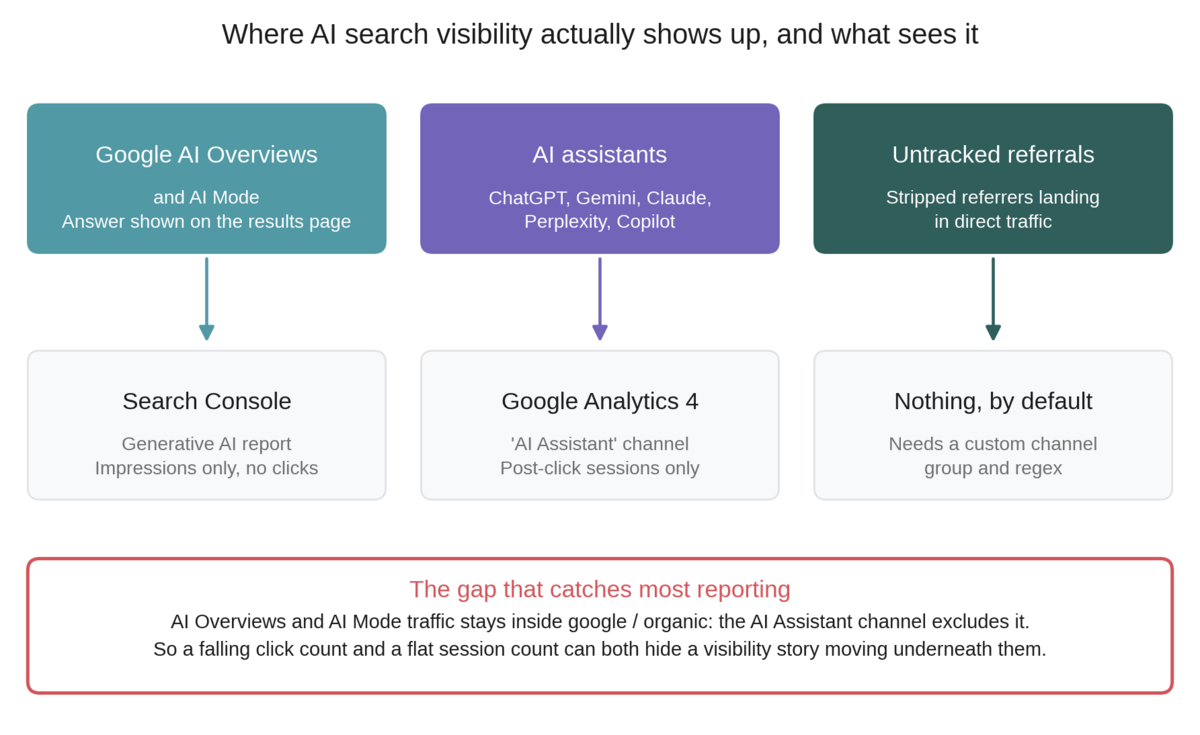
The first surface is Google's own AI features: AI Overviews and AI Mode. When your page is cited in a generated answer and the searcher clicks through, that visit arrives as ordinary Google organic traffic. Analytics has no idea it came from an AI answer rather than a blue link. Search Console can now tell you about the impressions, but as we will see, only the impressions.
The second surface is AI assistants: ChatGPT, Gemini, Claude, Perplexity, Copilot and the growing list behind them. These send genuine referral traffic with a referrer header, so Analytics can see them, and since May 2026 it has classified them into a dedicated channel. That channel is useful and it is also incomplete, in ways worth understanding before you build reporting on top of it.
The third surface is everything that loses its referrer on the way. An assistant running inside a desktop application, a link copied out of a chat and pasted into a browser, a summary read in a mobile app: these arrive with no referrer at all and land in direct traffic. There is no clean way to measure this one, only ways to estimate it.
Treating these as one thing called "AI traffic" is what produces contradictory reports. They behave differently, they are counted differently, and two of them are systematically undercounted.
What the GA4 AI Assistant channel does and does not capture
In May 2026 Google Analytics 4 added AI Assistant to its default channel groups. Google's definition is precise and worth reading closely, because the second sentence is where the trouble starts. Analytics describes it as the channel by which users arrive from sources like ChatGPT, Gemini, Deepseek, Copilot or Grok, and then adds that it excludes Google's AI Overviews and AI Mode. Technically, the rule fires when the medium exactly matches ai-assistant, which Analytics sets automatically when the referrer matches its maintained list of AI assistants.
Two consequences follow. The first is the exclusion Google states openly: traffic from AI Overviews and AI Mode is not in this channel, and will not be. If your organic clicks are falling because generated answers are absorbing them, this channel will not show you that. It will look flat and healthy while the story plays out somewhere else entirely.
The second consequence is subtler and only visible if you go looking. The classification depends on a list Google maintains, and lists lag reality. When we broke down every AI assistant referral to this site over a three month period, the same assistants turned up in the AI Assistant channel, in generic referral traffic, and under a medium of "not set", all at the same time.
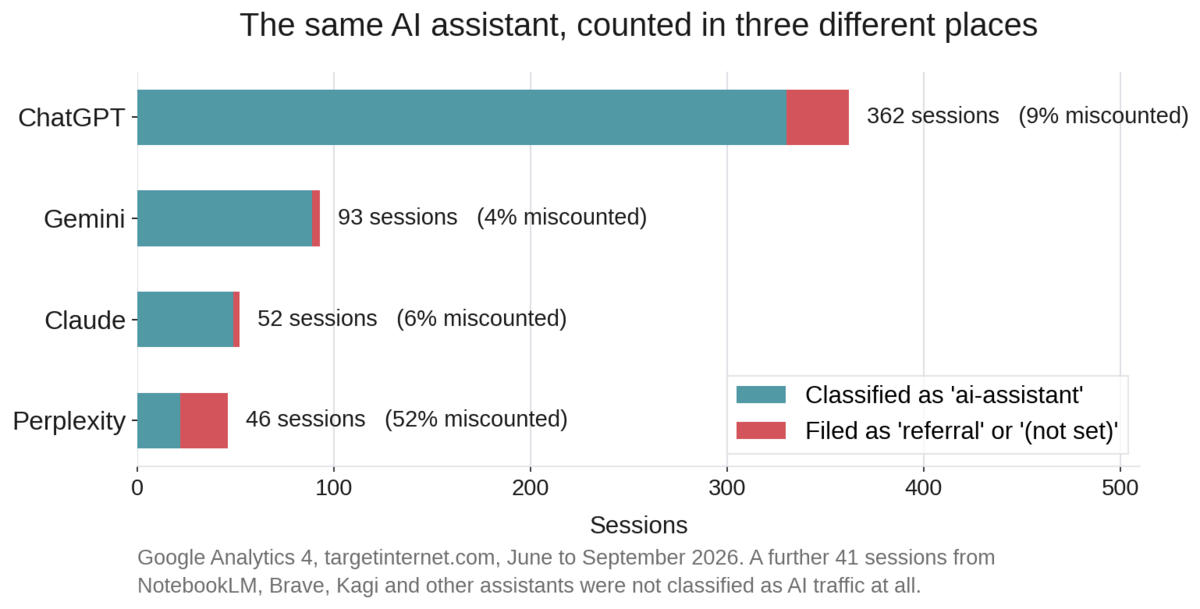
Across all four assistants, 11 per cent of sessions sat outside the channel meant to hold them. For Perplexity specifically it was 52 per cent, because sessions arrived under two different source spellings and only one of them matched. A further 41 sessions came from assistants and alternative search tools that were not classified as AI traffic in any form: NotebookLM, Brave, Kagi and others. Add it up and the AI Assistant channel reported 490 sessions where the true figure was 594, an undercount of 18 per cent.
Eighteen per cent is not catastrophic on its own. It becomes a problem when this is the channel you use to decide whether AI search is worth investing in, because the channel undercounts most severely for the newest and fastest-growing assistants, which are precisely the ones you are trying to spot early.
The fix is not to abandon the default channel but to run a custom channel group alongside it, built on a regex you control.
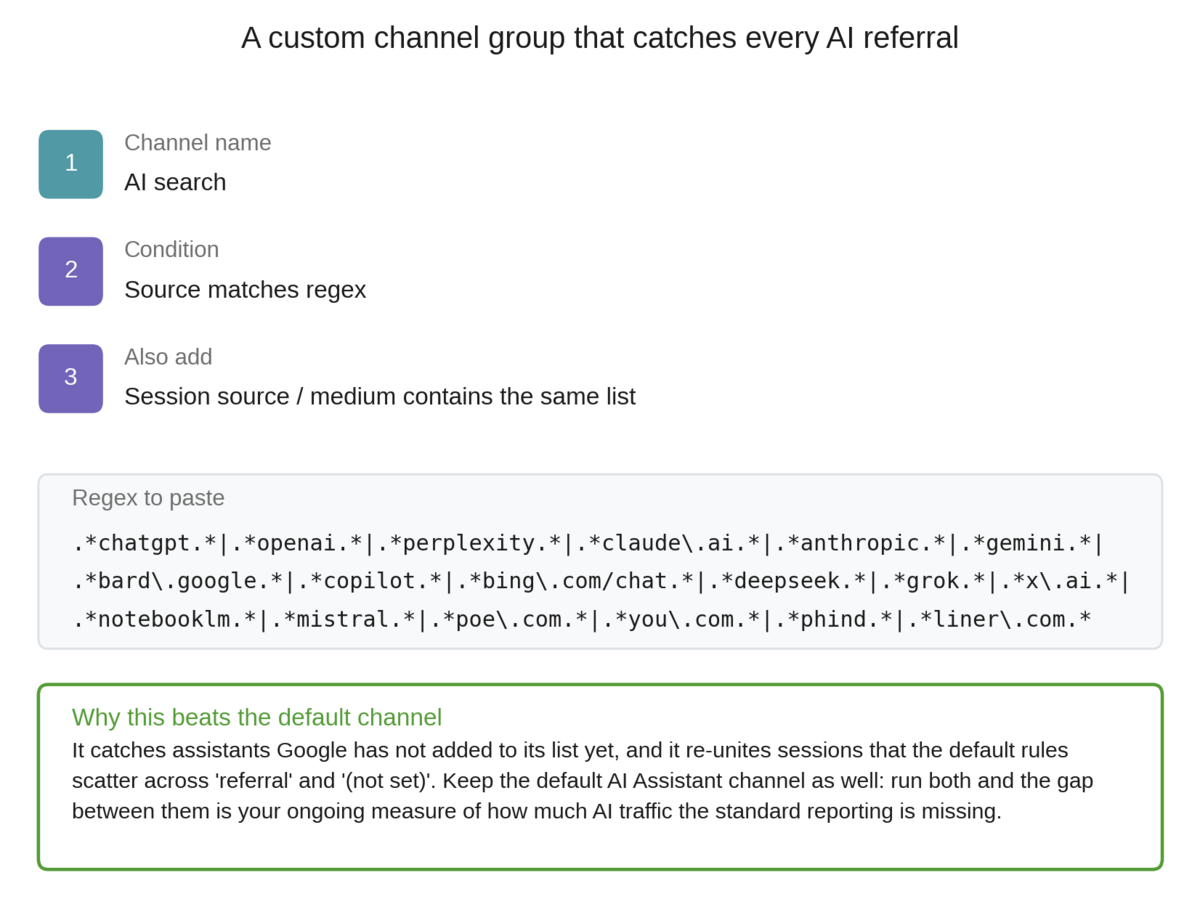
Build this in Admin, under Data display and Channel groups, as a new custom channel group rather than an edit to the default. Order matters: place the AI search rule above your organic search and referral rules, because Analytics applies the first matching condition and stops. Review the regex quarterly, since the assistant landscape changes faster than any list you write down.
Reading the Search Console generative AI report
In June 2026 Google introduced Search generative AI performance reports in Search Console, and this is the single most useful measurement development of the past two years. For the first time you can isolate how your content performs inside AI Overviews and AI Mode rather than inferring it from blended organic totals.
Understand its shape before you build reporting on it, because the shape is unusual. The report gives you impressions only. There are no clicks and no average position, and Google's documentation is explicit that if two results from the same site appear in a single generative answer, they count as one impression. You can segment by page, country, date and device. Search Labs experiments are excluded, and not every site has access yet.
An impressions-only metric feels thin if you are used to a full performance report, but it is measuring the right thing. In a generated answer there is often no click to have. Being present in the answer is the outcome, and impressions are the closest available proxy for presence. The mistake is to compare this number against your classic click count and conclude that AI search performs badly. They are measuring different events.
Use the report three ways. Track generative AI impressions as a trend line in its own right, separate from classic search. Look at which pages earn AI visibility, because those pages tell you which of your content patterns the systems favour, and that is a far more reliable optimisation signal than any general advice. Then compare the page list against your classic top performers: pages that rank well but earn no AI visibility are your most actionable gap, because the authority is already there and something about the structure is not landing.
If you want to build this kind of measurement judgement systematically rather than one report at a time, the Target Internet platform includes interactive courses on analytics, SEO and AI, skills benchmarking that shows you exactly where your measurement gaps sit, accredited certification, over 400 episodes of the Digital Marketing Podcast, and monthly live masterclasses where working practitioners walk through techniques like these on real accounts.
The zero-click signature, and how to spot it in your own data
The most useful AI visibility signal is not in either of the new reports. It is sitting in the Search Console performance data you have had all along, and it becomes obvious the moment you segment queries by shape rather than by volume.
Conversational queries, the questions and long natural-language phrases that AI systems are most likely to answer directly, behave completely differently from short keyword queries. We split three million impressions into the two groups and compared click-through rate at every position band.
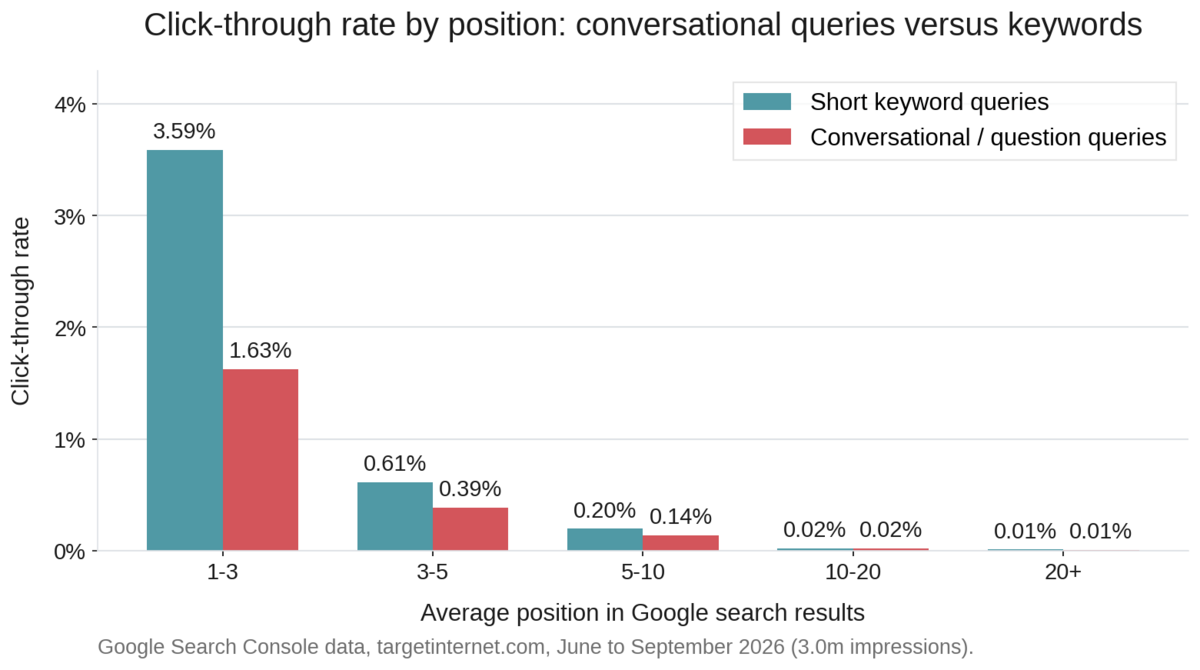
At positions one to three, short keyword queries earned a 3.59 per cent click-through rate. Conversational queries in the same positions earned 1.63 per cent, less than half. The pattern holds at every band. This is the zero-click signature: ranking well is no longer sufficient for the query types most likely to trigger a generated answer, because the answer is being resolved before the searcher reaches your link.
The scale of it is worth stating plainly. Of the queries where this site ranks in the top ten with meaningful impression volume, 56 per cent earned no clicks at all over the period, accounting for roughly 468,000 impressions. Some of that is ordinary search behaviour and always has been. A large and growing share is not.
Run this segmentation on your own data before you conclude anything about your AI visibility. Export your Search Console query data for the last three to six months, split queries into those that begin with a question word or run to eight words or more and everything else, and compare click-through rate by position band across the two groups. If your conversational queries show a materially lower rate at the same positions, generated answers are absorbing your clicks, and any report built on click volume alone will read that as a content failure rather than a channel shift.
Copy and paste prompt: "I am going to give you a Search Console query export with columns for query, clicks, impressions, CTR and average position. Split the queries into two groups: conversational queries (those starting with what, how, why, which, who, when, where, is, are, can, does, do, should, or running to eight words or more) and short keyword queries. For each group, calculate total impressions, total clicks and blended click-through rate within each position band: 1 to 3, 3 to 5, 5 to 10, 10 to 20 and 20 plus. Then list the twenty queries with the highest impressions that rank in the top ten but earned zero clicks. Here is the data: [paste export]"
The four metrics that actually describe AI visibility
Pulling this together, a measurement framework for AI search needs four metrics, and no single tool provides all of them.
Presence is whether you appear in generated answers at all. Search Console generative AI impressions cover Google's surfaces. For assistants, the only reliable method is direct testing: run your most commercially important questions through ChatGPT, Gemini, Claude and Perplexity on a fixed schedule and record whether you are named, whether you are linked, and who appears instead. Do this monthly, keep the results in a simple sheet, and the trend becomes meaningful within a quarter.
Referred traffic is the volume and quality of visits that AI surfaces actually send. Use your custom channel group rather than the default, and judge this traffic on engagement and conversion rather than volume, because it will be small for some time yet. On this site AI-referred sessions were roughly 0.9 per cent of the total. The number is not the point. The direction is, and the qualitative reports from teams tracking it consistently are worth taking seriously: visitors arriving from a generated answer tend to be further along in their decision, because the assistant has already handled the basics.
Absorption is how much of your search demand is being resolved without a click. This is the conversational-versus-keyword click-through gap from the previous section, tracked over time. It is the metric that explains a falling click count without requiring anyone to conclude the content got worse.
Accuracy is whether the answers about you are correct. This one gets forgotten and it is the one with genuine commercial risk attached. If an assistant confidently states that you do not serve a market you have served for years, or quotes pricing you retired eighteen months ago, that error reaches people at the exact moment they are evaluating you. Test it deliberately rather than waiting to hear about it from a prospect.
Copy and paste prompt: "I want to audit how AI assistants describe my organisation. My organisation is [name], we are based in [location], and we offer [list your main products or services]. Without searching for a specific page, answer these questions as you would for any user: what does [name] do, who are they best suited to, what do they charge, and how do they compare with their main competitors. After answering, tell me which claims you are most confident about and which you are least confident about, and list the sources you would rely on for each."
Run that same prompt across every assistant your audience uses and the differences between the answers are as informative as the answers themselves. Where they disagree, the underlying web evidence about you is thin or contradictory, and that is a corroboration problem rather than a content problem: it is solved by third-party mentions, consistent entity information and independent coverage rather than by another page on your own site.
Setting up the measurement in practice
The setup work takes a couple of hours and then runs itself.
Start in Analytics. Build the custom channel group described above and place its rule ahead of organic search and referral. Then create an exploration segmented by that channel, comparing engagement rate, average engagement time and conversion rate for AI-referred sessions against organic search sessions. That comparison is what turns a small traffic number into an argument, because AI-referred traffic frequently outperforms on quality even while it looks negligible on volume.
Next, deal with the direct traffic problem, at least approximately. You cannot recover referrer data that was never sent, but you can watch for its signature: a rise in direct sessions landing on deep informational pages rather than your homepage. Direct traffic to a specific guide is unusual behaviour for a returning visitor and much more consistent with someone following a link from an assistant that stripped the referrer. Build a segment for direct sessions with a landing page that is not the homepage, and track it as an indicator rather than a measurement.
In Search Console, save two filtered views: one for the generative AI report, one for your classic performance data restricted to question-shaped queries. Check them monthly rather than daily, because the numbers are noisy at short intervals and the trends only become legible over quarters.
Finally, put the assistant testing on a calendar. Ten to fifteen questions, four assistants, once a month, recorded in a sheet with columns for whether you were mentioned, whether you were cited, and who else appeared. It takes half an hour and it is the only view you will have of the surfaces that publish no data at all.
Reporting this without it reading as failure
There is a version of this reporting that gets a content programme cancelled. It shows organic clicks declining quarter on quarter, adds a small AI referral number that looks like a rounding error, and leaves the audience to draw the obvious and wrong conclusion.
Change the framing before the numbers force the conversation, not after. Lead with presence and impressions rather than clicks, because those are the metrics that describe what is actually happening: your content is being read and used, increasingly without a visit. Show the conversational click-through gap explicitly, so that falling clicks are understood as a change in how search works rather than a decline in performance. Report AI-referred traffic on quality alongside volume. And keep an accuracy line in the report, because a factual error in a widely-seen generated answer is a live commercial issue that deserves visibility at the same level as a broken checkout.
Set expectations about timescales too. Presence in generated answers responds slowly, because it depends on corroboration across the wider web rather than on changes to a single page. A structural improvement made this month may not show in the data for a quarter. Saying so in advance is the difference between a programme that gets time to work and one that gets judged on a six-week window.
The honest summary is that measurement here is genuinely harder than it was, and anyone claiming a single clean number for AI visibility is selling something. What you can build is a set of four imperfect but honest indicators that, taken together, tell you whether you are becoming more or less present in the places your audience now asks questions. That is enough to make decisions with, and it is considerably more than most organisations currently have.
If you want to build these skills properly rather than assembling them from blog posts, explore Target Internet membership. The platform includes interactive online courses covering analytics, SEO and AI, skills benchmarking to pinpoint exactly where your measurement capability needs work, accredited certification, over 400 episodes of the Digital Marketing Podcast, and monthly live online masterclasses, including dedicated sessions on AEO and analytics that go deeper into the techniques covered here.
Bibliography
1. Google Analytics Help. Default channel group. https://support.google.com/analytics/answer/9756891
2. Google Search Central Blog. Introducing Search generative AI performance reports in Search Console. https://developers.google.com/search/blog/2026/06/gen-ai-performance-reports
3. Google Search Console Help. Generative AI performance report (Search). https://support.google.com/webmasters/answer/16984139
4. Google Search Central. AI features and your website. https://developers.google.com/search/docs/appearance/ai-features
5. Google Analytics Help. Custom channel groups. https://support.google.com/analytics/answer/13051316
6. Target Internet. How to optimise your content for AI Overviews and Google AI Mode. https://targetinternet.com/resources/how-to-optimise-your-content-for-ai-overviews-and-google-ai-mode
7. Target Internet. A data-driven framework for AEO. https://targetinternet.com/resources/a-data-driven-framework-for-aeo
8. Target Internet. The Digital Marketing Podcast. https://targetinternet.com/resources/podcast/