This resource includes a step by step guide, model diagrams and excel template:
- Digital Marketing Measurement Dashboards in Perspective
- Setting Primary Objectives
- Setting Primary Objectives as GA4 Key Events
- Connecting Primary Objectives to Business Objectives
- Digital Channels Driving Primary Objectives
- Understanding How Digital Channels Contribute
- Gap Correlation
- Channel Mic, Tactics Iteration and Testing
- Conclusions
By Daniel Rowles, lead trainer at Target Internet and author of Digital Branding (Kogan Page). Last updated: November 2026.
A digital marketing dashboard brings together the measures that show whether your digital activity is working, from each channel's traffic and KPIs to its contribution towards your objectives. The framework below links channels to a primary objective tracked in GA4, then to business results, so you can set objectives you can actually measure.
This is a tried and tested framework we use in our training to plan, measure and improve digital strategy. You can download the example measurement framework spreadsheet and follow along.
What is a digital marketing dashboard?
A digital marketing dashboard is a single view of the key measures you need to judge how effective your digital marketing is. The data usually comes from web analytics such as Google Analytics 4 (GA4) combined with channel analytics from your email platform, social networks and ad accounts. A well-built dashboard helps you:
- Judge effectiveness: see which campaigns and channels are working.
- Spot problems early: identify areas that need further investigation.
- Test your channel mix: try different combinations of channels and see the effect.
- Understand interactions: see how channels influence one another on the way to a result.
The most common mistake in digital marketing is setting objectives that cannot be measured, followed closely by objectives that cannot be connected back to business results. Without both, you cannot judge success, calculate return on investment or justify your budget. The framework below fixes both problems.
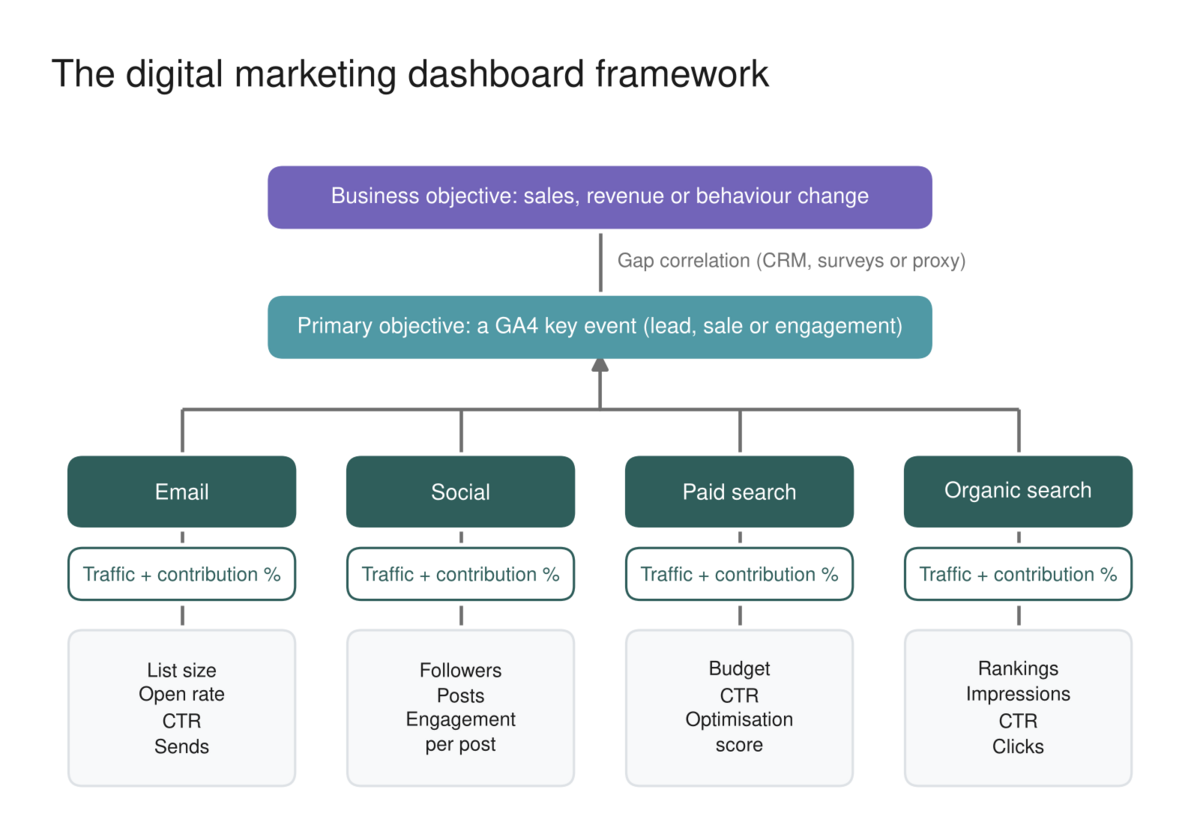
How do you set primary objectives for a dashboard?
Start by deciding what you want people to actually do online: fill in a form, buy a product, download a report or watch a video. Your primary objective is the closest online action to your business objective, even if it is still some way from it. Three examples show how this differs by business:
- Business to business: the business objective is a sale, but what the website can deliver is a lead, someone filling in a form or calling.
- Consumer brand: the sale happens in a store or on a retailer's site you may not own, so the primary objective is meaningful engagement, such as reading an article to the end or finishing a video.
- E-commerce: the business objective is an online sale, and so is the primary objective, so there is no difference between them.
Set your primary objective as a GA4 key event
Once you know your primary objective, set it up in your web analytics. In GA4, the goals you care about most are called key events. A key event can be a form submission, a scroll to the bottom of an important page, a PDF download or a completed video. Marking your primary objective as a key event gives you a direct measure of success and reports showing which journeys and channels led to it.

Our free interactive guide walks you through setting up GA4 key events step by step. Click the screenshot to open it, or read more in our free GA4 course.

Which KPIs should each channel have?
Next, add each digital channel to the model and define its key performance indicators. Every channel should report the traffic it drives to your site, plus the handful of measures you could improve to drive more of that traffic:
- Email marketing: traffic from email, open rate, click-through rate, number of emails sent and list size.
- Social media: traffic from the platform, number of posts, average engagement per post and followers.
- Paid search: traffic from Google Ads, click-through rate, budget and the optimisation score Google provides.
- Organic search: traffic, impressions, rankings and click-through rate from Search Console.

These are KPIs because they are the levers you can pull. More emails sent or a higher open rate should bring more traffic from email. Choosing KPIs this way keeps the dashboard focused on action rather than vanity metrics.
How do you measure each channel's contribution?
More traffic does not automatically mean more results. It is easy to grow followers and traffic from the wrong audience and see no increase in primary objectives at all. So the framework adds a contribution score for each channel: how much it helped people complete your primary objective.
Because your primary objective is a key event, GA4 does this for you in the attribution reports in the Advertising section. They show which channels people used on their way to completing a key event over the lookback window, not just the last thing they did. GA4's default data-driven attribution model uses machine learning to give each touchpoint a share of the credit.

You can use the contribution figure in two ways:
- Raw number: in the example above, 598 key events were completed and the model credits 264.82 of them to organic search. That is not 264.82 people arriving directly from search, but the share of value the model assigns to it.
- Percentage: divide 264.82 by 598 to get 44.2%. Percentages give context and are easier to communicate to colleagues, so they are usually the better choice.
Either way, you are looking for changes from one review to the next. Our explainer on attribution modelling covers how the different models work.
How do you connect online results to business objectives?
The final piece of the framework is the gap between your primary objective and your business objective. How you bridge it depends on the type of business:
- E-commerce: there is no gap, because the online sale is the business objective.
- Lead generation: track leads through to sales in a CRM such as Salesforce or HubSpot, so you know how many form fills become customers.
- Brand building: the sale happens offline or on someone else's site, so use surveys, for example asking customers which channels they used before buying, to estimate the link.
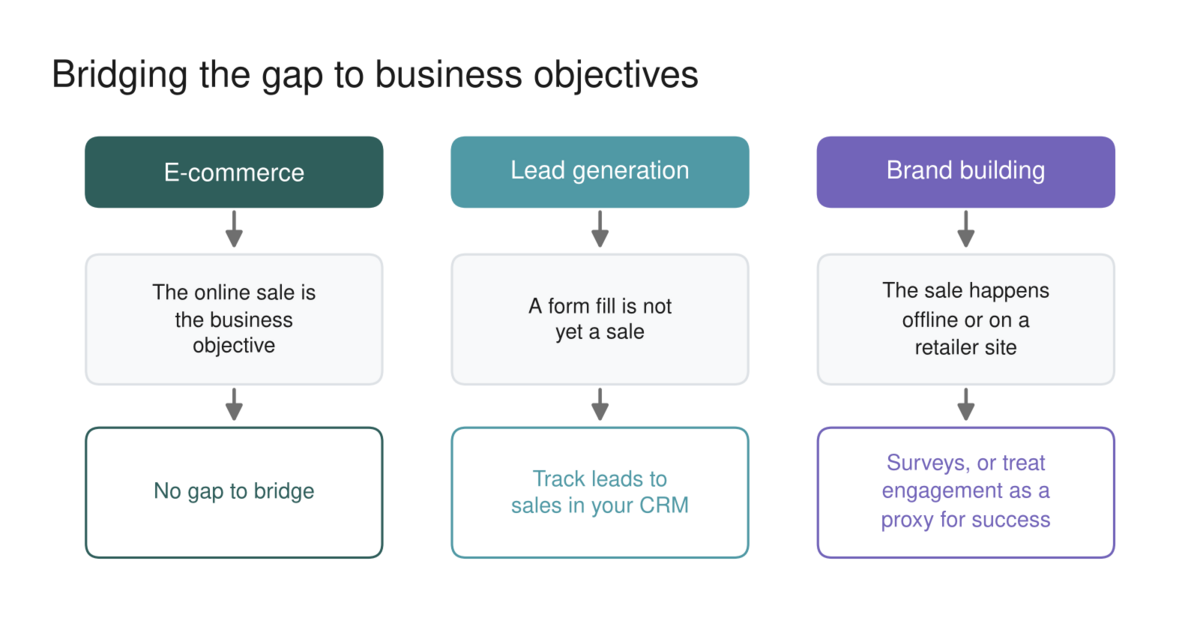
Often you will not bridge the gap fully, and that is acceptable. Instead you treat the primary objective as a proxy for success: you believe that more people watching your video to the end makes them more likely to buy, even though you cannot prove it for every person.
How should you use the dashboard?
A dashboard only creates value when you act on it. Update it monthly or quarterly and review it with the right stakeholders. Look for channels contributing well or poorly, form a hypothesis about which KPI to change, run a tactical campaign to change it, then see whether the channel's contribution moves at the next review.
The key discipline is this: a KPI changing is interesting, but unless the channel's contribution score changes, it has not really moved the needle. Iterating this way builds the best channel mix for your market and keeps it current as the market changes. Presenting the results clearly is part of good stakeholder management, and tools such as Looker Studio can pull GA4 and channel data into a shareable report.
Building a measurement framework draws on analytics, strategy and channel skills. The Target Internet platform covers all of them, with interactive courses across digital marketing and AI, skills benchmarking to show where your gaps are, accredited certification, over 400 episodes of the Digital Marketing Podcast, and monthly live masterclasses.
Copy and paste prompt: "I am building a digital marketing dashboard for [business type] whose business objective is [objective]. Our primary objective, tracked as a GA4 key event, is [action]. Our channels are [list]. For each channel, suggest four KPIs we can influence, explain how to find its contribution in GA4 attribution reports, and propose one hypothesis to test next quarter. Then suggest how to bridge the gap between our primary objective and business objective. Attached is our latest data export: [attach]."
If you are ready to take a structured approach to building your digital marketing skills, explore Target Internet membership options and discover how the platform's interactive courses, benchmarking tools, podcast, accredited certification and live masterclasses can help you prove the value of your digital marketing.
Frequently asked questions
What should a digital marketing dashboard include?
It should include your business objective, a primary objective tracked in analytics, each channel's traffic and KPIs, and each channel's contribution to the primary objective. Keep it to the measures that drive decisions, and review it on a regular schedule with the people who can act on it.
What is a key event in GA4?
A key event is an action you mark as especially important in Google Analytics 4, such as a purchase, form submission or completed video. Key events replaced the term "conversions" in GA4's main reports and are what attribution reports measure channel contribution against.
How often should you update a marketing dashboard?
Monthly or quarterly suits most teams. Update often enough to spot changes and test new ideas, but leave enough time between reviews for tactical changes to show an effect on channel contribution.
What tool should I use to build a marketing dashboard?
A spreadsheet works well for the framework in this guide, and you can download our example template. For automated reporting, Looker Studio connects to GA4 and many channel platforms for free, and paid tools can combine more data sources.
What is the difference between a KPI and a metric?
A metric is any measurement. A KPI is a metric you have chosen because it indicates progress towards an objective and is something you can influence. In this framework, channel KPIs are the levers that drive traffic and contribution.
About the author
Daniel Rowles is lead trainer at Target Internet and the author of Digital Branding (Kogan Page). He co-hosts The Digital Marketing Podcast and delivers digital marketing and AI training for organisations around the world, including digital transformation and future skills. You can find out more on his Target Internet profile.
Bibliography
1. Google (n.d.). Mark events as key events. Analytics Help. https://support.google.com/analytics/answer/13128484
2. Google (n.d.). Get started with attribution. Analytics Help. https://support.google.com/analytics/answer/10596866
3. Target Internet (n.d.). Digital measurement framework spreadsheet. https://www.targetinternet.com/resources/DigitalMeasurementFramework.xlsx