By Daniel Rowles, lead trainer at Target Internet and author of Digital Branding (Kogan Page). Last updated: November 2026.
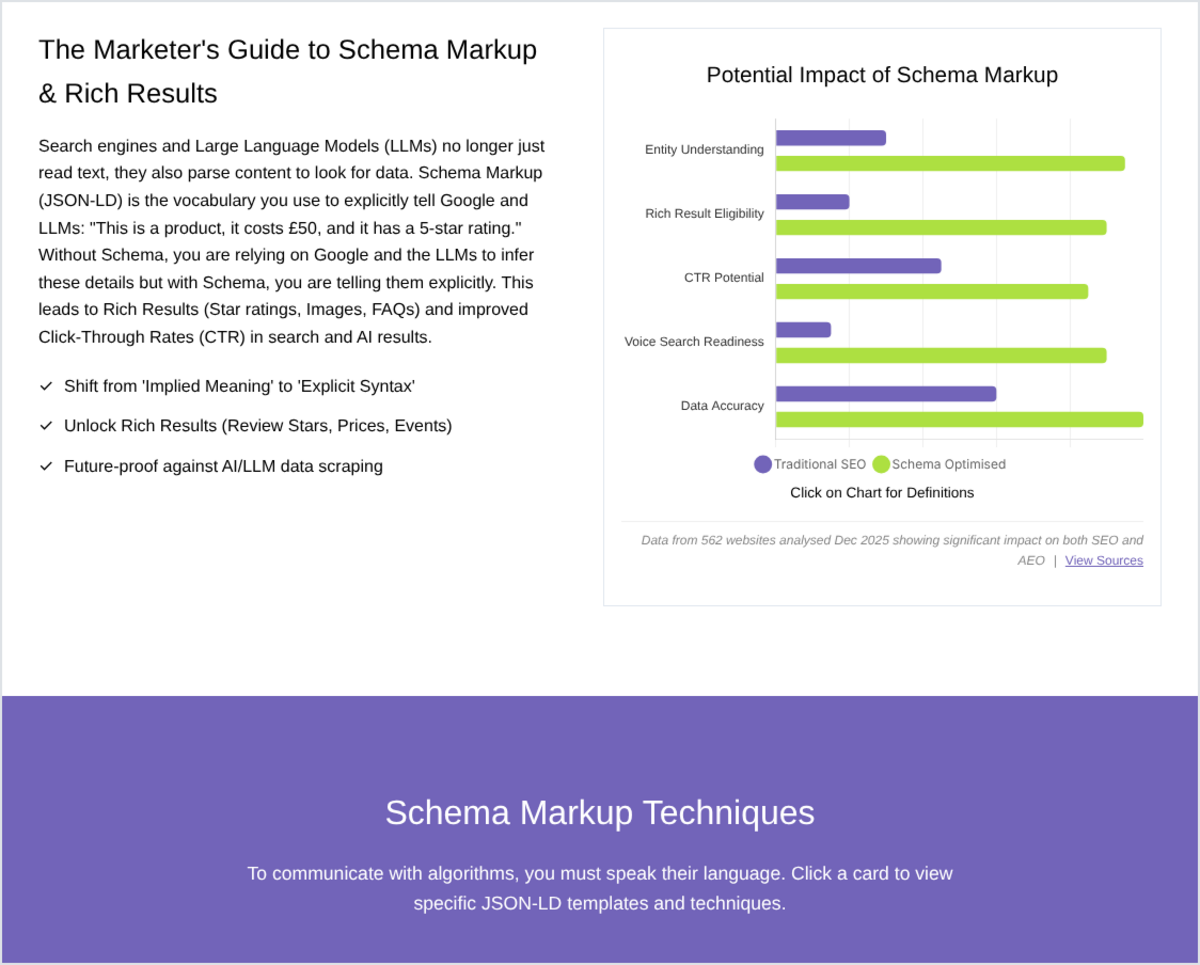
Schema markup is code you add to a web page, usually as JSON-LD, that describes the page's content in a standard vocabulary from Schema.org: who the organisation is, what a product costs, who wrote an article. Search engines use this structured data to understand pages and to show rich results, such as star ratings, prices and breadcrumbs, in search.
This guide explains what schema markup and structured data are, how they help SEO, what they do and do not do for AI search, which schema types to prioritise, and how to add and test markup on your own site, as part of a wider SEO strategy. Prefer to explore? Open our interactive schema markup guide for marketers, which includes worked examples and a checklist.
What is schema markup and structured data?
The two terms are often used interchangeably, but they mean slightly different things. Structured data is the general idea of describing information in a fixed, machine-readable format. Google's introduction to structured data describes it as a standardised format for providing information about a page and classifying its content. Schema markup is the specific vocabulary most websites use to do that, maintained at Schema.org and supported by Google, Bing and other search engines.
Without schema, a search engine has to infer from the text that "£49" is a price, that "Jane Smith" is the author, or that a block of text is an address. With schema, the page states those facts explicitly, in a format machines can read without guessing.
JSON-LD, Microdata and RDFa
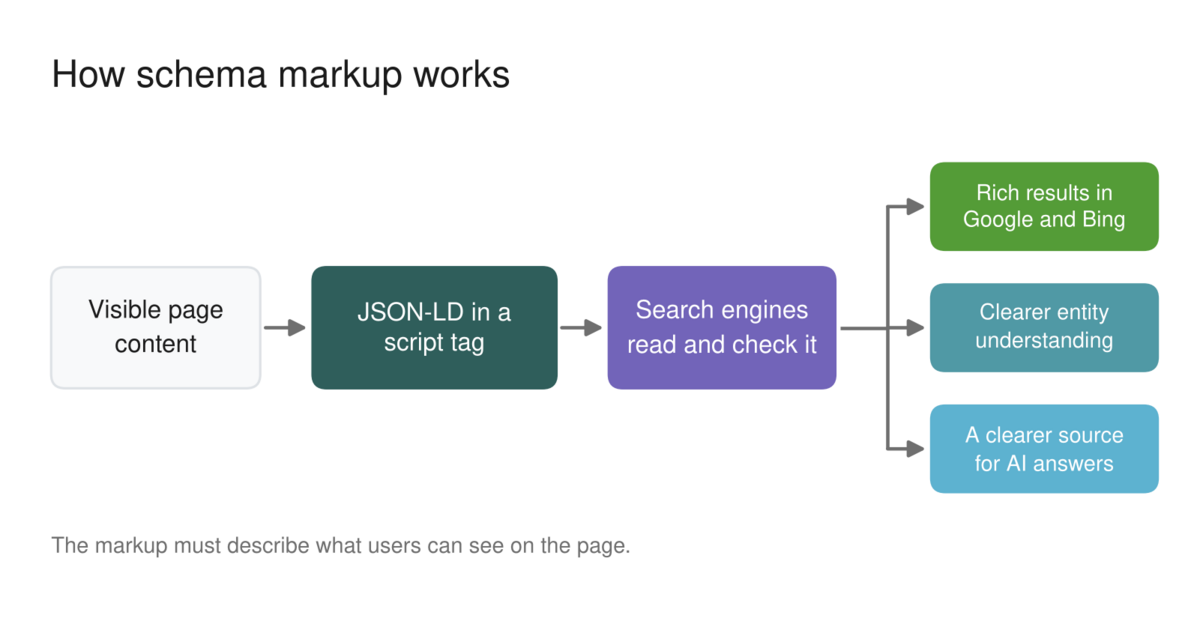
There are three ways to add structured data to a page. Google supports all three, and says they are equally fine as long as the markup is valid, but it recommends JSON-LD where your site allows it. JSON-LD sits in a single script block, separate from the visible HTML, which makes it far easier to add, update and generate automatically than Microdata or RDFa, which wrap attributes around the page's own HTML elements.
A simple Organization snippet in JSON-LD looks like this:
<script type="application/ld+json">
{
  "@context": "https://schema.org",
  "@type": "Organization",
  "name": "Your Company",
  "url": "https://www.example.com",
  "logo": "https://www.example.com/logo.png",
  "sameAs": ["https://www.linkedin.com/company/your-company"]
}
</script>
How does schema markup help SEO?
Schema markup is not a direct ranking factor, and adding it will not move a weak page up the results on its own. Its value comes in three other ways.
- Rich results. Valid markup can make a page eligible for enhanced listings, such as product prices and availability, review stars, breadcrumbs, event dates and video thumbnails. These take more space and give searchers more reason to click.
- Understanding. Markup removes ambiguity about entities: your organisation, your people, your products and how they connect. That helps search engines match pages to the right queries and supports features such as knowledge panels.
- Merchant and local features. For shops and local businesses, product, offer, return policy and business details feed some of the most commercially valuable parts of the results page.
Eligibility is not a guarantee. Google decides whether to show a rich result, and it says markup that breaks its guidelines can be ineligible. The most important rule is that markup must describe content users can actually see: Google tells site owners not to add structured data about information that is not visible to the user, even if the information is accurate.
Does schema markup help with AI search?
This is where much of the current advice overstates the case. In May 2026, Google published its first guide to optimising for generative AI features in Search. As Search Engine Journal reported, it says structured data is not necessary for generative AI search and there is no special schema.org markup to add, while still recommending structured data as part of an overall SEO strategy for rich results.
Microsoft has taken a slightly different line. At SMX Munich in March 2025, Bing's Fabrice Canel said that schema markup helps Microsoft's language models understand content, as Search Engine Land reported. That matters for Copilot, and potentially for other tools that draw on Bing's index.
The sensible conclusion for marketers is to treat schema as part of good technical foundations, not as a shortcut into AI answers. Accurate markup makes your facts easier to read and less likely to be misinterpreted, but whether you are cited depends mainly on the quality, clarity and authority of the content itself. Our guides to optimising for AI Overviews and AI Mode and measuring AI search visibility cover what does make the difference.
If you want hands-on help with this, the Target Internet platform includes courses such as user experience and SEO and Core Web Vitals, plus live sessions such as our answer engine optimisation masterclass, alongside skills benchmarking, accredited certification and over 400 episodes of the Digital Marketing Podcast.
Which schema types should you use?
Start with the types that match what your site actually is, and ignore the rest. Schema.org contains hundreds of types, but only a small number power features in Google Search, and Google has been retiring the less-used ones.
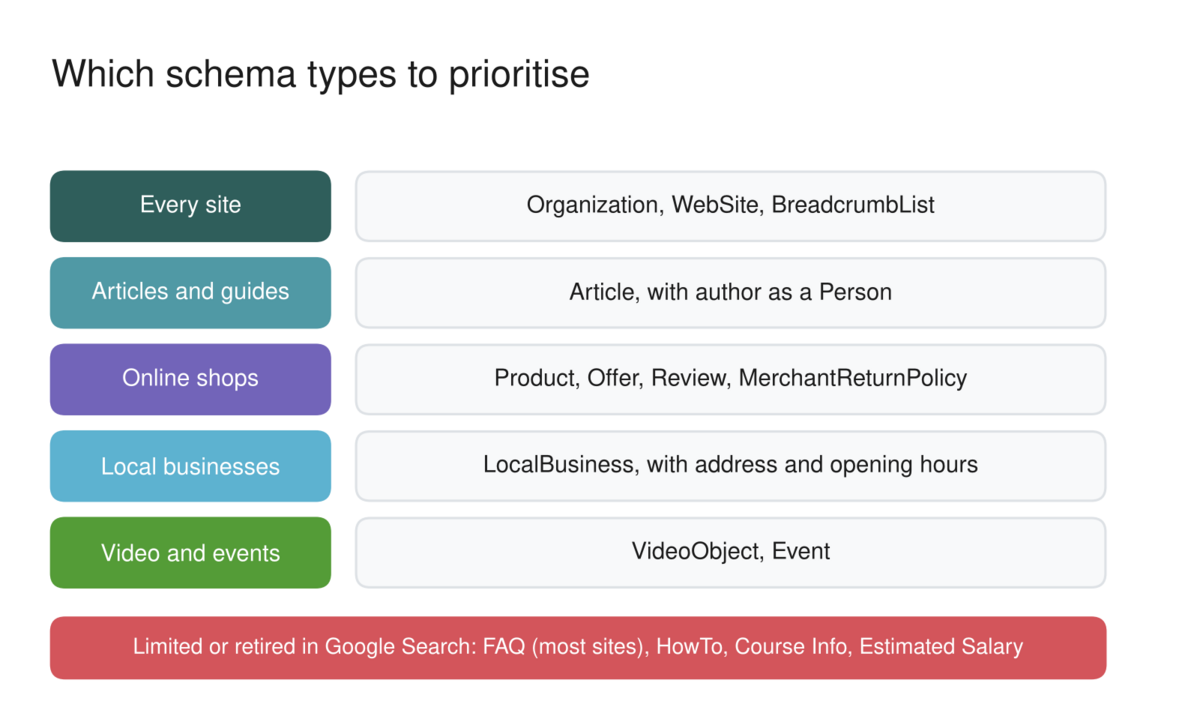
In practice, that usually means:
- Organization and WebSite on your home page, describing your brand, logo and official social profiles.
- BreadcrumbList on deeper pages, showing where each page sits in your site structure.
- Article on blog posts and guides, with the author marked up as a Person and linked to a real author page. This supports the experience and expertise signals Google looks for.
- Product, Offer and Review on product pages, plus return and shipping details where relevant.
- LocalBusiness for businesses with physical locations, including address, opening hours and contact details.
- VideoObject and Event wherever you publish videos or run events.
The types Google no longer rewards
Some popular markup has lost its value in Google Search. Since August 2023, Google has shown FAQ rich results only for well-known, authoritative government and health websites, and it has stopped showing HowTo rich results. In June 2025, Google's Search Central blog announced it was phasing out several more structured data types, including Course Info, Claim Review, Estimated Salary, Learning Video, Special Announcement and Vehicle Listing. In November 2025 it added practice problem markup to the list, with support removed from Search Console from January 2026.
That does not make FAQ markup harmful, and other search engines and tools may still read it. It does mean you should not expect it to change how your listing looks in Google.
How to add schema markup to your website
The right method depends on your website platform and how much control you have. For most marketing teams the order of preference is:
- Use your CMS or an SEO plugin. WordPress plugins such as Yoast SEO and Rank Math, and platforms such as Shopify, generate Organization, Article, Breadcrumb and Product markup automatically. Check what yours already outputs before adding anything, so you do not create duplicates.
- Add JSON-LD to page templates. Ask your developer to add markup to each template, such as article, product and location pages, pulling values from the page's own fields so the markup always matches the visible content.
- Add custom JSON-LD for one-off pages. Paste a script block into the page head or body for a specific page, such as your home page or a major event.
- Use Google Tag Manager only as a last resort. Markup injected with JavaScript can work, but it is less reliable than markup in the page's HTML, and some crawlers do not run JavaScript at all.
Copy and paste prompt: "Write valid Schema.org JSON-LD for this page: [paste the page URL or the visible content]. The page type is [article, product, local business, event]. Use only information that appears on the page, include [author, price, address or date details], and flag any recommended properties I have not provided. Then list the Google Search features this markup could make the page eligible for."
Common schema markup mistakes
Most schema problems fall into a handful of familiar patterns:
- Marking up content that is not on the page, such as reviews or prices visitors cannot see.
- Duplicate or conflicting markup, often from a theme and a plugin both outputting the same type.
- Out-of-date values, such as old prices, ended events or missing stock changes.
- Missing required properties, which makes the markup ineligible for rich results.
- Generic author markup that names the organisation rather than a real person with a profile page.
How to test and monitor your markup
Always test before and after you publish. Google's Rich Results Test shows whether a page is eligible for rich results and flags errors, and the Schema Markup Validator at validator.schema.org checks the markup against the full Schema.org vocabulary. After launch, the Enhancements and Shopping sections of Google Search Console report errors and warnings across your whole site.
To see whether markup is paying off, compare click-through rates in Search Console for pages before and after rich results appear, using the search appearance filter where it is available. If you change templates or plugins, re-test, because markup often breaks silently during site updates.
If you are ready to take a structured approach to building your digital marketing skills, explore Target Internet membership options and discover how the platform's interactive courses, benchmarking tools, podcast, accredited certification and live masterclasses can accelerate where you are heading next.
Frequently asked questions
What is schema markup in SEO?
Schema markup is structured data code, usually JSON-LD, that describes a page's content using the Schema.org vocabulary. In SEO, it helps search engines understand entities such as organisations, products, people and events, and it can make pages eligible for rich results such as prices, review stars and breadcrumbs in search listings.
Does schema markup improve rankings?
Not directly. Schema markup is not a ranking factor in itself. It can make pages eligible for rich results, which often attract more clicks, and it helps search engines understand your content more accurately. The quality and relevance of the page still decide where it ranks.
Do I need schema markup for AI Overviews?
No. Google's guidance on generative AI features says structured data is not required for AI search and there is no special markup to add. It still recommends structured data for rich results. Microsoft has said schema helps its language models understand content, so accurate markup remains worthwhile as part of good technical SEO.
What is the best format for schema markup?
JSON-LD. Google supports JSON-LD, Microdata and RDFa, and says all three work if they are valid, but it recommends JSON-LD where your site allows it. JSON-LD keeps the markup in one script block, separate from the visible HTML, which makes it easier to add, maintain and generate from templates.
How do I check if my schema markup is working?
Run the page through Google's Rich Results Test to check eligibility for Google features, and through the Schema Markup Validator to check the markup against Schema.org. Then monitor the Enhancements reports in Google Search Console, which show errors and valid items across your site over time.
About the author
Daniel Rowles is lead trainer at Target Internet and the author of Digital Branding (Kogan Page). He co-hosts The Digital Marketing Podcast and delivers digital marketing and AI training for organisations around the world, including SEO and answer engine optimisation. You can find out more on his Target Internet profile.
Bibliography
1. Google Search Central (2026). Introduction to structured data markup in Google Search. https://developers.google.com/search/docs/appearance/structured-data/intro-structured-data
2. Search Engine Journal (2026). Google's new AI search guide calls AEO and GEO "still SEO". https://www.searchenginejournal.com/googles-new-ai-search-guide-calls-aeo-and-geo-still-seo/575026/
3. Search Engine Land (2025). Microsoft Bing/Copilot use schema for its LLMs. https://searchengineland.com/microsoft-bing-copilot-use-schema-for-its-llms-453455
4. Google Search Central (2025). Simplifying the search results page. https://developers.google.com/search/blog/2025/06/simplifying-search-results
5. Google Search Central (2025). An update on our efforts to simplify the search results page. https://developers.google.com/search/blog/2025/11/update-on-our-efforts
6. Google Search Central (2023). Changes to HowTo and FAQ rich results. https://developers.google.com/search/blog/2023/08/howto-faq-changes
7. Schema.org (2026). Schema.org vocabulary. https://schema.org/