By Daniel Rowles, lead trainer at Target Internet and author of Digital Branding (Kogan Page). Last updated: November 2026.
Good user experience (UX) means a website, app or digital service is useful, easy to use, easy to navigate, accessible to everyone, credible and pleasant to interact with, so people can achieve what they came to do. For marketers, UX matters because it directly affects conversion rates, search visibility and brand perception. You improve it by auditing key journeys, measuring real behaviour, testing with real users and fixing problems iteratively.
Marketers often spend most of their budget getting people to a website and far less on what happens when they arrive. Yet a confusing form, a slow page or an inaccessible design can undo the best campaign. This guide explains the core principles of UX and how to apply and measure them.
What is user experience?
User experience describes how people feel and behave when they use a digital product such as a website or app. It is related to, but broader than, user interface (UI) design, which focuses on the visual and interactive elements people see and touch. A beautiful interface can still deliver a poor experience if it is slow, confusing or does not meet the user's need.
A useful way to think about UX is to compare what users are trying to do with how easily they can do it. If someone wants to book a train ticket, find opening hours or compare prices, good UX gets them there quickly and confidently. Poor UX adds friction, confusion and doubt, and many users simply leave.
What is the UX honeycomb?
One of the most practical frameworks for understanding UX is the user experience honeycomb created by information architect Peter Morville. It breaks good UX into six qualities, which together create the seventh: value.
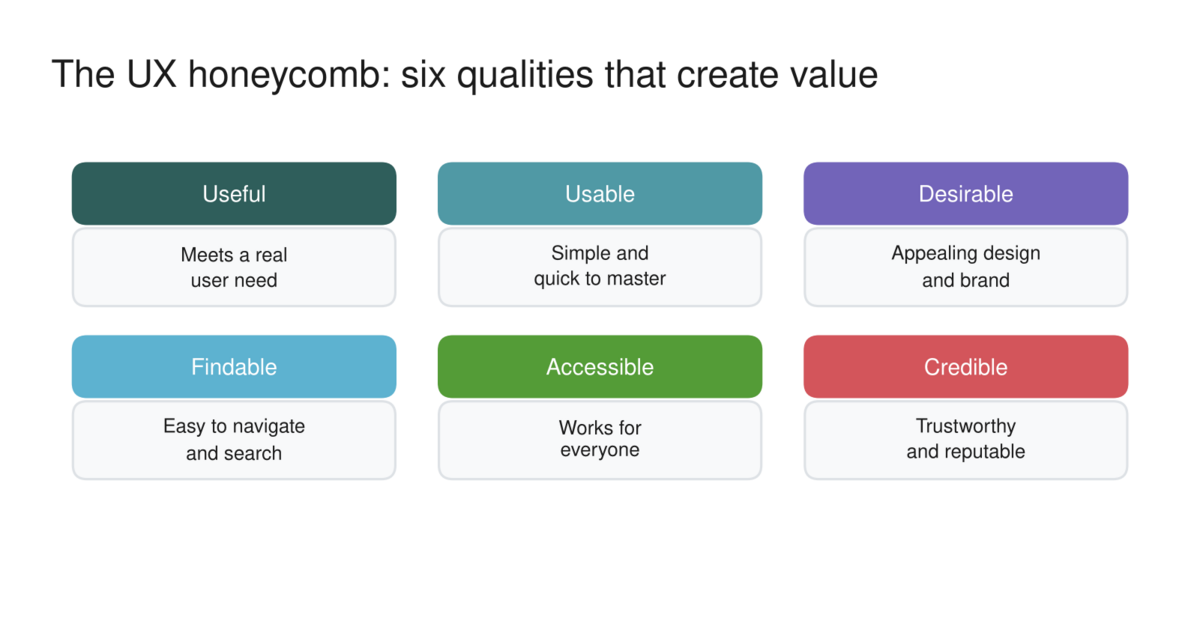
- Useful: it serves a genuine need.
- Usable: it is simple and quick to learn.
- Desirable: the design and brand are appealing.
- Findable: people can navigate and find what they need.
- Accessible: it works for everyone, including people with disabilities.
- Credible: users trust the organisation and the information.
The honeycomb is a great starting point for an audit. When we first introduced it in our training, we suggested auditing someone else's website before your own, because it is much easier to be objective about a site you have no attachment to. That advice still holds. Pick a key journey, such as buying a product or making an enquiry, and score it against each quality, noting specific observations and fixes.
Why does UX matter for marketers?
Because UX sits between your marketing and your results. Every improvement to a key journey increases the return on every campaign that sends traffic to it. Removing a single unnecessary form field, clarifying a confusing navigation label or speeding up a slow page can improve conversion rates without spending another penny on media.
UX also affects search. Google's Core Web Vitals measure loading speed, responsiveness and visual stability, and form part of how Google assesses page experience. In March 2024, Interaction to Next Paint (INP) replaced First Input Delay as the responsiveness measure, putting more emphasis on how quickly pages react to every interaction, not just the first.
Finally, UX shapes brand perception. People judge organisations by how easy they are to deal with. A frustrating digital experience can damage trust as surely as a rude member of staff.
How do you measure user experience?
The most reliable approach combines what users do with why they do it. These steps work for most organisations.
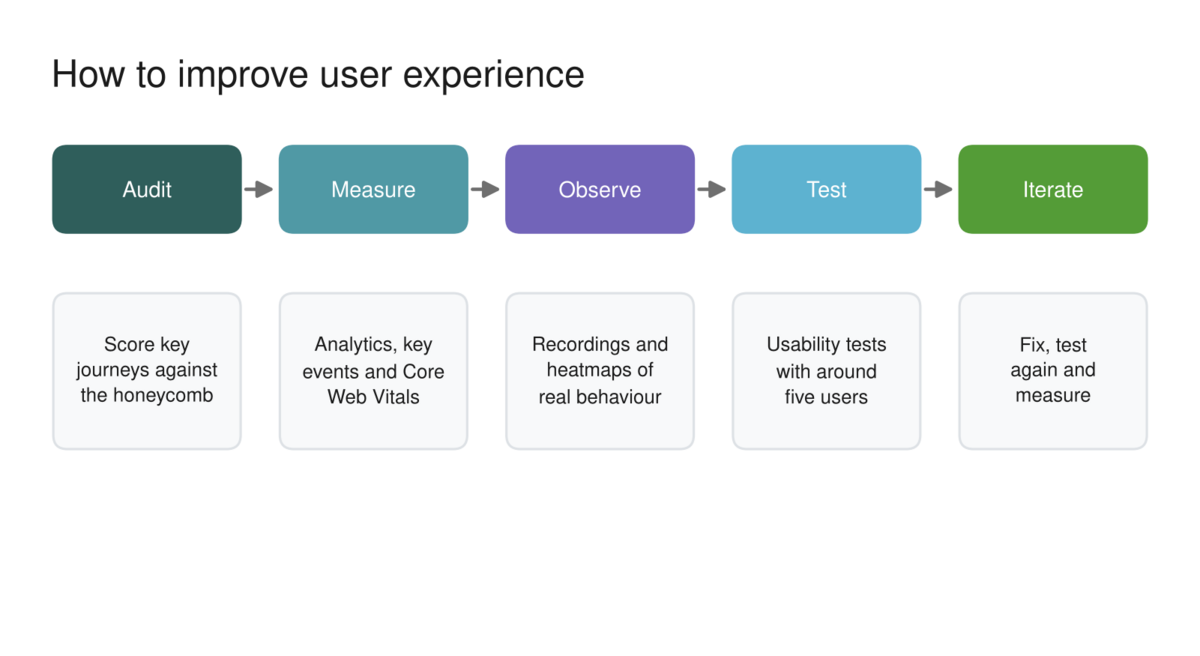
Measure behaviour with analytics. Set up key events for the actions that matter and look at where users drop out of important journeys. Our free GA4 course on key events shows how.
Check technical performance. Review Core Web Vitals in Google Search Console and PageSpeed Insights, especially on mobile.
Observe real sessions. Session recordings and heatmaps show how people actually use your pages: where they click, how far they scroll and where they hesitate. Microsoft Clarity is a free option, and tools such as Hotjar offer similar features.
Run usability tests. Ask real people to complete tasks while thinking aloud. You do not need a big budget: research from the Nielsen Norman Group suggests that testing with around five users uncovers most usability problems, as long as you test again after making changes.
Ask for feedback. Short on-page surveys and customer interviews add context that numbers alone cannot provide. Good customer personas help you recruit the right participants, and our free persona template tool can help you build them.
AI can help you prepare a usability test quickly.
Copy and paste prompt: "Act as a UX researcher. We want to test the [journey, for example checkout or enquiry form] on our website for [describe audience]. Write a usability test plan for five participants, including the goal of the test, five realistic tasks written in plain language without giving away the answer, follow-up questions to ask after each task, and a simple scoring sheet for task success and ease. Then list the most common usability problems we should watch out for in this type of journey."
Why is accessibility part of good UX?
Accessibility means making sure people with disabilities can use your website, including people who are blind or partially sighted, deaf, have motor impairments or cognitive differences. It is a core part of good UX, and it benefits everyone: clear headings, good colour contrast, descriptive links and captions make sites easier for all users.
It is also increasingly a legal requirement. The international standard is the Web Content Accessibility Guidelines (WCAG) 2.2. UK public sector websites must meet specific accessibility requirements, and the European Accessibility Act, which applies to many private sector digital products and services sold in the EU, came into force in June 2025. UK equality law also requires organisations to make reasonable adjustments for disabled people.
Simple starting points include checking colour contrast, adding meaningful alt text to images, making sure forms work with a keyboard and labelling every form field clearly.
How is AI changing user experience?
AI is changing UX in two ways. First, it is changing how people find and use information. More users now get answers directly from AI assistants and AI search features, which means the pages they do visit need to deliver clear value quickly. Our guide to answer engine optimisation explores this shift.
Second, AI is changing how we design and test experiences. AI tools can summarise session recordings, cluster survey feedback, generate design variations and help write clearer interface copy. They are excellent for speeding up analysis, but they do not replace watching real people use your site. AI can tell you what users did; usability testing tells you why.
Understanding UX is now an essential skill for marketers, not just designers. The Target Internet platform helps you build it, with interactive courses across digital marketing and AI, including usability, skills benchmarking to show where your gaps are, accredited certification, over 400 episodes of the Digital Marketing Podcast, and monthly live masterclasses.
Frequently asked questions
What is good user experience?
Good user experience means people can achieve what they came to do quickly, easily and confidently. Peter Morville's UX honeycomb describes it as useful, usable, desirable, findable, accessible and credible, which together make an experience valuable.
What is the difference between UX and UI?
UI, or user interface, refers to the visual and interactive elements people see, such as buttons, menus and layouts. UX, or user experience, is broader and covers how the whole interaction feels and whether it meets the user's needs.
How many users do you need for usability testing?
Research from the Nielsen Norman Group suggests testing with around five users uncovers most usability problems in a design. It is better to run several small rounds of testing, fixing problems in between, than one large test.
Does UX affect SEO?
Yes. Google uses page experience signals, including Core Web Vitals, as part of how it assesses pages, and a good experience also tends to improve engagement and conversions from the traffic you earn.
What are free tools for measuring UX?
Google Analytics 4, Google Search Console and PageSpeed Insights cover behaviour and performance, and Microsoft Clarity offers free session recordings and heatmaps. Simple usability tests with real users need little more than a video call.
If you are ready to take a structured approach to building your digital marketing skills, explore Target Internet membership options and discover how the platform's interactive courses, benchmarking tools, podcast, accredited certification and live masterclasses can help you create experiences that convert.
About the author
Daniel Rowles is lead trainer at Target Internet and the author of Digital Branding (Kogan Page). He co-hosts The Digital Marketing Podcast and delivers digital marketing and AI training for organisations around the world, including digital transformation and future skills. You can find out more on his Target Internet profile.
Bibliography
1. Morville, P. (2004). User experience design. Semantic Studios. https://semanticstudios.com/user_experience_design/
2. Google (2026). Web Vitals. https://web.dev/articles/vitals
3. Nielsen, J. (2000). Why you only need to test with 5 users. Nielsen Norman Group. https://www.nngroup.com/articles/why-you-only-need-to-test-with-5-users/
4. W3C (2023). Web Content Accessibility Guidelines (WCAG) 2.2. https://www.w3.org/TR/WCAG22/
5. GOV.UK (2026). Understanding accessibility requirements for public sector bodies. https://www.gov.uk/guidance/accessibility-requirements-for-public-sector-websites-and-apps