This review is part of our SEO tools comparison report. This article has been updated for 2026 and replaces the older review of Ahrefs.
Index
- Introducing the Tool
- Setting up a Project in Ahrefs
- After you Set up a Project
- User Interface
- Site Explorer
- Competitive Analysis
- Brand Radar - AI Features
- Keyword Explorer
- Site Audit
- Rank Tracker
- Content Explorer
- AI Content Helper
- Reporting
- Alerts
- Ahrefs MCP
- Pricing
- The Final Verdict
- FAQs
Introducing the Tool
Ahrefs has been around long enough that almost every person who works in SEO has a story about it.
For some, it's still "the backlink tool." In 2026, though, it feels much more like a full-fledged SEO operating system, with crawling, keyword research, rank tracking, content discovery, AI visibility, reporting, and now even AI-assisted writing, with MCP connections to tools like ChatGPT and Claude. This review is part of our 2026 SEO tools review and comparison report, where we put the major platforms side by side. Ahrefs remains one of our favourite suites to work with, not just because of the data depth, but because it actually teaches you how to use it.
Shoutout to Ahrefs for adding video walkthroughs and step-by-step tutorials for nearly every part of the platform, including the smaller subsections and sub-tools. Even if you're a complete beginner with zero SEO background, you're not left guessing how to dig into your backlinks, keyword data, or competitor insights.
Setting up a Project in Ahrefs
The first thing you notice when you get a subscription for Ahrefs is an option to import a new "project".
When you click on a new project, you can import a project automatically by connecting it to Google Search Console (GSC), making it easy for Ahrefs to pull analytics and give you live updates on your site traffic. If you don't have GSC, we highly recommend that you join and use it because it's a free tool offered by Google. It basically tells you how Google sees your website. It shows which keywords you rank for, how many clicks and impressions you get, how your pages perform on search, and whether there are any technical issues affecting visibility.
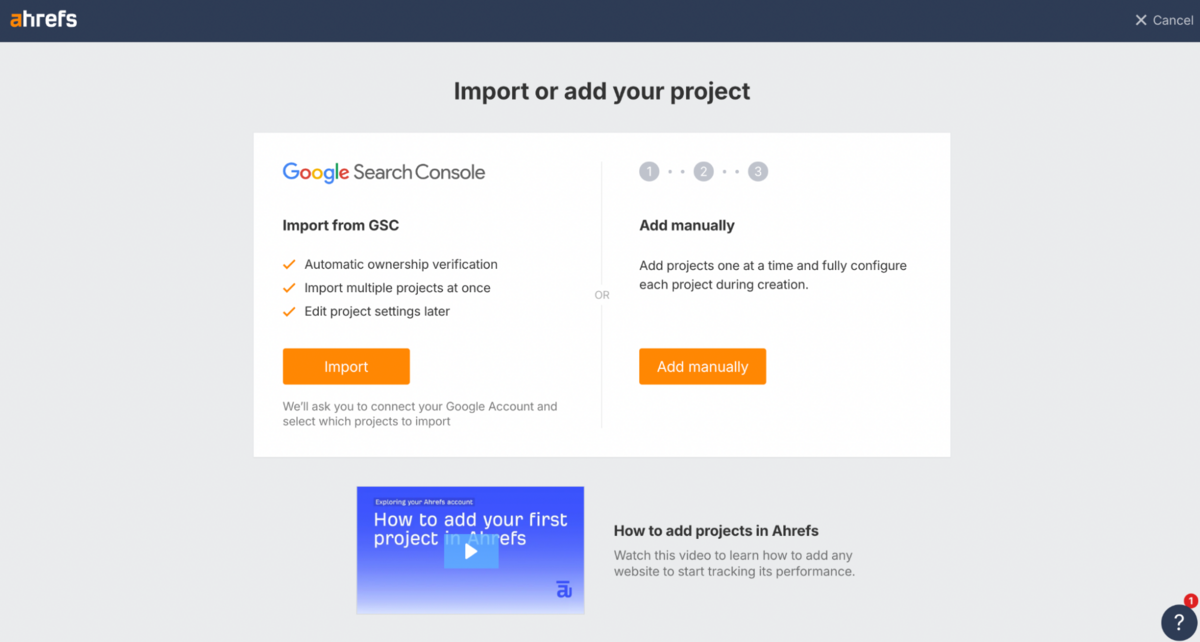
Connecting GSC to Ahrefs makes the data far more accurate because Ahrefs can combine its own crawled insights with Google's first-party search data to give you a clearer picture of what's driving traffic and where you can improve.
If you don't have GSC, Ahrefs also lets you track your analytics by adding a code snippet on the header of your site (similar to how you would install a Facebook pixel). This is a cool little feature that the other top SEO suites in the space don't provide.
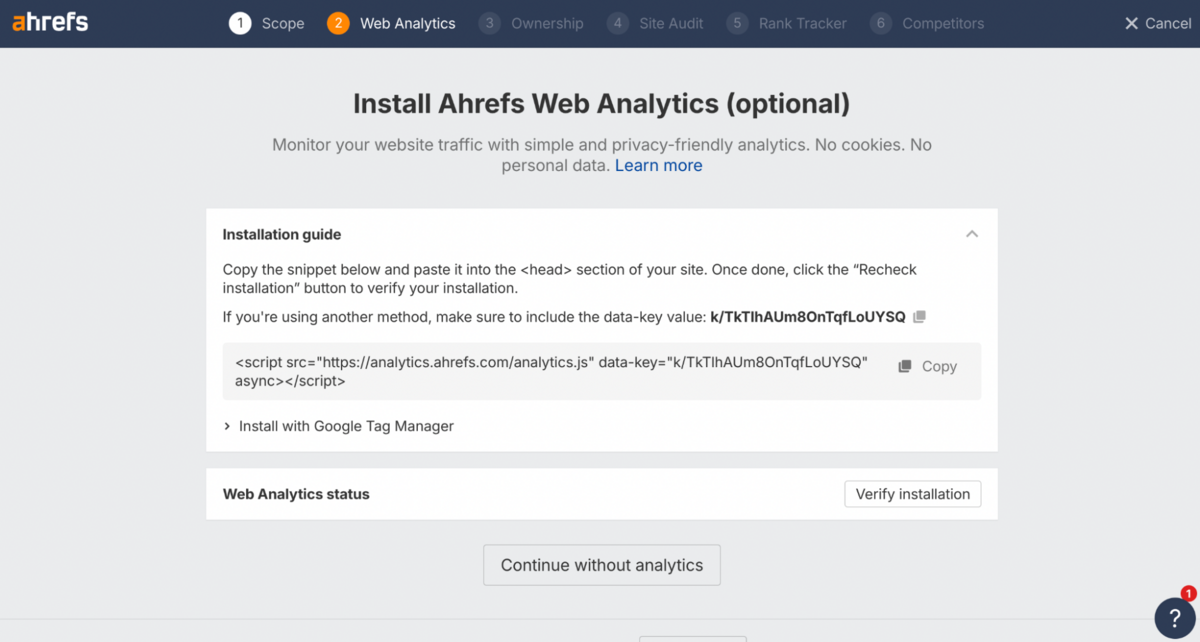
Regardless, we recommend going via the GSC route.
After you Set up a Project
Once a project is set up, you can choose how frequently you want Ahrefs to crawl your website and do a site audit.
You can also select what URL sources you'd like to be audited - Website, Auto-detected sitemaps, Specific sitemaps, Custom URL list, or Backlinks. What strikes you first is the unusually granular control over how your site gets crawled. You're not stuck with a one-size-fits-all approach. Instead, Ahrefs lets you customise practically every aspect of the crawl process, from scope and authentication through to JavaScript execution, URL rules, speed limits, and IndexNow submissions.
It's the kind of configurability that genuinely sets Ahrefs apart from tools like Semrush, Moz, or SE Ranking, where crawl settings tend to be far more rigid.
You can select your crawl sources and fine-tune the parameters with a level of precision that's rare in all-in-one SEO suites. For instance, you're able to adjust crawl speed down to exact URLs per minute, define how JavaScript should be handled, decide whether to follow non-canonical or nofollow links, and set limits on pages, crawl depth, folder depth, and URL length.
Need to ignore robots.txt? Switch user agents? Crawl a staging site using HTTP authentication?
Ahrefs handles all of this without forcing you into an enterprise pricing tier - something most competitors still reserve for their top-level plans.
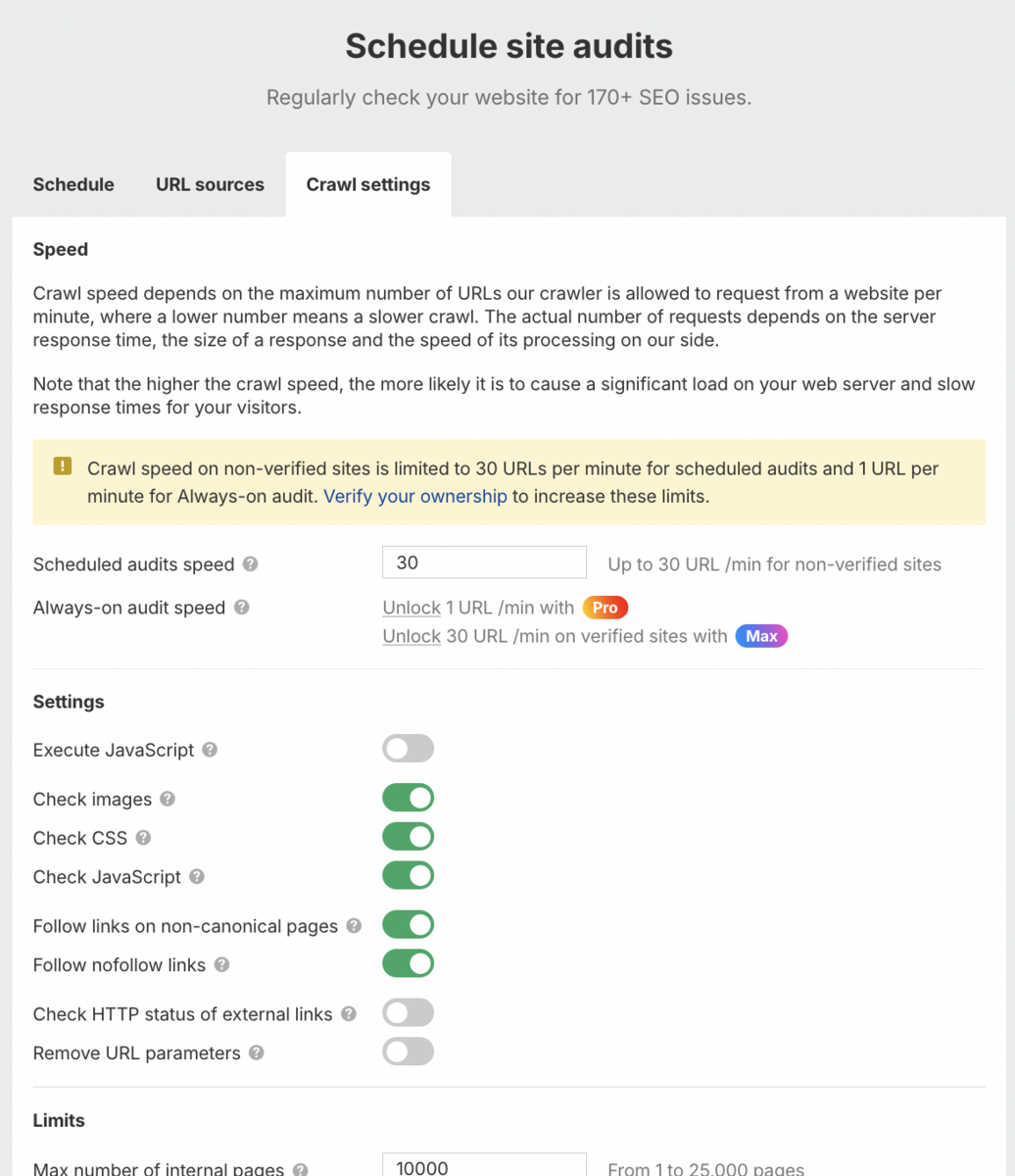
Beyond the core crawl controls, Ahrefs has woven several advanced modules directly into the audit workflow.
The AI content detection feature identifies and highlights AI-generated sections on any page, which is particularly useful if you're managing a large content operation or auditing a site where content originality matters.
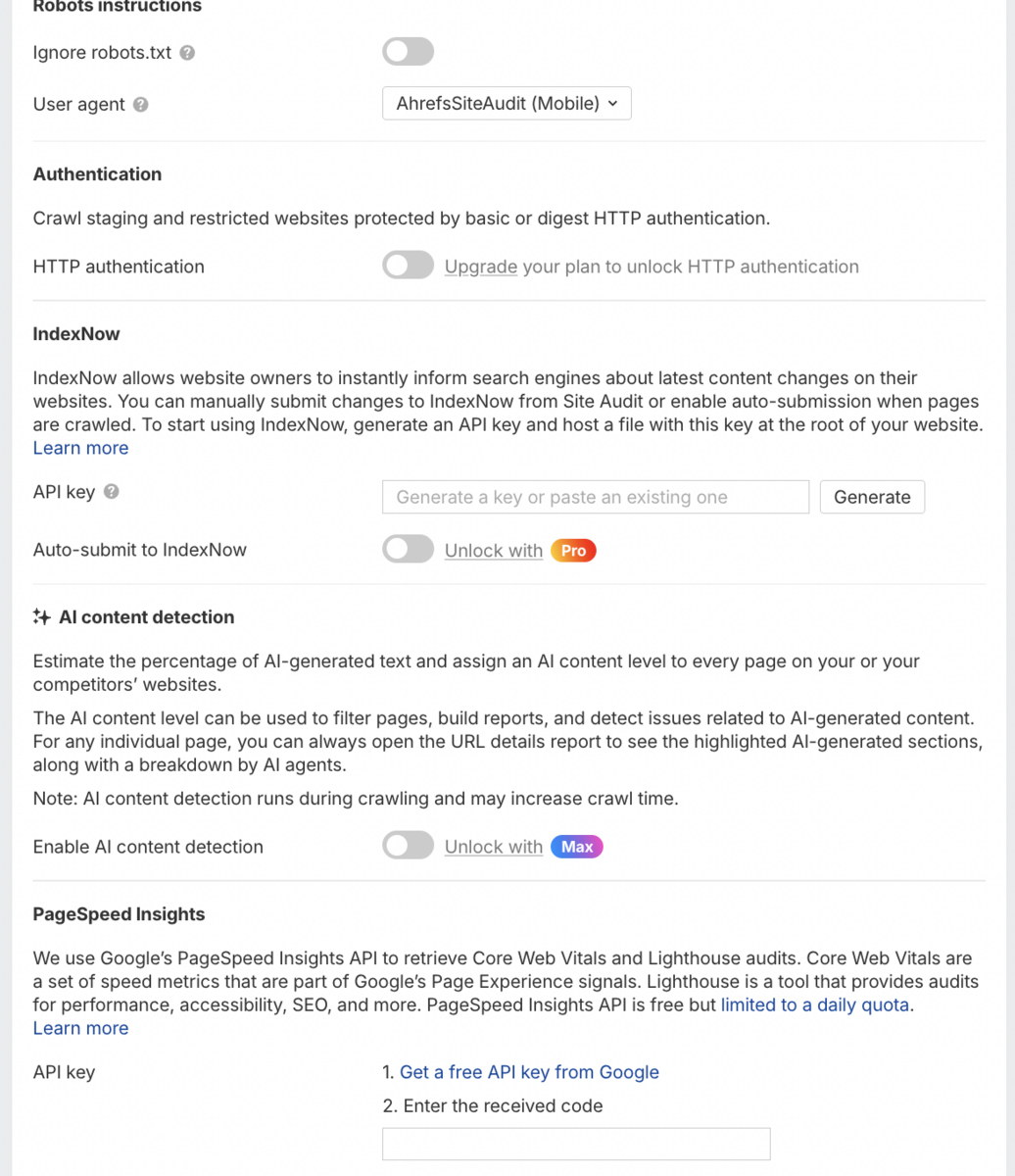
IndexNow auto-submission now allows you to instantly notify search engines about new or updated content, speeding up indexing without manual intervention. The PageSpeed Insights integration pulls Core Web Vitals and Lighthouse audits (Lighthouse is an open-source tool for measuring the performance and quality of webpages) straight into your site audit, consolidating performance data alongside your technical SEO findings.
This level of configurability makes Ahrefs one of the most capable technical audit tools currently available. Whether you're working with a large enterprise website, a complex multi-language setup, or a straightforward local business site, the granular controls let you simulate exactly how search engines crawl your content, something very few all-in-one platforms come close to matching.
User Interface
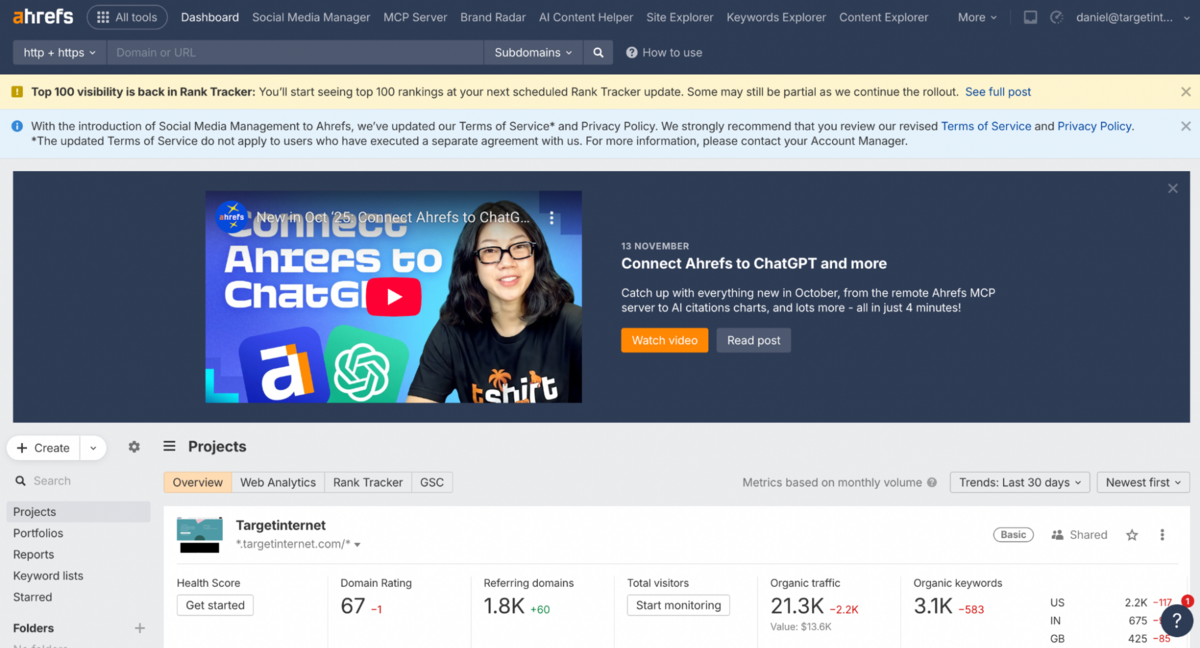
The first thing you notice when you load Ahrefs is its clean, no-nonsense interface that gets straight to business.
The horizontal menu at the top with context-sensitive sub-menus on the left feels immediately familiar if you've used professional SEO tools before. What we particularly appreciate is how the data visualisation serves a genuine purpose throughout the platform. Graphs and chart selections actually improve readability rather than just adding visual polish, which frankly sets Ahrefs apart from competitors that lean too heavily on style over substance.
That said, there's definitely a learning curve here, particularly if you're new to SEO software.
The sheer depth beneath the surface can feel daunting - Ahrefs provides video tutorials for most features, but those assume you already know what you want to accomplish and where to look. If you're still figuring out which reports solve which problems, the workflow can feel genuinely overwhelming. Tools like Semrush guide users more gently with in-app prompts and suggested next steps.
Once you cross that initial learning hump, though, navigation becomes remarkably efficient. Finding specific reports usually takes a couple of clicks, which is genuinely valuable for agencies switching between multiple client accounts daily. The platform rewards experience - you just need to invest time upfront figuring out where everything lives.
Site Explorer
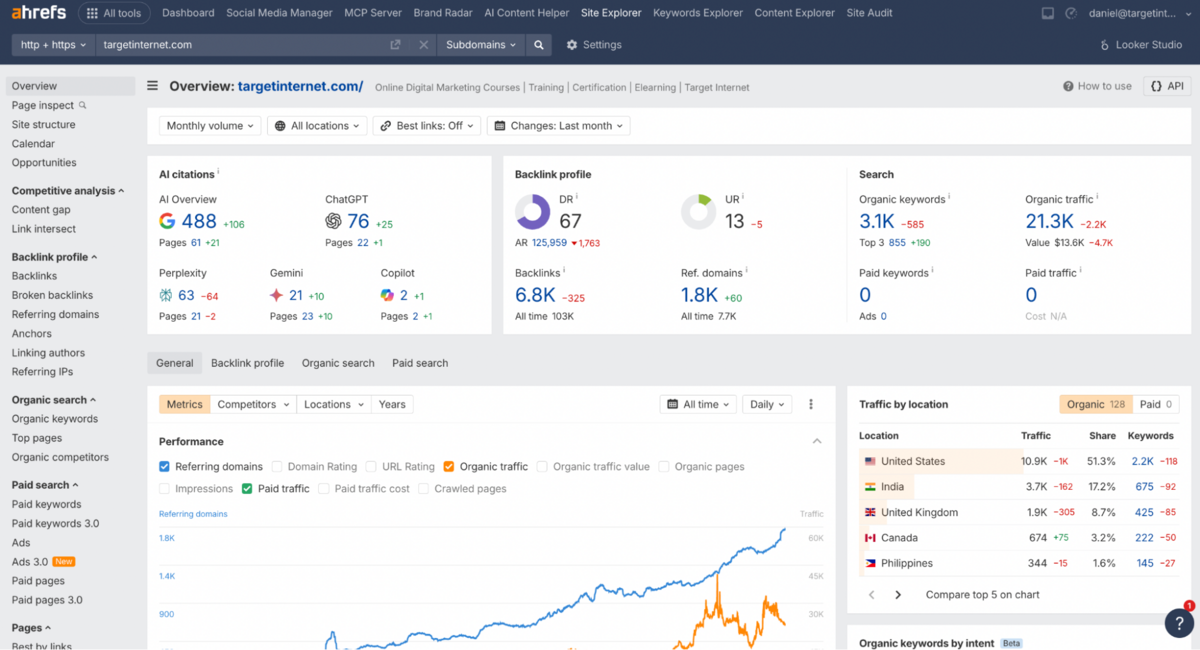
Every SEO suite has its own version of this tool - Site Explorer is Ahrefs' flagship module, and it's fair to say it sits at the heart of the entire platform (remember how Ahrefs was once only known as The Backlink Tool?).
Site Explorer functions as a comprehensive diagnostic and intelligence dashboard for any website - bringing together Backlink Data, Organic Keyword Visibility, Paid Search Behaviour, Topical Authority, AI Citations, and Traffic Trends into one single view. What's particularly impressive is how Ahrefs surfaces everything at once rather than hiding metrics behind multiple tabs. You'll see Domain Rating, URL Rating, backlink volume, referring domains, organic keyword movements, paid search data, and even emerging AI citations across ChatGPT, Claude, Gemini, Copilot, and Perplexity - all from the moment you load a domain into Site Explorer.
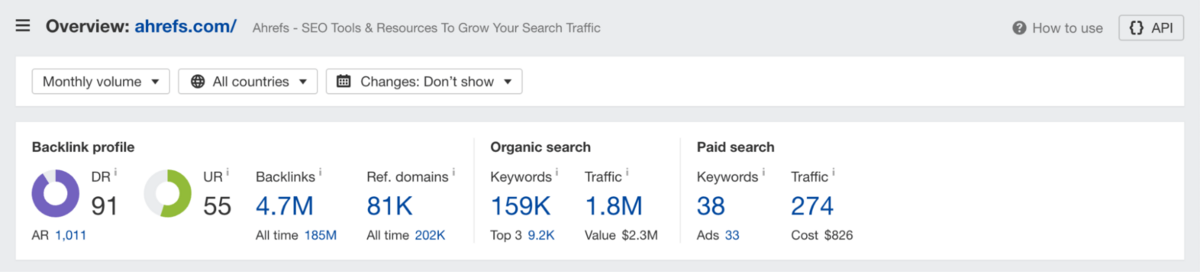
This gives you a genuinely multifaceted snapshot of a site's authority, discoverability, and competitive position without needing to hunt through separate reports.
The depth of segmentation here stands out. You can break down performance by competitors, locations, traffic channels, and timeframes, switching between daily, weekly, or monthly views depending on what you're tracking. The traffic-by-location panel is especially useful for global SEO teams, revealing not only where traffic originates but also the share of keywords driving it.
You'll find distribution charts for organic positions, internal versus external traffic drivers, top entities associated with your brand, backlink types, and detailed performance timelines as you scroll deeper. The module answers not just "how much traffic does this domain get?" but why it gets that traffic, where it comes from, and which SERP levers are actually moving the needle.
Additional features available in Site Explorer:
- Page Inspect - Compare how a page's HTML and content changed between any two dates to reverse-engineer traffic spikes
- Site Structure - View site architecture in tree format with traffic and backlink metrics by subfolder, no crawl required
- Calendar - Visualise daily ranking changes and new/lost pages in calendar format to spot algorithm impact
- Organic Keywords - See all keywords a domain ranks for with position tracking, traffic value, and SERP features
- Organic Competitors - Auto-detect sites competing for similar keywords with overlap analysis (this is especially useful because, in most cases, your real search competitors aren't the brands you think are your competitors)
- Top Pages - Identify which pages drive the most organic traffic and their ranking keywords
- Paid Keywords - Analyse competitor PPC activity with ad spend estimates and keyword targeting
- Best by Links - Find pages with the strongest backlink profiles for content gap analysis
- Linked Domains - See which external sites you're linking to and how often
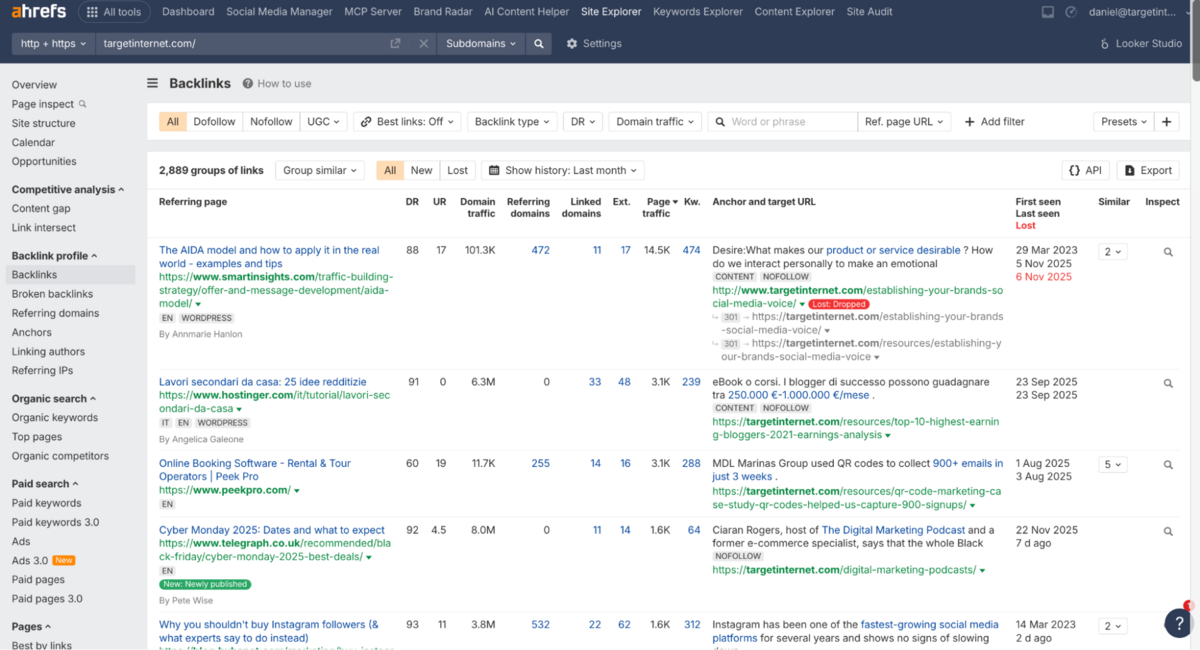
Backlink Profile
Ahrefs' Backlink Profile section is baked into the Site Explorer.
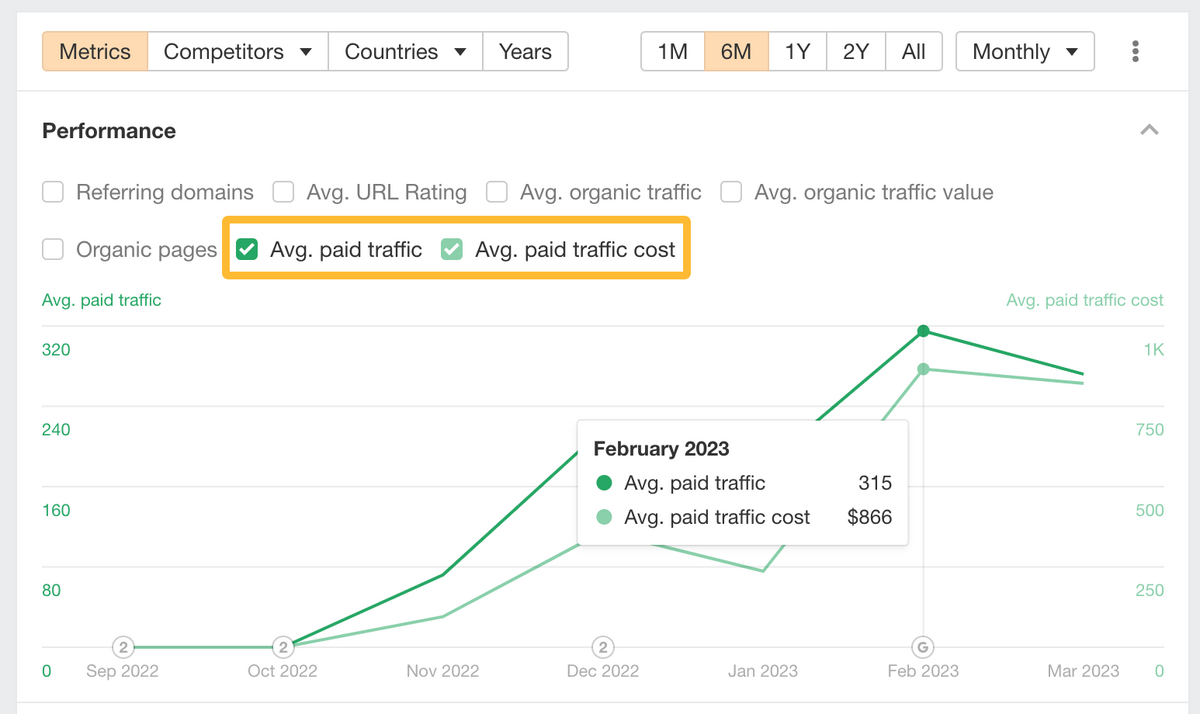
It provides a detailed analysis of the backlinks pointing to any domain or URL, going well beyond simple link counts. You'll see Total Backlinks, Referring Domains, and key authority metrics such as Domain Rating (DR) and URL Rating (UR), alongside breakdowns by Link Type (DoFollow, NoFollow), Anchor Text Distribution, and the authority of Linking Domains.
What makes this particularly useful is the ability to monitor new and lost links over time.
If you're running a link-building campaign or monitoring competitors, knowing exactly which links were gained or lost (and when) gives you the context you need to spot trends, identify risks, and act on new opportunities. The advanced filters let you sort backlinks by Language, Link Type, and Website Ranking, making it straightforward to isolate high-quality prospects or flag low-quality links that might be dragging down your profile.
Additional reports within the Backlink section include Broken Backlinks (identify referring pages linking to 404 pages for link reclamation opportunities) and Internal Backlinks (review internal linking structure and find nofollow or broken internal links).
Workflow Gaps
That said, Ahrefs doesn't have any standout features in backlink analysis that the competition (like Semrush or Moz Pro) doesn't offer.
It delivers all the tools that make backlink analytics useful, but it stops short of the workflow integrations you'll find in tools like Semrush. For instance, there's no way to easily select backlinks and send them to a dedicated list or outreach workflow for later action. If you're researching link opportunities, you'll need to export the data and manually work through spreadsheets or Excel to integrate your outreach efforts into your broader workflow.
This positions Ahrefs more as a research tool by default.
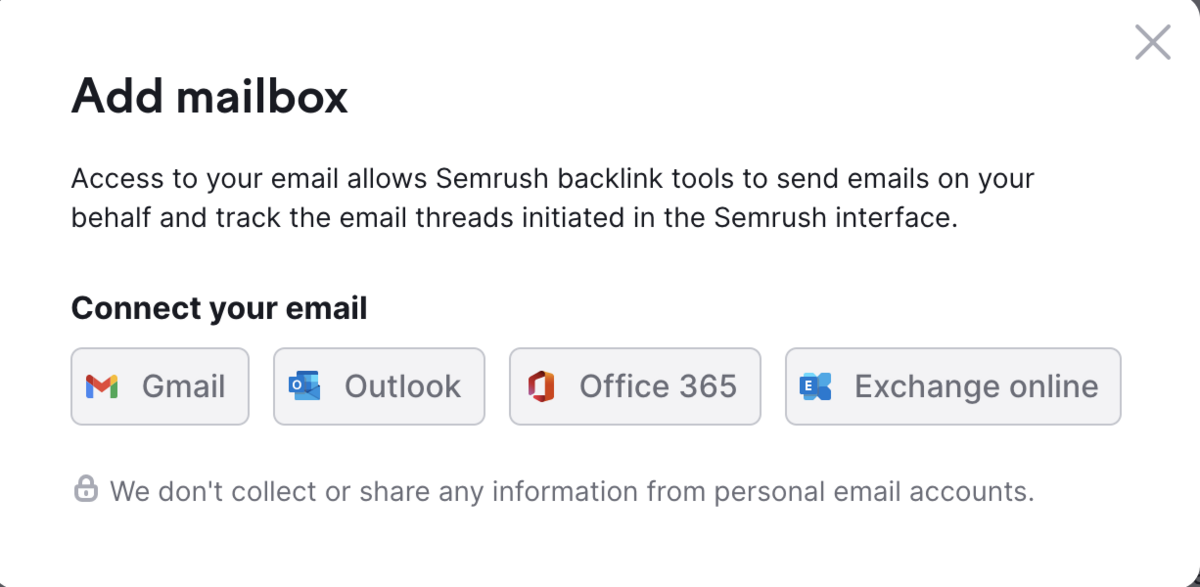
Using the right filters will absolutely help you spot opportunities for outreach, broken link building, or reclaiming lost links - but there's no integration with a workflow manager, email sender, or list builder to streamline what comes next. Competitors like Semrush offer dedicated sections for outreach management, letting you add prospects directly into campaigns without leaving the platform.
Ahrefs, by contrast, expects you to handle that part of the process elsewhere. It's a notable gap if link building is a core part of your day-to-day operations.
An important feature that's also missing here is the ability to disavow spam links directly from Ahrefs. Multiple SEO suites give you the flexibility to bulk-select problematic backlinks and generate a disavow file for submission to Google Search Console - some even let you submit it directly from within the platform. Ahrefs requires you to manually identify spam links, export them, format a disavow file yourself, and then upload it separately to Google.
For agencies or in-house teams managing multiple sites with active negative SEO threats, this adds unnecessary friction to what should be a streamlined process.
What You Can Actually Do with Backlinks in Ahrefs
While Ahrefs lacks workflow integrations, the Backlink report does include several filtering and search capabilities worth highlighting.
You can filter by link attribute to isolate DoFollow, NoFollow, UGC, or Sponsored links, making it straightforward to assess the actual SEO value of a profile.
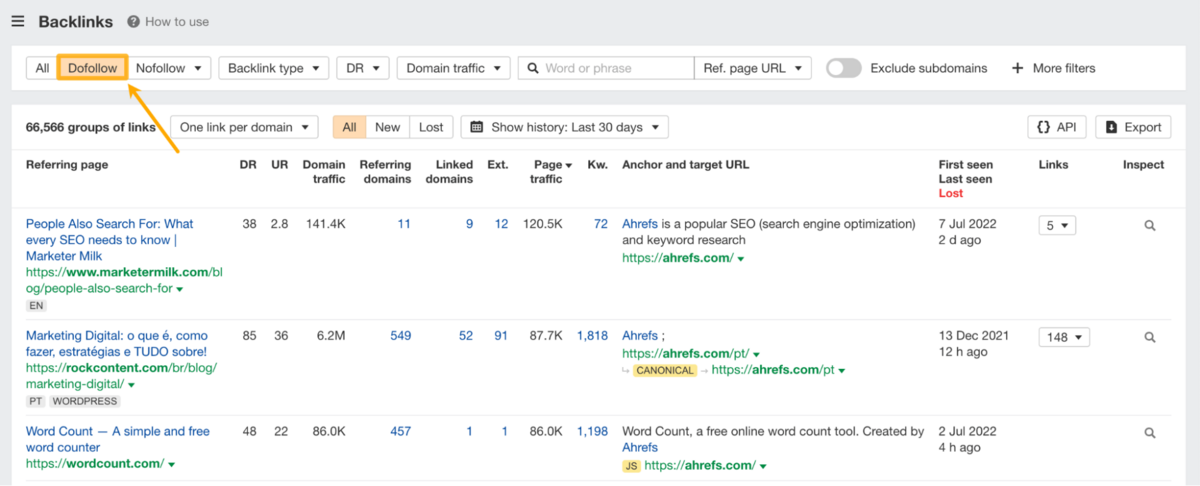
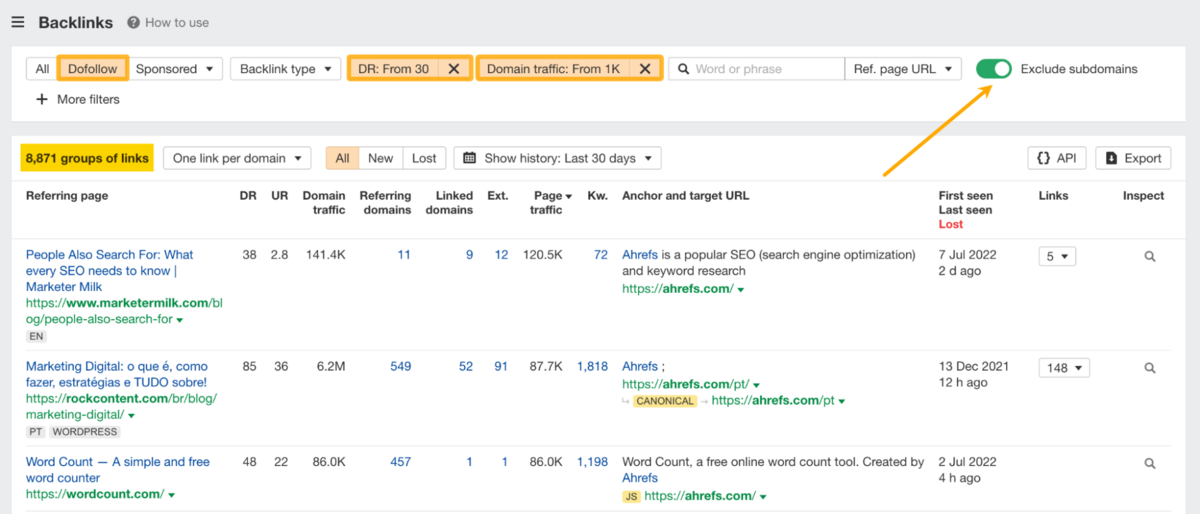
More usefully, you can apply combined filters to show only "high-impact" links. For example, you can set a minimum Domain Rating of 30 and filter for domains generating at least 1,000 organic visits per month. This filters out most spammy backlinks and leaves you with the authoritative links genuinely worth targeting.
The "New backlinks" filter, combined with historical views, lets you spot newly built links and differentiate between links added to brand-new pages versus existing content. Setting the status to "Link restored" reveals whether competitors are actively doing link reclamation - another useful bit of competitive intelligence.
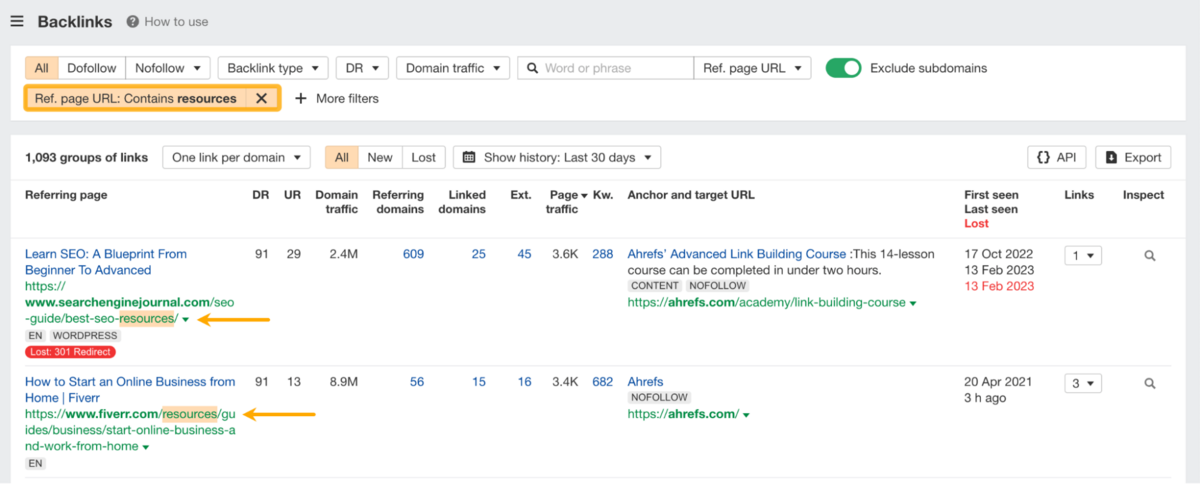
The search functionality is particularly powerful for mining specific opportunities from competitor profiles. Searching for words like "resources" or "links" in referring page URLs surfaces resource pages where your competition is listed.
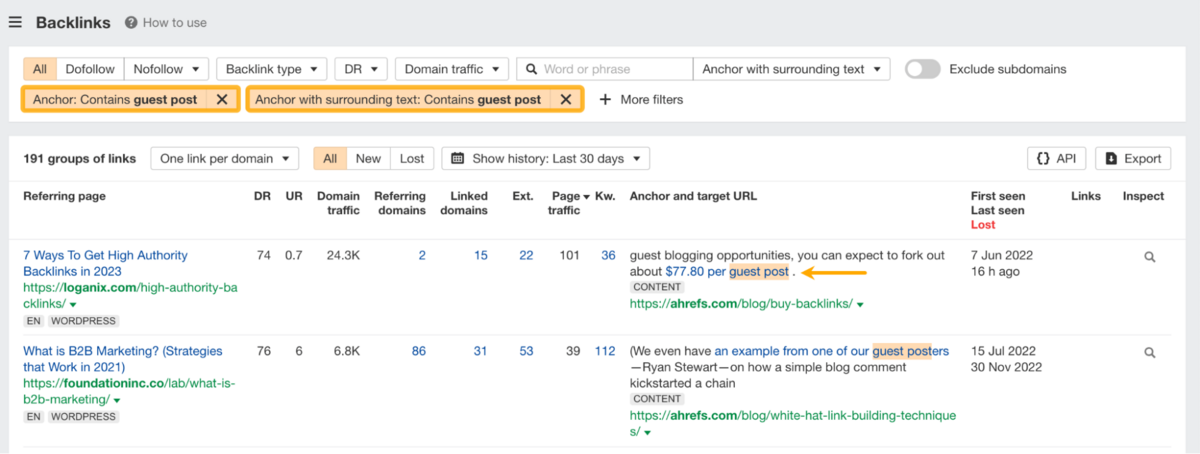
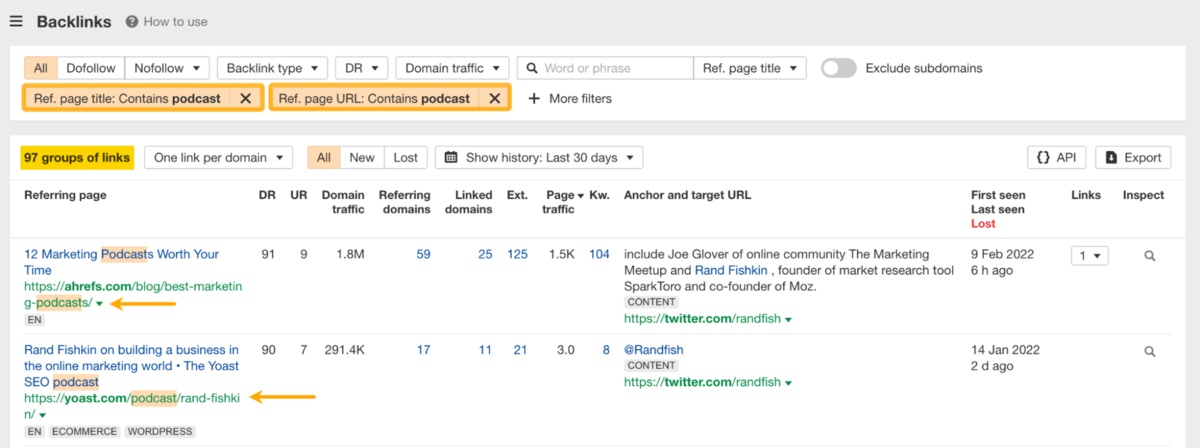
Similarly, searching for "podcast" or "interview" in page titles reveals podcasts they've appeared on, while "guest post" or "written by" in anchors can help you find guest posting opportunities.
Batch Analysis 2.0
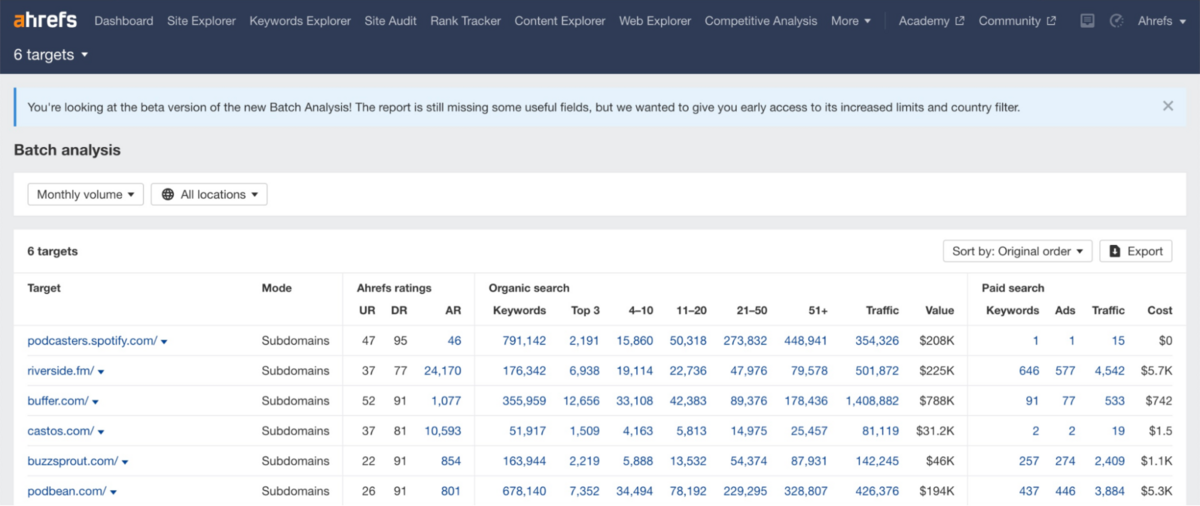
Batch Analysis 2.0 is one of Ahrefs' premium features, available on higher-tier plans and designed specifically for agencies, enterprise teams, and analysts who need to benchmark hundreds of sites at scale.
In its latest iteration, the tool supports significantly higher limits and faster processing, allowing you to pull Domain Rating, URL Rating, Organic Keyword Counts, Traffic Estimates, Top-Ranking positions, Paid Search data, and Traffic Value across multiple targets in seconds. It's essentially a bulk Site Explorer that condenses the most critical SEO metrics into a single table, which is exactly what you need when you're reviewing potential link prospects, evaluating client portfolios, or conducting market-wide competitor research.
Competitive Analysis
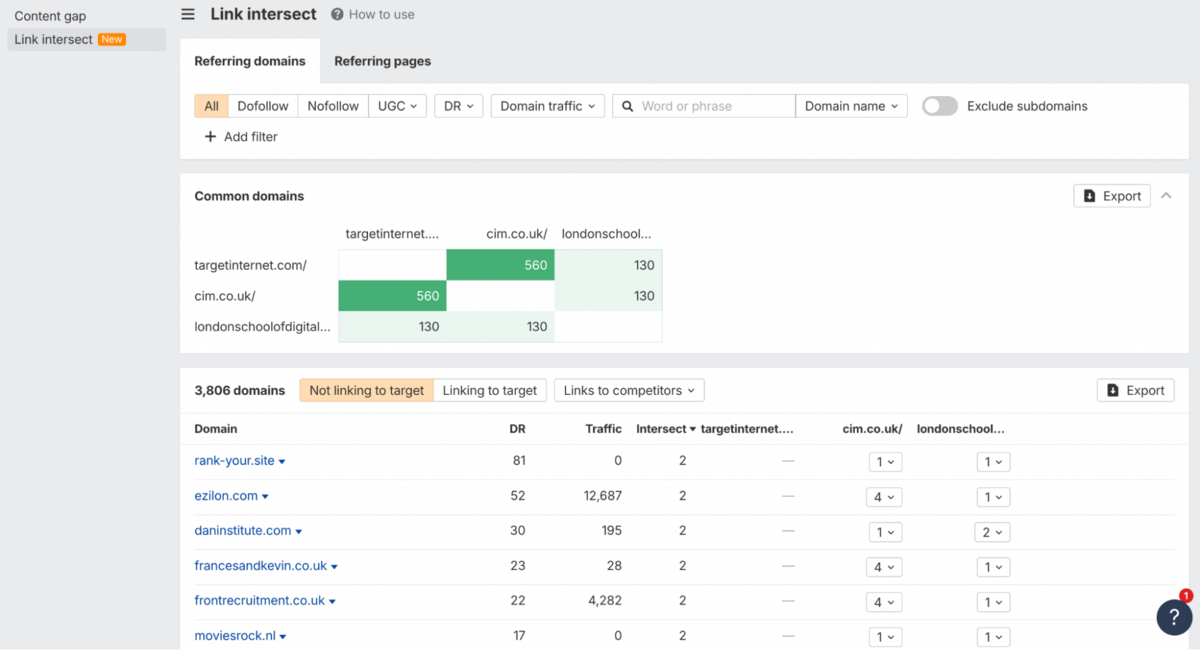
It's worth noting upfront that competitive analysis isn't a particular strength of Ahrefs. The competition - particularly Semrush and Moz Pro - offer a much wider range of competitive tools with clearer, more UI-friendly visualisations and toggles that Ahrefs simply lacks. That said, Ahrefs does include two basic competitive analysis tools integrated directly into Site Explorer.
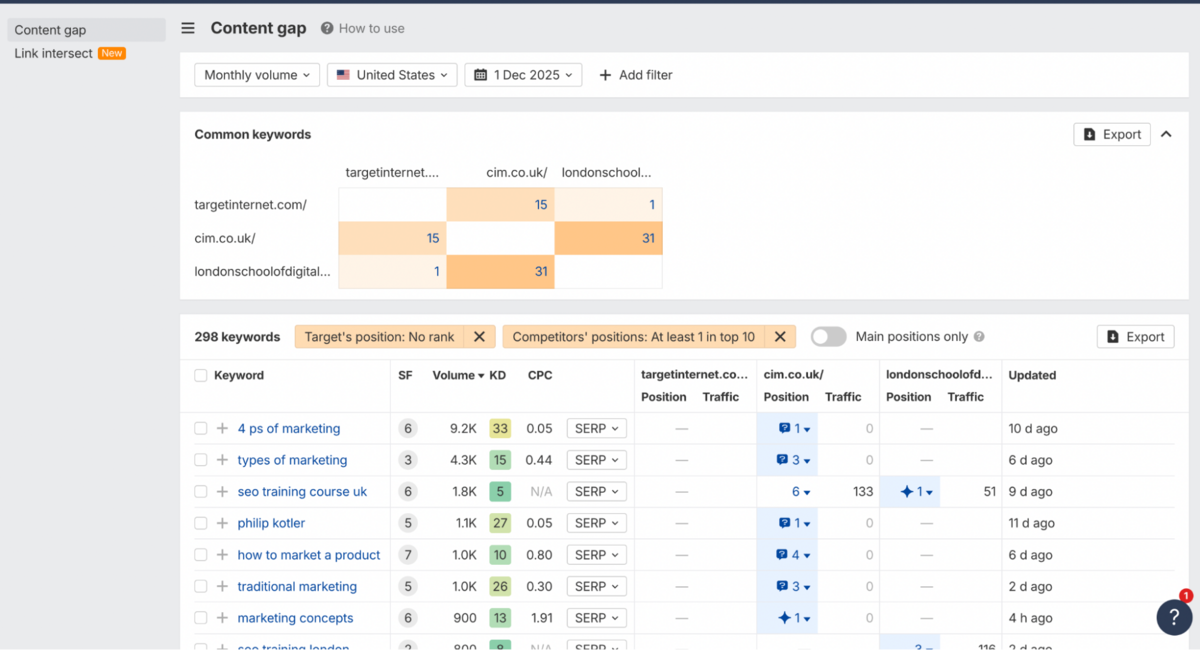
The Content Gap tool identifies keywords that your competitors rank for, but you don't. You select your domain, add competitors, and Ahrefs surfaces the keyword gaps. Results can be filtered by search volume, keyword difficulty, or position to help you prioritise which opportunities to pursue.
Link Intersect does the same thing for backlinks. It highlights linking domains that point to your competitors but not to you, helping you identify sites that are already linking to similar content in your space and might be receptive to outreach.
Both tools are functional and fast - but they lack the depth, visual polish, and actionable insights you'll find in competing platforms. If competitive analysis is central to your workflow, Ahrefs covers the basics but doesn't particularly excel at them.
Brand Radar - AI Features
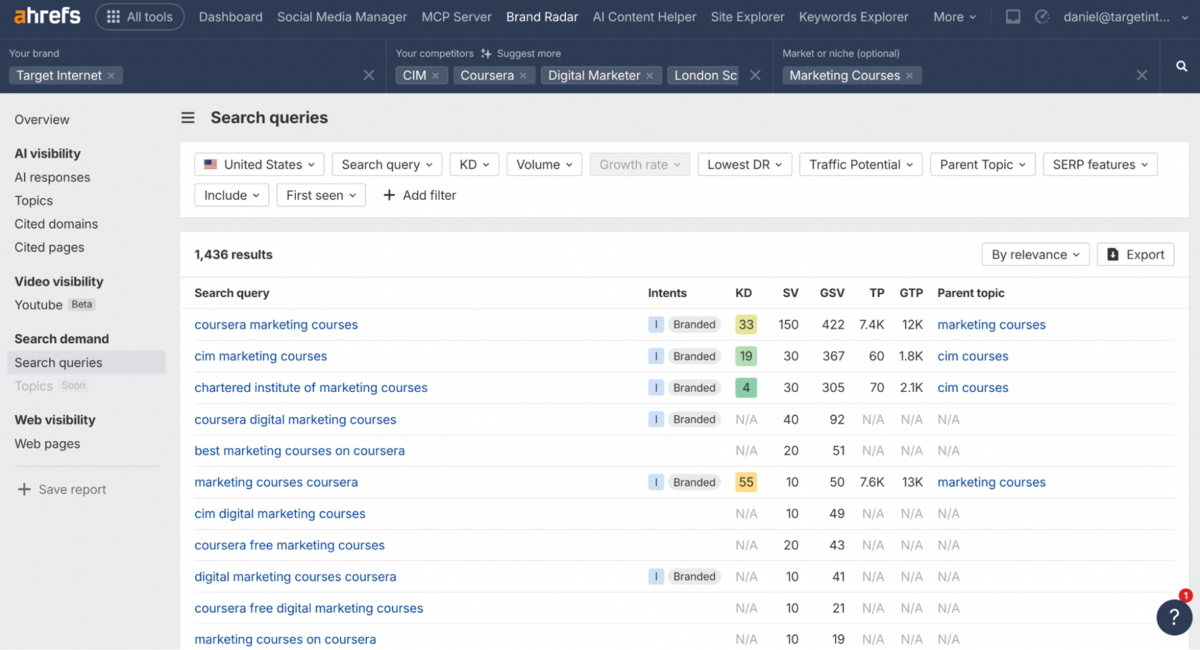
It's worth noting upfront that Brand Radar and its AI-focused features are available only on Ahrefs' higher-tier plans or as an add-on (from $199/mo), so if AI visibility tracking is important to you, you'll need to factor that into your budget.
It is, however, a forward-looking feature that addresses something most competing SEO suites haven't tackled comprehensively yet. The tool tracks where your brand appears across AI platforms like ChatGPT, Perplexity, Claude, Gemini, Copilot, and Google's AI Overviews, analysing over 150 million monthly prompts. You'll see metrics including Mentions (how many AI responses include your brand), Citations (how many cite you with a link), Impressions (potential exposure weighted against search volume), and AI Share of Voice (your percentage of brand impressions compared to competitors).
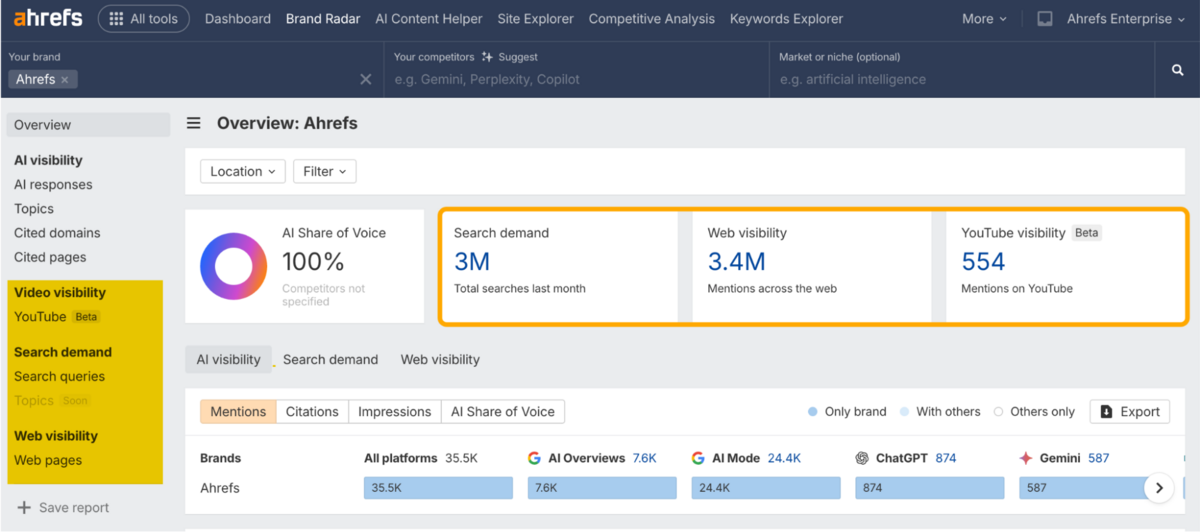
What makes this particularly useful is that Brand Radar doesn't just track AI visibility in isolation.
It also monitors the underlying drivers, including Search Demand in Google, Web Visibility across publications citing your brand, and Video visibility across YouTube (with TikTok coming soon). This gives you a clearer picture of where your brand appears in AI responses and where the gaps might be.
You can also measure how strongly AI platforms associate certain topics with your brand, which is valuable for understanding your foothold in specific categories or niches.
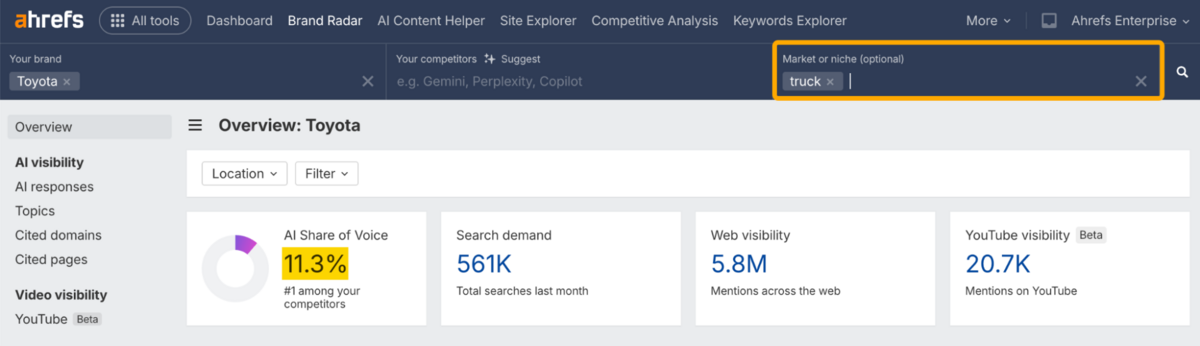
For instance, you might compare your brand's AI Share of Voice in one product category versus another, or run a broad search in your niche to see which brands get surfaced most frequently in AI answers. It's the kind of intelligence that's becoming increasingly relevant as more users turn to AI-powered search.
Keyword Explorer
Keywords Explorer is where Ahrefs demonstrates why it's considered one of the top-tier keyword research platforms, and the first thing you notice is how much depth sits behind what initially looks like a simple search box.
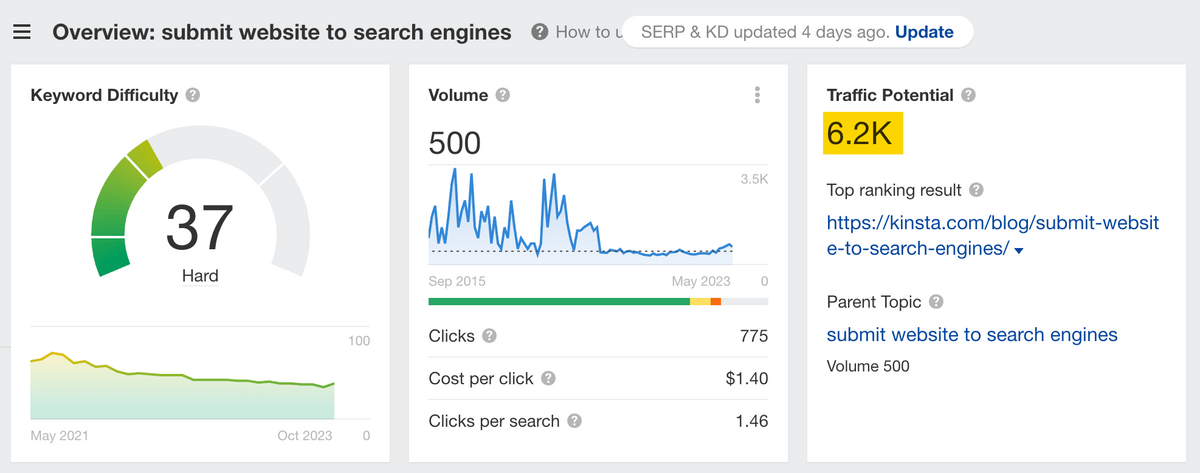
Built on a database of over 28 billion keywords across more than 200 countries, the tool goes well beyond the standard search volume and difficulty scores you'd find in basic keyword planners. What sets it apart are the proprietary metrics that help you understand the actual opportunity. Traffic Potential, for instance, shows you the total organic traffic the top-ranking page gets from all its keywords, not just your target term. This means you can spot opportunities where a 500-search-per-month keyword actually unlocks 6,000+ monthly visits because the ranking page captures dozens of related queries.
It's the kind of insight that changes how you prioritise content, and it's something most competing tools either don't offer or bury deep in their interfaces.
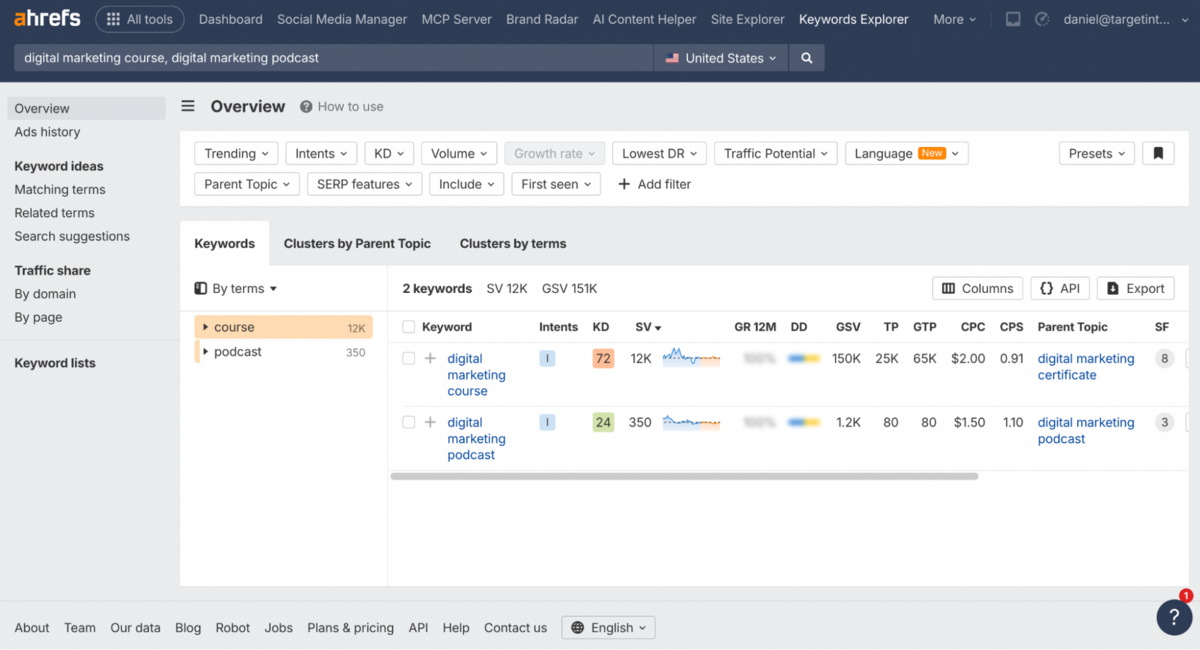
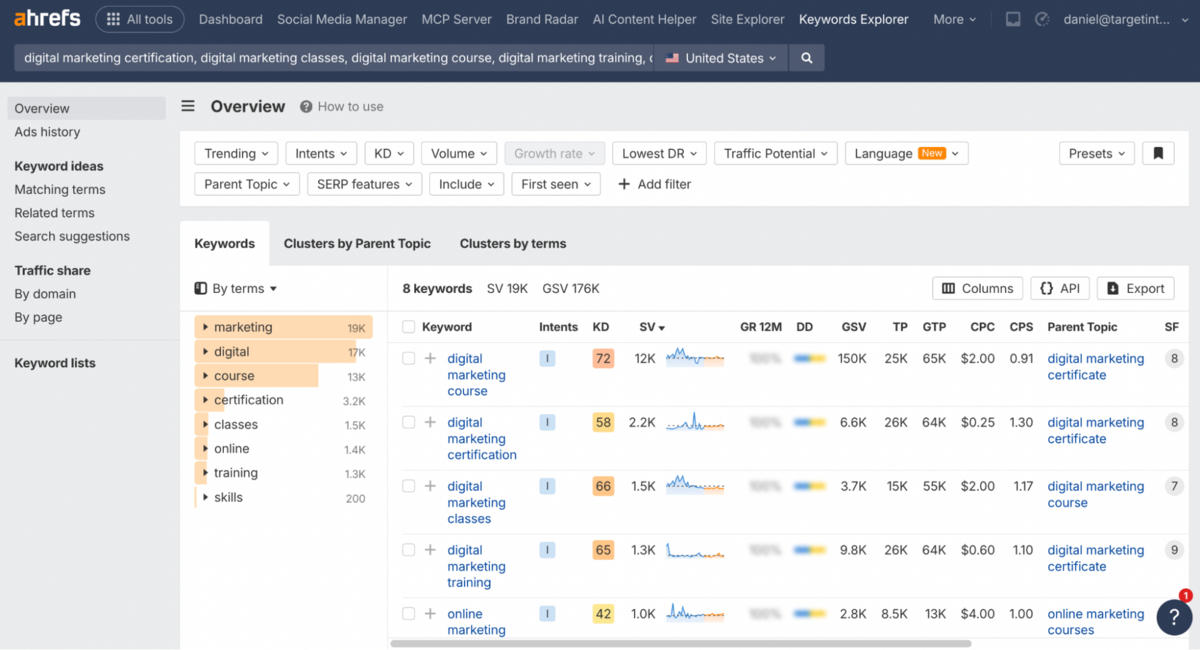
The filtering options are robust without being overwhelming, and the ability to cluster keywords by Parent Topic, showing you the broader theme driving traffic, helps you think strategically rather than just chasing individual keyword variations. Despite this, this portion of Ahrefs does have its drawbacks. The interface itself isn't as visually polished as Semrush's Keyword Magic Tool, which offers a sleeker, more modern experience. Ahrefs feels more utilitarian (and a little nerdy), and can take some time to get used to.
Overview
The Overview section gives you everything you need to make a decision quickly: Search Volume, Global Volume, Keyword Difficulty (scored 0-100 based on referring domains), Traffic Potential, and Clicks.
The Clicks metric is particularly useful because it shows you how many people actually click through on the SERP. Because not all searches result in clicks, and targeting a keyword with 10,000 searches but only 500 clicks means you're chasing vanity metrics. Parent Topic reveals whether you'd be better off targeting a broader term that captures more traffic, which can save you from creating overly narrow content that misses the bigger opportunity. The SERP position history chart shows ranking volatility over time, and you can compare SERPs side-by-side from different dates to see if Google treats keywords as similar topics.
Matching Terms, Related Terms & Search Suggestions
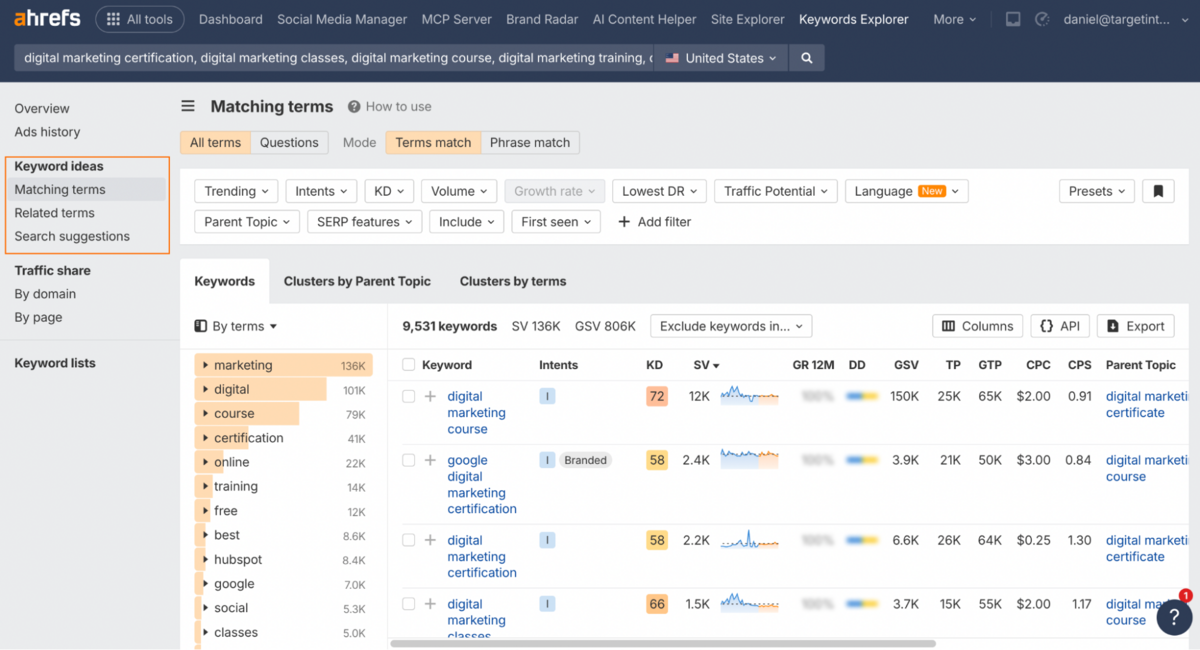
The three keyword ideas reports - Matching Terms, Related Terms, and Search Suggestions - are where you can expand your initial keyword idea into a full content strategy.
Matching Terms shows variations of your seed keyword with solid filtering options to isolate high-volume, low-competition opportunities. The clustering feature here is particularly strong: you can group keywords by Parent Topic in a treemap format that visually shows which broader themes drive the most traffic. It's genuinely more strategic than the basic lists you'd get from free tools.
Related Terms uncovers less obvious opportunities by showing what top-ranking pages also rank for or frequently mention, which is useful for identifying subtopics to cover.
Search Suggestions pulls in autocomplete data with full SEO metrics, going well beyond Google's search box, though it's not particularly innovative compared to what other tools offer for free.
Where Ahrefs again falls slightly short is in the presentation. Semrush's Keyword Magic Tool offers a more intuitive, visually organised experience with better sub-grouping. Ahrefs gets you the same data, but you'll spend more time filtering and organising it yourself.
Traffic Share by Domains & Traffic Share by Pages
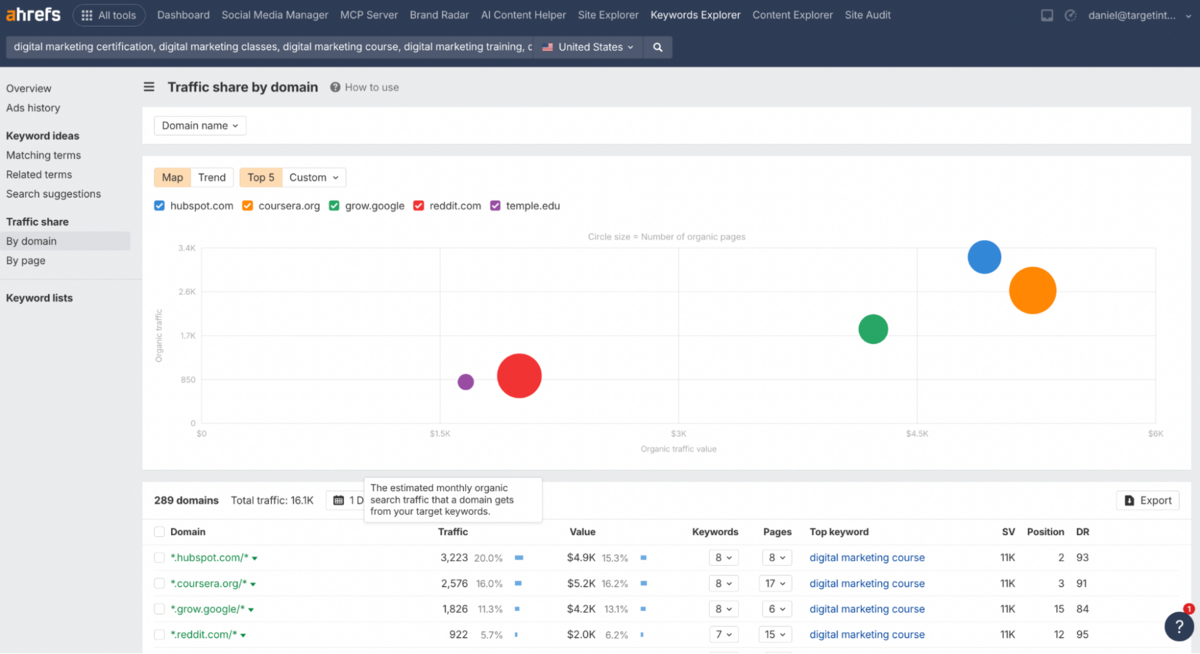
These reports support up to 10,000 keywords and are designed for bulk competitive analysis.
The By Domains report shows which sites capture the most traffic for your keywords and gives you a sense of search intent based on the types of sites ranking. You can drill down into competitors' top pages to uncover content ideas. The By Pages report shows specific URLs capturing traffic and helps you determine whether you can target multiple keywords with a single page by checking SERP overlap. Both are practical for competitive research, though they feel more like analysis tools than planning tools.
Ads History
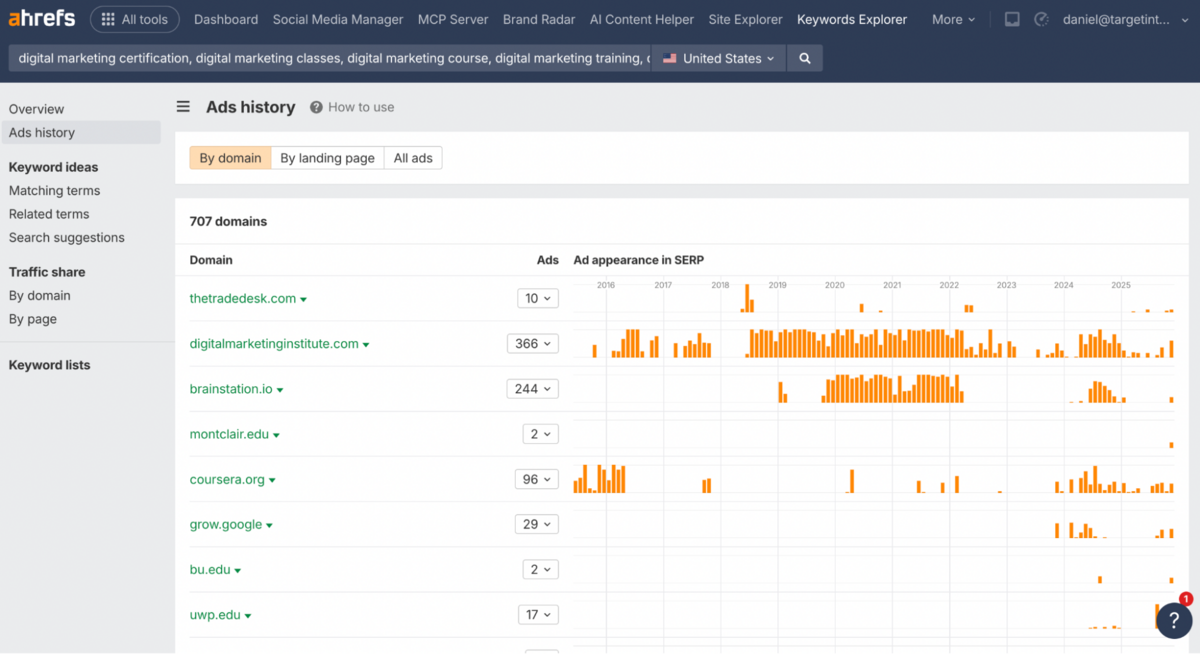
Ads History shows which websites have been advertising on your target keyword over time, including their ad copy and landing pages.
It's useful for gauging commercial intent. Consistent ad spend is a strong signal that a keyword drives conversions, and you can borrow insights from competitor ad copy for your own titles and meta descriptions. It's straightforward and convenient but not particularly groundbreaking. Semrush offers similar ad intelligence, and SpyFu arguably does it better with more historical depth.
Site Audit
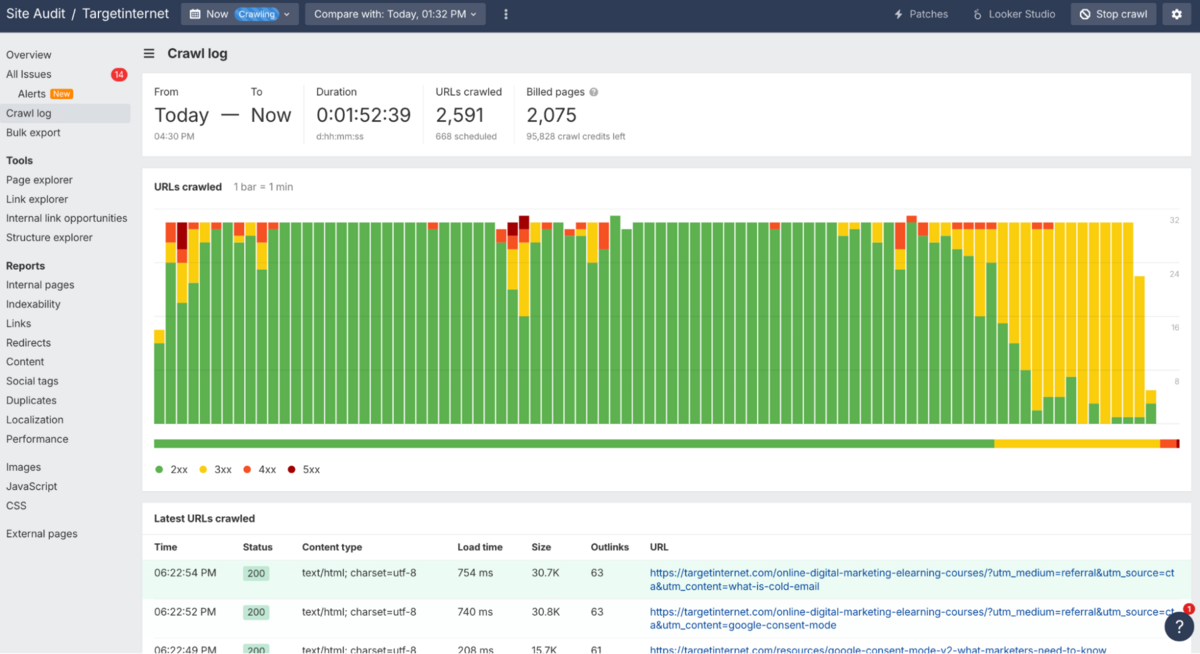
Site Audit is one of the most comprehensive crawling tools we've tested to date.
The platform organises projects hierarchically with a Health Score metric that calculates the percentage of internal URLs without errors - straightforward for benchmarking progress and communicating with non-technical stakeholders.
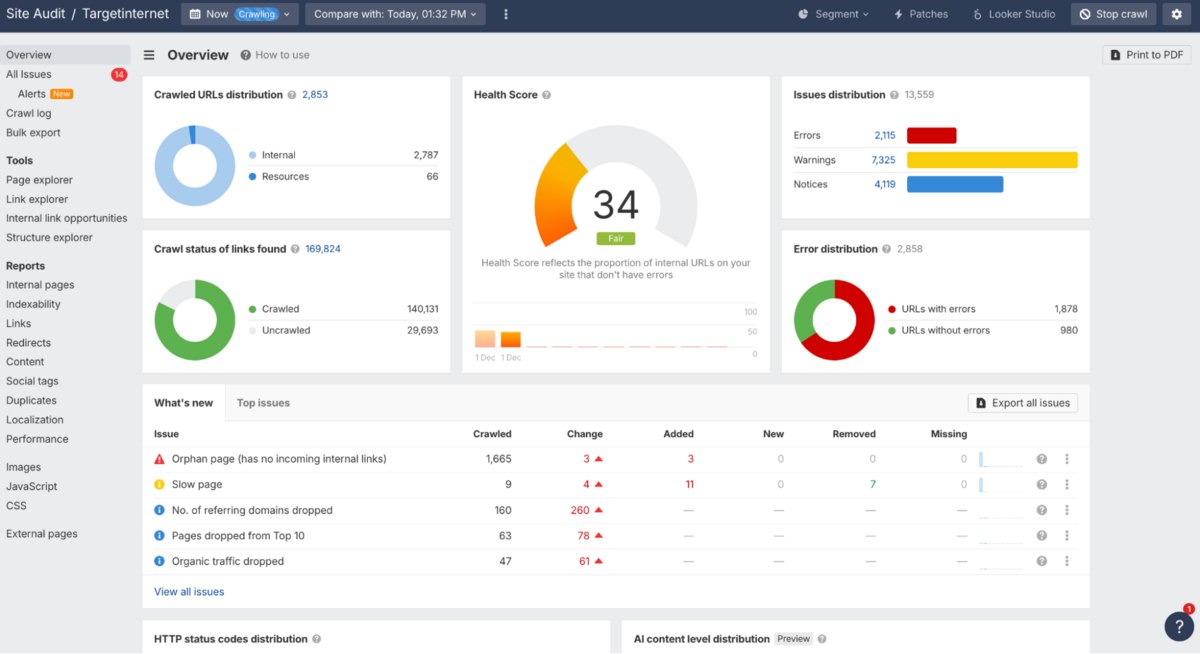
Where this genuinely excels is flexibility. You're scanning for 170+ predefined issues, but Ahrefs lets you customise classifications at both global and project levels. For example, seasonal e-commerce sites with intentionally orphaned products shouldn't be penalised with lower health scores - this customisation solves that elegantly.
Page Explorer
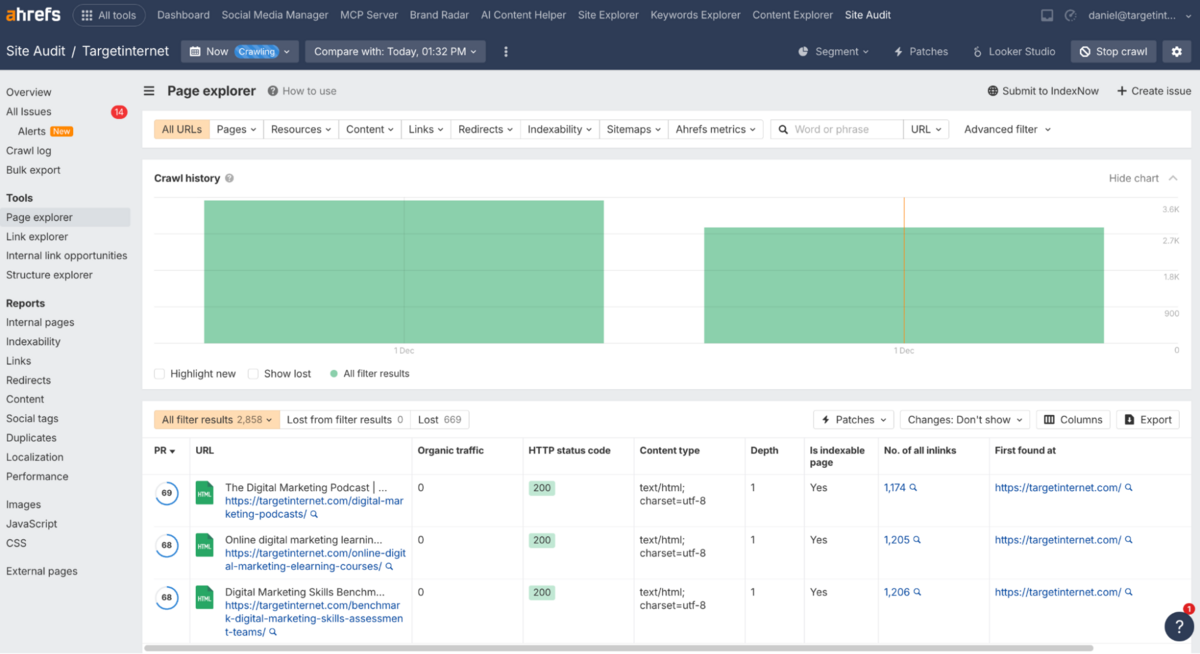
Ahrefs really shines in technical diagnosis with the Page Explorer.
The historical HTML snapshot feature is also very impressive. Ahrefs stores snapshots of each page's code and text, showing deletions in red and additions in green when you compare crawls. When rankings drop after a content update, you can see exactly what changed instead of making guesses (however educated they are). For agencies that need to regularly troubleshoot client sites, this removes hours of detective work.
The learning curve is steep, though - some of the sections here feel like they're built for advanced SEO analysts. If you're not comfortable reading HTML diffs, the value is harder to unlock.
Link Opportunities
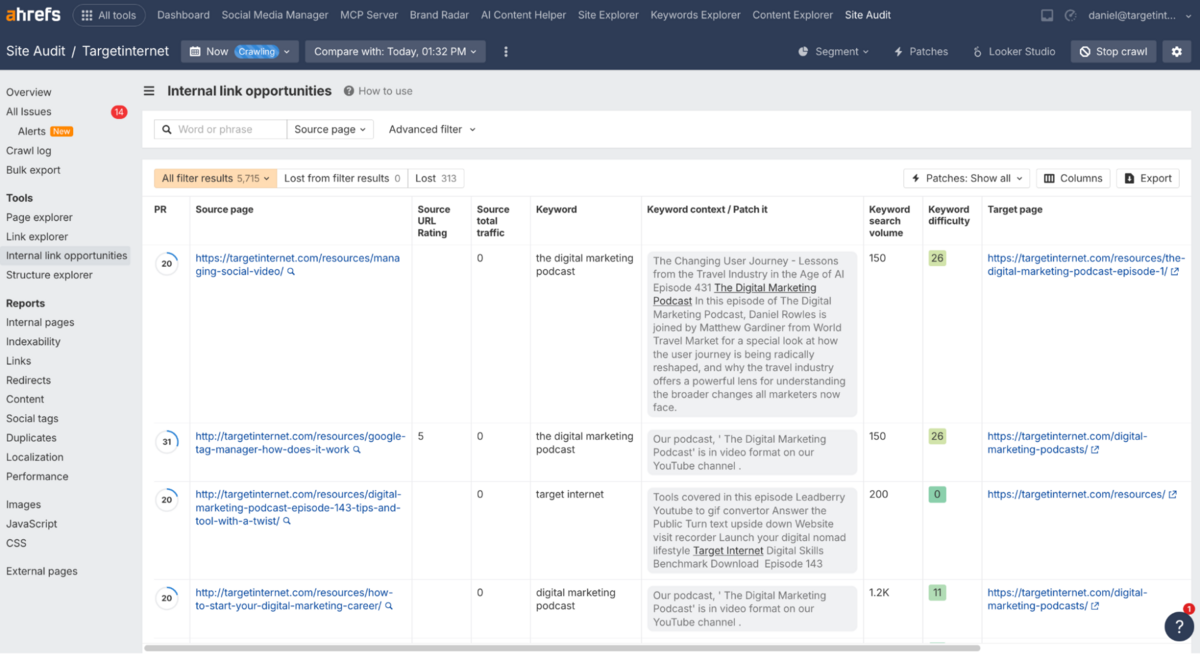
Link Opportunities removes much of the manual work from internal link building by surfacing where you've mentioned keywords but haven't linked yet.
The Page Rating sorting is clever - it helps you prioritise links from pages with stronger internal backlink profiles since they have more 'link equity'. If you've just published a guide on "Technical SEO", for example, you can paste the URL and immediately see every page that mentions those terms without linking to it. This is particularly helpful for agencies/brands managing large content libraries where manually tracking internal link opportunities would be impractical (especially when there are 1,000+ pages).
Where this tool falls short is context awareness. The tool spots keyword mentions but can't evaluate whether a link actually makes sense for users. You'll still need to manually review suggestions to avoid awkward or forced links.
Link Explorer
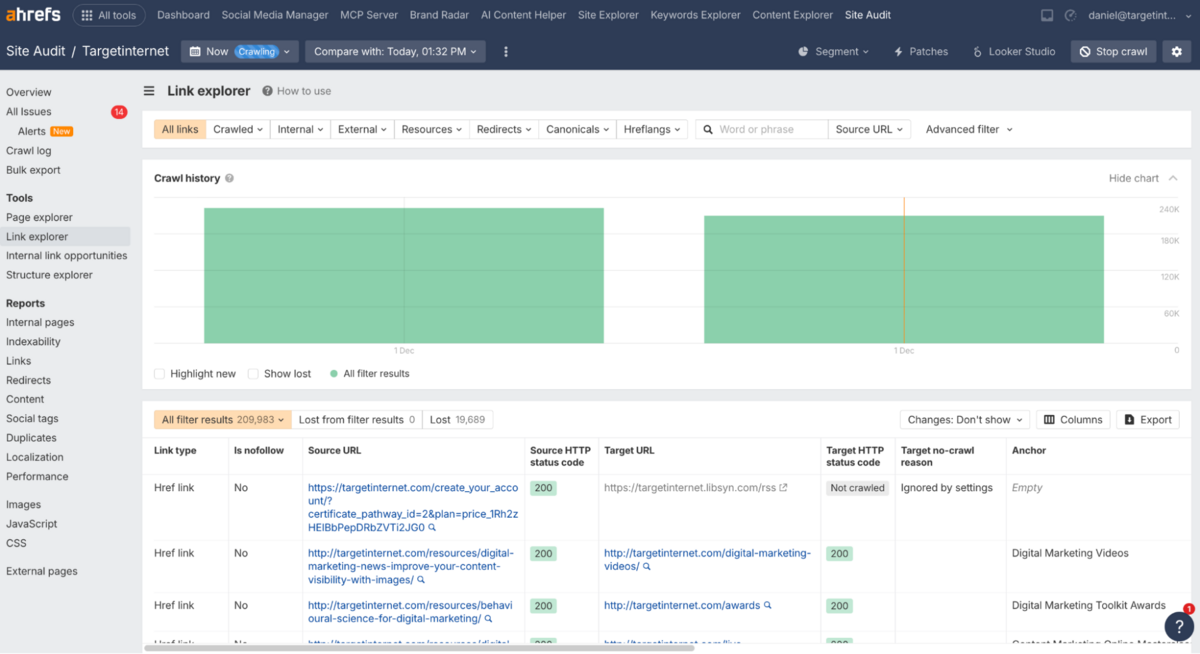
Link Explorer is honestly a specialised diagnostic tool rather than something that you'll use daily.
The "Target no-crawl reason" field is worth mentioning - it shows URLs that weren't crawled and explains why (robots.txt blocks, JavaScript issues, or redirect chains). If search engines can't reach your pages either, this helps diagnose indexation problems quickly. We've seen cases where entire site sections were accidentally blocked, and this field surfaced the issue immediately.
Beyond that, most link workflows happen better elsewhere in Ahrefs. Broken link detection is table stakes at this point - every major SEO tool offers it.
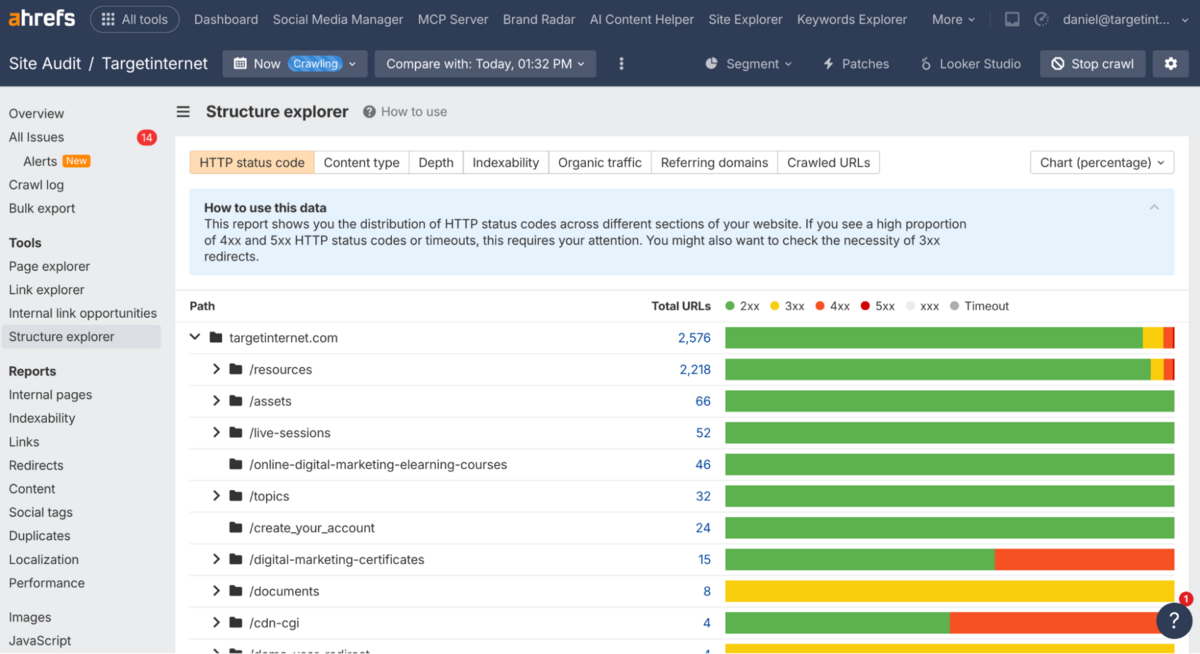
Structure Explorer
Structure Explorer shows URL distribution by folder depth, helping you spot whether important pages are buried too deep in your architecture.
The depth filter reveals how many clicks separate pages from your homepage. If valuable content sits four or five clicks away, you're likely diluting internal link equity (which crawlers do not like). For large sites, this visualisation definitely beats manually analysing spreadsheets.
Reporting in Site Explorer
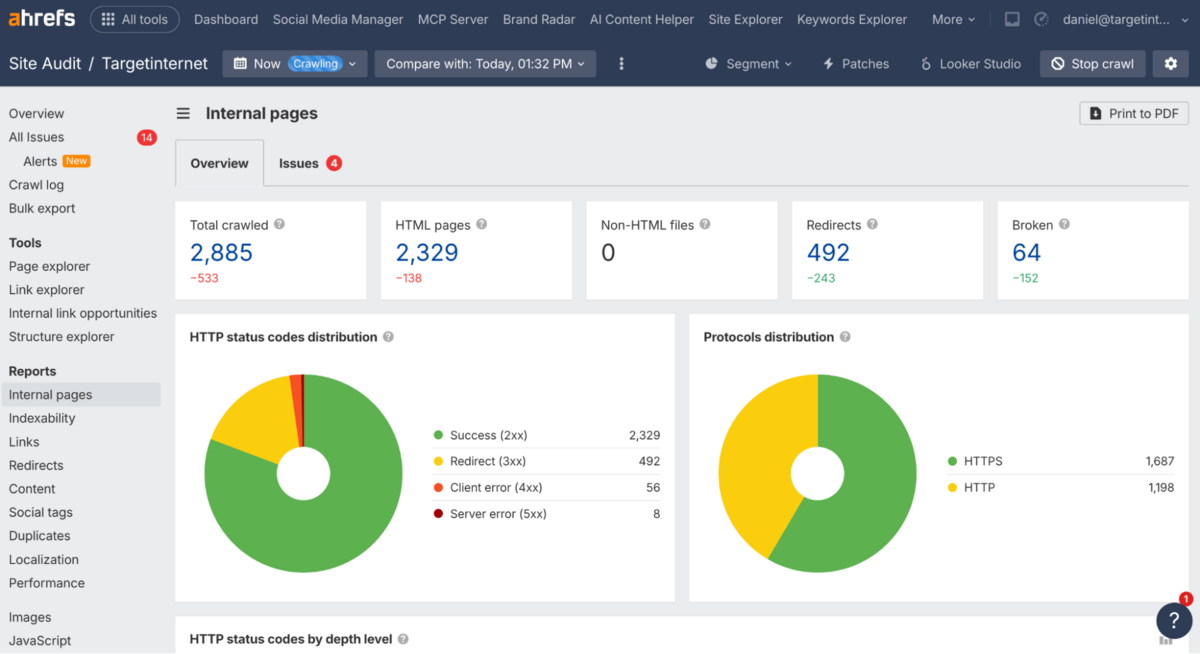
Within Site Explorer, there is a helpful reporting section where you can export PDF reports (or connect to Looker Studio - which is available in the Advanced Plan only) on Internal pages, Indexability, Links, Redirects, Content, Social tags, Duplicates, Localisation, and Performance.
Rank Tracker
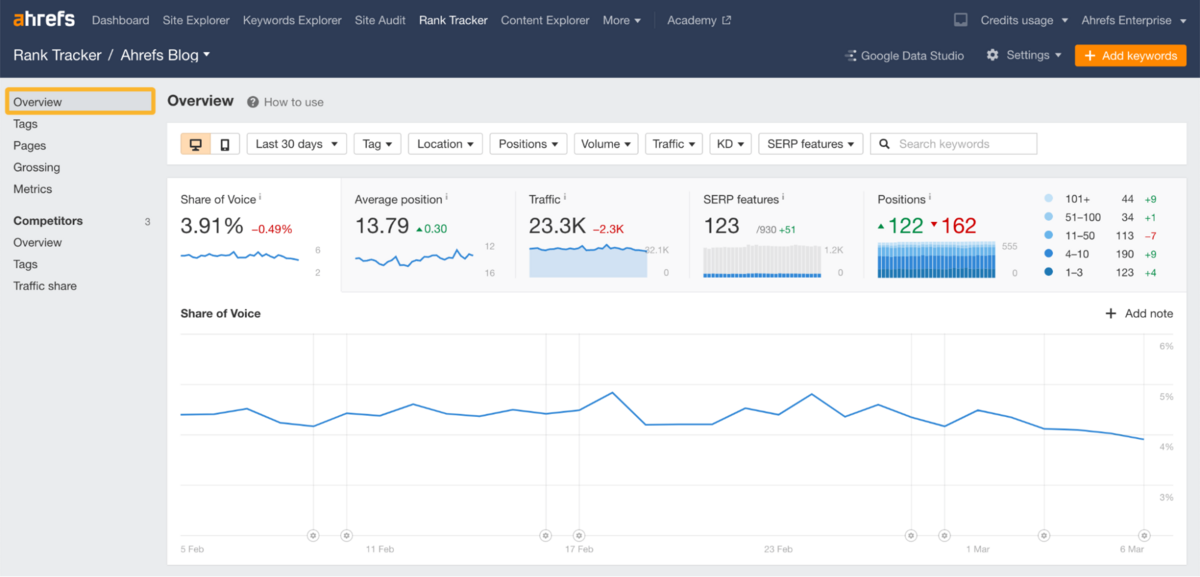
Ahrefs' Rank Tracker distinguishes itself by behaving less like a reporting table and more like a control centre.
It's worth noting that most of the data is filled in this section only after you add the pages (domains/subdomains) & keywords you want to track rank for, which means that you will not get a 'historical view' of the rank that you're tracking.
Tags & Pages
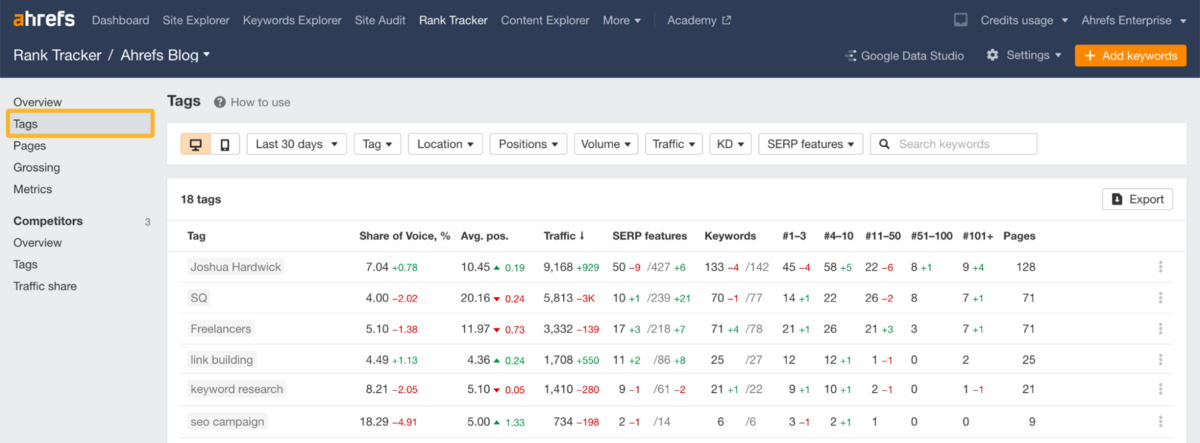
Its tagging system is one of the strongest arguments for using Rank Tracker at scale.
If you tag intelligently - by page type, product line, content pillar, or funnel stage - the Tags and Pages reports become a fast way to diagnose where momentum is building and where visibility is slipping. Instead of drowning in individual keyword lines, you can answer broader, operational questions like which category is softening, or whether your product pages are keeping pace with your blog. This matters because real SEO work is rarely about 1–2 keywords. It's about clusters, intent groups, and sections of a site performing in unison.
Ahrefs gives you clear, high-level views without sacrificing the option to drill down when a cluster starts dipping.
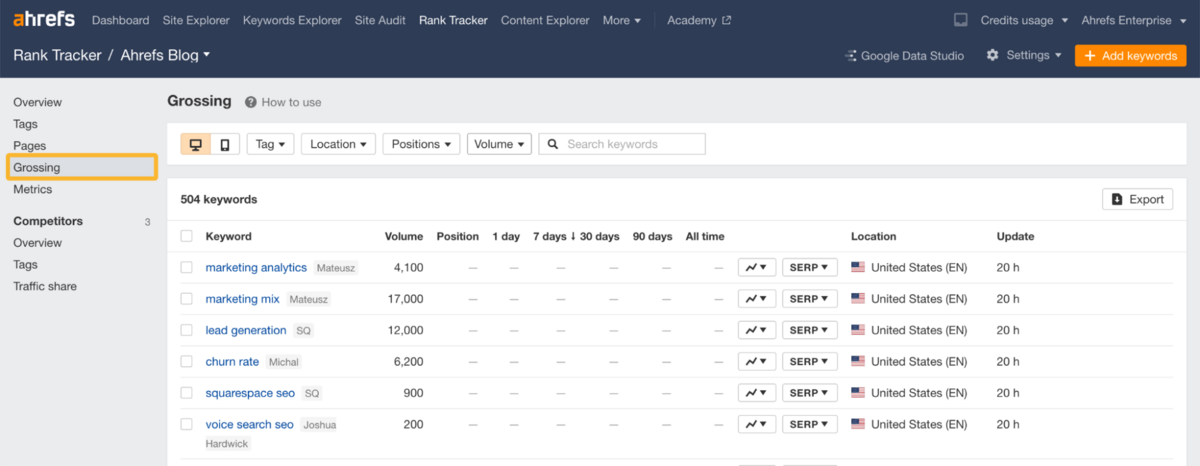
Grossing (Ranking History)
The Grossing view is useful for daily and weekly monitoring.
Instead of obsessing over sharp jumps and dips, you get a clearer sense of how groups of keywords move across meaningful ranges. Filtering by search volume, location, device or position bands helps isolate the shifts that matter from the noise that doesn't. Adding notes to dates is a small but important touch - it allows you to line up ranking trends with deployments, migrations, content updates or algorithm changes without having to leave the interface.
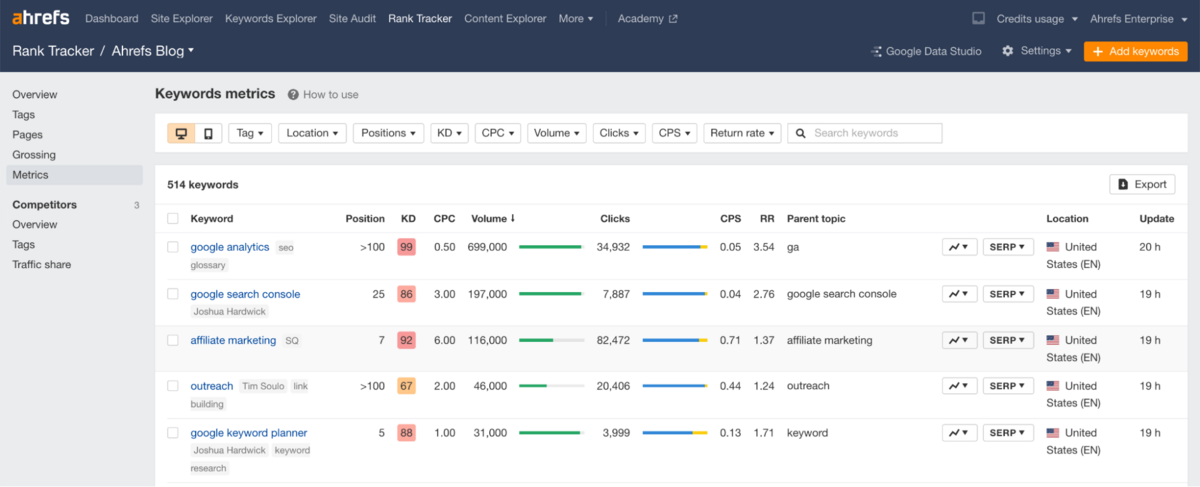
Metrics & SERP View
The Metrics section surfaces Parent Topics, Traffic Estimates, Backlinks, DR/UR, and Competing Pages in a way that feels integrated rather than bolted on. When you open the SERP dropdown, you're not just seeing competitors - you're seeing why those pages are ahead. Sometimes it's obvious (authority gap, backlink depth). Sometimes it's more subtle (intent alignment, topical breadth). But having those details in one place stops ranking data from feeling abstract.
It helps you understand whether a position is realistically defensible or if you're pushing against a wall.
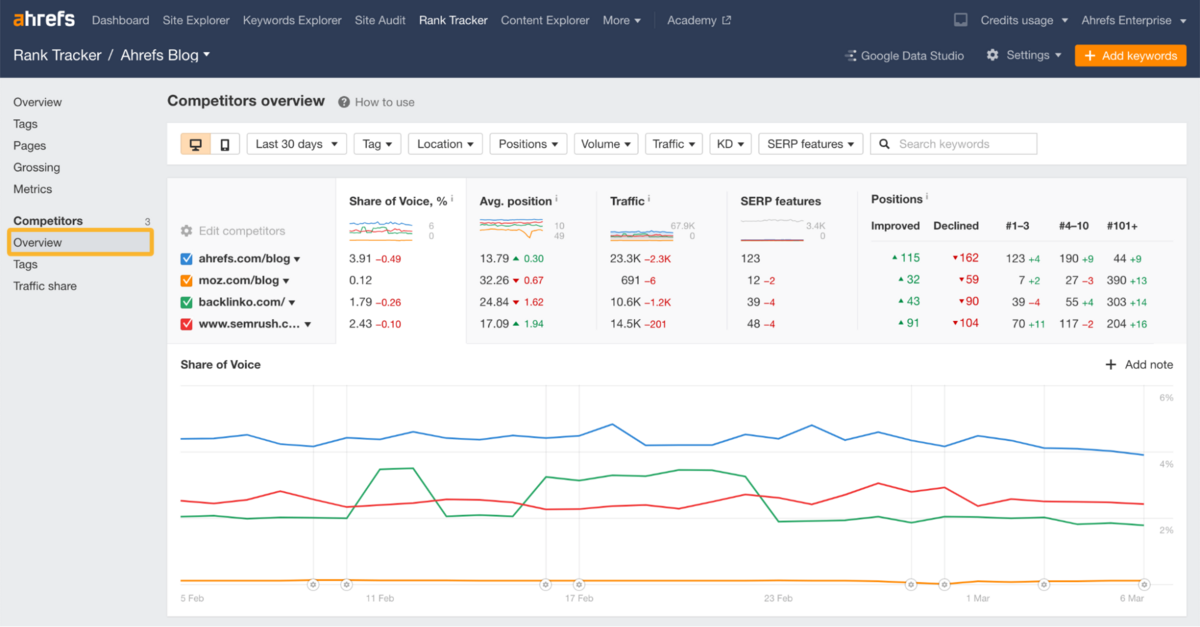
Competitor Context
The Competitors panel inside Rank Tracker is very straightforward.
Sorting keywords by a competitor instantly surfaces the terms where you're losing ground, and the Position History comparison adds clarity on whether gaps are widening or closing. The Traffic Share view is the one we find particularly helpful because it highlights sites you may not even consider competitors - but Google clearly does.
Without having to dig through Site Explorer, you already get a sense of who's emerging in your space and whether they're capturing share around your own tracked keywords.
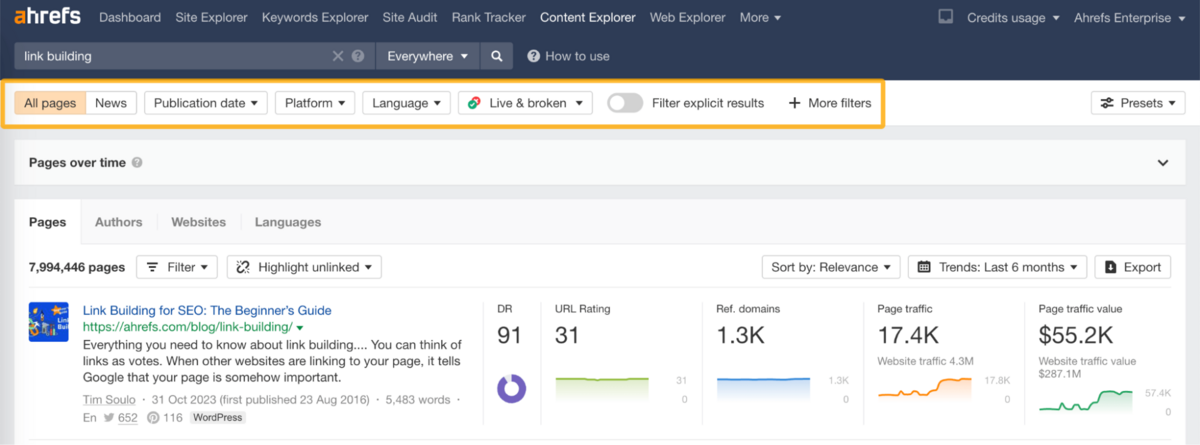
Content Explorer
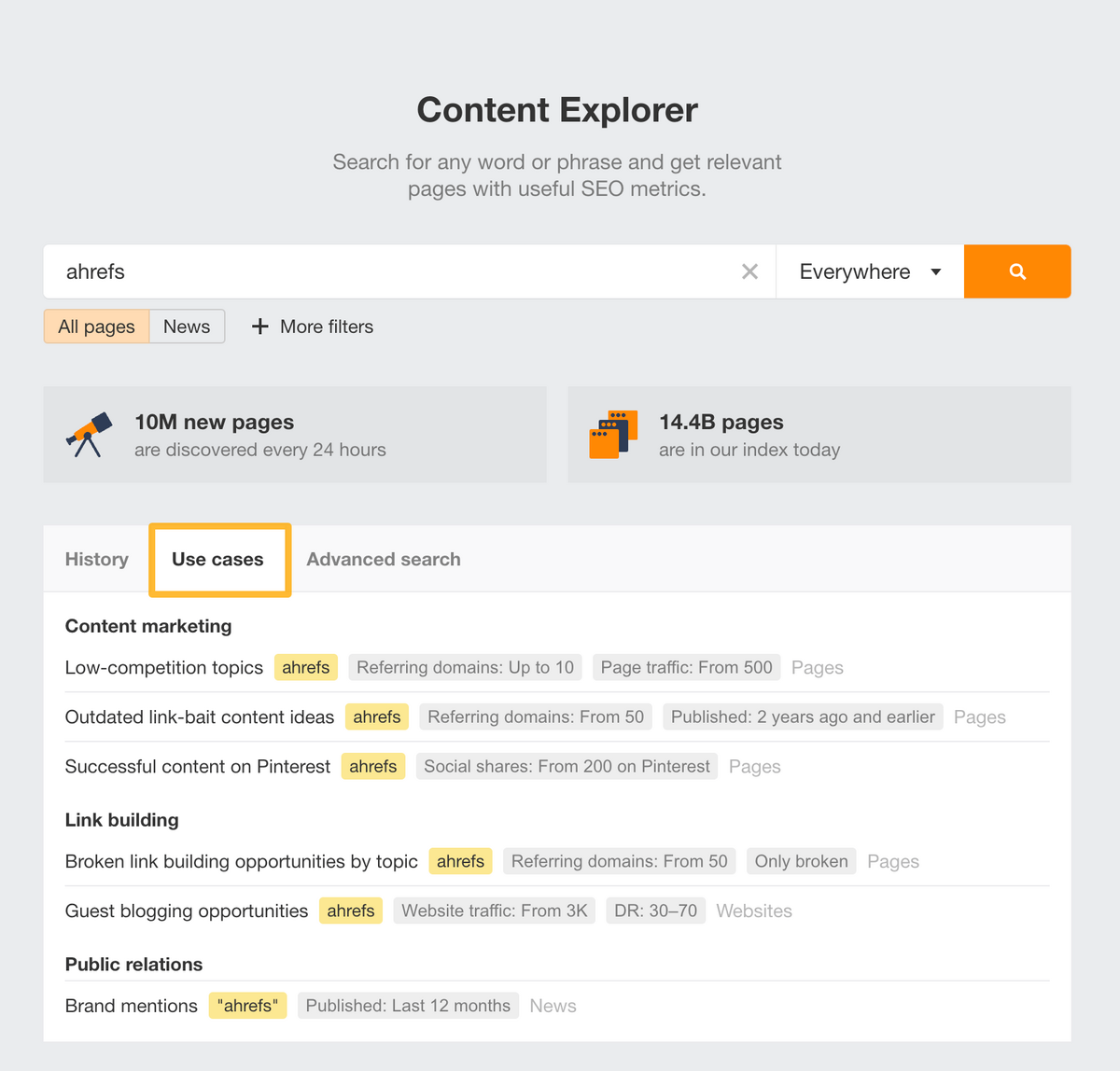
Content Explorer is Ahrefs' content discovery tool that lets you search for any topic across 14.4 billion pages. It feels less like a research tool and more like a specialised search engine that's tuned to how marketers actually think.
The scale alone gives it reach, but what makes it useful is the context layered on top - authors, dates, traffic, DR, backlinks, word count, and publishing frequency. It cuts through clutter quickly, and the filtering experience is surprisingly frictionless.
Content Use Cases
The core value here is how fast you can spot low-competition, high-traffic topics.
For example, filtering for pages with strong traffic but almost no backlinks instantly reveals ideas you can win without needing authority. The tool has preset 'Use cases' with filters where you can simply add your domain and find content opportunities.
Guest post opportunities surface naturally once you layer DR, traffic, and author count filters. And for YouTube creators, the ability to isolate video topics that pull search traffic from Google (not only the YouTube algorithm) is a quietly powerful advantage.
Ahrefs has made the manual content research process sophisticated by creating this tool, which was not available in earlier versions.
Link Building Use Cases
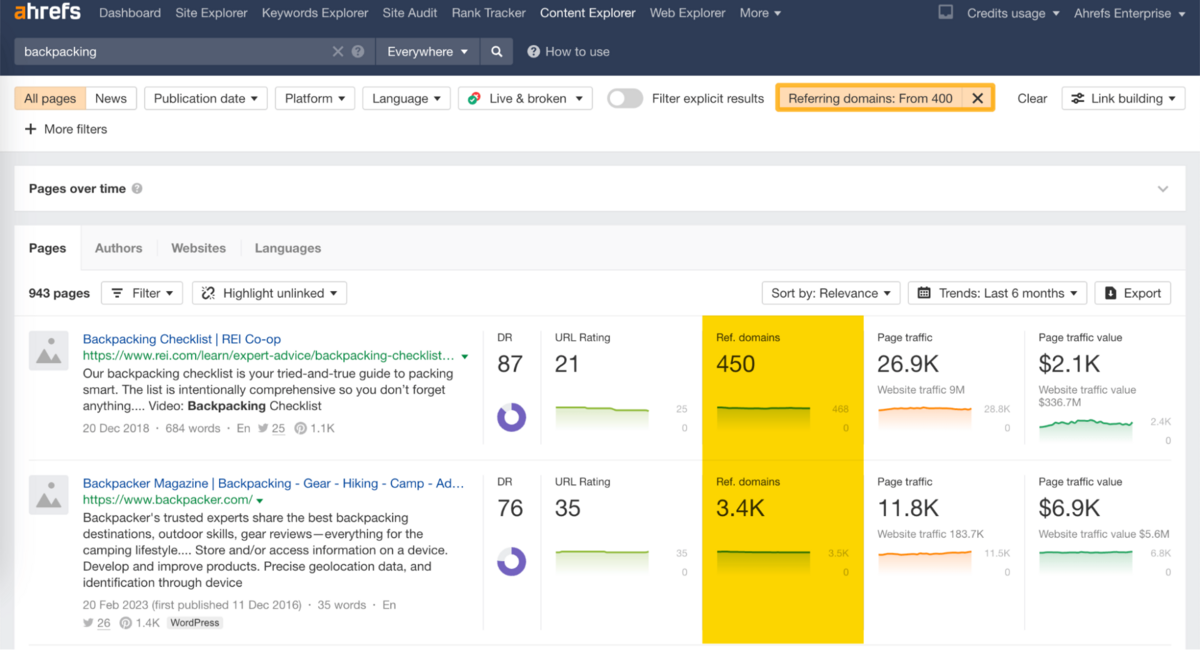
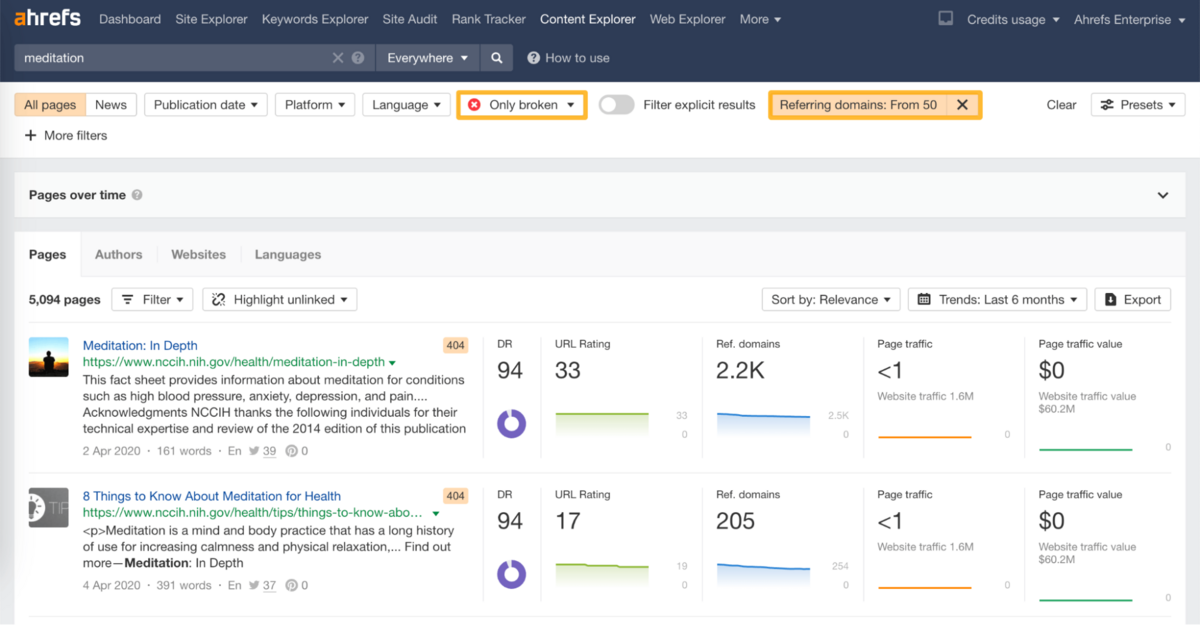
It also shines in link building because it exposes link patterns you can act on quickly. Finding broken-link opportunities is as simple as filtering for "Only broken pages" with a high number of referring domains.
Unlinked brand mentions appear in seconds once you exclude your own site. And spotting topics that earn hundreds of referring domains helps you understand what actually attracts links in your niche - without running full audits or scraping SERPs manually.
AI Content Helper
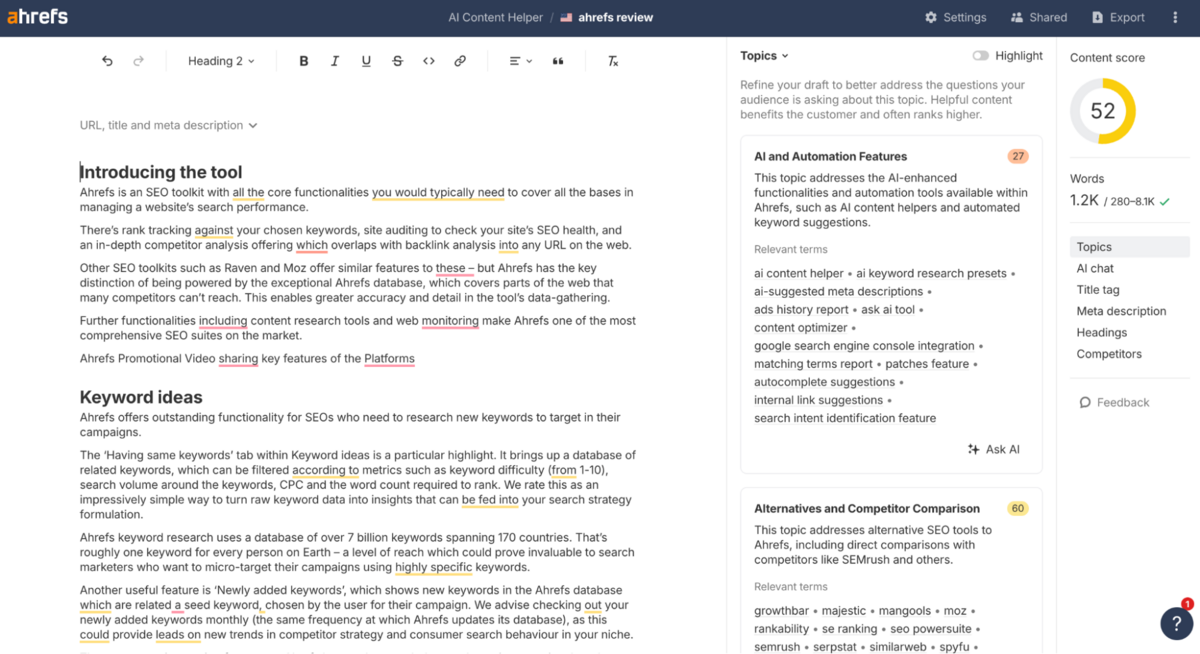
Ahrefs' AI Content Helper is positioned as a writing companion. In practice, it behaves a lot like Semrush's Writing Assistant - just baked deeper into the Ahrefs universe.
It scans your target keyword, checks the top-ranking pages, and then turns that into a live checklist of topics, subtopics, and intent signals you're missing. It gives you the content score, topic gaps, relevance clusters, competitor coverage - basically a map of what Google "expects" from a strong page. In a real workflow, it's undeniably helpful. You get a practical, at-a-glance view of the themes your competitors cover that you haven't touched yet, without falling into the trap of keyword stuffing. And because the suggestions come from the actual SERP leaders, not a generic LLM model hallucinating structure, the guidance feels grounded.
Semrush still wins on portability - its Google Docs plugin is a massive advantage when you're drafting in long form.
Reporting
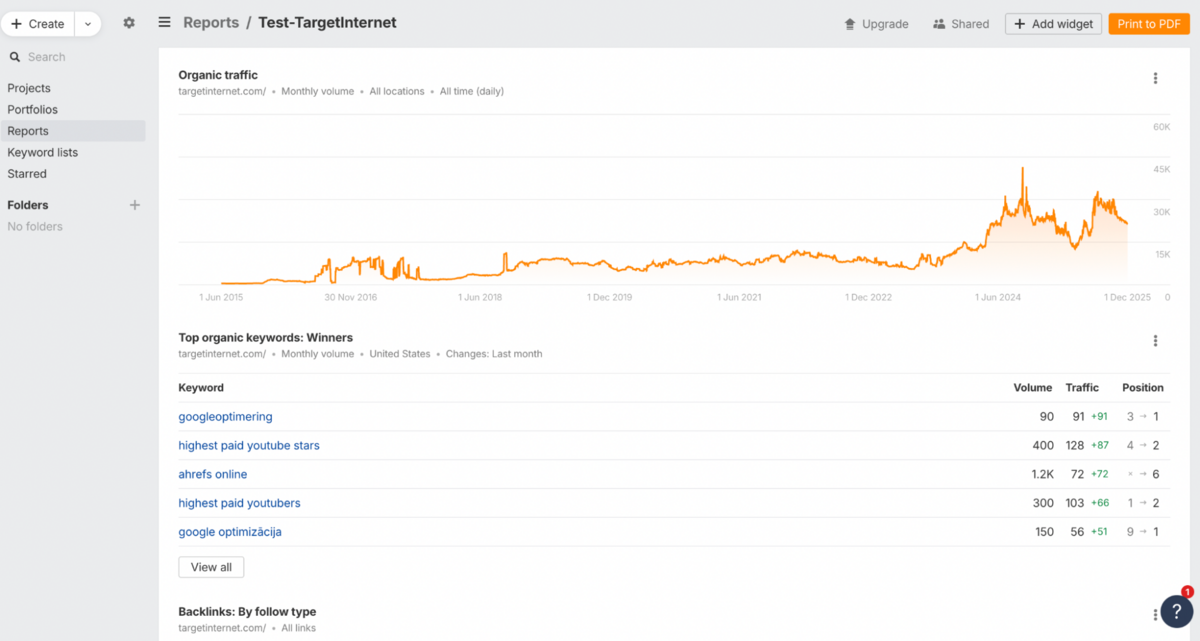
Ahrefs' Report Builder is essentially their answer to the monthly-reporting grind - a clean, modular dashboard where you can stitch together data from Site Explorer, Rank Tracker, and other widgets without touching a spreadsheet. You start with a blank canvas, drop in widgets for whatever matters (organic traffic, top keywords, winners/losers, backlink shifts, Share of Voice, GSC queries, trend charts, etc.), and tailor each one with your own headings, URLs, locations, time ranges, and comparison windows.
The scale is generous too - up to 50 reports with 50 widgets each - and everything exports cleanly to PDF for clients or internal teams. This feels like Ahrefs is finally acknowledging how much of SEO work is communication, not just analysis.
And with scheduled email sends on the roadmap, this could genuinely replace the patchwork of Google Sheets, Notion tables, and screenshots most teams still rely on.
The only limitation worth noting is that not every view inside Ahrefs can currently be exported to PDF, even if the report has a "Connect to Looker" option (as mentioned before, Looker integration is available only in the Advanced Plan, which is $449/mo). To work around this, you can recreate the same view inside Report Builder as a widget and then export it, but it's an extra step you don't always want to take.
Alerts
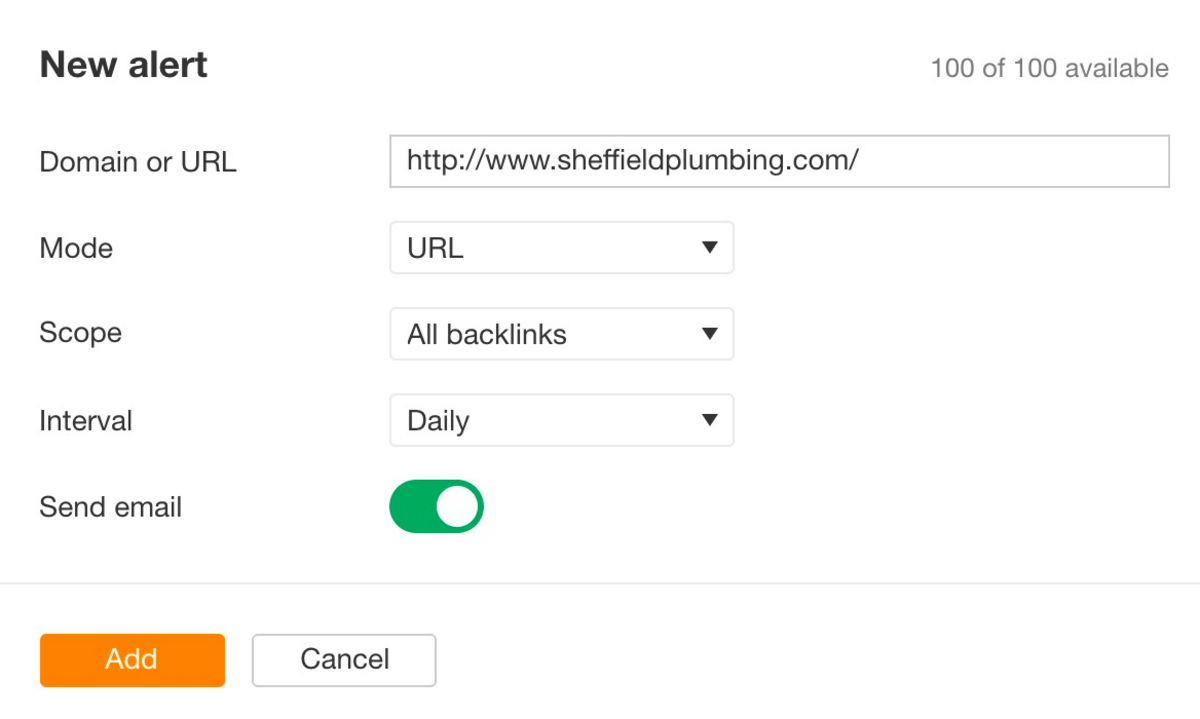
Alerts are one of those underrated features that quietly remove a lot of manual monitoring from your workflow. Instead of digging through reports, you get useful signals delivered straight to your inbox - the kind of intel that actually helps you react early, not after the damage is done. Each alert type serves a different purpose, but together they create a simple "always-on" layer around backlinks, keywords, and brand activity.
- Backlinks Alerts - Spot new backlinks to competitors (great for prospecting) and monitor your own lost links so you can reclaim them before they disappear for good
- New Keywords Alerts - See when you or a competitor start ranking for new terms. Helpful for catching content opportunities or shifts in their strategy as they happen
- Mentions Alerts - Track brand mentions, find unlinked references, and monitor competitor mentions you're missing from - an easy way to uncover outreach or PR gaps
Ahrefs MCP
While writing this review, we spotted a new feature that's actually pretty cool.
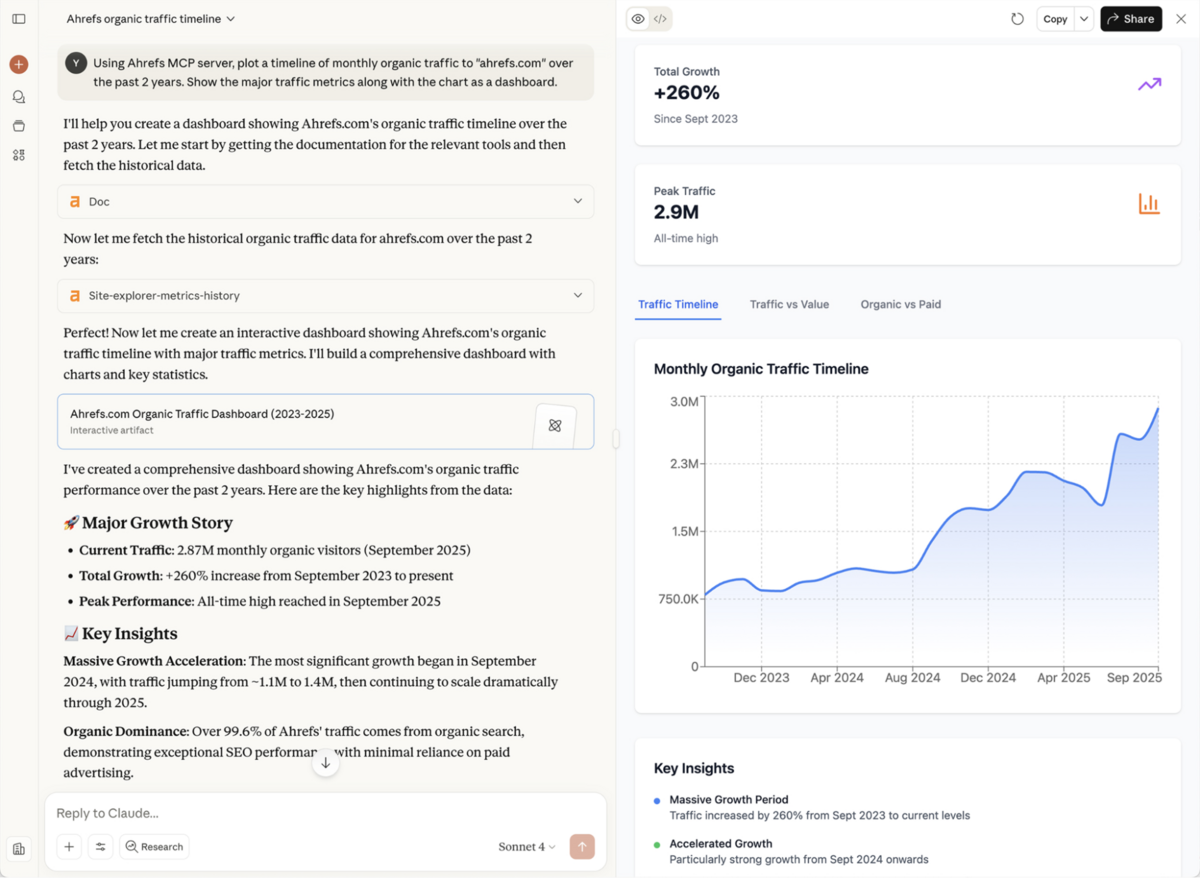
MCP (Model Context Protocol) is a relatively recent development that allows AI assistants like Claude or ChatGPT to connect directly with external tools and databases in real-time. Ahrefs has implemented this through Ahrefs MCP, which lets AI tools securely pull live Ahrefs data straight into your chat. You can generate dashboards, run SEO analyses, and fetch metrics on the fly through natural language, just as you would chat with ChatGPT.
Since it's still new, we'd recommend that you use it with some caution and always verify the data before making any major decisions - because we all know that LLMs can occasionally hallucinate (even if Ahrefs sends the right data).
Pricing
Ahrefs' pricing structure is built around both scale and feature access, with higher tiers unlocking additional tools alongside expanded capacity.
The Lite plan at $129 per month covers essential needs for small businesses, whilst the Standard and Advanced plans at $249 and $449 progressively add more sophisticated features like Content Explorer, Batch Analysis, and Looker Studio integration. For enterprise teams requiring API access, unlimited historical data, and advanced security, Ahrefs also offers an Enterprise plan that starts at $1,499 per month (with an annual commitment). Beyond the core plans, Ahrefs also offers optional add-ons, including Brand Radar AI for tracking visibility across AI search platforms (from $199/mo), Content Kit for AI-powered content tools (from $99/mo), and Project Boost options for enhanced crawl capabilities at the project level.
As you can already tell, Ahrefs sits at the higher end of the market in terms of pricing - particularly once you factor in add-ons or the need to scale beyond base limits.
They also offer a Starter plan at $29 per month for those just beginning their SEO journey or wanting to explore the platform without a significant commitment. This plan provides light usage access to Site Explorer, Keywords Explorer, and Site Audit - a step up from the free Webmaster Tools offering.
Ahrefs' pricing tiers:
| Plan | Lite | Standard | Advanced | Enterprise |
|---|---|---|---|---|
| Who it's for | Essential data for small businesses and personal projects | Perfect for freelance SEOs and marketing consultants | More tools and data for lean in-house marketing teams | Advanced customisation, automation, and controls for large teams |
| Price | $129/mo | $249/mo | $449/mo | $1,499/mo (annual commitment) |
| Projects | 5 | 20 | 50 | Custom |
| Historical data | 6 months | 2 years | 5 years | Unlimited |
| Tracked keywords | 750 | 2,000 | 5,000 | Custom |
| Crawl credits | 100,000 | 500,000 | 1,500,000 | Custom |
| Users included | 1 (add 2 more at $40/mo each) | 1 (add 5 more at $60/mo each) | 1 (add 10 more at $80/mo each) | Custom |
| Key extras | Dashboard, Site Explorer, Keywords Explorer, Brand Radar, Site Audit, Rank Tracker, Competitive Analysis, Web Analytics, MCP Server | All Lite features, plus Portfolios, Content Explorer, Batch Analysis, SERP comparison, SERP history, Page Inspect, Calendar view, keyword clusters and search intents | All Standard features, plus Looker Studio integration, search type distribution, agency directory listing, site structure views, HTTP authentication, AI suggestions | All Advanced features, plus API access, SSO & enterprise-grade security, access management & audit log, personalised higher limits & data exports, forecasting & trends |
For a more direct plan-by-plan comparison and a detailed breakdown of server, rate, and crawl limits, you can check out this page from Ahrefs.
Add-ons
Below is the pricing for some of the add-ons that we discussed above:
| Add-on | What it does | Pricing |
|---|---|---|
| Brand Radar AI | Deep AI-visibility tracking across ChatGPT, Perplexity, Gemini, Copilot, AI Overviews, etc. | From $199/mo |
| Content Kit | Extra AI content tools (Content Helper, Grader, Inventory) | From $99/mo |
| Report Builder | Dedicated reporting suite (50 reports, 50 widgets each, 200 total widgets, sharing/scheduling) | $99/mo |
| Project Boost Pro | IndexNow auto-submit, "Ask AI in Site Audit", always-on crawl (1 page/min), instant recrawl | $20/mo per project |
| Project Boost Max | Heavier AI & crawl features (patches, daily keyword updates, 30 pages/min crawl, AI detection at scale) | $200/mo per project |
The Final Verdict
Ahrefs remains one of the most powerful SEO platforms available in 2026, and it's undoubtedly in the top five tools for serious SEO work.
The depth of its backlink data, the precision of its keyword research, and the sheer configurability of its Site Audit make it a compelling choice for anyone prioritising technical SEO, competitive intelligence, and link building. The recent additions - Brand Radar AI, MCP integration, Content Helper, and Report Builder - show how Ahrefs is evolving beyond pure data analysis into something more strategic and actionable. That said, it's not without trade-offs.
Compared to Semrush, Ahrefs still lags in overall user experience - the interface feels more utilitarian, the learning curve is steeper, and the workflow integrations (particularly around link building and outreach) simply aren't as polished.
Semrush offers a larger backlink database (43 trillion vs. Ahrefs' 35 trillion), more generous reporting limits, daily rank tracking, and broader marketing tools, including PPC research (Product Listing & Display ads), none of which Ahrefs currently matches. Moz Pro, meanwhile, offers something Ahrefs doesn't: genuine local SEO capabilities. Business listings management, Google Business Profile optimisation, reviews management, and neighbourhood-level GeoRank tracking make Moz the better choice for local businesses or agencies managing multi-location clients. Moz also wins on ease of use, with a simpler interface and more beginner-friendly insights, though its backlink index is considerably smaller than Ahrefs.
Ahrefs is best suited for technical SEOs, content strategists, and agencies whose work revolves around link building, competitive analysis, and deep keyword research.
It rewards expertise and expects you to know what you're looking for. If you're managing local SEO campaigns, running paid search alongside organic, or need a platform that's less intimidating for junior team members, you'll find better fits elsewhere. But if data depth, crawl flexibility, and competitive intelligence are your priorities, Ahrefs is one of the strongest platforms available - just be prepared to invest time learning it properly.
Click here to get back to the 2026 SEO tools comparison report.
Frequently Asked Questions (FAQs)
Is Ahrefs Worth It?
Ahrefs delivers strong value for SEO professionals focused on backlink analysis, keyword research, and content optimisation, with a database of 28.7 billion keywords and difficulty scores that genuinely outperform most competitors. Pricing starts at $129 per month for the Lite plan, offering reasonable project limits and historical data access that make sense for agencies or serious users, though the credit-based crawl system can feel restrictive if you're running heavy audits across multiple large sites.
What is Ahrefs?
Ahrefs is a comprehensive SEO suite built around keyword exploration, site audits, rank tracking, and backlink monitoring, with a live index of over 30 trillion backlinks and tools like Site Explorer for competitive analysis. It excels at uncovering content gaps, broken link opportunities, and traffic estimates through features such as Keywords Explorer and Content Explorer - making it one of the most data-rich platforms available for serious SEO work.
What's Better: Semrush or Ahrefs?
Semrush comes out on top as the stronger all-in-one SEO tool. It gives you a huge keyword database, daily rank tracking, PPC and local SEO tools, AI writing help, and even social media features - making it ideal for agencies and anyone who wants one platform for everything. Ahrefs is great for backlink checks and solid technical SEO, but it doesn't offer PPC or social tools, its database isn't as large, and the credit limits can feel restrictive if you use it heavily.
How to Disavow Links in Ahrefs?
Access Site Explorer in Ahrefs, enter the target URL or domain, then navigate to the Backlinks report and export suspicious links using filters for toxic patterns like low domain ratings. Create a disavow file in .txt format listing URLs or domains (one per line), upload it via Google Search Console's disavow tool, and monitor post-submission.
How to Do Keyword Research in Ahrefs?
Start with Keywords Explorer by entering seed terms, analysing metrics like volume, difficulty, and clicks, then use Matching Terms for variations and Questions for long-tail ideas. Leverage Keyword Difficulty scores and SERP features to prioritise, cross-check with Site Audit for on-page fit, and export lists for content planning.