This review is part of our SEO tools comparison report.
Index
- Introducing the Tool
- Getting Started: Connecting Google Search Console
- Content Optimisation
- Rank Tracking
- Integrations
- Pricing
- Conclusion
Introducing the Tool
Content Raptor is a focused SEO tool that does one thing and does it reasonably well: it helps you identify and optimise existing content that's already ranking but underperforming.
Unlike the comprehensive SEO suites we've reviewed (Semrush, Ahrefs, Moz Pro, etc.), Content Raptor isn't trying to be an all-in-one SEO platform. There's no backlink analysis, no site audit, no keyword discovery engine, and no dedicated competitor research suite. Instead, it operates as a specialised content optimisation tool that connects directly to Google Search Console, surfaces your best quick-win opportunities, and guides you through systematic improvements to capture more traffic from rankings you've already earned.
What sets it apart is how lean it is - both in scope and price point. It positions itself as a practical option for content teams, bloggers, and smaller businesses who need a clear action plan for improving existing rankings without the complexity (or cost) of enterprise SEO platforms. That narrow focus is both its strength and its limitation, and we'll explore both sides throughout this review.
Getting Started: Connecting Google Search Console
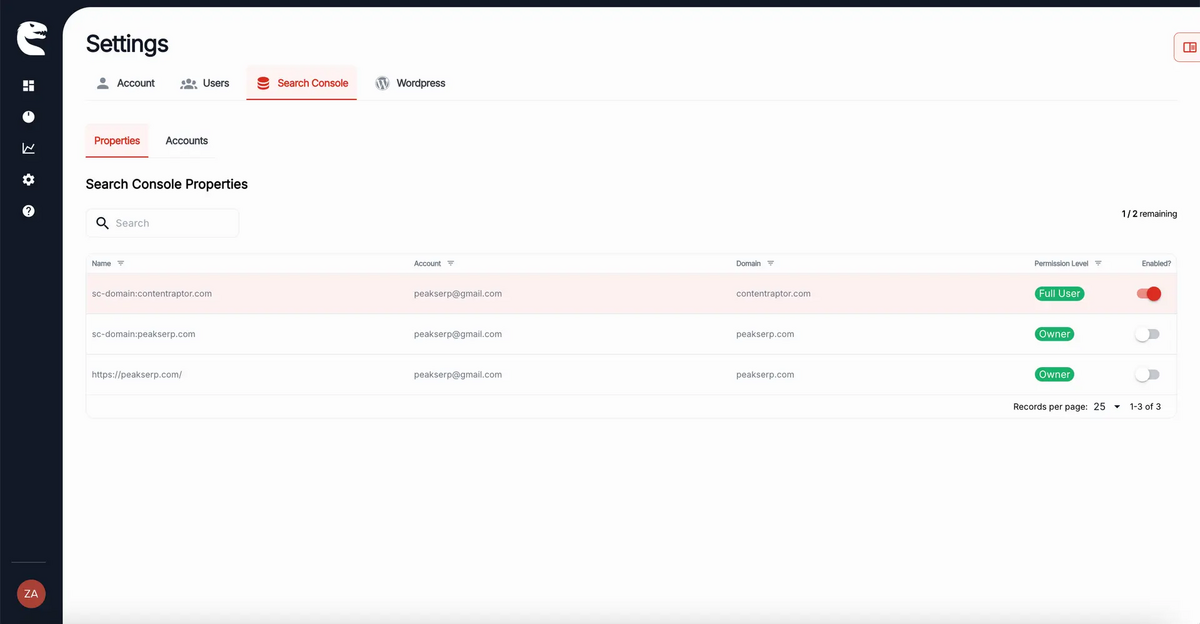
The first thing Content Raptor asks you to do when you sign up is to connect to Google Search Console.
This isn't a nice-to-have feature or an optional integration for enhanced data - it's the foundation of how the entire platform works. Without GSC connected, Content Raptor literally cannot function. The tool doesn't crawl your site, scrape SERPs, or maintain its own keyword database. Instead, it pulls all of its intelligence directly from Google's first-party data about how your site actually performs in search results.
In practice, this means Content Raptor is entirely dependent on GSC data quality and availability. If your site is brand new with minimal search presence, or if you haven't set up Search Console properly, Content Raptor will have nothing to work with. The platform needs existing ranking data - preferably from a site that's already generating impressions and clicks across multiple keywords - before it can surface opportunities worth optimising.
This approach has trade-offs worth noting upfront.
On one hand, you're working with the most accurate data possible: Google's own records of which queries trigger your pages, where you rank, and how often users click through. There's no need to trust traffic estimates or rely on third-party keyword volumes that may or may not reflect reality.
On the other hand, you're limited to optimising what's already there. Content Raptor won't help you discover new keyword opportunities your site doesn't rank for yet, identify direct content gaps relative to competitors, or guide your strategy for entering new topic areas. It's a tool for improving existing performance, not for building a content strategy from scratch.
Dashboard
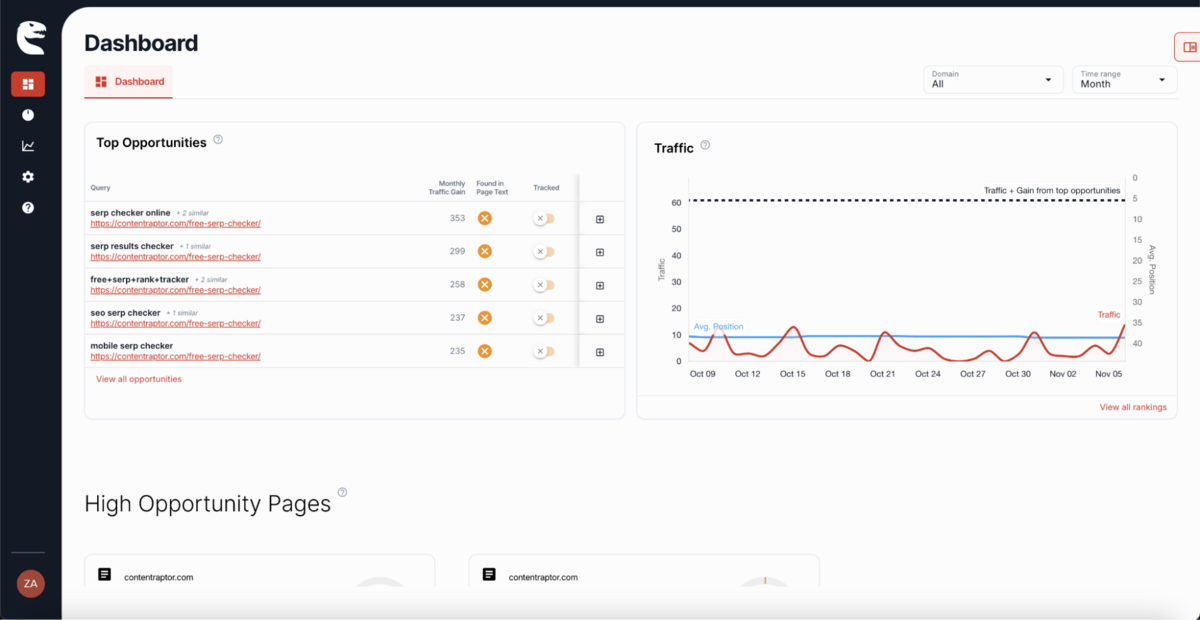
Once your GSC data has synced, the Dashboard becomes your central workspace - and Content Raptor keeps things deliberately simple here.
The entire interface is built around a single priority card at the top of the screen, which changes based on your current status. If GSC isn't connected yet, you'll see a "Connect GSC" prompt. If you've already started working on an optimisation task, the card will show "Continue Optimising" and guide you back to your in-progress work.
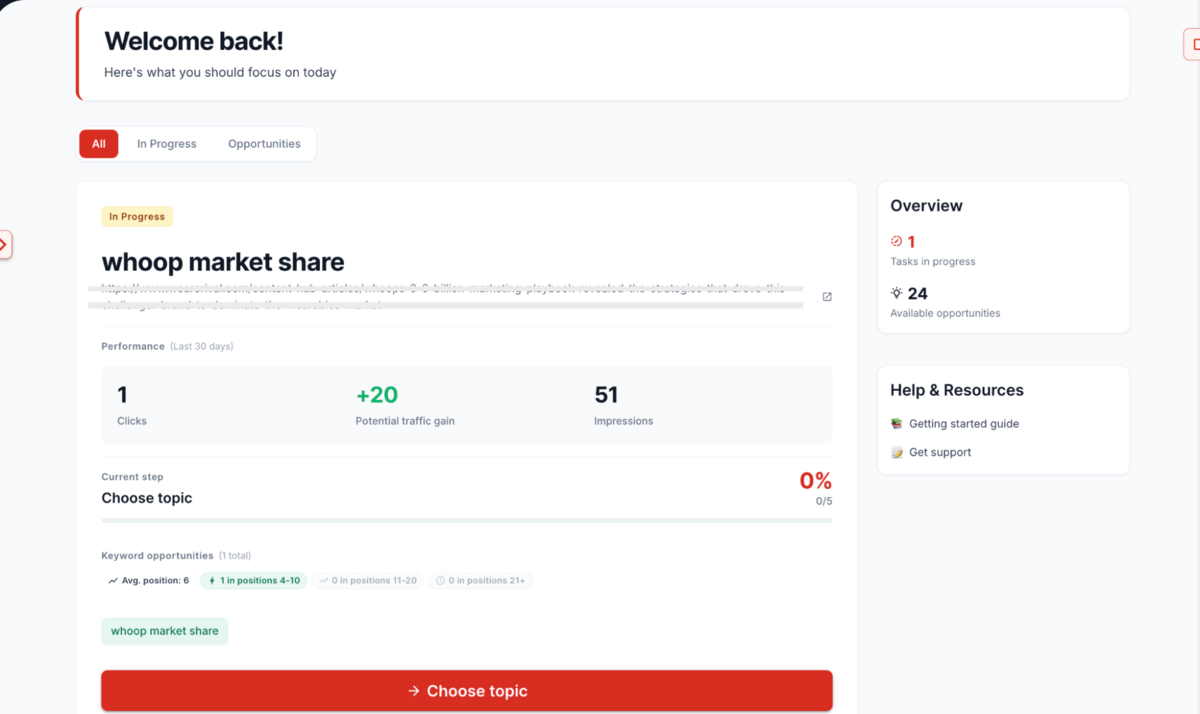
What we appreciate here is the clarity of direction.
Content Raptor doesn't overwhelm you with dashboards full of charts, widgets, and metrics that require interpretation. Instead, it tells you exactly what to do next, which is genuinely helpful if you're managing content optimisation as one part of a broader marketing role rather than as a dedicated SEO specialist. The platform assumes you don't want to spend time deciding what to prioritise - it makes that decision for you based on which pages have the most upside.
Content Optimisation
Content Raptor's optimisation workflow is where the platform either justifies its existence or reveals its limitations, depending on what you're trying to accomplish.
The entire process is built around a four-step wizard that walks you through selecting a keyword, configuring search settings, creating an outline, and reviewing your brief before you start writing. It's deliberately linear and prescriptive, which works well if you appreciate structure but can feel restrictive if you prefer a more exploratory approach to content planning.
The Optimisation Wizard
Step 1: Choose Your Topic
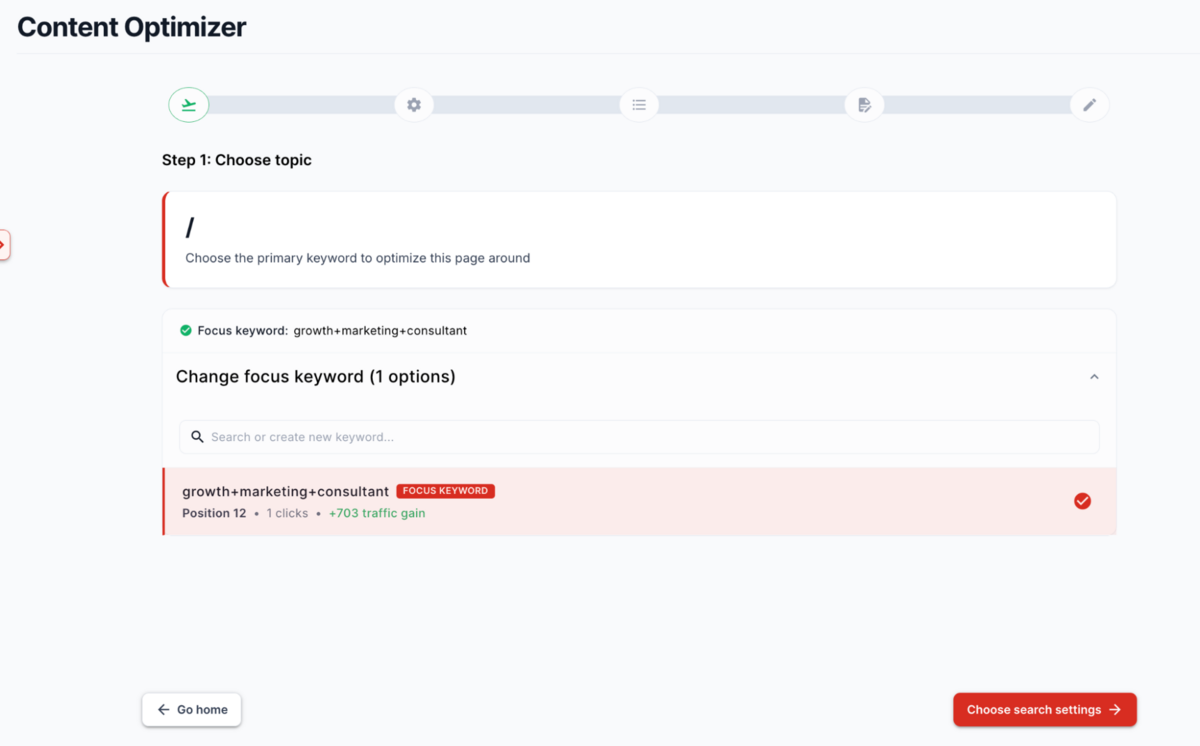
Content Raptor pre-selects a "Focus Keyword" based on your GSC data - typically the term with the highest potential traffic gain for the page you're optimising. You can see the current position, search volume, and estimated traffic opportunity right there, which removes most of the guesswork about whether a keyword is worth targeting.
To say the least, this is a pretty 'simple' tool. The tool tells you what to optimise, and in most cases, it's correct. If you want to override the suggestion, you can browse other ranking keywords from your GSC data or manually enter a different term, but the default recommendation is usually your best bet. This is Content Raptor operating in its sweet spot - surfacing quick wins from data you already have rather than sending you down a research rabbit hole.
The limitation, though, is that you're entirely constrained by what you already rank for.
If your site doesn't rank for a particular topic yet, Content Raptor can't help you target it. There's no keyword discovery engine here, no way to explore related topics or find content gaps relative to competitors. It's purely reactive: "Here's what you already rank for - let's make it better."
For established sites with existing rankings, that's often enough. For newer sites trying to build topical authority from scratch, it's not.
Step 2: Set Your Search Settings
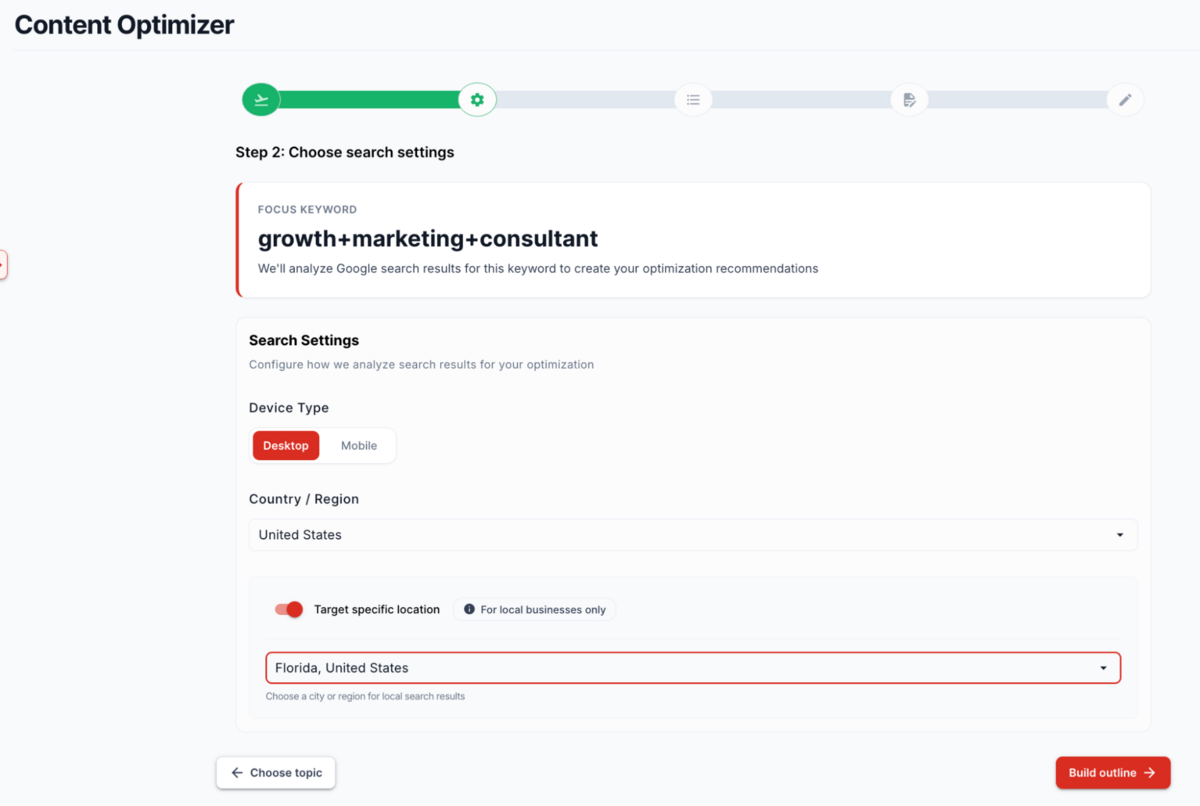
This step is straightforward - you select the device type (desktop, mobile, tablet), country, and optionally a specific city if you're doing local SEO. These settings determine which competitors Content Raptor analyses and which SERP features it surfaces.
It's worth noting that this step matters more than it might initially appear.
Search results genuinely do vary by device and location, and Content Raptor's competitor analysis is only as good as the SERP it's analysing. If you're targeting mobile users in the UK but accidentally leave it set to desktop in the US, the optimisation recommendations you get will be largely irrelevant.
Step 3: Create Your Content Outline
Here's where Content Raptor attempts to streamline content planning by giving you three options: AI generation, importing from an existing URL, or building manually.
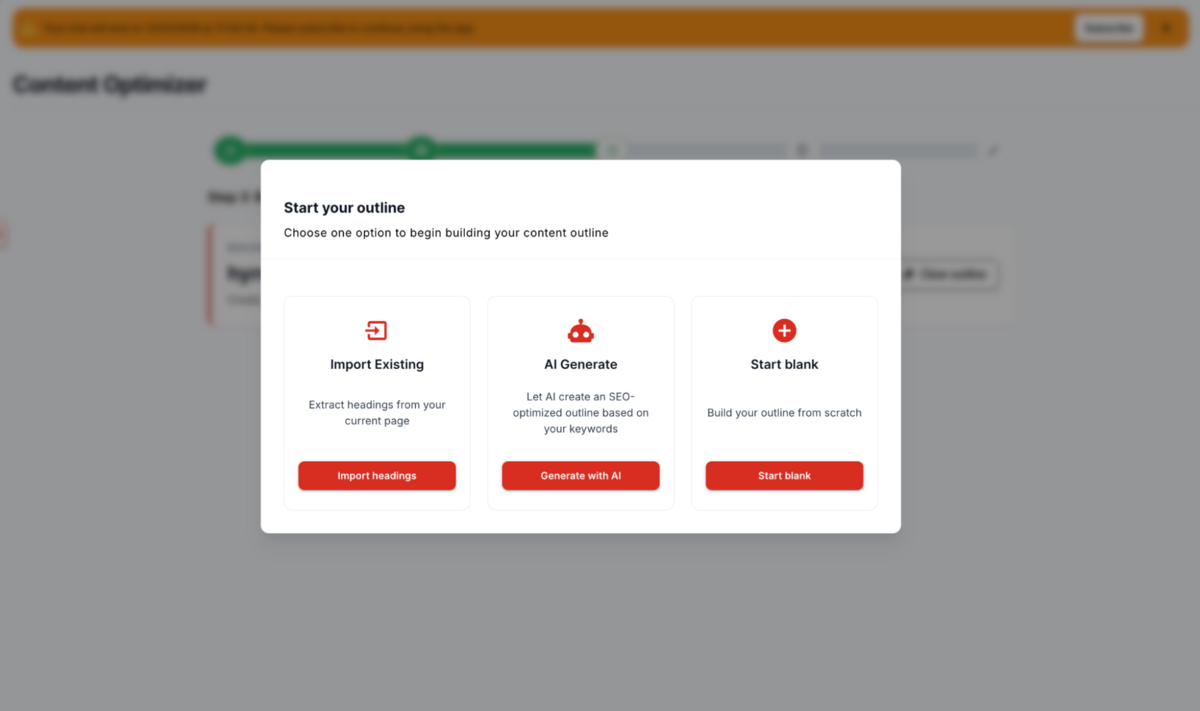
The AI generation feature analyses top-ranking competitors and produces a complete heading structure (H1, H2, H3) that covers the topics they cover. In practice, this works reasonably well for straightforward informational content - product reviews, how-to guides, and comparison posts. The outlines it generates are logical, comprehensive, and grounded in what's actually working in the SERPs rather than what an LLM usually hallucinates as "good structure."
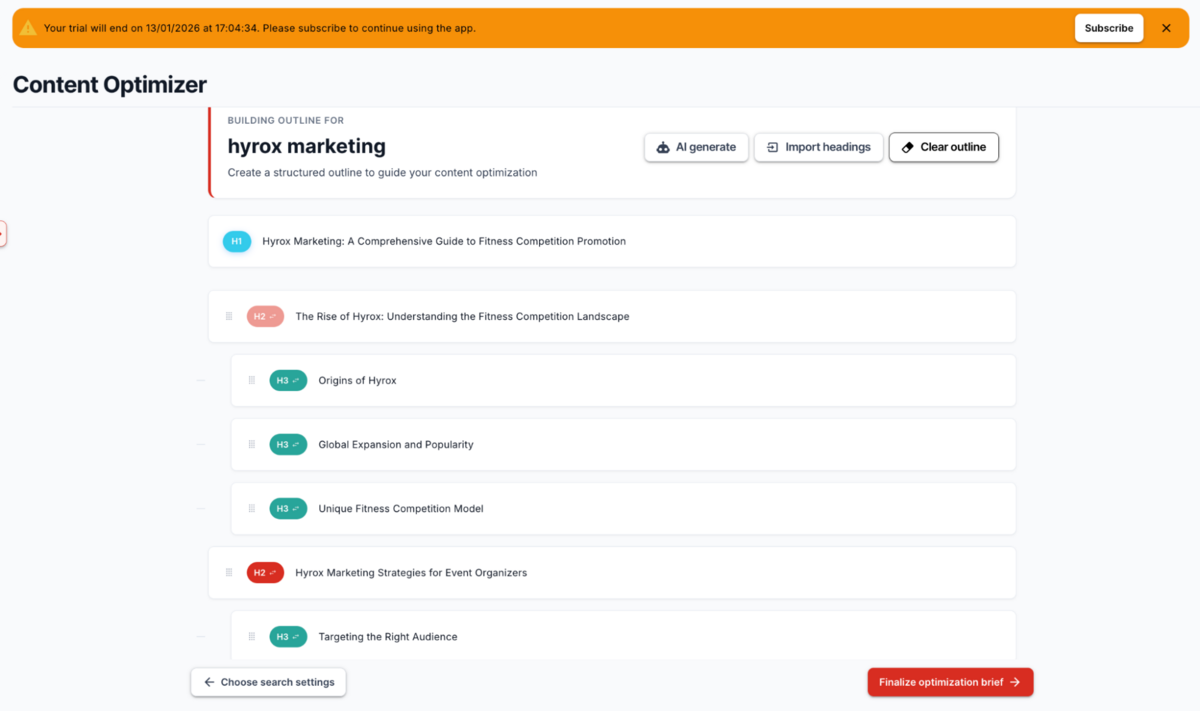
That said, the AI-generated outlines can feel generic. If you're writing something that requires a unique angle, fresh research, or a unique POV, you'll need to heavily edit the structure anyway. The structure is logical - it's just not creative enough to stand out.
The import feature is helpful if you're optimising an existing page - it pulls your current heading structure so you can see what you already have before deciding what to add or rearrange. There is also the manual option if you prefer full control, though at that point you're questioning why you're using Content Raptor rather than just writing in Google Docs.
Step 4: Review Your Brief
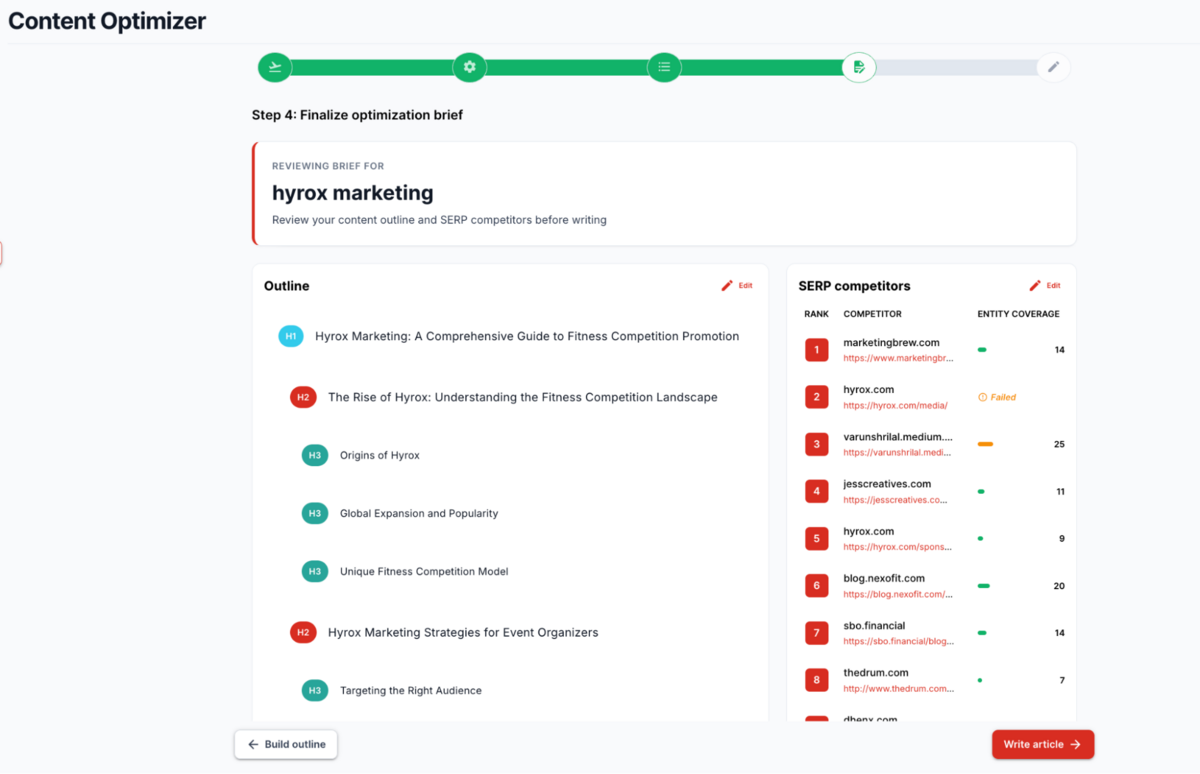
The final wizard step gives you a mission control view: your primary keyword, search settings, outline, and a competitor table showing the top 20 ranking pages with their entity coverage scores.
What's genuinely useful here is the competitor benchmark. You can see that the #1 result has an entity score of 14, the #3 result has 25, and the #8 result has 7. This immediately tells you what level of comprehensiveness you're competing against, which is considerably more actionable than vague advice like "write comprehensive content."
However, the competitor analysis stops at surface-level metrics.
You can see their entity scores and click through to read their pages manually, but Content Raptor doesn't give you a detailed breakdown of what they covered that you're missing or how they structured their arguments. Tools like Semrush's SEO Writing Assistant or Clearscope provide much more granular insights into competitor content - word counts, specific semantic keywords, readability scores, and topical depth analysis.
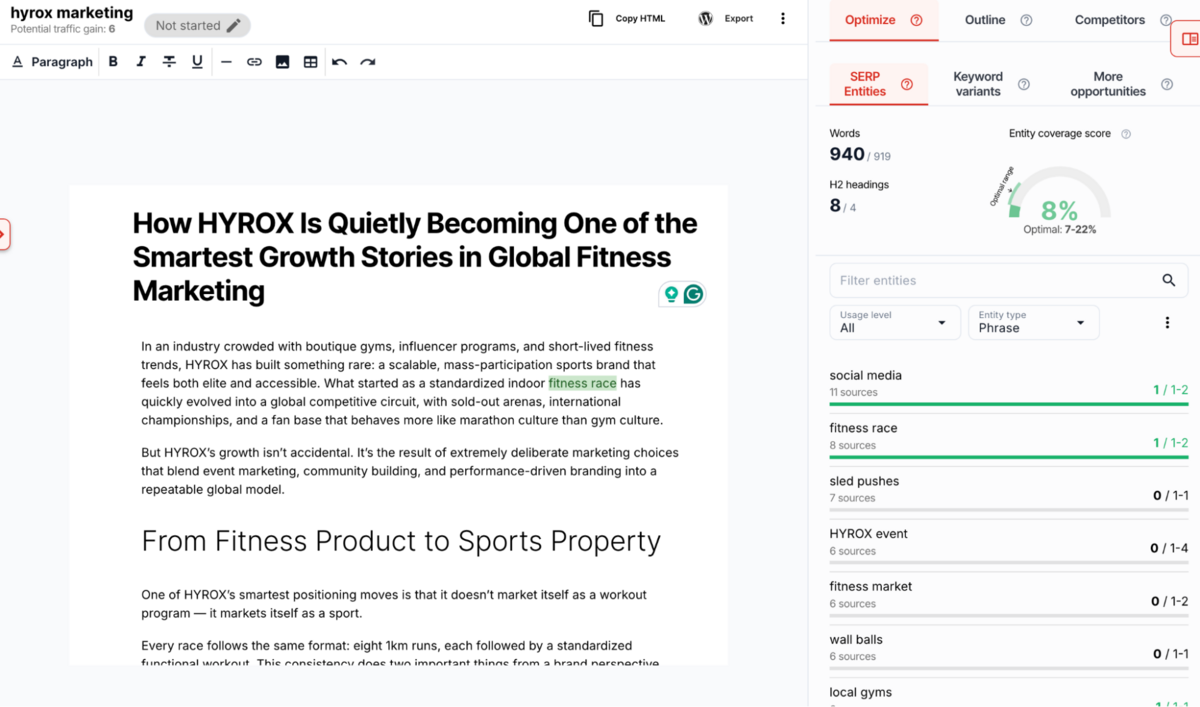
Content Raptor's approach is leaner, which keeps it simple but also less informative.
The Page Editor
Once you've completed the wizard, you land in the Page Optimiser editor - a clean, functional writing interface with a toolbar for basic formatting (bold, italics, headings, links, images) and a right-hand sidebar that houses your SEO guidance.
The editor itself is fine. It's not as polished as Semrush, but it does what it needs to do: gives you a blank canvas to write with real-time entity tracking as you type. Again, a similar result could be achieved with a plug-in on Google Docs.
The Entity Coverage System
This is the core mechanic of Content Raptor's optimisation approach, and it's both the platform's greatest strength and equally its most frustrating limitation.
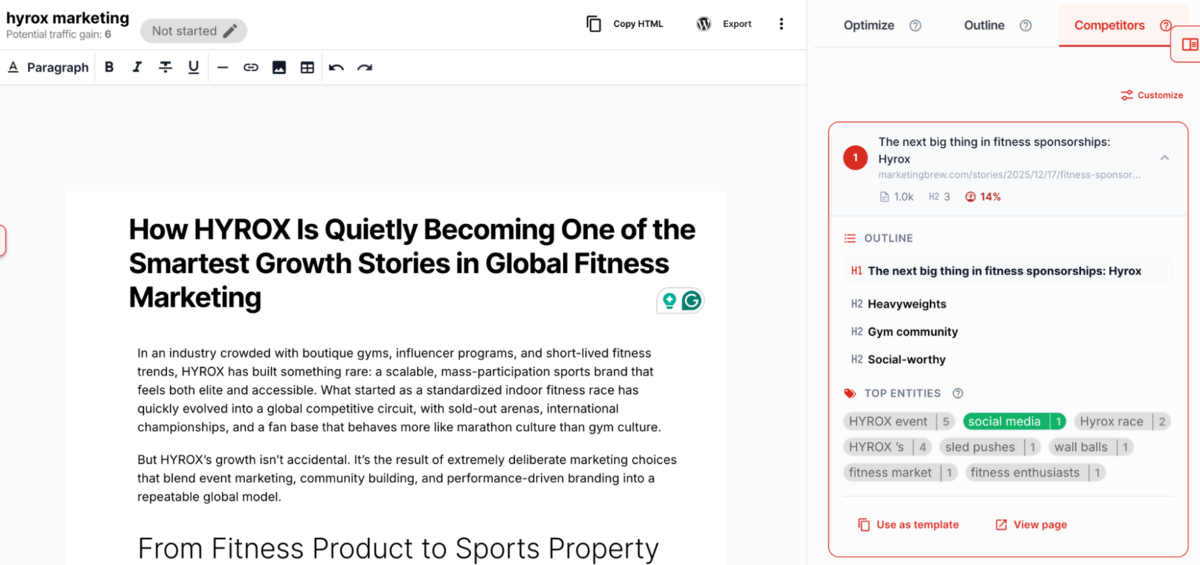
Content Raptor analyses the top 20 ranking pages for your keyword, extracts the "entities" (concepts, topics, people, places, things) that appear across those pages, and then checks whether your content covers them. Entities are colour-coded in the sidebar:
- Red (Not Used): Critical missing topics - these give you the biggest score boost when added
- Yellow (Underused): You mentioned it once, but competitors mention it more frequently
- Green (Optimal): Perfect coverage - you've hit the sweet spot
- Orange (Overused): Potential keyword stuffing - you're mentioning something too often
Your overall Entity Score is a percentage (0-100%) that represents how comprehensively you've covered the topic compared to competitors.
This system works surprisingly well for straightforward informational content. If you're writing a product review, Content Raptor will flag that you haven't mentioned "battery life," "price," "durability," or "customer support" - all legitimate gaps that you probably should cover. It keeps you honest and prevents you from publishing shallow content that misses obvious topics.
Where the system falls apart is in nuance. Entity extraction isn't perfect, and Content Raptor sometimes surfaces irrelevant terms that appeared in competitor navigation menus, footers, or sidebar widgets rather than in the actual content. You'll occasionally see entities like "Cookie Policy," "Subscribe to Newsletter," or "Related Articles" flagged as "missing," which you can safely ignore, but it clutters the interface and makes it harder to focus on what genuinely matters.
More problematically, the entity system can't evaluate quality. It knows whether you mentioned "battery life" but not whether your analysis of battery life is insightful, accurate, or differentiated from what competitors already said. This pushes you toward comprehensiveness rather than originality, which is a reasonable trade-off for quick-win content updates but doesn't help you produce genuinely exceptional work.
Writing Workflow and Real-Time Guidance
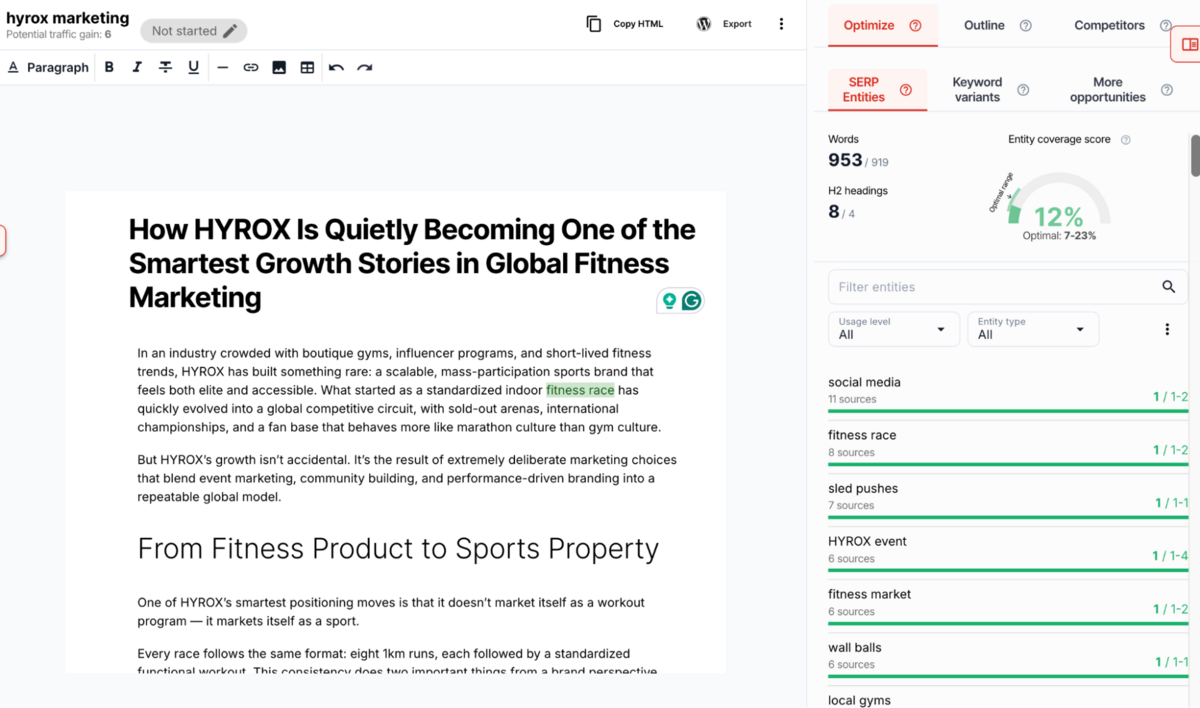
As you write, the sidebar updates in real-time to show your progress. You can see your entity score climbing (or not), track which entities you've covered, and monitor your word count along with the outline completion %.
The interface also includes keyword variant suggestions pulled from your GSC data - related searches that people actually use. For instance, if your primary keyword is "best running shoes," variants might include "cheap running shoes," "Nike running shoes review," or "running shoes for men." Content Raptor shows you the search volume for each variant and tracks whether you've used them in your content, helping you capture multiple keyword variations with a single piece of content.
Competitor Analysis During Writing
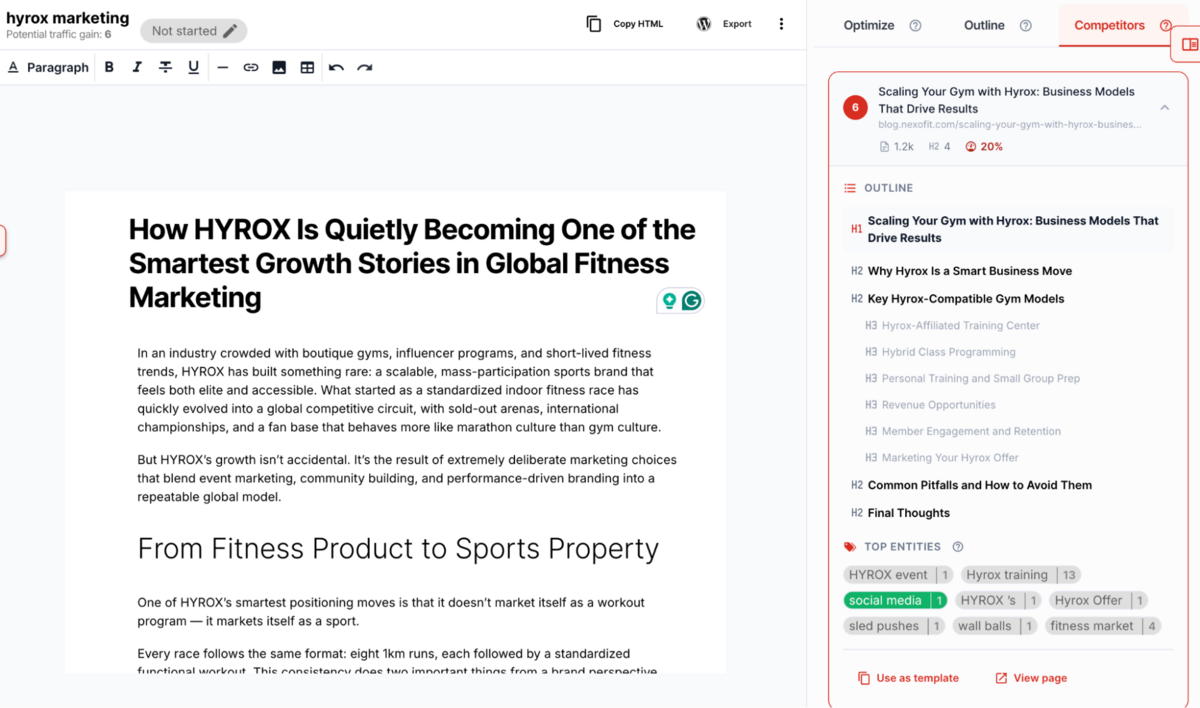
The SERPs tab in the sidebar shows you the top 20 ranking pages with their entity scores and direct links to their content. The idea is that you can click through, read what they wrote, identify gaps, and incorporate better coverage into your own piece.
In theory, this is helpful. In practice, it's not much more than a structured way to do what any competent SEO would already do: look at the SERP, read the top results, and figure out what works. The entity scores add some quantitative context, but Content Raptor doesn't give you a detailed breakdown of what specifically made those pages rank or how your coverage compares point-by-point.
What Content Optimisation Does Well
The optimisation workflow is useful for teams that need structure and guidance.
If you're managing freelance writers, junior content creators, or simply want a clear process for improving underperforming pages, Content Raptor gives you that. The entity coverage system keeps content comprehensive without requiring deep SEO expertise, and the wizard-based approach removes decision paralysis by telling you exactly what to optimise next.
For quick wins - taking a page ranking in position 8 and pushing it to position 5 - this workflow is efficient. You're working from real GSC data, targeting keywords with proven traffic potential, and ensuring you cover the topics that matter.
What Content Optimisation Doesn't Do
What's missing is any ability to operate strategically rather than reactively.
Content Raptor can't help you identify content gaps, discover new keyword opportunities, plan content clusters, or build topical authority from scratch. It can only optimise what you already rank for.
The entity coverage system is helpful but incomplete - it ensures comprehensiveness but doesn't evaluate quality, differentiation, or user experience. You can hit a 75% entity score and still produce mediocre content that doesn't meaningfully improve on what already ranks.
And compared to the major SEO suites, the feature set is bare-bones. There's no readability scoring, no plagiarism detection, no tone analysis, no content grading beyond entities, and no integration with broader SEO workflows like backlink analysis or technical audits. Content Raptor does one thing - content optimisation based on entity coverage - and that's it.
To sum this up: for teams that only need content optimisation and already have other tools handling keyword research, technical SEO, and link building, that focus might be an advantage. For teams that want an all-in-one solution, it's a significant limitation.
Rank Tracking
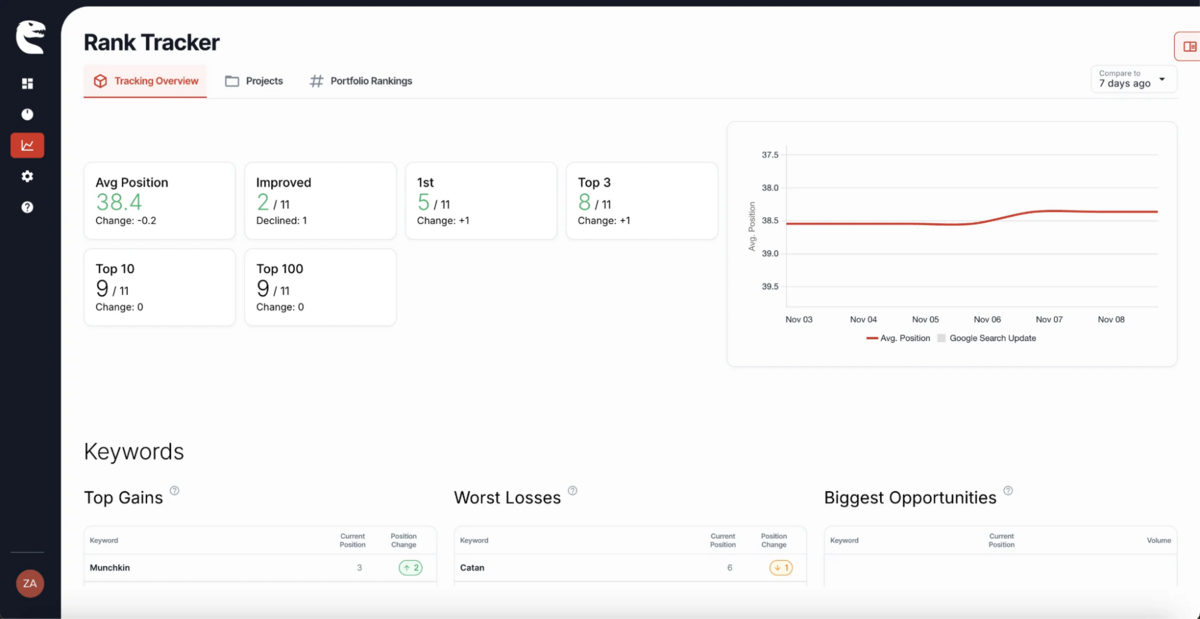
Getting into Rank Tracker, this is a straightforward position monitoring tool that does the basics competently without attempting to compete with the comprehensive tracking capabilities you'll find in Semrush, Ahrefs, or even SE Ranking.
The functionality is simple: you create a project for your domain, add keywords manually or import them from CSV or Google Search Console, set target URLs for each keyword, and Content Raptor tracks your positions daily. You can also add competitor domains to see how they rank for the same keywords, giving you a side-by-side comparison of where you stand relative to others in your space.
Setting Up Projects
The project creation process is deliberately minimal. You enter a project name (e.g., "Main Website," "Blog Rankings"), add your domain, and optionally import keywords from GSC during setup. That's it. There's no complex configuration, no advanced settings to wade through, and no decisions about crawl depth or tracking frequency - Content Raptor handles it all automatically with daily updates.
What we appreciate here is the lack of friction. If you've used enterprise rank trackers before, you'll know how overwhelming the setup process can be - deciding between exact match vs. broad match tracking, configuring location and device settings at a granular level, setting up tag taxonomies and custom dashboards. Content Raptor strips all of that away and gives you a functional rank tracker in about three minutes.
The trade-off, of course, is flexibility.
You can't configure hourly tracking for competitive keywords, you can't set up alerts for specific position thresholds, and you can't segment tracking by city-level location or multiple device types simultaneously. Content Raptor operates at a national/country level with basic device selection (desktop, mobile, tablet), which is sufficient for most small-to-medium sites but limiting for enterprise teams or agencies managing complex, multi-location campaigns.
Adding and Managing Keywords
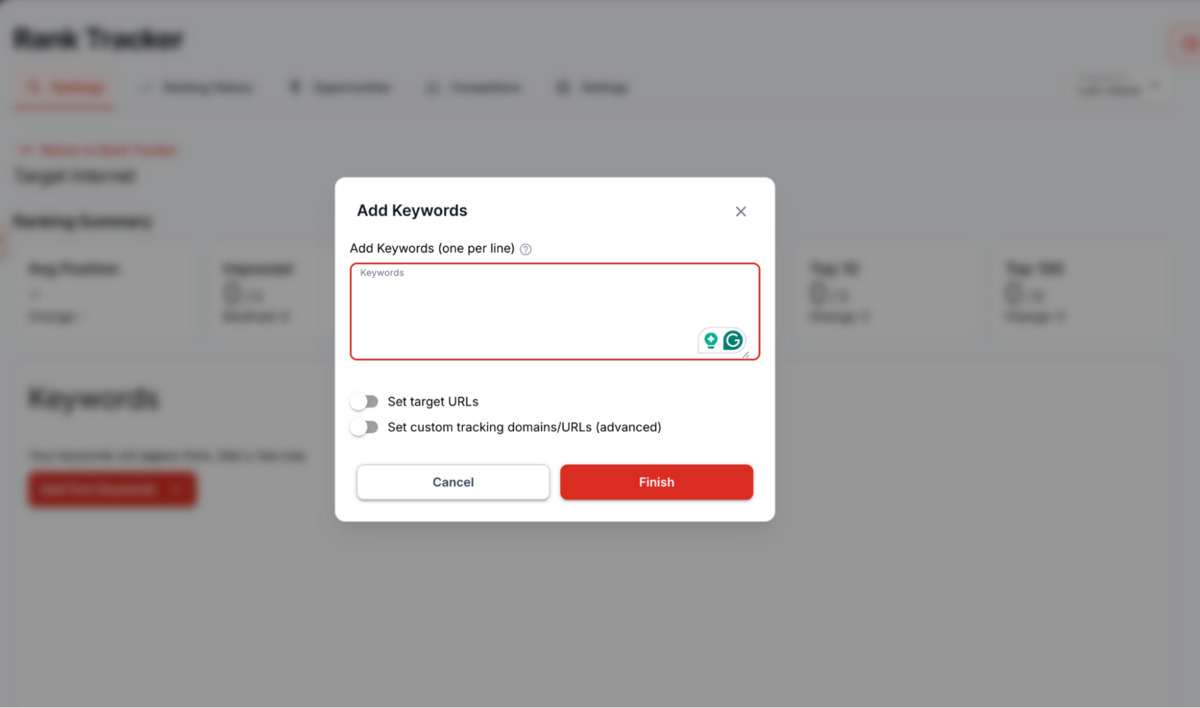
Content Raptor offers three methods for adding keywords: manual entry, CSV import, and GSC import. The GSC import is the most useful of the three, as it pulls in keywords you're already ranking for rather than forcing you to guess what to track. This aligns well with Content Raptor's overall philosophy - work with the data you already have rather than starting from scratch.
Once keywords are added, you can set target URLs to specify which page should rank for each term.
This is genuinely helpful because it surfaces keyword cannibalisation issues - situations where the wrong page is ranking for a keyword, which can hurt both relevance and conversions. The interface shows you whether your domain ranks, whether the target URL ranks, or whether you're not ranking at all, giving you a quick diagnostic view of what's working and what needs fixing.
Understanding the Rankings Table
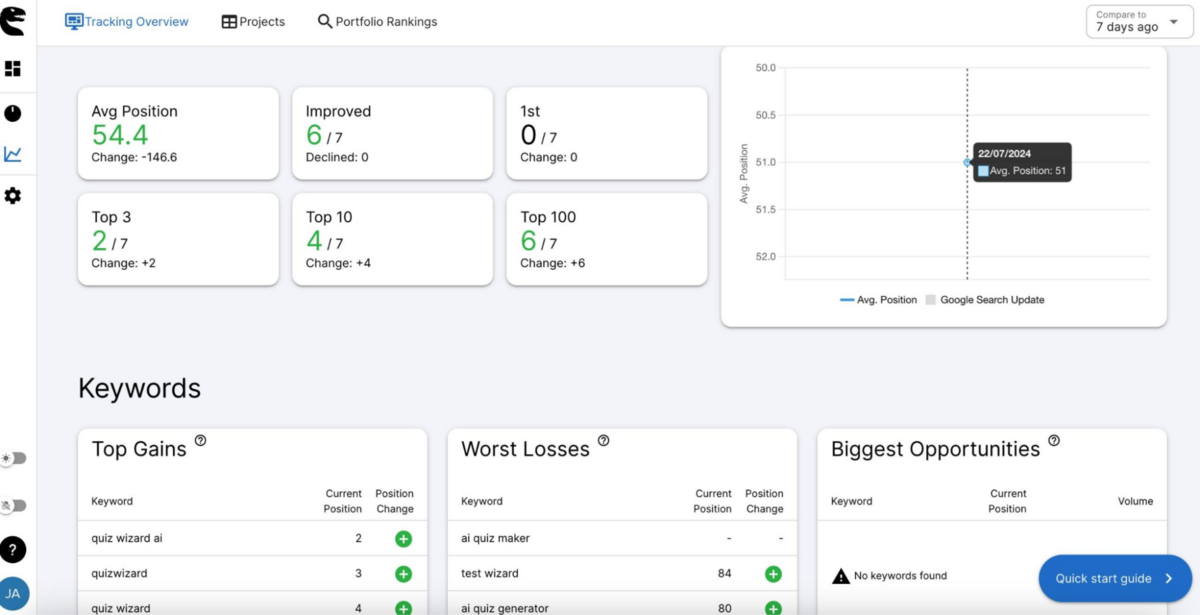
The rankings interface is clean and functional. You see your keywords in a table with columns for Position, Change (green up arrow, red down arrow, or grey dash), Target URL, and Last Updated. Competitor columns appear to the right if you've added competitors, showing their positions alongside yours.
The position change indicators are helpful for spotting trends at a glance - you can immediately see which keywords improved, which declined, and which stayed stable. Historical charts show ranking trends over time, though the visualisations are basic compared to what you'll find in tools like SE Ranking or AccuRanker, which offer interactive graphs with algorithm update overlays, SERP feature tracking, and share-of-voice metrics.
What Content Raptor doesn't show you is SERP feature tracking - whether you appear in Featured Snippets, People Also Ask, or AI Overviews - local pack positions, or estimated traffic based on your rankings. These omissions are significant if you're doing serious SEO work. Understanding whether you're appearing in SERP features is increasingly critical as AI Overviews and zero-click searches erode traditional organic traffic, and Content Raptor simply doesn't surface this information.
Competitor Tracking
You can add several keywords to track per project, and Content Raptor will automatically find competitors for your keywords.
However, a major drawback here is the inability to add competitors manually. The competitive data appears directly in the rankings table, but you're unable to add new competitors here yourself. For example, in our testing, the keywords we used were "digital marketing course" & "digital marketing certification" - 2 keywords that are hyper relevant to what Target Internet does. However, Content Raptor was unable to find any relevant competitors here, rendering this entire section useless.
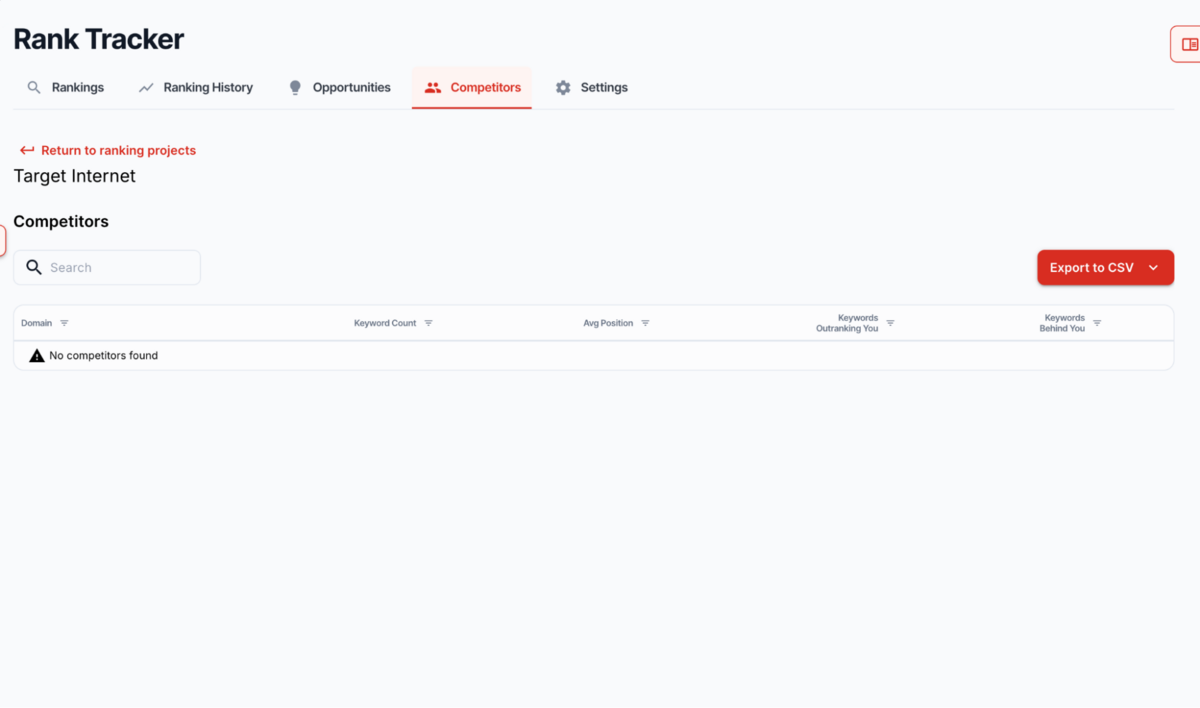
Honestly, even when this tool does work, it only works well for basic competitive benchmarking. You can quickly identify keywords where competitors are outranking you, spot patterns in their performance, and prioritise optimisation efforts accordingly. But remember that the competitive analysis stops there.
Content Raptor doesn't show you which keywords competitors rank for that you don't (a keyword gap), how many total keywords they rank for, their estimated traffic, or their domain authority. For deeper competitive intelligence, you'll still need a tool like Ahrefs' Site Explorer or Semrush's Competitive Research suite.
Finding Opportunities
Content Raptor surfaces "ranking opportunities" - keywords where you have room to improve into top positions. The Opportunities view shows keywords with high search volume, good current positions (typically 4-20), and significant potential traffic gain if you reach the top spots.
This feature is useful for prioritising optimisation work, as it tells you which keywords are closest to "quick wins".
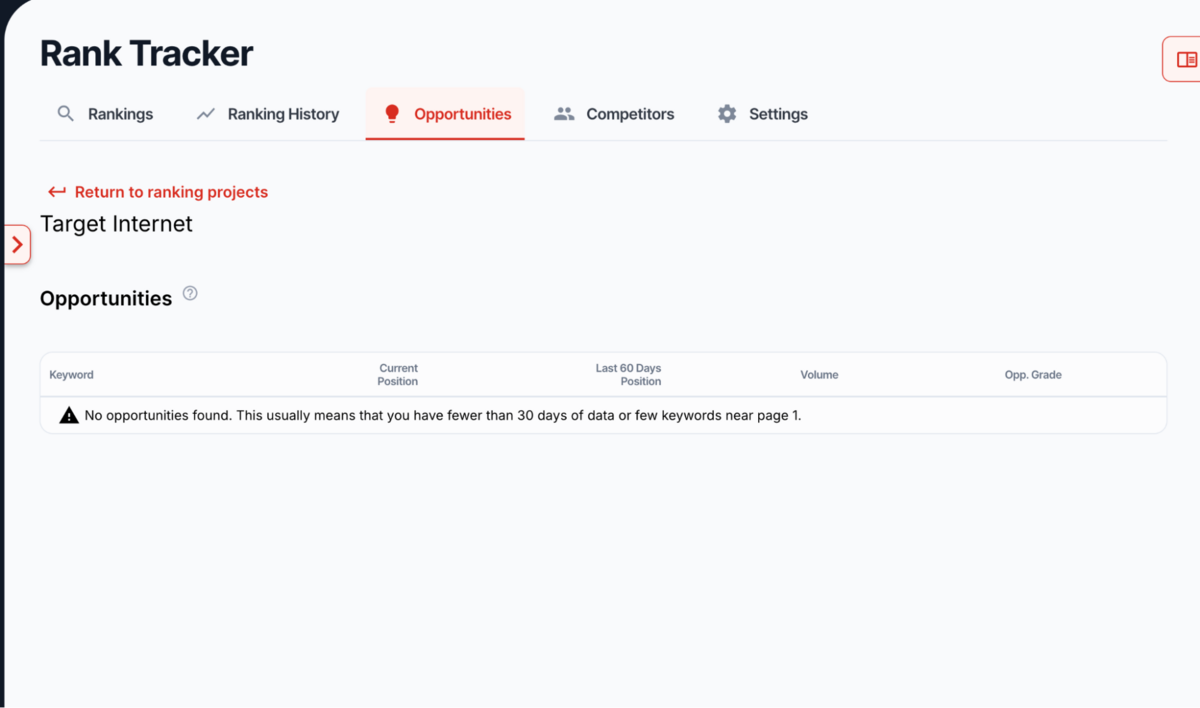
A major drawback here is that Content Raptor does not populate data or show you any opportunities until a month after you set up a project on Rank Tracker.
The opportunity detection, as well, is entirely dependent on your existing rankings. Content Raptor can't identify keywords you should be targeting but aren't ranking for yet, nor can it spot emerging trends or seasonal opportunities - a repeating theme across all of its features.
Where Rank Tracking Falls Short
In our honest opinion, Content Raptor's Rank Tracker is not a very useful or practically built tool.
What's missing is depth and sophistication. There's no share-of-voice tracking, which means you can't measure what percentage of total traffic your domain captures for a group of keywords relative to competitors. There's no API access, no white-label reporting beyond basic PDF exports, and no advanced alerting - you can't set up notifications for specific position thresholds or SERP feature wins. The reporting capabilities are bare-bones: you get a rankings table and historical charts, but nothing approaching the customisable dashboards and automated reporting workflows available in competing platforms.
And perhaps most significantly, there's no traffic estimation based on your rankings.
Tools like Semrush and Ahrefs estimate the organic traffic you're receiving based on your positions, CTR curves, and search volumes, giving you a sense of actual business impact rather than just vanity metrics. Content Raptor shows you positions and potential gains, but it doesn't tell you how much traffic you're currently getting from those rankings, which makes it harder to measure ROI or prioritise based on actual impact.
Integrations
Content Raptor's integration options are minimal but functional, focusing on the two connections that matter most for its core workflow: Google Search Console and WordPress.
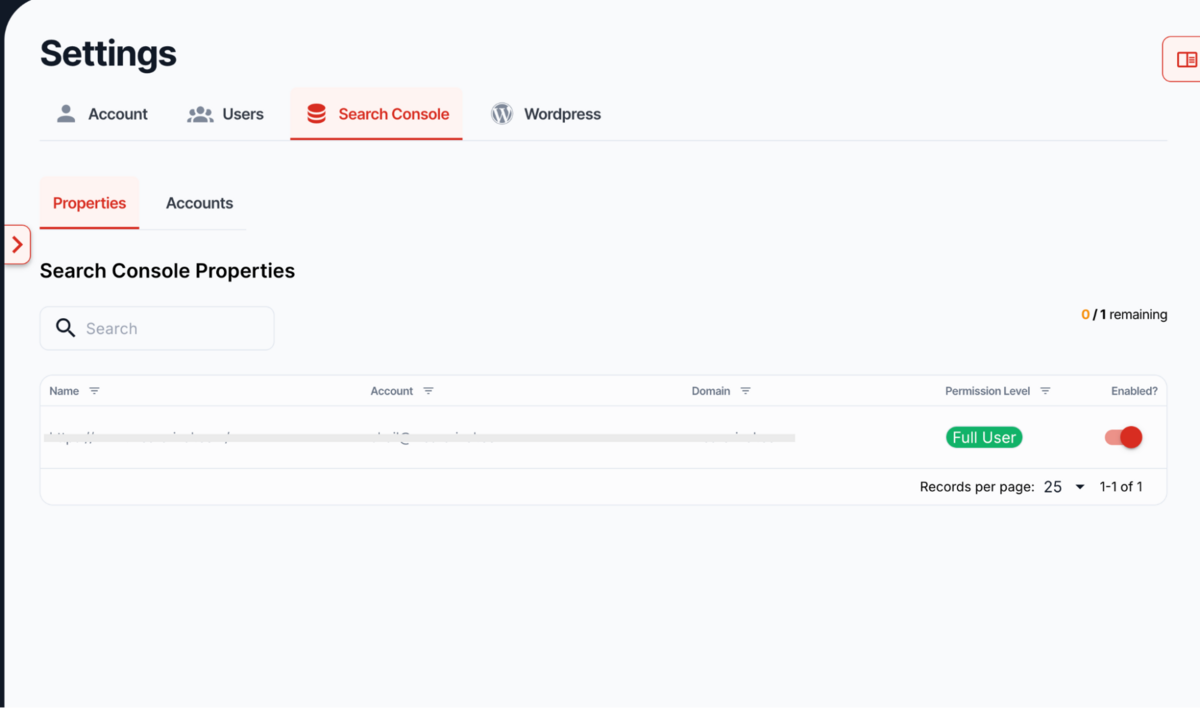
Google Search Console Integration
The GSC integration is mandatory rather than optional - without it, Content Raptor has no data to work with. Once connected, the platform pulls in your ranking keywords, impressions, clicks, and position data automatically, refreshing in the background without manual intervention.
The connection process is straightforward (OAuth authentication through Google), and you can connect multiple GSC properties if you manage multiple sites. The integration works as advertised - data syncs reliably, and the 24-48 hour initial processing window is reasonable given the volume of data being analysed.
WordPress Integration
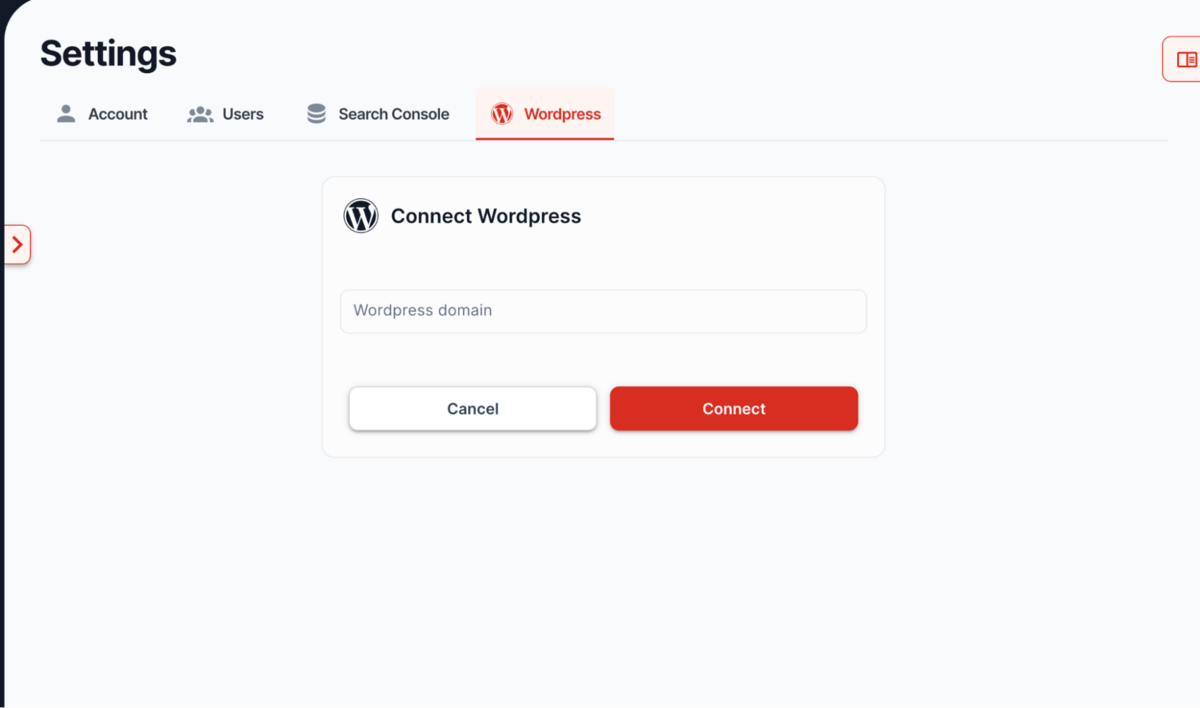
The WordPress connection enables one-click publishing from Content Raptor's editor directly to your WordPress site, either as a draft or published post. Setup requires creating an Application Password in WordPress (not your regular login password), entering your site URL and username in Content Raptor's settings, and connecting.
In practice, this integration is useful but limited. When it works, it saves time by eliminating copy-paste workflows and preserving formatting through the export process. Content Raptor converts your headings, images, and lists into WordPress blocks, uploads images to your Media Library, and creates a new post ready for publication or final review.
However, there are significant limitations worth noting. First, the WordPress export feature is currently disabled for maintenance, which undermines its value entirely if you're relying on it for your workflow. Second, even when functional, the integration can only create new posts - it cannot update existing ones. If you're optimising a published page, you'll need to export as a draft and manually copy the content into your existing post, which defeats much of the convenience.
Third, some security plugins (Wordfence, iThemes Security) block external API connections by default, requiring you to whitelist Content Raptor or temporarily disable firewall rules to establish the connection. This adds friction and potential security considerations that agencies and enterprise users may not be comfortable with.
And fourth, the integration only supports WordPress - there's no native support for Shopify, Webflow, Squarespace, or any other CMS. If you're not on WordPress, you're limited to copying HTML and pasting manually.
What's Missing
Content Raptor lacks integrations with virtually every other tool in the modern SEO stack. There's no connection to Google Analytics (which would enhance traffic attribution and conversion tracking), no API access for building custom workflows, no Zapier integration for connecting to other platforms, and no native connections to project management tools, link-building platforms, or reporting suites.
For comparison, Semrush integrates with GA4, Google Ads, Looker Studio, WordPress, Trello, and offers a robust API for custom integrations. Ahrefs connects to GA4 and GSC, and offers MCP (Model Context Protocol) for AI assistants. Even smaller tools like Surfer SEO integrate with Google Docs, WordPress, Jasper, and multiple other content platforms.
Pricing
Content Raptor's pricing is refreshingly straightforward, particularly compared to the complex tiering and add-on structures you'll find in enterprise SEO platforms.
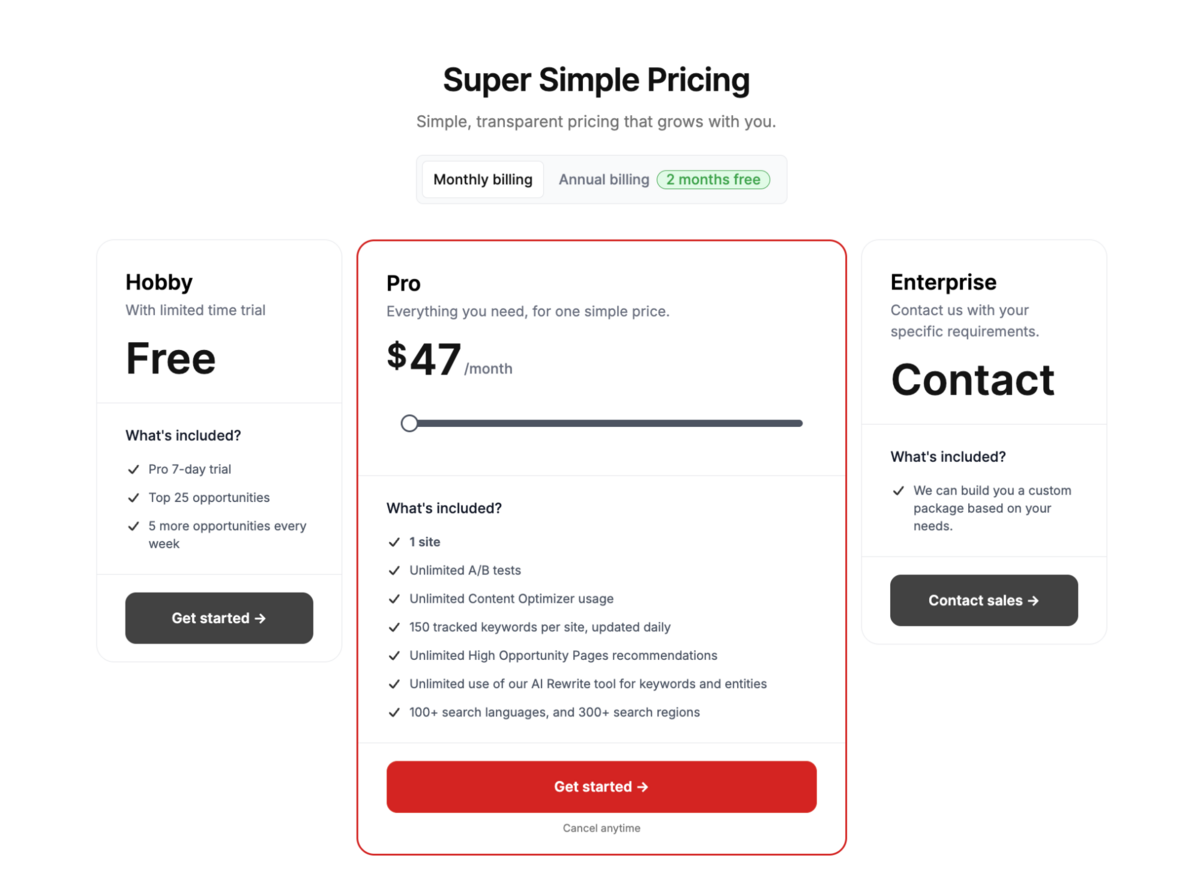
The platform offers three tiers: Hobby (Free), Pro ($47/month), and Enterprise (custom pricing).
Hobby Plan (Free)
The free tier is genuinely usable rather than just a marketing hook. You get a 7-day trial of Pro features, access to your top 25 optimisation opportunities, and 5 new opportunities added each week. This is enough to test the platform properly and optimise a handful of pages, making it a reasonable entry point for bloggers or small site owners who want to evaluate Content Raptor before committing.
Pro Plan ($47/month or $94/month for 2 sites)
The Pro plan is where Content Raptor positions itself as a 'budget-friendly' alternative to enterprise SEO suites. At $47/month for a single site, it's considerably cheaper than Semrush's entry-level plan or Ahrefs Lite ($129/month).
However, Moz Pro also offers a Starter plan at $49/month - practically the same price - which provides significantly more features.
What you get for $47/month is still reasonable within Content Raptor's defined scope: 1 site (scales to 2 sites for $94/month, following a linear $47-per-site pricing model), unlimited Content Optimiser usage - you can optimise as many pages as you want without hitting arbitrary report limits, 150 tracked keywords per site updated daily - adequate for small-to-medium sites but limiting for larger content operations, unlimited High Opportunity Pages recommendations - the platform will continue surfacing optimisation candidates without throttling, unlimited use of the AI Rewrite tool for keywords and entities, and 100+ search languages and 300+ search regions - surprisingly robust international coverage for a budget tool.
The pricing scales linearly: each additional site costs exactly $47/month more.
Conclusion
Content Raptor is a tool that knows exactly what it is and doesn't pretend to be anything more.
It's not trying to compete with Semrush, Ahrefs, or Moz Pro as an all-in-one SEO suite - and frankly, it would lose that battle badly. Instead, it operates in a deliberately narrow lane: helping you identify and optimise existing content that's already ranking but underperforming. Within that specific use case, it does a reasonable job at a reasonable price.
The platform's greatest strength is simplicity. Connect Google Search Console, wait for data to sync, and you're presented with a prioritised list of optimisation opportunities based on real traffic potential. The entity coverage system ensures comprehensive content without requiring deep SEO expertise, and unlimited optimisation capacity means you're not throttled by report limits. For content teams and small businesses who need clear direction on what to improve next, Content Raptor delivers without overwhelming complexity.
What's missing is everything else.
There's no keyword discovery, no backlink analysis, no site audit, no meaningful competitor research, no SERP feature tracking, and no local SEO capabilities. The rank tracker is functional but bare-bones. The UI is clunky, things randomly take too long to load, and 404 errors appear more often than they should. And perhaps most significantly, Content Raptor is entirely reactive - it can only optimise what you already rank for, offering no strategic guidance on what to create next.
Content Raptor makes sense for solo content creators managing 1-3 sites with existing rankings who need structured optimisation guidance at $47/month. It's particularly useful if you're producing high volumes of content updates and value unlimited optimisation capacity over comprehensive SEO features.
However, it's not suitable for agencies, enterprise teams, anyone building new sites, or professionals who need the full breadth of SEO capabilities.
When we compare Content Raptor to the platforms reviewed in this report, the gap is substantial. Semrush, Ahrefs, and Moz Pro offer 10x the functionality at higher price points that reflect their comprehensive capabilities (the higher price point obviously being very justified). Even within a smaller budget, we'd recommend you go with Moz Pro's Starter Plan.
One more thing to keep in mind is that the UI crashes sometimes and feels slow/clunky to use, with broken loops sending you back to the same place.
The verdict: Content Raptor is a budget-friendly tool for reactive content optimisation, not a strategic SEO platform. If you're managing a small content operation with existing rankings and want guided improvements without enterprise pricing, it's worth testing. If you need capabilities beyond basic content optimisation, you'll outgrow it quickly and find better value elsewhere.
It's a useful supplement for a specific use case, but it's not a primary SEO solution for most of us who work in SEO.
Get back to the SEO tools comparison report.
Frequently Asked Questions (FAQs)
1. What is Content Raptor?
Content Raptor is a content optimisation and rank tracking tool that connects to Google Search Console to identify underperforming pages on a website. It analyses top-ranking competitor content, surfaces entity gaps, and guides you through systematic content improvements to capture more organic traffic from keywords you already rank for.
2. How much does Content Raptor cost?
Content Raptor offers three pricing tiers: Hobby (Free with limited features), Pro ($47/month for 1 site, scaling to $94/month for 2 sites), and Enterprise (custom pricing).
3. Does Content Raptor offer a free trial?
Yes, Content Raptor offers a free Hobby plan that includes a 7-day trial of Pro features, access to your top 25 optimisation opportunities, and 5 new opportunities added each week. This allows you to test the platform before committing to a paid subscription.
4. Who should use Content Raptor?
Content Raptor is best suited for solo content creators, bloggers, and small businesses managing 1-3 sites with existing search rankings who need structured guidance for improving underperforming content.
5. Can Content Raptor help me find new keyword opportunities?
No. Content Raptor can only optimise content for keywords you already rank for in Google Search Console. It does not include keyword discovery, competitive gap analysis, or strategic content planning tools. For new keyword opportunities, you'll need a separate keyword research tool like Semrush, Ahrefs, or a dedicated keyword planner.