This review is part of our SEO tools comparison report. This article has been updated for 2026 and replaces the older review of Semrush.
Index
- Introducing the Tool
- Reporting
- SEO Dashboard
- Competitive Research
- Keyword Research
- Link Building
- On Page & Tech SEO
- Content Ideas
- Pricing & Value Considerations
- Conclusion
- FAQs
Introducing the Tool
Semrush is the flagship SaaS platform from Semrush Inc., an all-in-one digital marketing toolkit that brings together SEO, PPC, content marketing, competitor analysis, and social media management under one roof. For the purposes of this review, we'll focus primarily on the SEO functionality (with a bit of content management thrown in).
Founded in 2008 as a small group of SEO and IT specialists, Semrush has evolved into one of the most comprehensive and trusted marketing intelligence platforms used by professionals worldwide. As of 2026, the platform offers an expansive suite of tools for keyword research, backlink analysis, site audits, advertising insights, and content optimisation. What sets Semrush apart is the frequency and substance of its updates; the platform consistently adapts to search engine algorithm changes and introduces genuinely innovative tools like the AI Visibility toolkit, rather than simply iterating on existing features. On top of that, Semrush's search volume data is notably more accurate than competitors, sitting 32.39% closer to Google Search Console numbers - a meaningful advantage when you're making decisions based on traffic projections.
Spoiler alert: Semrush is our #1 choice in the updated 2026 SEO tools comparison report. This ranking is based on multiple factors, including depth, breadth, functionality, price competitiveness, ease of use, and reporting capabilities - areas where Semrush consistently outperforms the competition.
Reporting
One of the first things to understand about Semrush - and something we think many new users overlook - is that the platform is now divided into multiple toolkits, with SEO being just one of them. Alongside SEO, you also have toolkits for AI Visibility, Traffic & Market, Local, Content, Social, Advertising, and PR. Each toolkit houses its own set of reports and data units, which means your usage capacity depends not just on your subscription tier, but also on which toolkit you're working in.
Semrush's report limits operate on a pooled system: depending on your plan, you get access to anywhere between 5 and 50 reports per month across the account. However, not all of these reports belong to the SEO toolkit specifically. If SEO is something you do at high volume - daily keyword research, competitor checks, backlink audits, and so on - you can buy additional SEO reports individually, which we think is helpful for agencies managing multiple clients. For example, on the Guru plan, you get 3 base SEO reports per month, which is enough for lighter research workflows but can be restrictive for teams that rely heavily on daily analysis. On the Business plan, these limits expand significantly, making it a better fit for enterprise teams or agencies with ongoing campaigns.
This setup can feel slightly complex at first, but once you understand how toolkits and reports are structured, the flexibility works in your favour. You only pay for the toolkits you actually use, and you can scale your reporting capability as your workflow grows.
SEO Dashboard
The Semrush SEO Dashboard acts as the central command centre for any Project you create, providing a high-level snapshot of your site's overall performance.
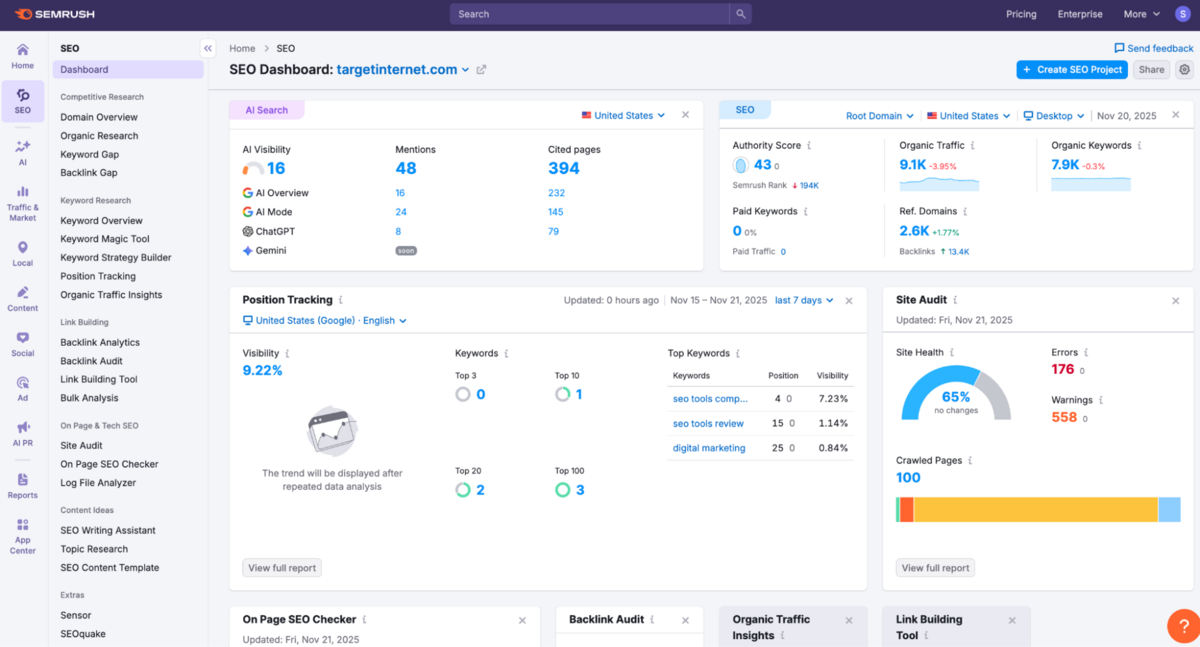
Depending on your plan, you can manage multiple domains simultaneously, with each Project pulling together essential metrics such as Authority Score, Organic Traffic, Keyword Visibility, Referring Domains, and Technical Site Health. You can also connect Google Search Console and GA4 to your Semrush, which allows it to pull in real-time impressions, clicks, traffic trends, and behavioural metrics directly into the dashboard. We strongly recommend enabling these integrations, as they greatly improve the accuracy of your organic performance data, and they remain a capability that most competitors still do not provide.
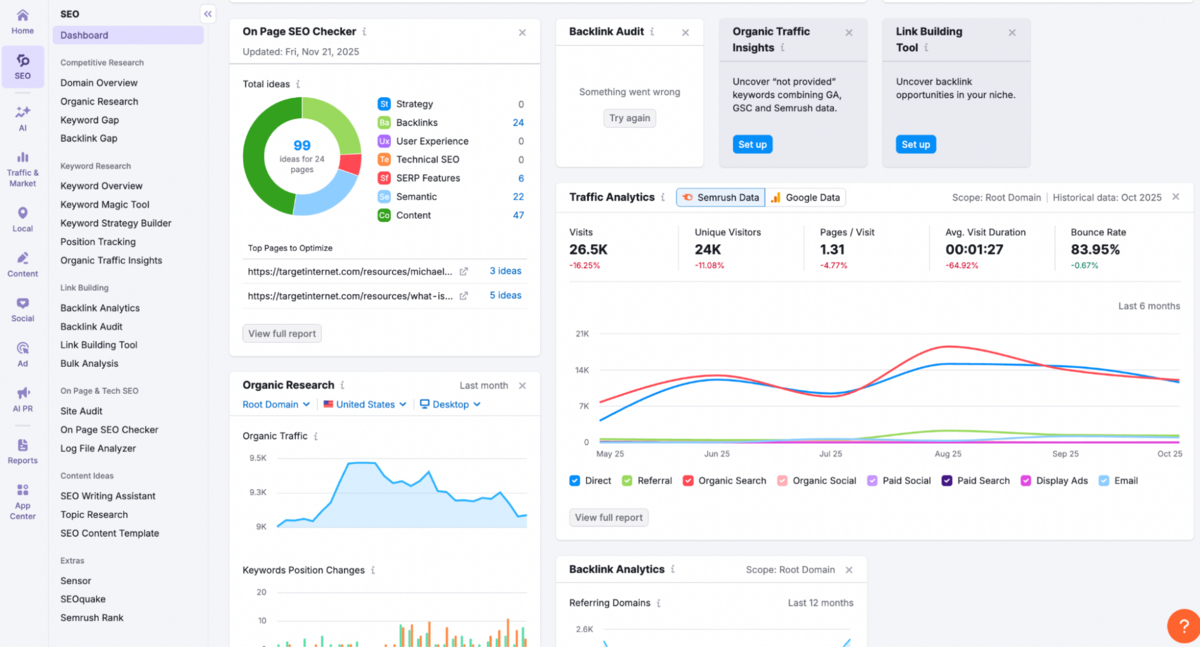
What we find particularly useful here is how the dashboard surfaces quick-glance summaries from core Semrush tools: Position Tracking, Site Audit, Organic Research, Backlink Analytics, On-Page SEO ideas, and Traffic Analytics.
Rather than forcing you to dive into each module individually, it highlights headline insights such as visibility movement, keyword distribution, top pages requiring optimisation, new versus lost backlinks, and traffic patterns across channels. It's not designed to replace deeper reporting (and nor should it), but it does give you an immediate sense of what's working, what's slipping, and where to focus your attention before exploring each tool in more detail.
However, it's worth acknowledging that with this breadth comes complexity.
The overall interface can feel overwhelming at first - it's not that easy to use when you are just starting with it. With so many tools and so much data available, it might be hard to know where to start or how to use everything effectively. The navigation has many tabs and sections, which can make it difficult to navigate initially, and you may need to invest time learning what each module does.
But once you're past that initial learning curve, the platform becomes intuitive and easier to use.
Semrush Categories
Similar to Moz Pro and other SEO suites, Semrush has compiled all of its tools into mainly 5 categories: Competitive Research, Keyword Research, Link Building, On Page & Tech SEO, and Content Ideas.
Below, you'll find an in-depth review of every subsection and feature set in each of these five categories.
Competitive Research
1. Domain Overview
The Domain Overview in Semrush is where we typically begin any piece of SEO research.
It pulls together a high-level snapshot of a website's visibility, authority, traffic trends, and competitive standing, giving you an immediate sense of how strong (or fragile) a domain really is. Alongside the usual metrics - organic traffic estimates, paid search activity, Authority Score, referring domains, backlink volume, and top keywords - you also get Semrush's AI Visibility panel.
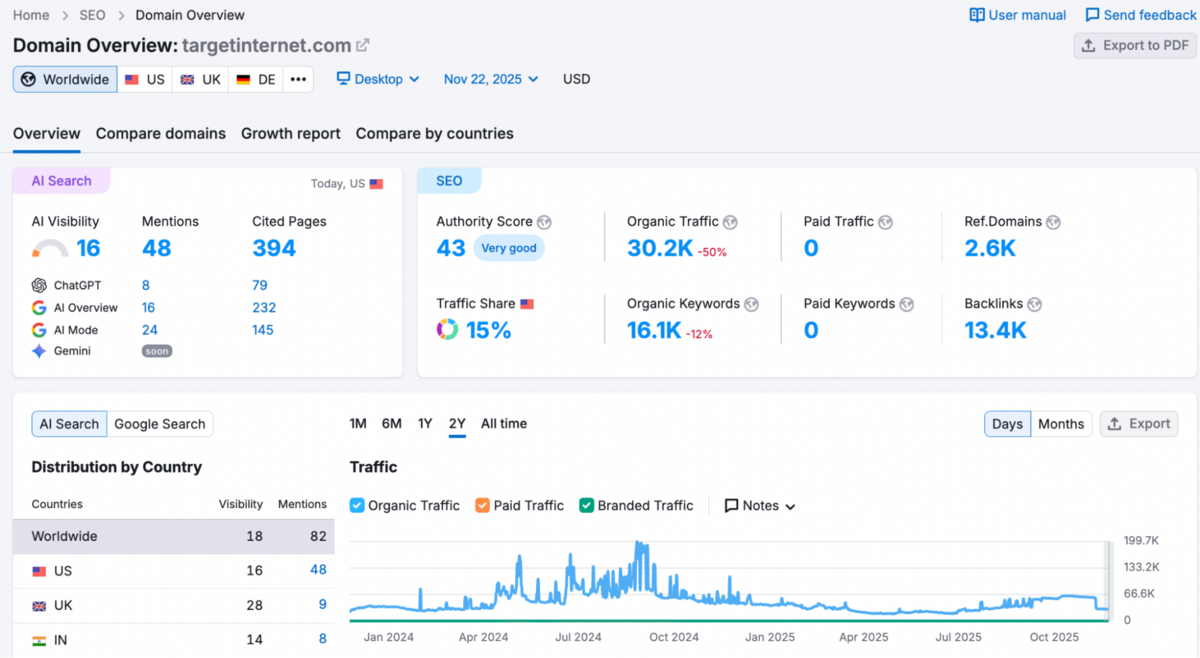
This shows how often your site is cited across AI search engines like ChatGPT, Google's AI Overview and AI Mode, with data broken down by mentions & cited pages. We think this is becoming increasingly important as AI-generated answers are beginning to take away share from traditional search.
What stands out is how much context Semrush surfaces without overwhelming you. You can quickly assess keyword intent breakdowns, identify which countries drive the most visibility, track AI mentions over time, and spot sudden jumps or dips in organic performance. The trend graphs make it easy for you to see whether a site is growing, stagnating, or quietly slipping - something many teams overlook until it's too late.
There are limitations, of course: comparison is capped at four domains, and traffic estimates are still best treated as directional. Semrush's Search data is also limited to Google - it provides keyword data for Google only, so if your SEO work involves other search engines (Bing, Yahoo) or platforms like Amazon, you may need additional tools. But since Google controls over 90% of the search market, whatever you do to rank high on Google will almost always translate into meaningful gains across the few remaining engines - so the limitation is rarely a deal-breaker in practice.
As an initial diagnostic layer, though, Domain Overview does an excellent job of showing "where things stand," so you know exactly which sections to explore next.
2. Organic Research
The Organic Research section gives you a clear, high-resolution view of how a site performs across its entire keyword universe.
You can see total keywords, traffic, branded vs non-branded share, and a visual trendline that breaks rankings into buckets. We find this especially useful because it lets you spot whether visibility is quietly slipping or steadily improving without digging through filters. Position changes are shown cleanly as well, highlighting new, improved, lost, and declined keywords, along with SERP feature gains such as AI Overviews and People Also Ask. It's a simple layout, but the granularity is surprisingly strong.
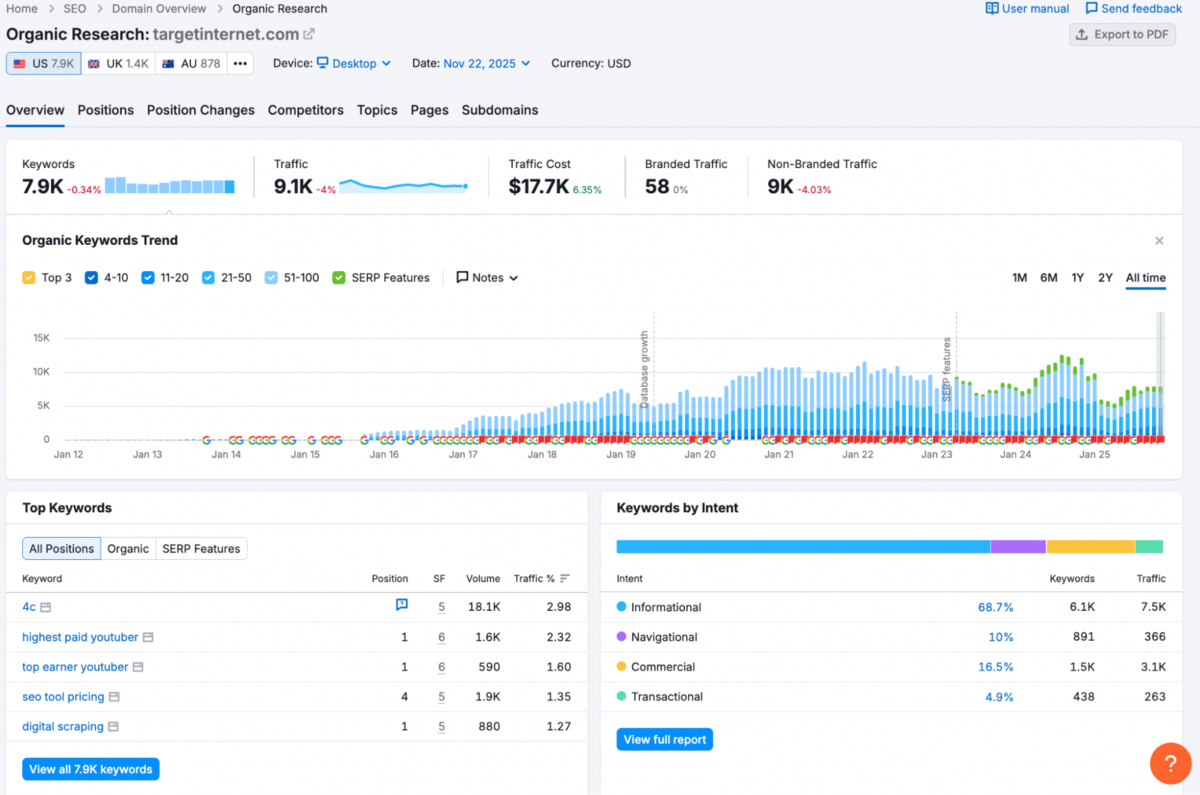
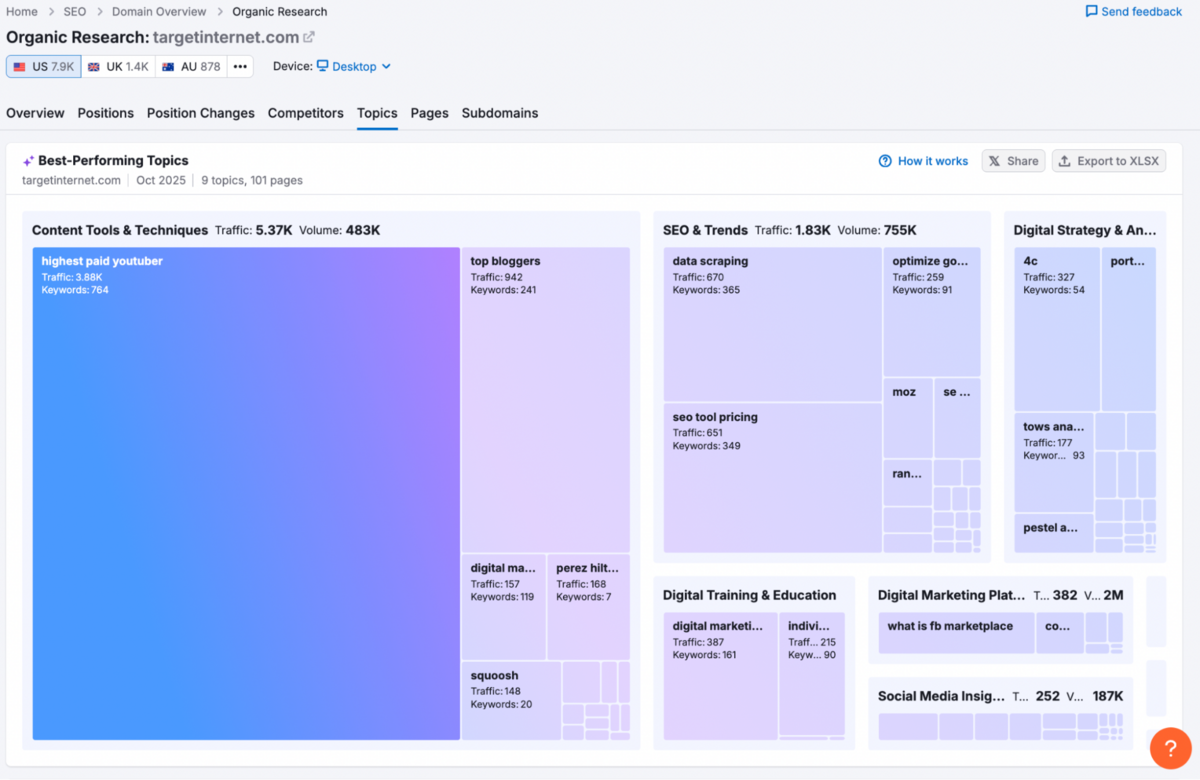
What genuinely elevates this section is the depth beyond the overview: Competitors, Pages, and Topics. The Competitors tab maps out who you're actually competing with for shared keywords and how they stack up in traffic - helpful for identifying real rivals rather than just perceived ones. Pages provides a fast breakdown of which URLs are pulling their weight and which have dropped off, making it considerably easier to prioritise updates. The Topics module is one of the more interesting additions: a visual cluster of a site's strongest themes, showing which content groups drive the most traffic and keyword volume. It's helpful in understanding topical authority at a glance rather than wading through endless keyword lists and figuring out the themes yourself.
3. Keyword Gap
Keyword Gap is one of the fastest ways to spot where your competitors are outperforming you, and where you're already ahead. You can compare your domain against up to four competitors at once, and Semrush cleanly breaks everything into shared, missing, weak, strong, untapped, and unique keywords.
Just enter the domains, select the type of rankings you want to analyse (organic, paid, or PLA/Google Shopping), and Semrush instantly generates a side-by-side comparison. The report that you see will show you: total keyword overlap, unique keywords competitors rank for that you don't, common keywords shared by all sites, and top opportunities for each domain.
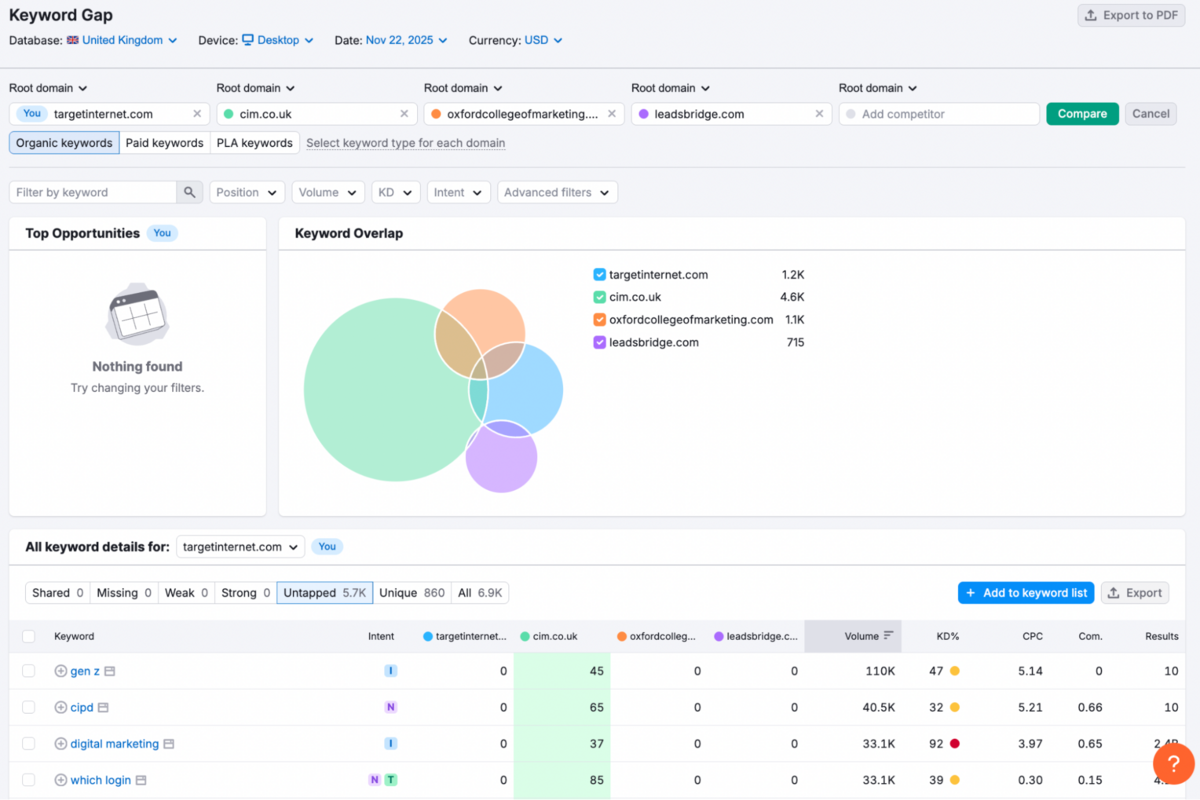
The visual overlap charts and granular filters (Position, KD%, Intent, CPC, device type, subdomains/subfolders/URLs, etc.) make it easy to pivot and narrow down exactly what matters for you - whether that's mobile vs desktop keywords or deeper competitive gaps.
This is incredibly helpful when planning for content because you can see exactly where the best opportunities lie in your niche, and focus on actions that will drive impact faster.
4. Backlink Gap
The Backlink Gap tool in Semrush gives you a clean, side-by-side view of how your backlink profile compares with up to five competitors (not four - Semrush recently expanded this), surfacing the domains linking to your competition but not to you.
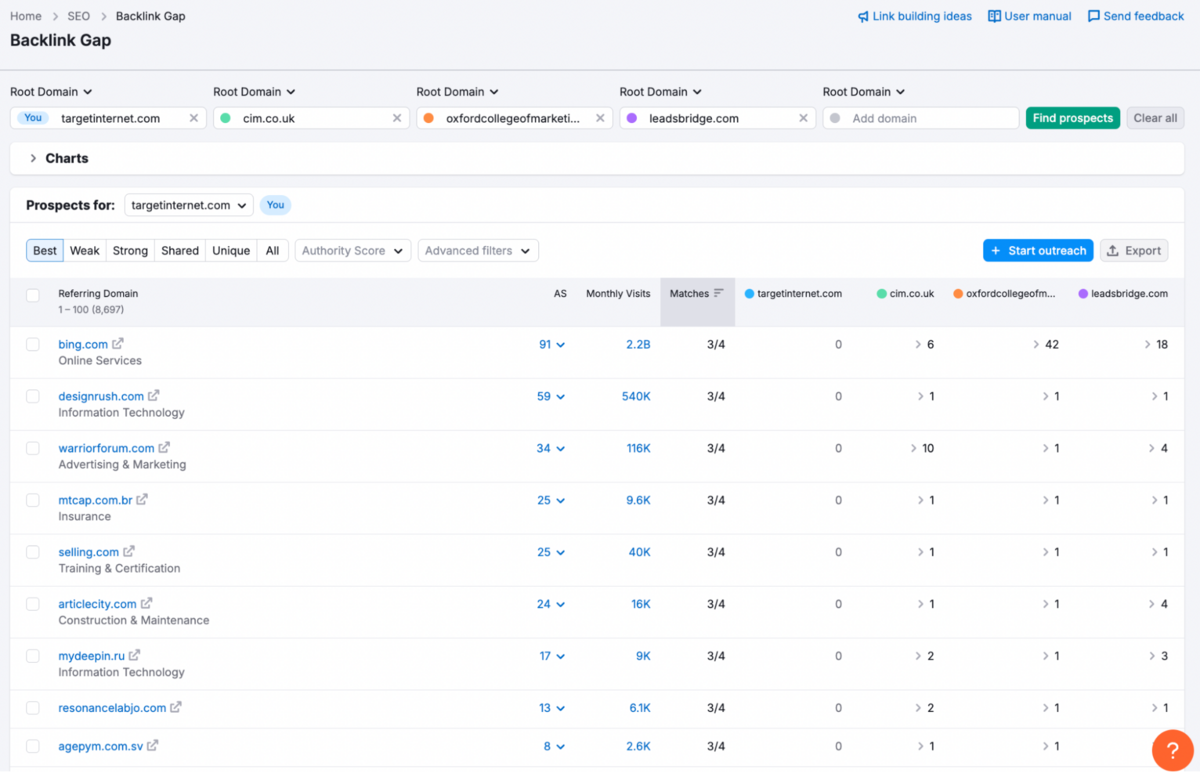
What we like most is how Semrush highlights the highest-value opportunities first. It shows the referring domains shared across multiple competitors, which instantly tells you where the strongest authority signals are coming from. The "Matches" column is particularly clever here: it shows you how many of your competitors share each referring domain, making it immediately obvious which sites are popular link sources in your niche versus one-off relationships. This is super helpful because it also lets you know if the domain is likely to link to your site, especially when they do it for multiple competitors.
The filters (Authority Score, link types, prospect categories) help you keep the focus on quality prospects, and you can segment results into Best, Weak, Strong, Shared, and Unique categories, similar to what we saw in the Keyword Gap tool.
Breakdown of what each of these categories is: 'Best' prospects are domains linking to all your competitors but not you, whilst 'Strong' shows domains where you're already ahead.
This tool is also seamlessly integrated into the Link Building Tool: you can send up to 100 domains directly for outreach, moving from insights to an actual workflow without juggling multiple tabs or spreadsheets.
What also stands out is the trend graph at the top, which visualises backlink profile growth over time across all competitors. It's a quick way to spot who's aggressively building links and whether your profile is keeping pace or falling behind. And if you need to compare even more domains at scale, you can analyse up to 200 URLs at once using the Bulk Backlink Analysis tool.
There's still some manual vetting required (as with any backlink tool), but overall, Backlink Gap is one of the more genuinely actionable features in the Semrush SEO toolkit (and the strongest compared to similar suites).
Keyword Research
1. Keyword Overview
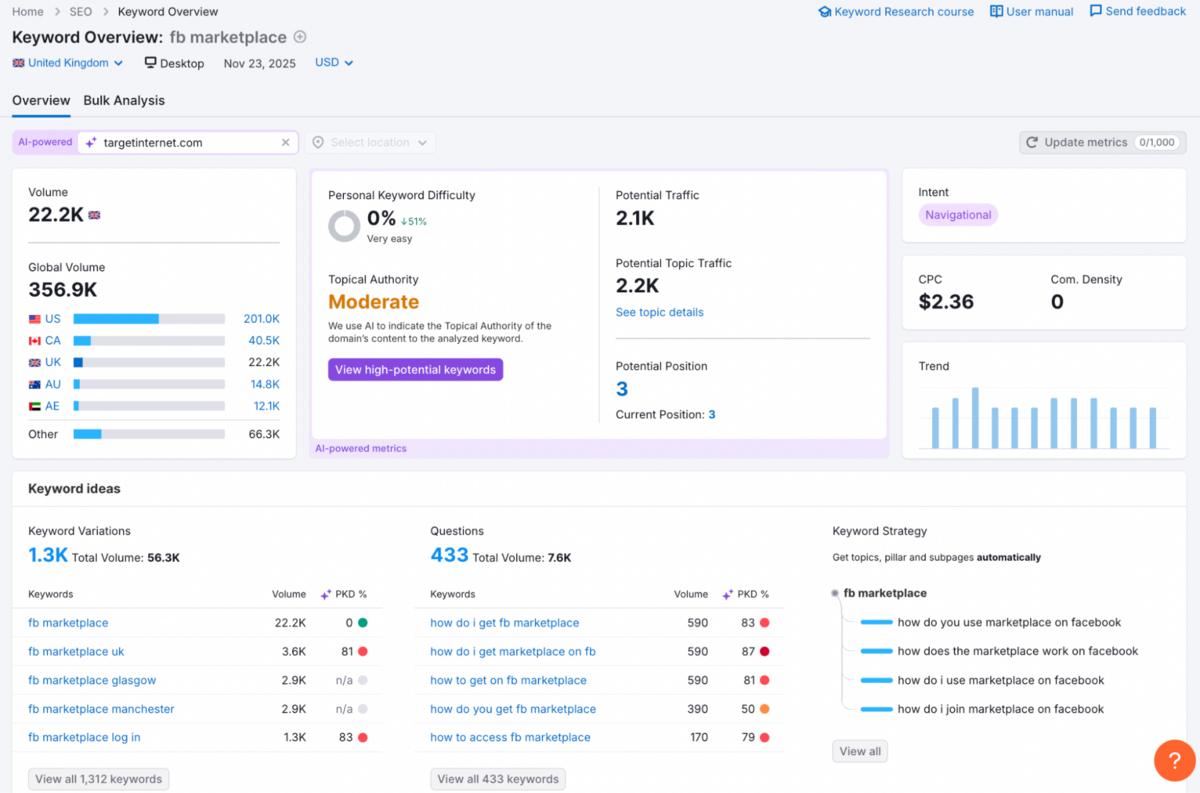
Keyword Overview brings everything into sharp focus with a clean snapshot of a keyword's real value - volume, difficulty, CPC, intent, topical authority, potential traffic, and even how strongly it trends across markets.
It also lets you look at variations, questions, and SERP features to help you understand what people are really searching for. It's the easiest place to judge a keyword's estimated value and competition at a national, local, or global level, and acts as the gateway to deeper research reports inside Semrush. You can also push terms straight from Bulk Analysis into the Keyword Strategy Builder, where Semrush's AI-generated insights help you prioritise what to target first, based on intent and difficulty.
2. Keyword Magic
The Keyword Magic Tool is where keyword research truly opens up.
Think of it as the central area where you do keyword research. It pulls from a database of 27B+ keywords to surface every variation, question, long-tail phrase, and topical cluster around your seed term. You start with a single word or phrase as your 'seed term', and Keyword Magic immediately returns a structured table of keywords & ideas, neatly grouped into topic-based subfolders with all the relevant metrics.
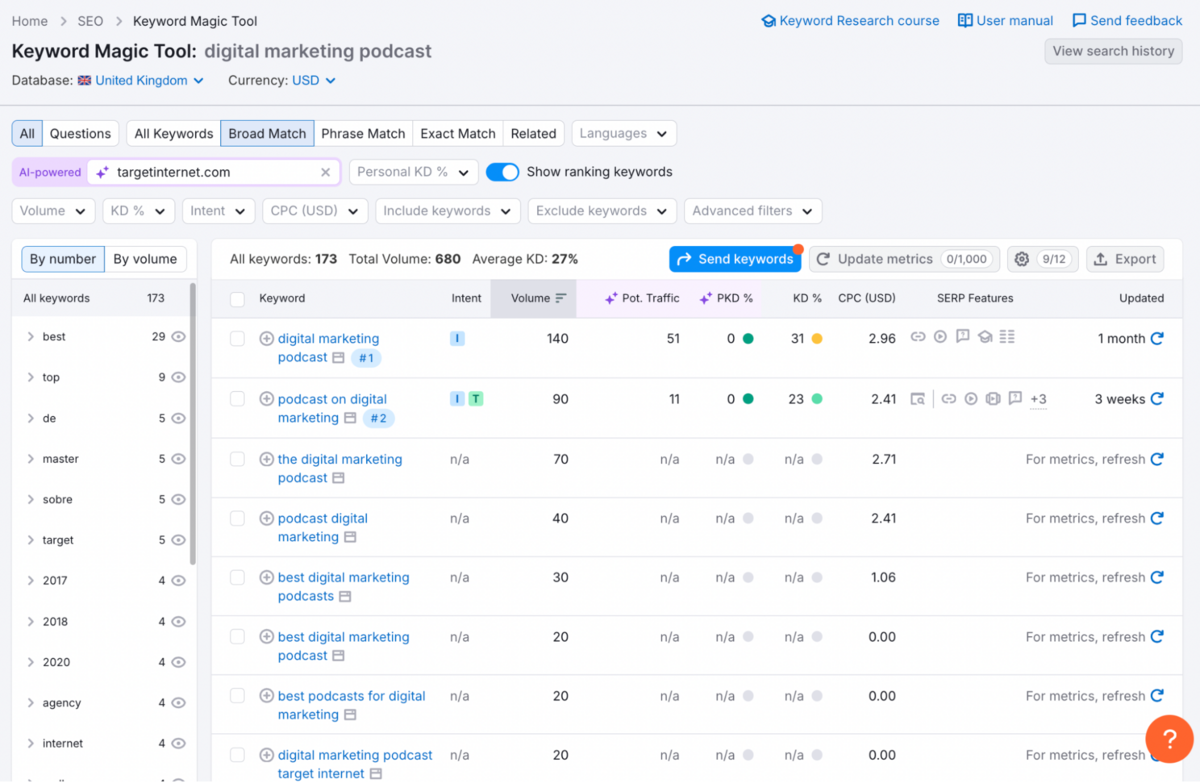
From there, you can slice the data by Volume, Keyword Difficulty, CPC, Intent, or SERP Features (including a questions-only view), which makes it very straightforward to spot content gaps or high-impact opportunities across both SEO and PPC.
You can also organise keyword lists by project or website, and quickly see which SERP features appear for each term that you add – whether that's standard blue links, videos, featured snippets, or other rich results. In practice, this takes a lot of the guesswork out of deciding which content format to prioritise for a given query. While you get a broad, instant overview of all the main metrics, Semrush also lets you manually refresh specific keywords using the Update Metrics feature (within the limits of your plan). On the Guru tier, for instance, you can update up to 1,000 keywords to pull in fresher, near-real-time data. In our experience, Semrush's Keyword Magic Tool is definitely the #1 keyword research tool out there.
It's not only the depth, breadth, and quality of the data that stand out, but also how approachable it feels thanks to an intuitive, clean UI that doesn't take long to get comfortable with.
3. Keyword Strategy Builder
The Keyword Strategy Builder offers three powerful workflows that together streamline your entire SEO content planning process.
It begins with the Seed Keyword workflow, where you can enter up to five core terms that define your business focus or topical themes. From there, Semrush expands these seeds into structured clusters, providing a clear roadmap for both content creation and keyword targeting. What stands out here is how the tool organises your keywords. For lists generated from seed inputs, Keyword Strategy Builder automatically groups related terms into topics and sub-clusters, saving you time so you can focus on strategy.
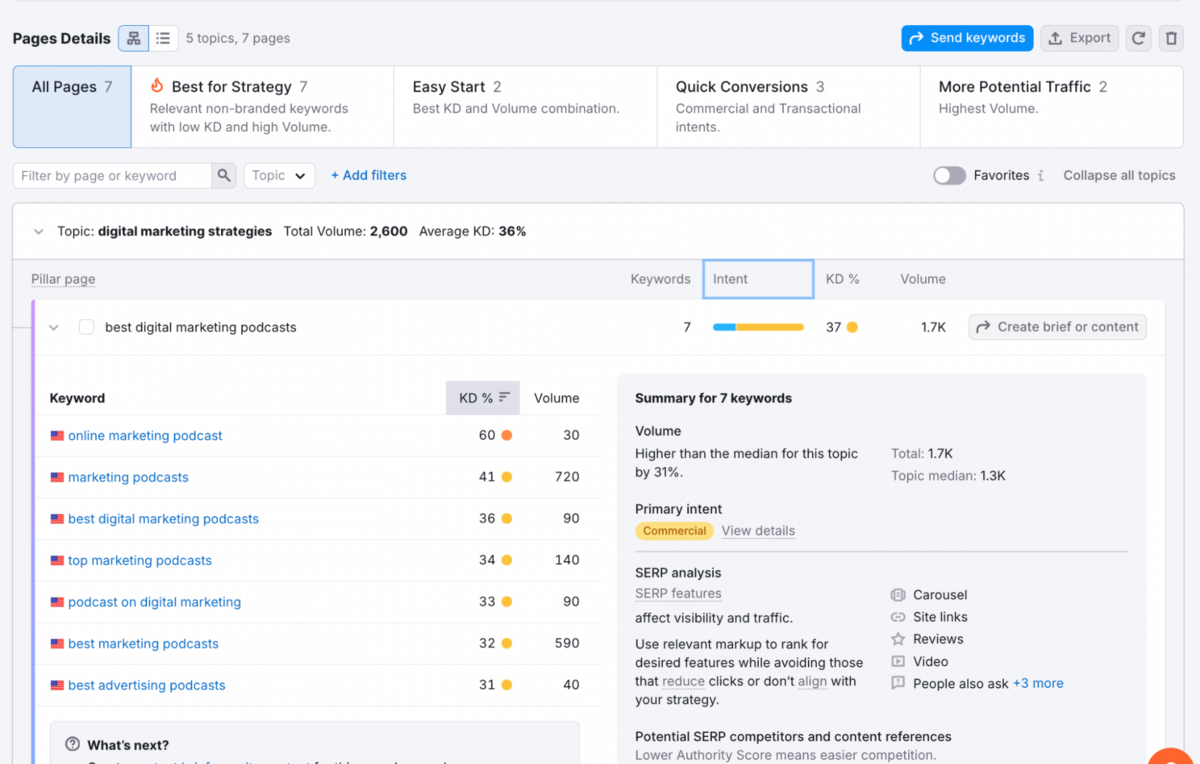
It also identifies which pages should act as pillar content for broader themes, and which should sit underneath as supporting subpages.
The tool then prioritises pages based on relevance to your seed terms, along with key metrics including search volume, keyword difficulty, domain diversity, and SERP features. In practice, this helps you understand not just what to write, but how to structure your website around those topics for maximum visibility.
All of this is, of course, supported by multiple real data points. We remember the days when briefs would come in from 'an SEO guy,' which really didn't make any sense because they would usually be assumptions based on simple keyword research. The Keyword Strategy Builder really takes this process up to a whole other level.
The second workflow, Domain-Based, is one of the newest and most impactful features.
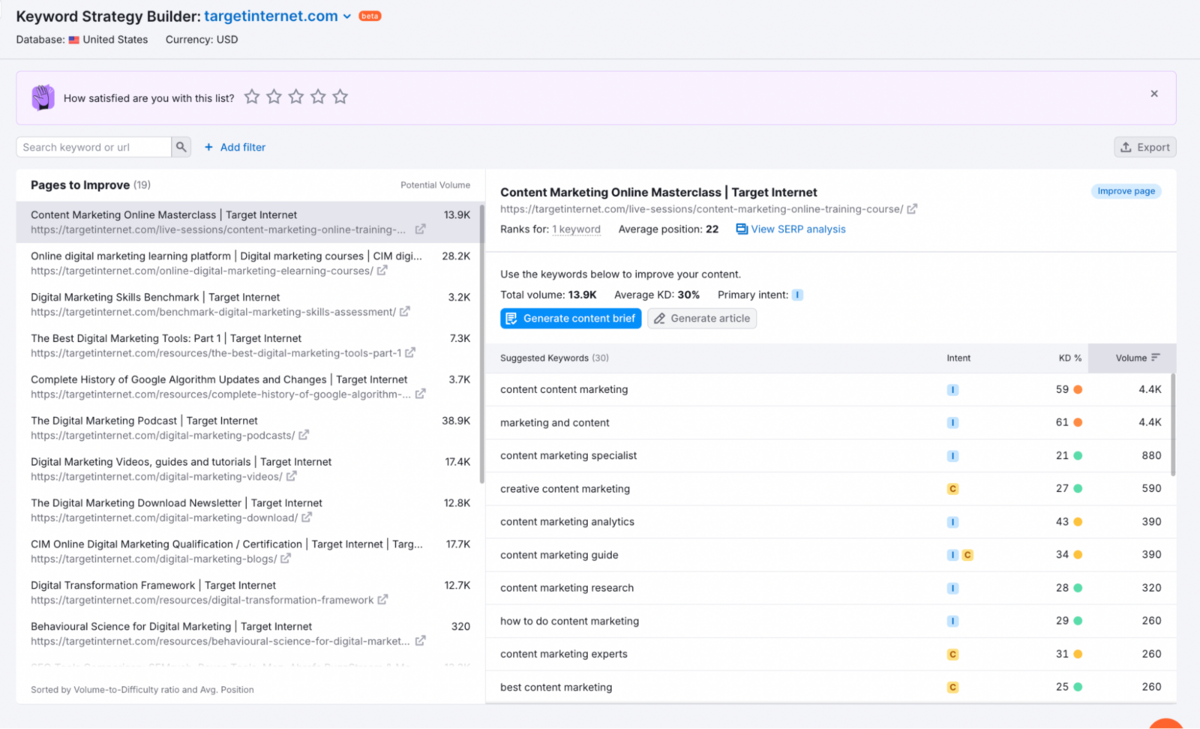
Instead of building from scratch, it analyses your existing website and pinpoints pages that can unlock immediate traffic gains.
It highlights what pages to improve, the keywords they currently rank for, fresh keyword opportunities to add, estimated traffic potential, KD%, and SERP behaviour. For audits, refresh projects, and "quick win" content updates, this feature becomes invaluable because it shows exactly where SEO improvements will have the highest return. Generating a Domain-based report is a BETA feature, and can take anywhere from a few minutes up to 10 hours to generate, based on the size of your domain.
The third workflow is fully Manual, allowing you to upload or paste in keywords gathered from anywhere - Search Console, Competitor Analysis, other tools, etc. - and Semrush will automatically cluster them, prioritise them, and suggest how they should be structured across pages.
It's helpful if you already have a keyword list and just need the tool to organise it into topics and potential pages. But the limitation is that Semrush assumes every keyword you upload is important - even ones with zero search volume. It will still recommend adding them to your content, which means that you will still need to double-check your keywords' volume carefully.
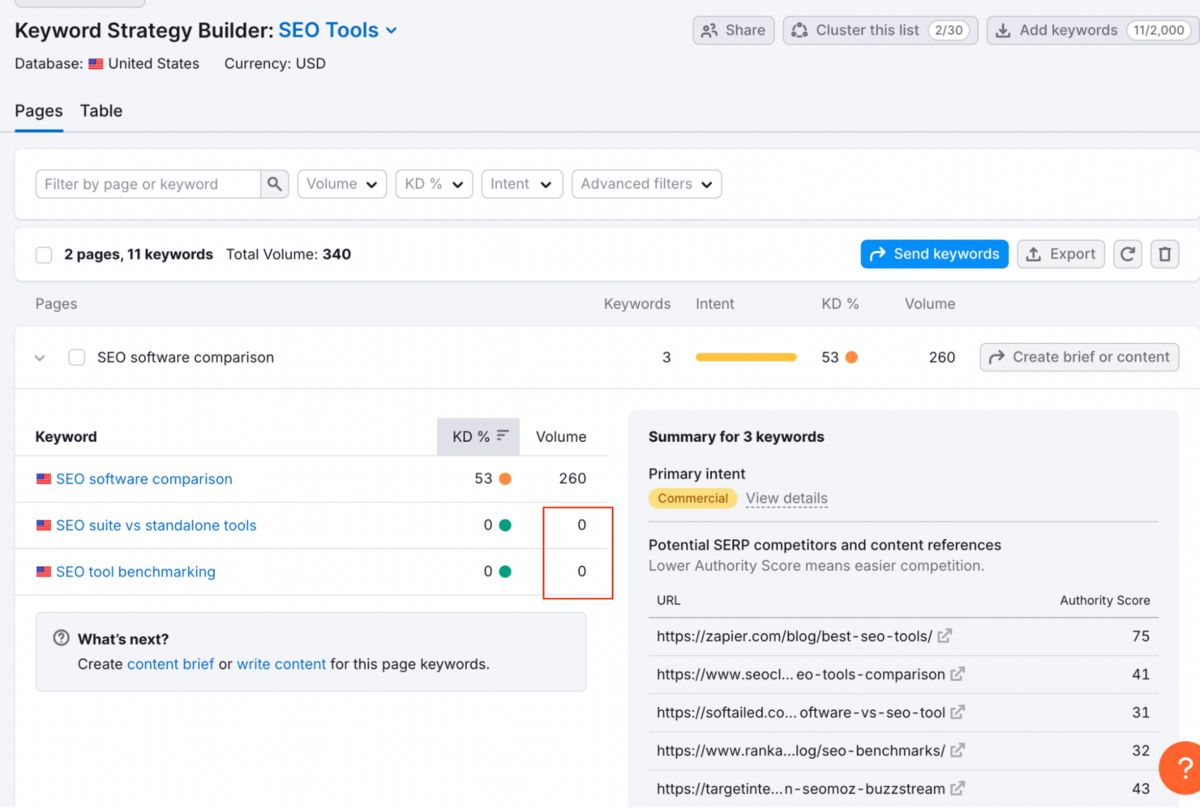
In most cases, the smarter next step is to return to proper keyword research or look for Semrush's suggested alternatives, because right now the tool doesn't always fill in those gaps or offer similar, more viable keyword options. So while the manual workflow is useful, it definitely requires more judgment and cleanup compared to the other two.
NOTE: All three workflows connect seamlessly into Semrush's SEO Content Briefs, allowing you to turn any topic, cluster, or page suggestion into a brief with structure, competitor insights, and keyword recommendations. However, Content Briefs and related features (like outline generation) require an additional $60/month add-on. For teams producing content at scale - or anyone wanting to remove the guesswork from briefing writers - this upgrade becomes an extremely valuable extension of the Strategy Builder.
4. Position Tracking
This tool does exactly what it says - it tracks your website's position.
It makes it straightforward to identify which keywords are improving, which require attention, and where competitors may be encroaching on your territory - particularly useful when you're planning weekly SEO priorities.
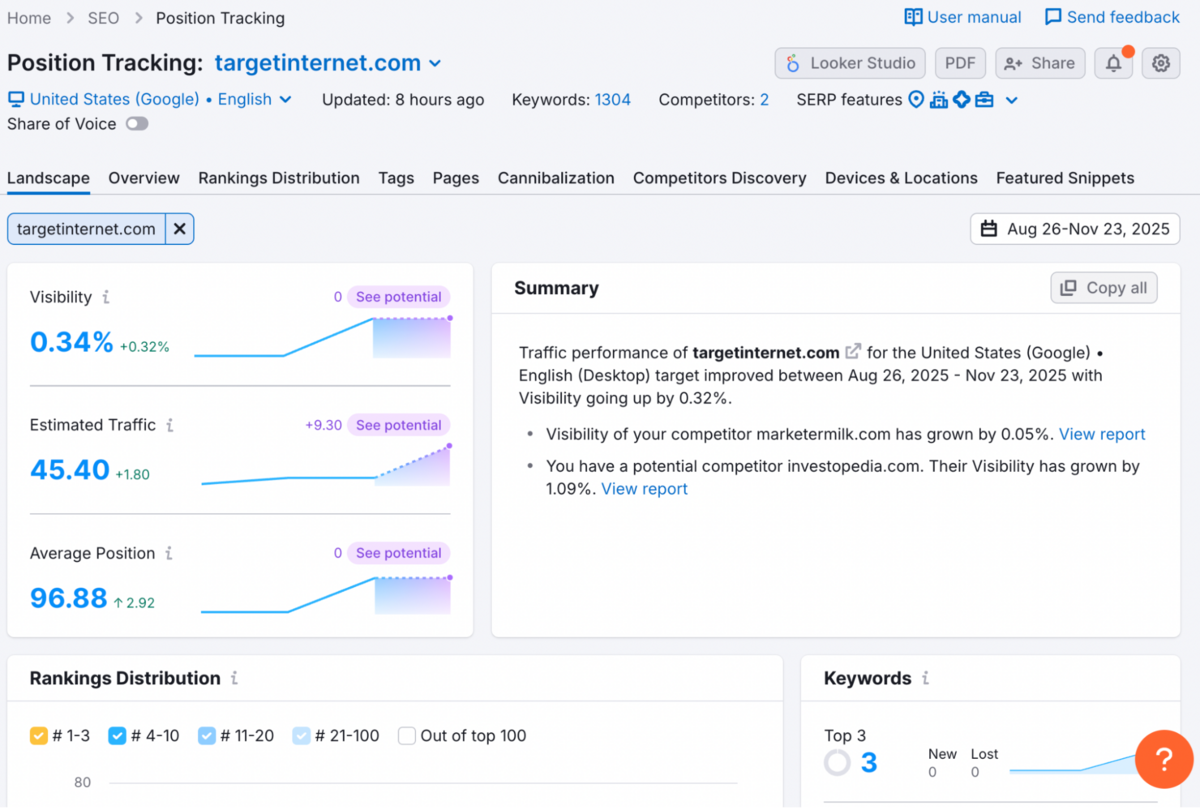
You can segment performance by device type, location, SERP features, and cannibalisation issues, whilst also tracking newer AI-search metrics such as brand mentions appearing across LLM responses.
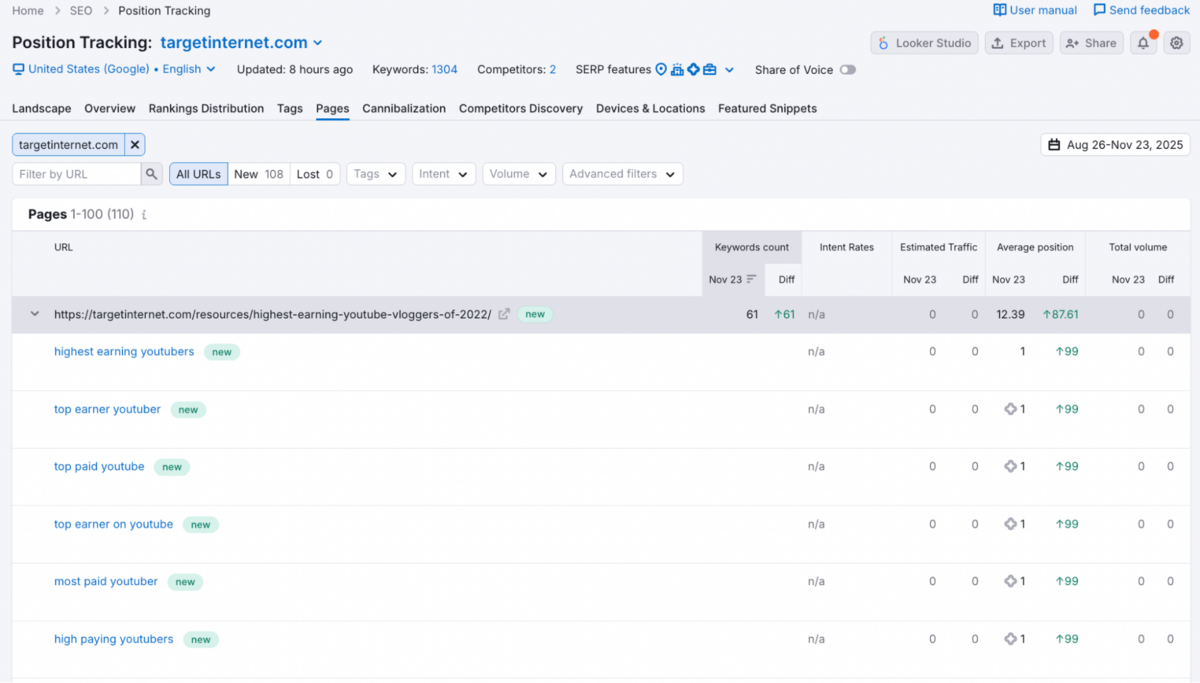
The Business plan also grants access to Share of Voice metrics, allowing you to view the traffic percentage your domain captures relative to competitors - a helpful addition for understanding your overall market visibility rather than just isolated keyword positions.
5. Organic Traffic Insights
The Organic Traffic Insights tool is one of Semrush's most practical features, bringing together data from Google Analytics, Search Console, and Semrush into a single, coherent view.
It reveals which landing pages are attracting organic traffic, the keywords driving that traffic (including many that GA hides as "not provided"), and where performance is improving or declining across users, sessions, and conversions.
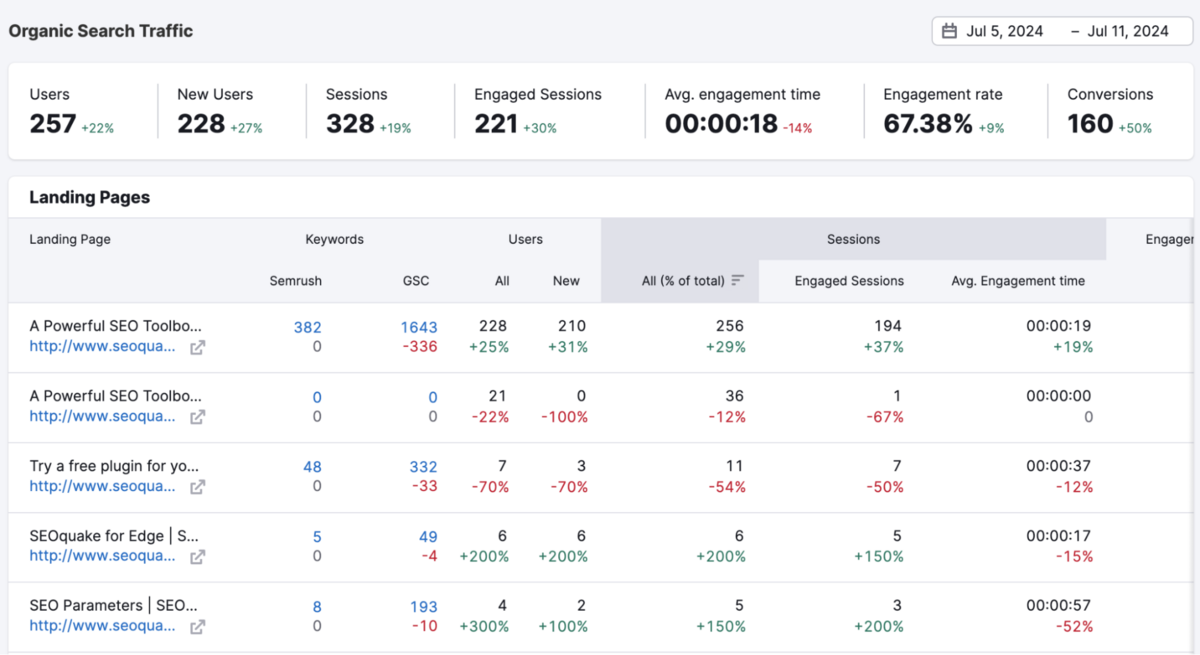
This makes it considerably easier to identify pages requiring optimisation, spot mismatches such as strong rankings paired with poor engagement, and add promising keywords directly into Position Tracking for ongoing monitoring.
Link Building
No SEO tool is complete without a Link Building Suite. Semrush's Link Building Tool is one of the strongest integrated workflows we've seen for discovering, managing, and executing backlink campaigns in a single place.
1. Backlink Analytics
The Backlink Analytics tool is one of Semrush's strongest features, and frankly, it's a major reason many people even buy Semrush.
It doesn't simply show you a backlink count - it reveals the reality behind a site's authority. You get a clear, intuitive overview of who's linking to you, the quality of those domains, which anchors they're using, and whether your link profile appears healthy or risks looking over-optimised. The Overview section alone is excellent for quick competitor benchmarking, but visualisations like the Network Graph and Link-type breakdowns take it further by making patterns and risks visually obvious - something most tools bury in endless tables.
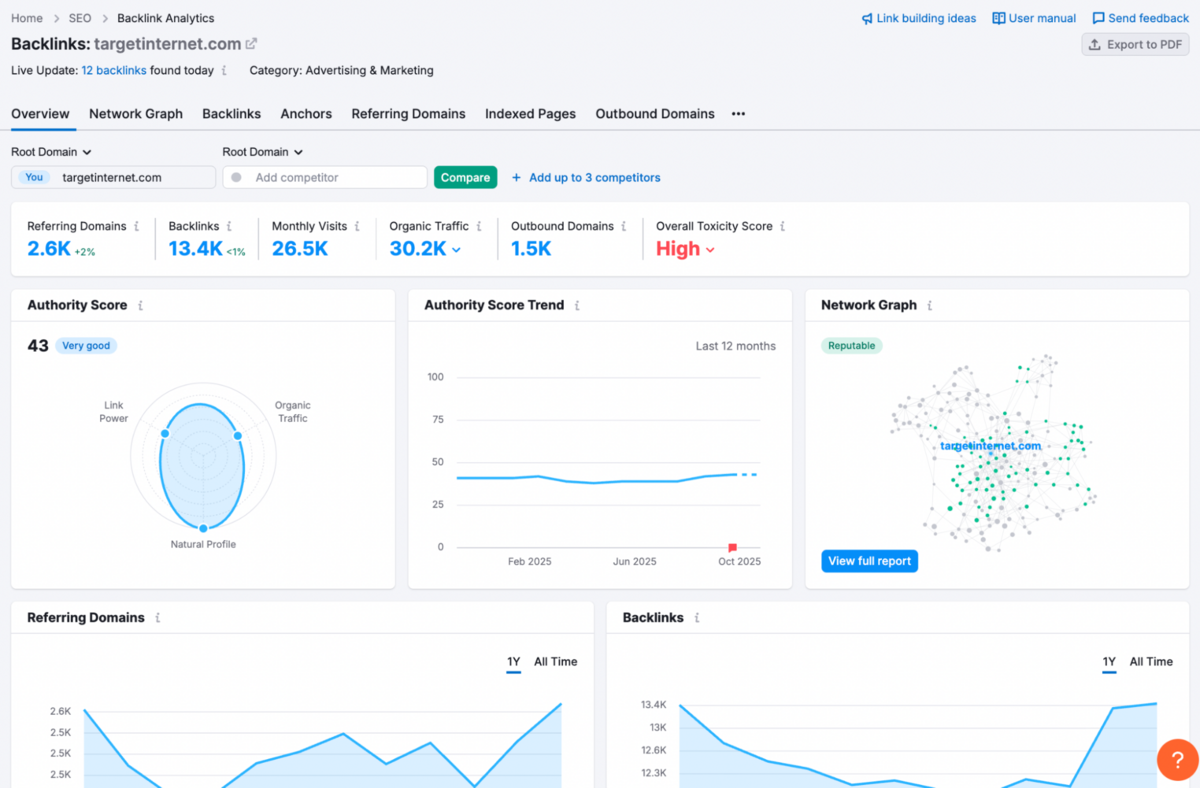
The depth here is genuinely impressive: authority scores, anchor distribution, domain types, link categories, and historical trends - it's all detailed enough for serious SEO work without getting into noise where you can't make any sense.
The tool particularly excels when used for competitive analysis, revealing precisely where rivals are earning high-value links and where your own gaps lie. You can examine referring domains in detail, assess the quality of linking pages through Authority Scores, and track how your backlink profile has evolved over time.
There are trade-offs worth noting. The volume of reports can feel overwhelming initially, particularly if you're new to enterprise-grade backlink analysis, and some specialists still prefer Ahrefs for certain niche backlink metrics. Access to this tool also sits behind Semrush's higher-tier plans, which can feel expensive for freelancers or smaller teams managing single domains.
Overall, though, if you're serious about understanding link equity, mapping competitor strategies, or identifying high-value link opportunities, this is one of the most insightful backlink analysis tools available - providing the foundation you need before moving into active link building or cleaning up.
2. Backlink Audit
The Backlink Audit tool is where Semrush moves beyond reporting and actually helps you fix your backlink profile.
Instead of simply listing potentially toxic links, it evaluates every backlink across 50+ markers and assigns an AI-driven Toxicity Score that immediately tells you which links might be harming your rankings. The workflow is genuinely useful: suspicious links land in a "For Review" bucket, safe ones can be whitelisted, and anything harmful can be added to a disavow file directly within Semrush - no messy spreadsheets or manual sorting required.
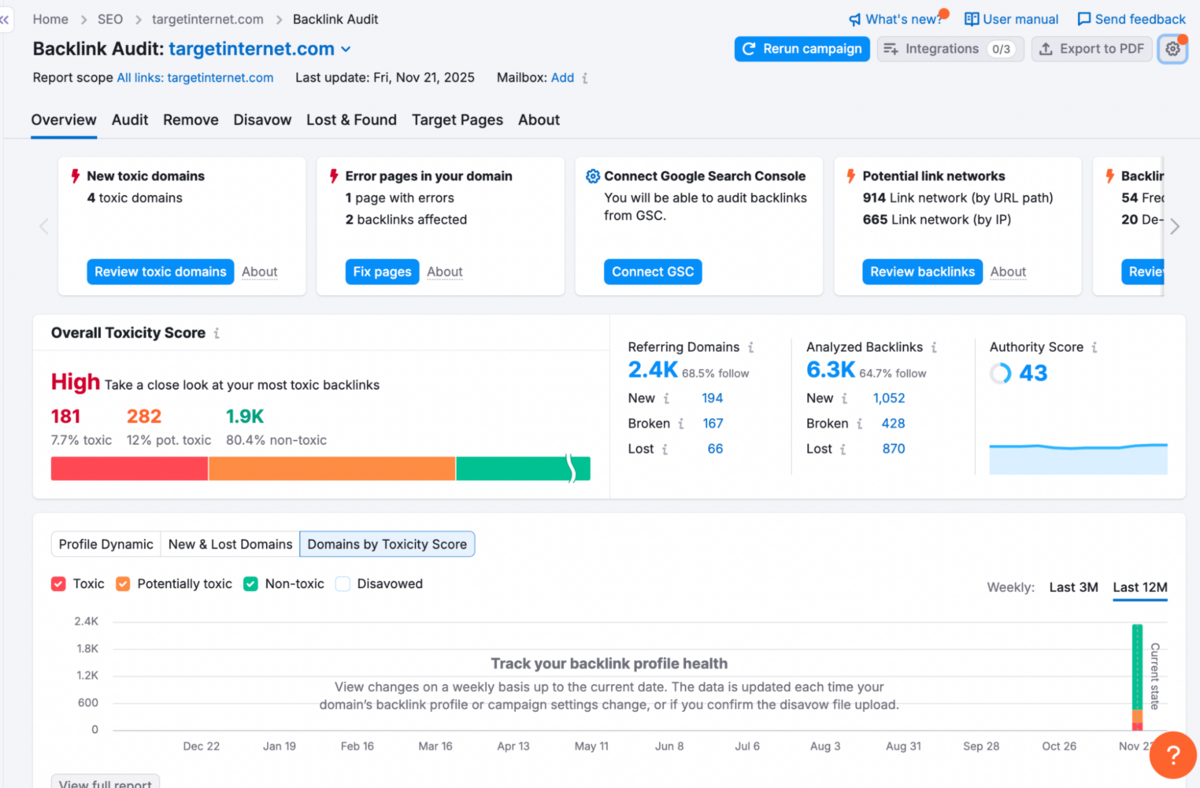
What makes this particularly powerful is the built-in outreach system and the direct integration with Google's Disavow Tool, which turns a tedious clean-up process into something structured and manageable. It's really impressive how easy it is to remove and disavow harmful links, with Semrush improving site health by quickly lowering the toxicity score after cleanup.
The tool also pulls data from Google Search Console, Google Analytics, and even Majestic (up to 10 backlinks per referring domain), giving you a broader view of your link profile than Semrush alone could provide. You also get "Lost & Found" reports that track new, lost, and regained backlinks, making it easier to spot patterns or spam attacks early before they cause significant damage.
3. Link Building Tool
The Link Building tool serves as the central workspace for managing outreach and link acquisition workflows.
What we appreciate here is that it transforms the insights from Backlink Analytics and Backlink Audit into actionable campaigns.
The tool streamlines the entire process: it identifies link prospects based on your keywords, competitor backlinks, and brand mentions, then helps you manage outreach communications through different stages (contacted, follow-up needed, link confirmed) in a CRM-style approach. Once backlinks are secured, the Monitor section tracks their status over time and alerts you if any links are lost or broken, allowing you to take timely action.
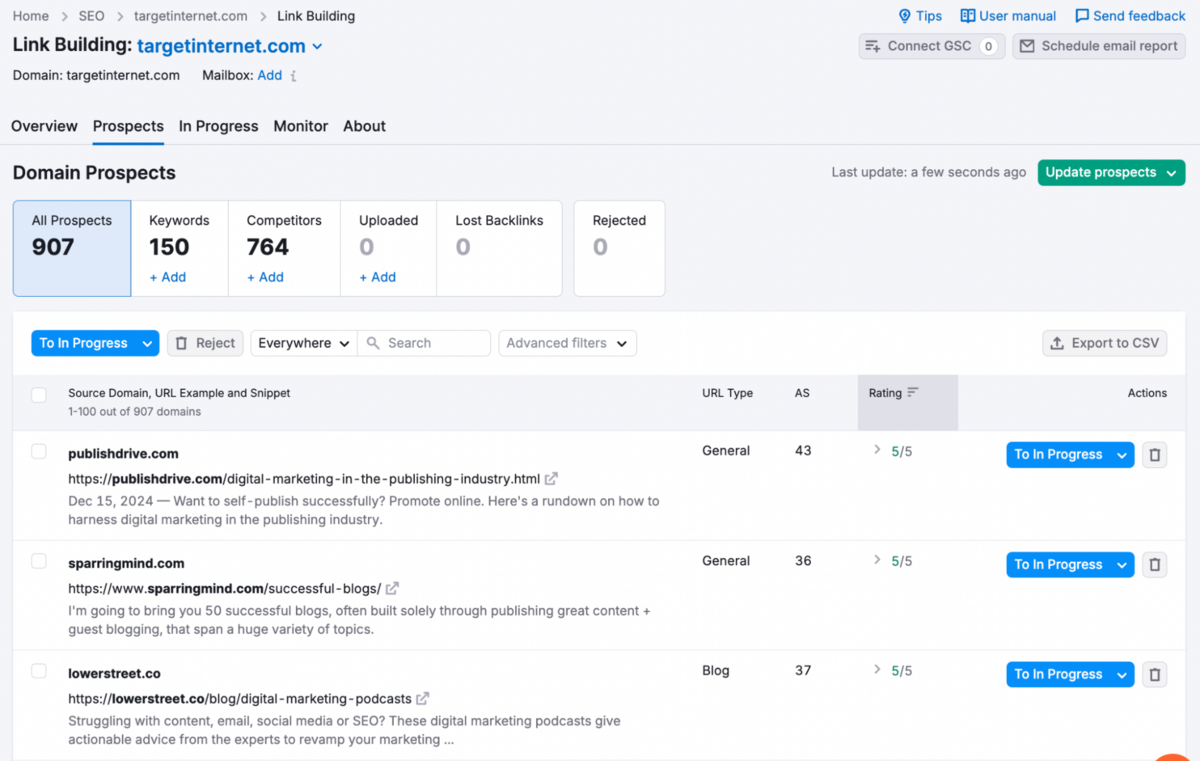
Essentially, it connects research to execution in a way that keeps link-building organised rather than scattered across spreadsheets and email threads. This easily makes Semrush the #1 contender in link building tools.
4. Bulk Analysis
The Bulk Backlink Analysis tool allows you to analyse up to 200 URLs or domains simultaneously, providing a comprehensive overview of backlink metrics across multiple sites in one batch.
It's particularly useful for large-scale competitive research or link prospecting, showing data such as backlink counts, referring domains, authority scores, and link types for all entered URLs at once.
On Page & Tech SEO
On Page & Technical SEO has 3 sub-tools: Site Audit, On Page SEO Checker, and Log File Analyser.
1. Site Audit
The Site Audit tool performs over 140 technical and on-page SEO checks, scanning your site for issues such as broken links, duplicate content, crawlability errors, HTTPS implementation, and hreflang usage (hreflang is an HTML attribute used for international SEO to tell search engines which language and regional version of a page to show to users in different locations). It provides an overall SEO Health Score with prioritised recommendations, and you can crawl by domain, subdomain, or folder across both mobile and desktop versions - accommodating up to 20,000 pages or more depending on your subscription tier.
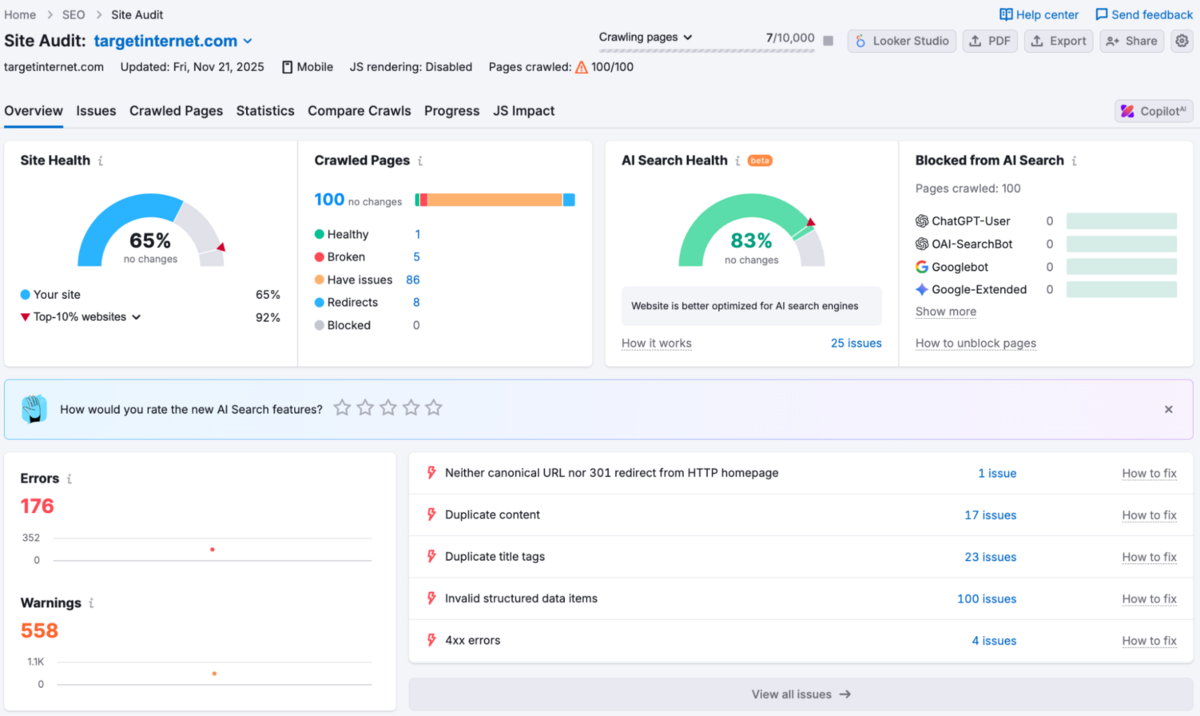
What sets this apart are the thematic reports that focus on specific problem areas: Crawlability, HTTPS Implementation, International SEO, Internal Linking, and Structured Data Markups.
The Core Web Vitals and Performance reports are particularly valuable here, breaking down metrics like Largest Contentful Paint, Cumulative Layout Shift, and Total Blocking Time into clear "good," "needs improvement," and "poor" categories.
This makes it considerably easier to prioritise fixes that actually impact user experience and Google's page experience standards, rather than wading through generic lists of technical debt. The reports track progress over time, which is helpful for demonstrating improvements to stakeholders or simply ensuring your fixes are sticking.
2. On Page SEO Checker
The On Page SEO Checker is one of those tools that feels genuinely practical rather than just another data dump. It analyses your landing pages against top-ranking competitors and generates a structured list of optimisation ideas tailored to your specific content - covering everything from keyword usage and semantic keywords to backlinks, technical issues, user experience improvements, and SERP feature opportunities.
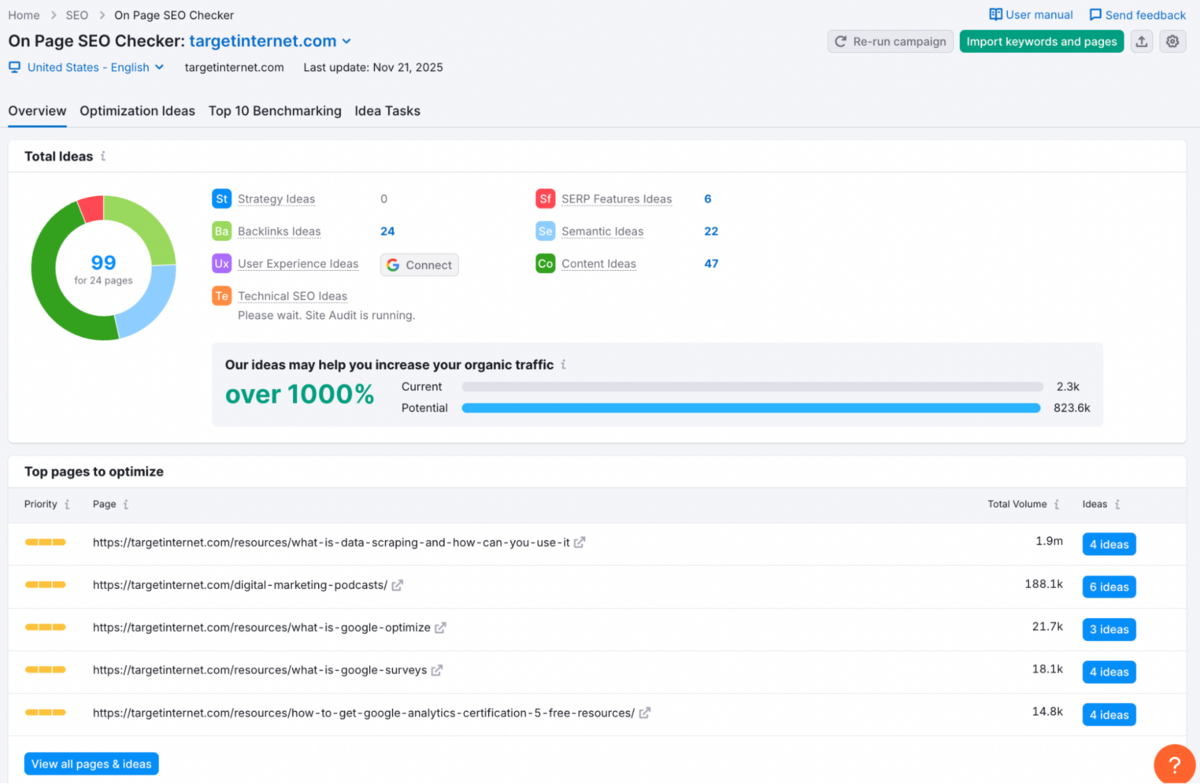
What's particularly valuable here is the prioritisation. Each recommendation is ranked by potential impact and comes with a clear explanation of what needs fixing and why it matters for rankings. This stops you from wasting time on low-impact tweaks and helps you focus on changes that will actually shift performance. This is very valuable for optimising content and even getting ideas for featured snippets and rich results. The tool integrates data from Google Analytics, Google Search Console, and Semrush's Site Audit to deliver personalised, data-driven insights rather than generic best practices that may or may not apply to your situation.
The Idea Tasks reports track your progress over time, showing trends in applied optimisations and estimated organic traffic gains - helpful for demonstrating ROI or simply confirming that your efforts are translating into measurable results. It's worth noting, though, that you'll still need to apply editorial judgement rather than implementing every suggestion blindly.
3. Log File Analyser
If you're not particularly technical or your site has fewer than a few thousand pages, you can probably skip this section - log file analysis is genuinely niche territory and won't be relevant for most everyday SEO work.
That said, the Log File Analyser is a specialist tool designed for teams that want server-level insight into how Googlebot actually interacts with their website. Unlike regular site audits, which simulate a crawl, log file analysis uses real data from your server's access logs, giving you an unfiltered view of crawl behaviour and technical issues that search engines encounter in practice.
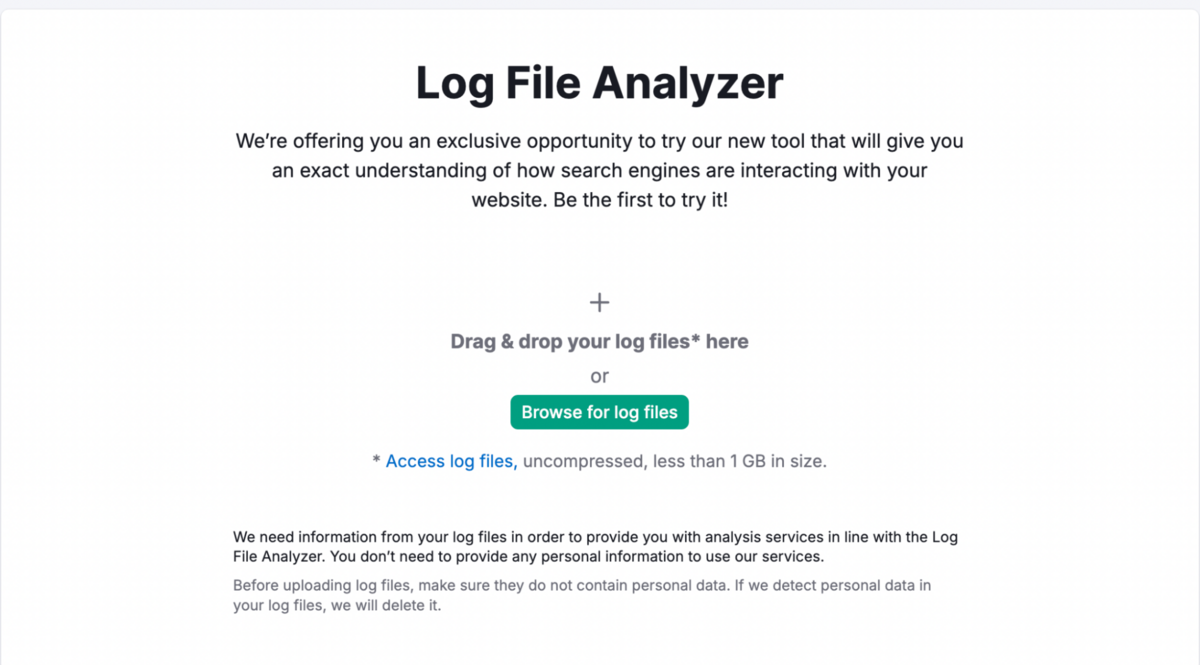
It's particularly useful for medium-to-large websites, enterprise SEO teams, and publishers where crawl budget and indexing efficiency can materially impact performance. By uploading your server's log files, the tool reveals exactly which pages Google is crawling most often (and which it's ignoring entirely), whether bots are wasting crawl budget on irrelevant URLs, what errors they're hitting, and whether your most valuable pages are being discovered and revisited. This makes it ideal for spotting problems typical SEO tools miss - such as orphan pages getting crawled, broken redirects that only bots see, or pages that rarely get crawled and consequently struggle to rank.
Content Ideas
SEO Writing Assistant
This is one of our most favourite features in Semrush.
SEO Writing Assistant gives you real-time feedback on your content's readability, originality, tone of voice & SEO (keyword usage).
You can simply give it a list of 30 target keywords, and it will tell you exactly what you're missing in your content. The recommendations range from whether your content is too hard to read, whether you're not using enough links in your content, whether your paragraphs are long, what seed & clustered keywords you're missing, whether your content is plagiarised, whether there is no consistency in your tone of voice, and most importantly, whether you're following basic rules like keeping medium-sized titles and word counts.
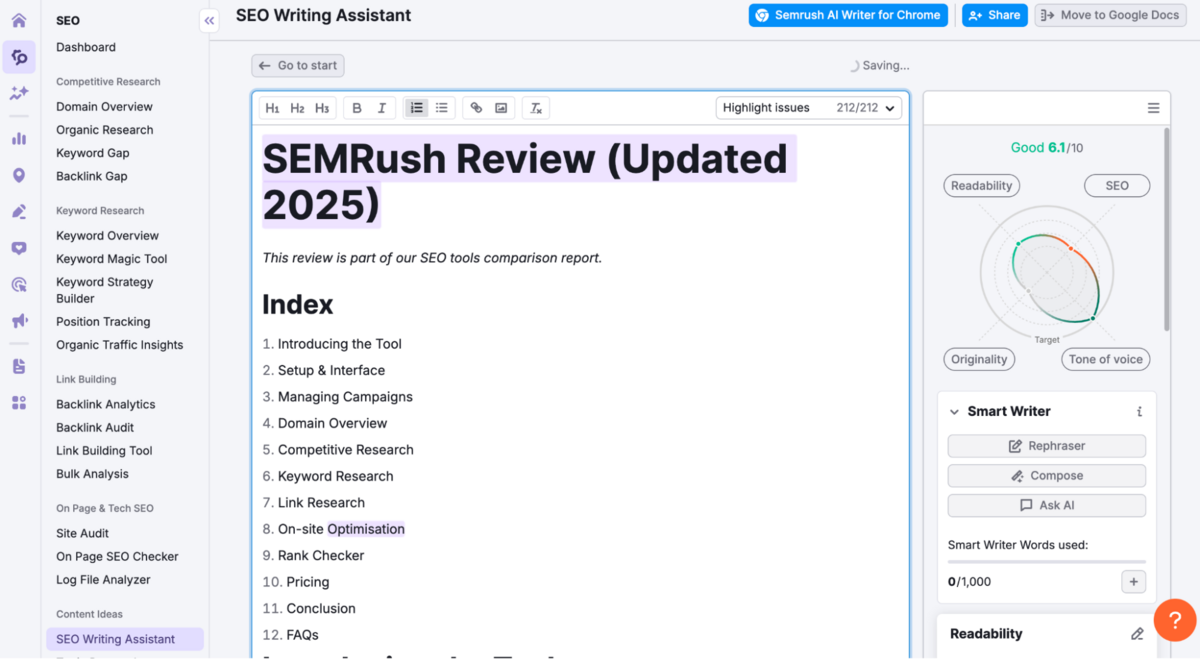
Honestly, it removes a lot of the guesswork and gives you a total score on each of the above metrics. You can fine-tune the content then in real time until you get an improved score, and feel more confident about what you're going to publish.
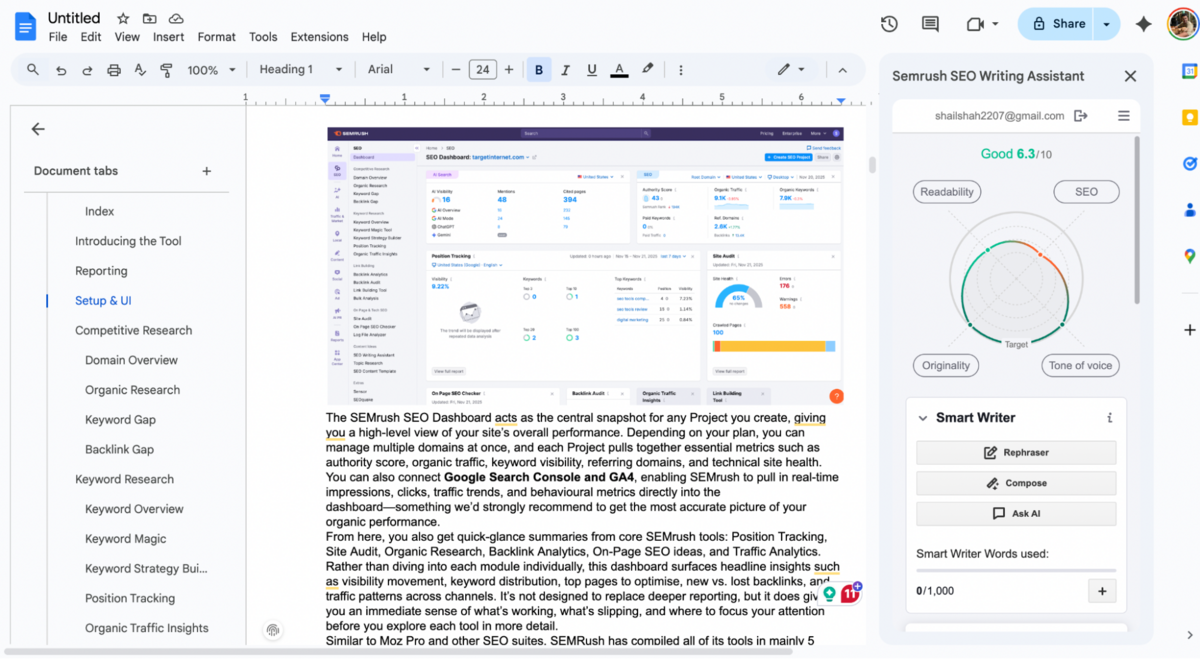
What's also cool is that Semrush lets you use this exact tool on your own Google Docs via a Chrome plugin, so you can write your content naturally on Google Docs and get real-time feedback.
SEO Content Template
This is another tool within the 'Content Ideas' section.
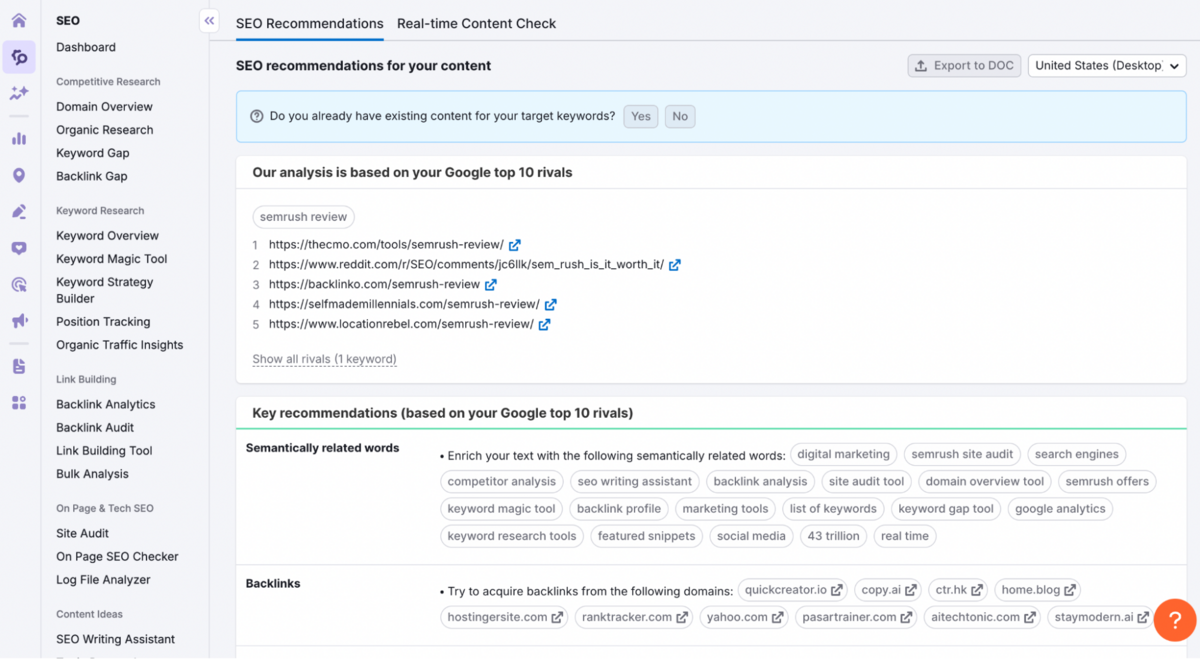
Here, you can simply add a target keyword, and Semrush will run a content analysis - giving you the top Semantically Related Keywords you can include in your content, align with whom you should reach out to for Backlinks, and what your recommended word count should aim for if you want to rank higher than your competition.
There's a more robust version of this tool in Semrush called the SEO Brief Generator, but that's only available as an add-on for $60/mo.
What it does is automatically research keywords and analyse what's ranking on Google for you. It looks at your top competitors and tells you exactly which keywords to use, what title & subtitles to write, and how to structure your article. Instead of doing hours of research yourself, it pulls real-time data from Semrush to create a complete content brief. It even factors in local search trends if you're targeting a specific location, so your content has a better shot at ranking high.
Topic Research
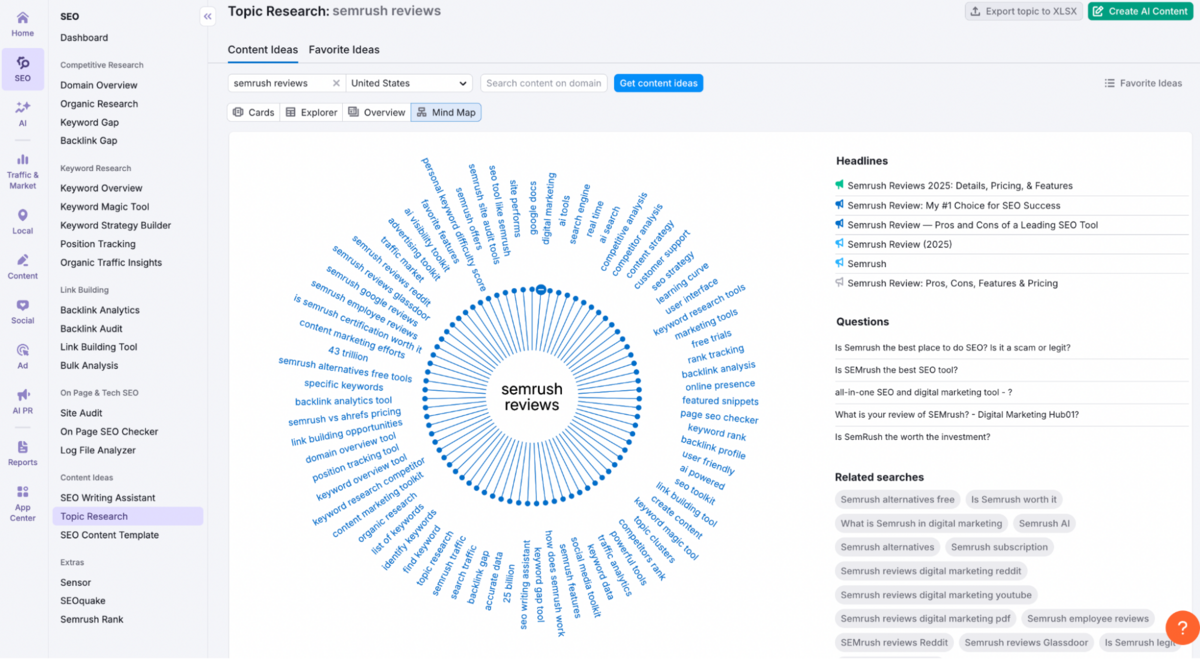
Topic Research is another sub-tool in 'Content Ideas' that lets you discover fresh, relevant, and engaging content ideas based on popular and trending topics in your niche. It identifies trending subtopics, related questions, and popular headlines - providing SEO-friendly topic suggestions tailored to your target audiences' interests and search behaviours.
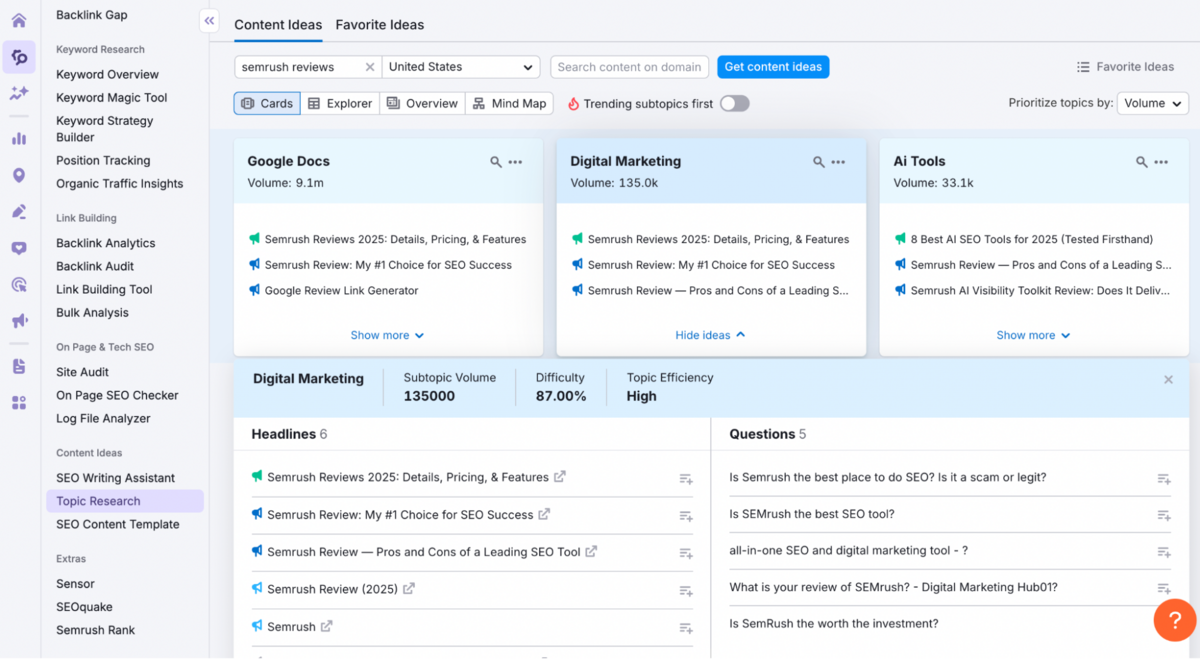
If you've used answerthepublic.com before, you'll find the UI very familiar.
Pricing & Value Considerations
Before getting into the numbers, it's worth being clear about how Semrush approaches pricing - because it doesn't behave like a typical single-function SEO tool.
Semrush is priced as an all-in-one platform, and that becomes obvious once you start using it day-to-day. Keyword research, competitor analysis, site audits, backlink tracking, content optimisation, reporting, and now AI visibility are all tightly connected, sharing the same data layer and projects.
That said, Semrush is definitely expensive at face value.
Even the entry-level plans sit above $150/month, which can be hard to justify if you're a freelancer doing occasional audits or a small business managing SEO part-time. The pricing makes the most sense when the platform is used continuously - daily tracking, ongoing competitor monitoring, regular audits, and reporting, rather than for ad-hoc research. It's also important to understand that not everything is included upfront. Some advanced capabilities, such as content marketing workflows or deeper trend analysis, sit behind optional add-ons. In practice, though, many users don't need these immediately.
Most teams start with the core SEO and visibility features, then layer on additional tools only when their workflow demands it.
Where Semrush does justify its cost is in scale and efficiency. Monitoring multiple websites, tracking thousands of keywords daily, analysing competitors across markets, and pulling everything into one reporting environment saves a meaningful amount of time once projects grow beyond a certain size. For agencies and in-house teams managing multiple properties, that efficiency often outweighs the higher subscription fee.
The Starter plan begins at $199 a month, going all the way to $549 per month in the Advanced plan.
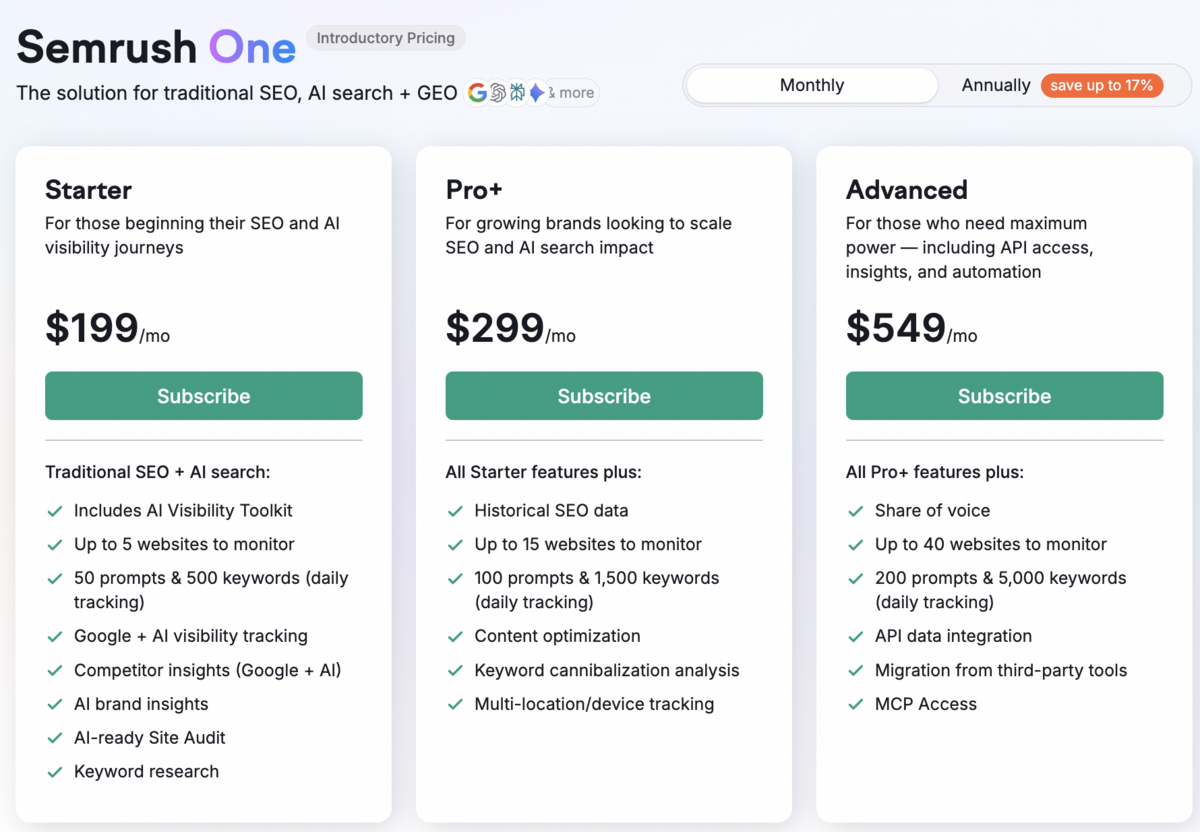
You can find more detailed information on Semrush's pricing tiers and associated features from this link.
Conclusion
After comparing all major platforms in our 2026 SEO Tools Comparison Report, Semrush clearly ranks #1 overall.
What sets it apart is not just the depth of its keyword and backlink research, but how seamlessly that data feeds into real, usable workflows. Semrush is built as a connected system rather than a collection of standalone tools.
Keywords, site audits, backlinks, content planning, and tracking all live inside a single ecosystem. As you move through the platform, you're consistently guided toward what needs attention and where effort will deliver the highest impact. This directional clarity removes a significant amount of uncertainty from SEO - especially when compared to tools that surface large volumes of data without helping teams prioritise or act on it.
That same clarity carries through to content planning. Semrush's content briefs are fast to generate, practical to work from, and designed to bridge the gap between research and execution. Teams spend less time interpreting data and more time publishing with confidence. For lean teams in particular, this reduction in guesswork makes a tangible difference.
On the operational side, Semrush surfaces priorities cleanly across the board - from crawl and server issues to keyword gaps, backlink gaps, and optimisation tasks - without overwhelming you. Even with its breadth, the platform remains approachable. You don't need a technical background to understand what's happening or what your next move should be.
Taken together, Semrush offers the strongest combination of depth, guidance, and day-to-day usability. It provides clear direction, cohesive workflows, and dependable support across the entire SEO process. As of 2026, it stands as the most complete SEO platform available.
Go back to the SEO tools comparison report.
Frequently Asked Questions (FAQs)
1. What Does Semrush Do?
Semrush is an AI-powered digital marketing platform that helps businesses improve online visibility through tools for SEO, content creation, social media, advertising, and competitive analysis. Key features include keyword research, site audits, backlink analysis, traffic benchmarking, and AI-driven insights for rankings and market trends.
2. How to Cancel Semrush Subscription?
Log into your Semrush account, navigate to Subscription Info in the top-right corner, and click "Active" next to your upcoming payment to access the cancellation form. Submit the form with details like your linked email, last four digits of your credit card, card type, last payment date, and amount.
3. How Much Is Semrush?
Semrush offers tiered plans: Starter plan at $199 monthly, Pro+ plan at $299 monthly, and Advanced plan at $549 monthly.
4. How to use Semrush?
Add your website to launch the SEO Dashboard for monitoring, revealing prioritised fixes in strategy, content, UX, technical, and backlinks. Use Keyword Magic Tool for research, Organic Research and Keyword Gap for competitor insights, then optimise with SEO Writing Assistant and Site Audit.