By Daniel Rowles, lead trainer at Target Internet and author of Digital Branding (Kogan Page). Last updated: November 2026.
Data scraping, also called web scraping, is the automated collection of information from websites into a structured format such as a spreadsheet. Marketers use data scraping to track competitor prices and content, research markets, build product feeds and audit websites, using tools that range from free spreadsheet formulas to AI assistants.
This guide explains what data scraping is used for in marketing, how to scrape data without writing code, which tools to consider, how AI is changing scraping, and where the legal and ethical lines sit. It is written for marketers who want practical techniques rather than a programming tutorial.
Prefer video? Watch our short introduction to data scraping.
What is data scraping used for in marketing?
Data scraping is used in marketing wherever useful information is published on websites but not available in a convenient format. Instead of copying and pasting by hand, a scraper reads the page and pulls the parts you need into rows and columns you can sort, compare and chart.
The most common marketing uses are:
- Competitor research: tracking prices, product ranges, offers and content on competitor sites.
- Market and audience research: gathering reviews, forum discussions or directory listings to understand what customers care about.
- SEO audits: extracting page titles, headings, meta descriptions and links across a site.
- Product feeds: pulling product data from an ecommerce site into a feed for Google Merchant Center or other channels.
- Content research: collecting headlines and topics from publications in your sector to spot gaps.
Competitor research is where we use scraping most at Target Internet. We pull the course titles, topics and prices that other digital marketing training providers list on their websites into a spreadsheet, so we can compare how the market is positioning itself and spot topics we are not yet covering. Done by hand that would take hours; with a simple scraper it takes minutes and can be refreshed whenever we need it.
The common thread is turning web pages into data you can analyse. If that analysis is the part you want to strengthen, our analytics and data resources cover how to turn raw data into decisions.
How to scrape data from a website without code
You can scrape data from a website without code using Google Sheets formulas, Excel's Power Query or a browser extension. These methods suit small, regular jobs such as tracking a competitor's price list or pulling a table from a public page, and they are free or nearly free.
Scraping with Google Sheets
Google Sheets has two built-in functions for scraping. IMPORTHTML pulls a table or list from a web page, and IMPORTXML pulls any element you can describe with an XPath query, such as every heading or link on a page. According to Google's documentation, IMPORTXML takes a URL including the https:// protocol and an XPath expression that selects the data to extract.
- Open a new Google Sheet and click into cell A1.
- To pull a table, type the IMPORTHTML formula below with the page URL and the number of the table on the page.
- To pull specific elements, use IMPORTXML with an XPath query, for example "//h2" for every second-level heading.
- Press Enter and wait a few seconds for the data to load into the sheet.
- Copy the results and use Paste special, values only, if you want a fixed snapshot rather than a live connection.
Copy-and-paste formulas: =IMPORTHTML("[page URL]", "table", [table number]) pulls a table, and =IMPORTXML("[page URL]", "//h2") pulls every h2 heading. Swap "//h2" for "//title" to get the page title, or "//a/@href" to get every link.
These functions only read what is in the page's HTML when it loads. Many modern sites build their content with JavaScript after the page loads, and Google Sheets cannot see that content, which is the most common reason a formula returns an error.
Scraping with Excel Power Query
Excel's Power Query is the best option if you work in Excel and want a refreshable connection to a web table. Go to the Data tab, choose Get Data, then From Other Sources and From Web, and paste the page URL. Excel shows the tables it detects on the page, and you can select one, clean it in the Power Query Editor, then load it into your worksheet.
Right-click the loaded table and open Query Properties to set it to refresh every few minutes or each time the file opens. Like Google Sheets, Power Query works best on simple pages with clear HTML tables.
Which data scraping tools should marketers use?
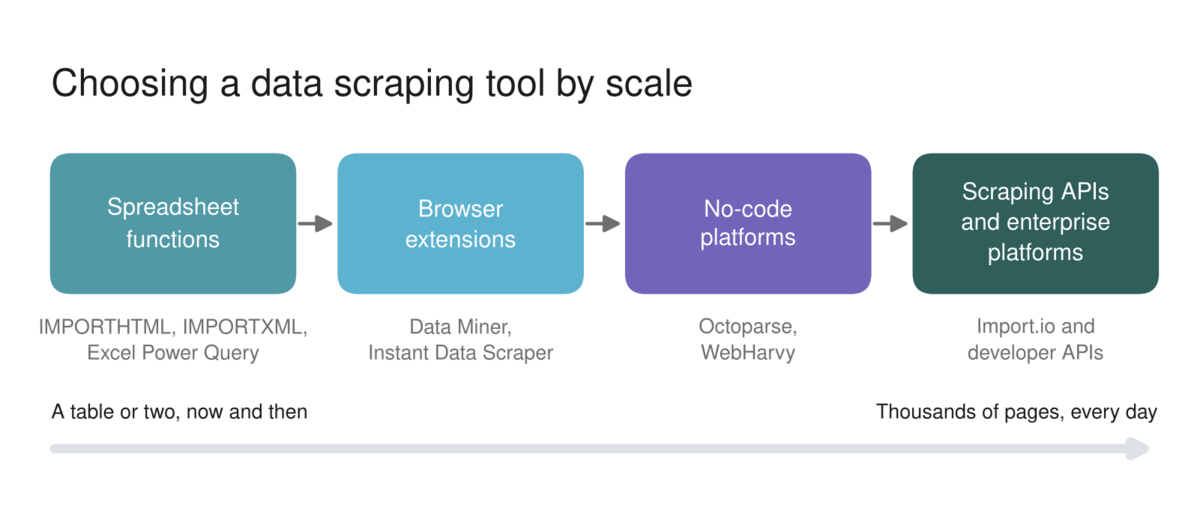
The right data scraping tool depends on how often you need the data, how complex the website is, and whether anyone on the team can write code. For most marketing teams, spreadsheet formulas and a browser extension cover occasional jobs, while no-code platforms or APIs make sense for regular, large-scale scraping.
| Type of tool | Examples | Best for | Typical cost |
|---|---|---|---|
| Spreadsheet functions | Google Sheets IMPORTHTML and IMPORTXML, Excel Power Query | Small tables and lists from simple pages | Free with Sheets or Excel |
| Browser extensions | Data Miner, Instant Data Scraper | One-off scrapes of a page or a few pages while you browse | Free tiers, then monthly plans |
| No-code scraping platforms | Octoparse, WebHarvy | Regular scrapes across many pages, including pagination | Subscription or one-off licence |
| Scraping APIs and enterprise platforms | Import.io and developer APIs | Large volumes, sites that change often, data delivered into other systems | Usage-based or quoted |
| AI assistants and agents | ChatGPT, Claude, Gemini with browsing | Quick extraction and summarising from a handful of pages | Included in paid AI plans |
Pricing for scraping tools changes often, so check the current plans on each provider's site before you commit. The bigger decision is usually build versus buy: if the data feeds a business process every day, a maintained platform is cheaper than fixing a broken in-house scraper every time a website changes its layout.
If you want to build the data and analytics skills that make scraped data useful, the Target Internet platform includes interactive courses such as analytics analysis, accredited certification, over 400 episodes of the Digital Marketing Podcast, and monthly live masterclasses delivered by working practitioners.
How is AI changing data scraping?
AI is changing data scraping in two directions at once. AI assistants make it far easier for marketers to extract information from web pages without technical skills, while website owners are increasingly blocking AI crawlers from reading their content at all.
On the first point, an AI assistant with web access can now read a handful of pages and return the information you ask for as a table, which removes the need to write XPath queries or configure a scraper. It works well for small research tasks, but it is not a replacement for a proper scraper at scale, and the output needs checking because assistants can miss or misread values.
Copy and paste prompt: "Visit these pages: [list of URLs]. For each page, extract the [product or course name], [price], [key features] and [any offer or discount shown]. Return the results as a table with one row per page, and write 'not shown' where a value is missing rather than guessing."
On the second point, the balance of power has shifted towards website owners. On 1 July 2025, Cloudflare, which sits in front of around a fifth of websites, started blocking AI crawlers by default for new domains unless they have permission. That matters for marketers in two ways: some sites you want to research will block automated access, and your own site may be blocking the AI search tools you want to be cited by. Our guide to optimising content for AI Overviews and AI Mode explains why that second point matters for visibility.
Is data scraping legal?
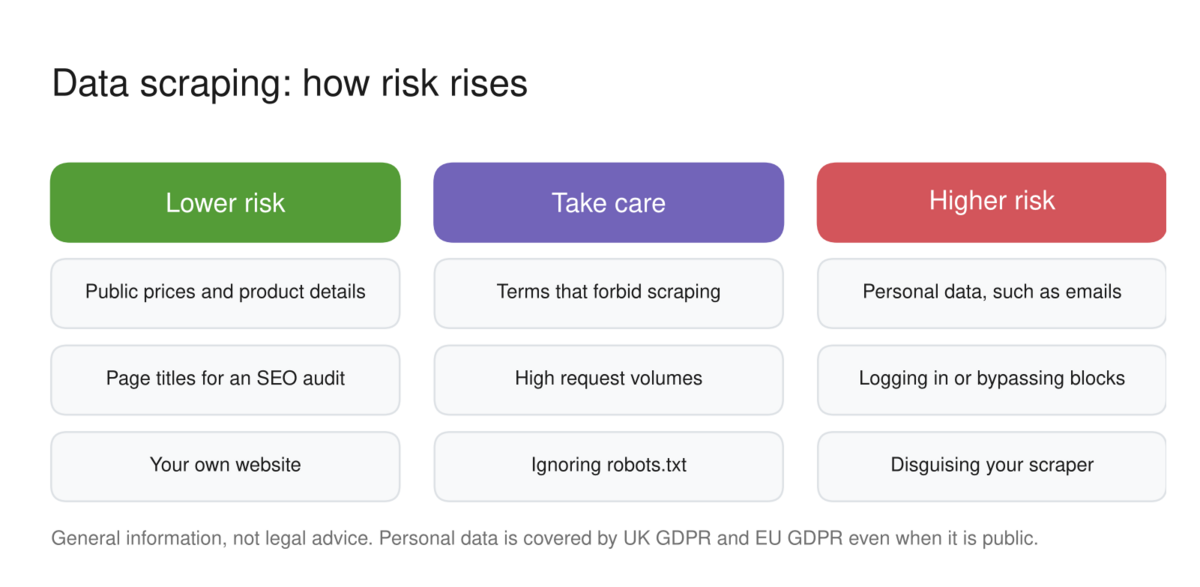
Data scraping is not illegal in itself, but whether a particular scrape is lawful depends on what data you collect, how you collect it, and what you do with it. Scraping publicly available, non-personal information for research is generally lower risk; scraping personal data, getting around technical blocks or breaching a site's terms of use carries real legal risk. This section is general information, not legal advice.
In the United States, the long-running hiQ Labs v. LinkedIn case is the best-known example. The courts indicated that scraping public pages was unlikely to breach the federal Computer Fraud and Abuse Act, but in November 2022 a district court found that hiQ had breached LinkedIn's user agreement, and the case ended in a settlement in December 2022 that required hiQ to stop scraping LinkedIn. The lesson for marketers is that a site's terms of use can be enforced even when scraping is not a crime.
In the UK and EU, data protection law is the main constraint. Any scraping that collects personal data, such as names, email addresses or profile details, must comply with UK GDPR or the EU GDPR, including having a lawful basis and telling people how their data is used. In October 2024, the UK Information Commissioner's Office and other data protection authorities issued a concluding joint statement on data scraping, which makes clear that personal data on public websites is still protected, and that contractual permission alone does not make scraping personal data lawful.
In practice, a few rules keep most marketing scraping on the right side of the line. Scrape facts about products, prices and content rather than personal data about individuals. Read and respect each site's terms of use and robots.txt file, and never log in, bypass blocks or disguise your scraper to get around restrictions. Keep request volumes low so you do not slow down the site you are reading, and use an official API or data partnership wherever one exists.
For marketers working with customer and audience data more broadly, our guide to Google Consent Mode covers how privacy rules shape the way data is collected on your own site.
How to start using data scraping
The best way to start is with one recurring question your team currently answers by hand. Competitor pricing, a list of industry events, or the headings on your top-ranking competitors' pages are all good first projects, because the value is obvious and the pages are usually simple.
Start in Google Sheets with IMPORTHTML or IMPORTXML, check the results against the live page, and only move to a paid tool when a free method stops working or the job becomes too big. Most importantly, decide in advance what decision the data will inform, because a spreadsheet full of scraped data that nobody acts on is just another report.
If you are ready to take a structured approach to building your digital marketing skills, explore Target Internet membership options and discover how the platform's interactive courses, benchmarking tools, podcast, accredited certification and live masterclasses can accelerate where you are heading next.
Frequently asked questions
Is data scraping legal?
Data scraping is not illegal in itself, but it can break the law or a contract depending on what you collect and how. Scraping public, non-personal information for research is generally lower risk. Scraping personal data must comply with GDPR, and breaching a site's terms of use or bypassing technical blocks can lead to legal action. Take legal advice for any large or commercial scraping project.
What is the difference between web scraping and web crawling?
Web crawling is the process of discovering and visiting pages by following links, which is what search engines do to find content. Web scraping is the process of extracting specific data from those pages into a structured format. A crawler finds pages; a scraper pulls information out of them. Many scraping tools do both, crawling a set of pages and then scraping each one.
Can ChatGPT scrape websites?
AI assistants such as ChatGPT, Claude and Gemini can read web pages when browsing is available and extract information into a table, which works well for small research tasks across a handful of pages. They are not designed for large-scale scraping, some websites block AI crawlers, and the results need checking because assistants can miss or misread values.
How do I scrape data into Google Sheets?
Use the IMPORTHTML function to pull a table or list, for example =IMPORTHTML("URL", "table", 1), or IMPORTXML to pull specific elements with an XPath query, for example =IMPORTXML("URL", "//h2") for every h2 heading. These functions only see content in the page's HTML, so they may not work on sites that load content with JavaScript.
What is data scraping used for?
Data scraping is used to collect information from websites into a structured format for analysis. In marketing, the most common uses are competitor price and content tracking, market and review research, SEO audits, building product feeds for shopping channels, and content research. Outside marketing it is used for price comparison sites, academic research, journalism and financial analysis.
About the author
Daniel Rowles is lead trainer at Target Internet and the author of Digital Branding (Kogan Page). He co-hosts The Digital Marketing Podcast and delivers digital marketing and AI training for organisations around the world. He teaches data, analytics and AI tools as part of Target Internet's training programmes. You can find out more on his Target Internet profile.
Bibliography
1. Google (2026). IMPORTXML function: Google Docs Editors Help. https://support.google.com/docs/answer/3093342
2. Cloudflare (2025). Cloudflare just changed how AI crawlers scrape the internet-at-large. https://cloudflare.com/press-releases/2025/cloudflare-just-changed-how-ai-crawlers-scrape-the-internet-at-large
3. Proskauer Rose (2022). hiQ and LinkedIn reach settlement in landmark scraping case. https://newmedialaw.proskauer.com/2022/12/08/hiq-and-linkedin-reach-proposed-settlement-in-landmark-scraping-case/
4. ZwillGen (2022). hiQ v. LinkedIn wrapped up: web scraping lessons learned. https://www.zwillgen.com/alternative-data/hiq-v-linkedin-wrapped-up-web-scraping-lessons-learned/
5. Information Commissioner's Office (2024). Global privacy authorities issue follow-up joint statement on data scraping after industry engagement. https://ico.org.uk/about-the-ico/media-centre/news-and-blogs/2024/10/global-privacy-authorities-issue-follow-up-joint-statement-on-data-scraping-after-industry-engagement/
6. William Fry (2024). Unlawful data scraping + personal data = data protection, contractual and other rules apply. https://www.williamfry.com/knowledge/unlawful-data-scraping-personal-data-data-protection-contractual-and-other-rules-apply/