This review is part of our 2026 SEO tools review and comparison report. This article has been updated for 2026 and replaces the older review of Advanced Web Ranking.
Index
- Introducing the Tool
- Setup and Interface
- Position Tracking
- SERP Analysis
- Competitive Intelligence
- Keyword Difficulty
- AI Search Tracking & AI Brand Visibility
- Reporting & Dashboards
- Pricing
- The Verdict
- Frequently Asked Questions (FAQs)
Introducing the Tool
Advanced Web Ranking has been around since 2002, and is one of the most well-known SEO tools built specifically for rank tracking.
It was built by Caphyon, a Romanian software company, at a time when there was no reliable way to check where your website appeared in search results. Their original product was a desktop app, and the cloud version came much later on (in 2018). They've always had sophisticated tools for rank tracking, and have not positioned themselves as a tool that manages every aspect of SEO, until recently.
Over the past year, they've expanded into SERP analysis, competitive intelligence, visibility reporting, keyword difficulty, and AI search tracking. AWR is still a rank tracker at heart, but the platform now covers enough ground to compete with broader SEO suites (apart from backlinks, technical audits, & deep keyword research).
Whether that expansion holds up is what we're here to find out.
Setup and Interface
Setting up AWR takes less than five minutes.
You create a project, add your domain, choose your target search engines, and enter your keywords. For the purposes of this article, 'allrecipes.com' is the test project that we've used. AWR includes this site's data as part of their free trial, so you can explore the full feature set and interface without any commitment. You can sign up for a trial from this link (no credit card needed).
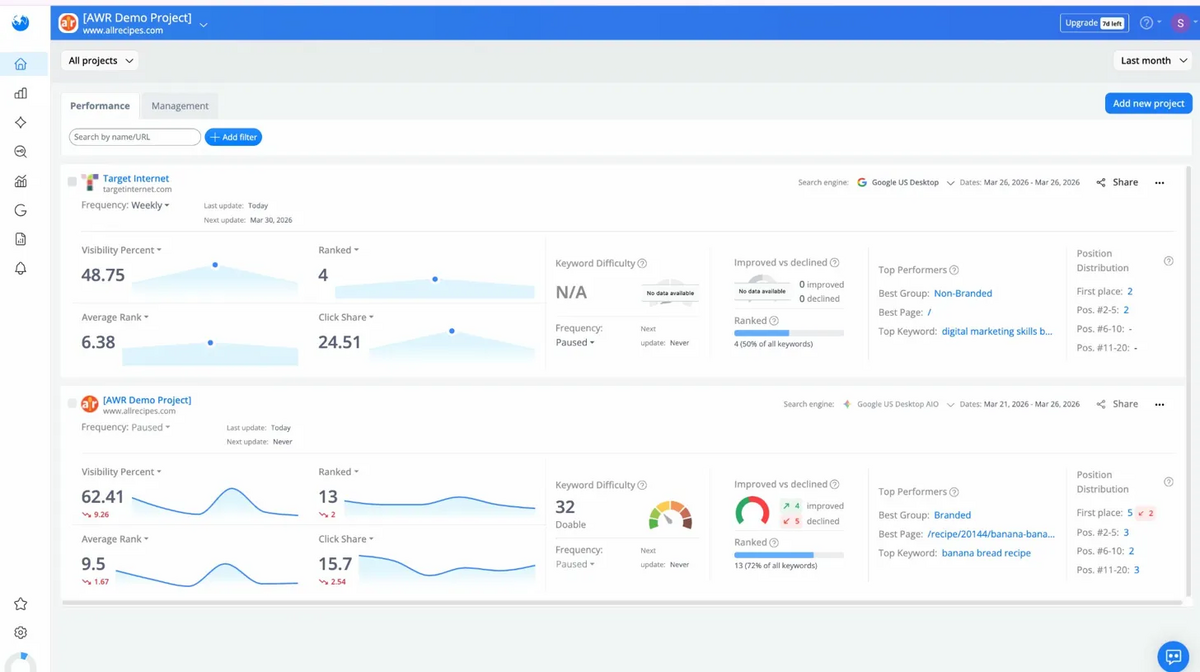
Once you've set up a project, the home screen shows all your projects in one view.
Each project card gives you your main ranking metrics in a snapshot: Visibility %, Number of Ranked Keywords, Average Rank, Click Share, Keyword Difficulty, etc.
The interface is clean, fast, and the navigation speed is noticeably better than several tools we've tested this year.
Position Tracking
Rank tracking (called Position Tracking in AWR) is the reason most people purchase a subscription to Advanced Web Ranking. A lot of the features offered in this section are unique to AWR.
Obviously, every SEO tool offers some form of rank tracking. The question is how deep the data goes, how reliable it is, and more importantly, how well the data is visualised so you can actually use the information to shape your ranking strategy.
Keyword Ranking
This is the main section under Position Tracking.
It shows all your tracked keywords in a table with metrics like position, citation rank, target URL, SERP features, AI brand mentions, citations, etc.
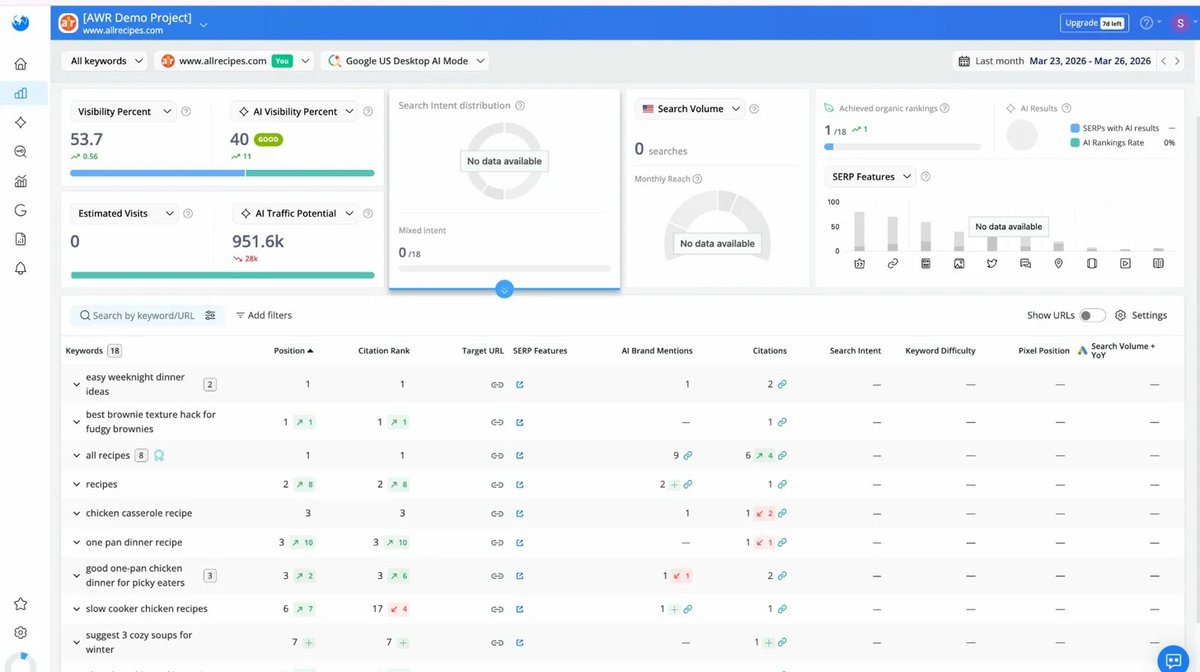
What stands out here is how AI metrics sit directly inside the rank tracking view.
Most tools that are catching up to AI search treat it as a separate section or a separate product. AWR puts AI brand mentions, citation counts, and AI visibility right next to your traditional ranking data. For example, for "all recipes" as a keyword, we could see 9 AI brand mentions and 6 citations in the same row as the position 1 organic ranking.
You can also see trends/historical data here. "One pan dinner recipe", for example, jumped 10 positions this month. This helps you prioritise your workflow when building your keyword strategy, so you can focus your effort on where rankings are growing.
It's even more useful when you're losing rankings, as it helps you understand where a competitor is overtaking your pages and prioritise your next steps.
Distribution
Distribution gives you a quick health check on your keyword portfolio. Instead of looking at individual keywords, it groups your positions into brackets so you can see the overall shape of your rankings at a glance.
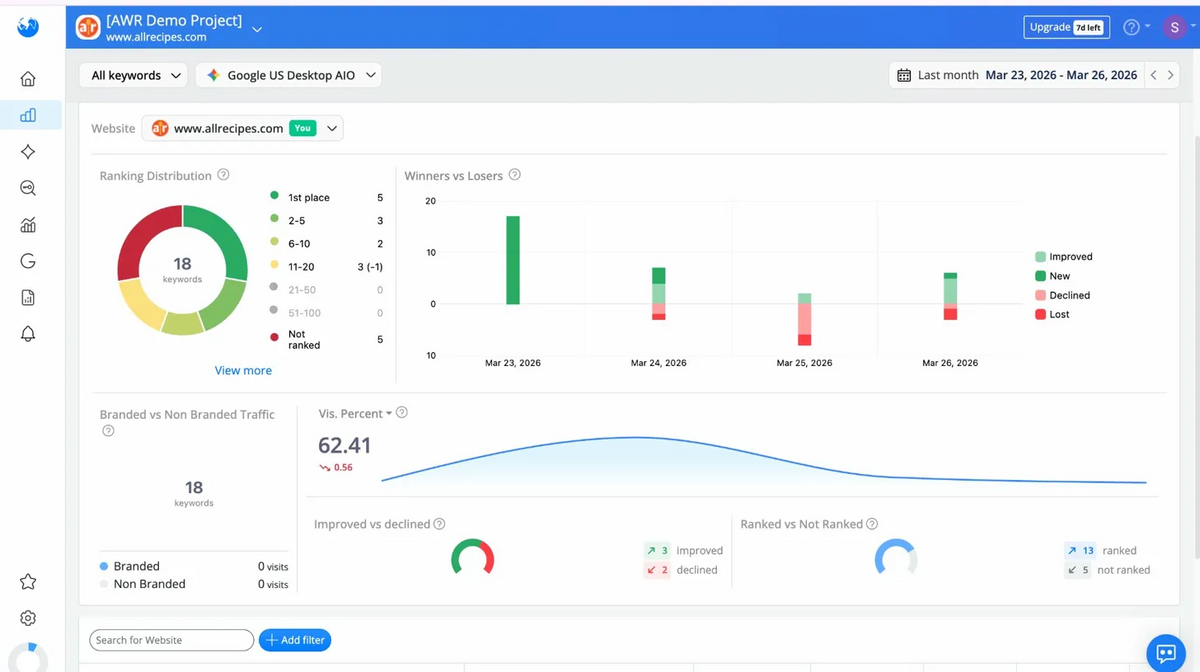
For our test project, 5 keywords sat in 1st place, 3 in positions 2-5, 2 in 6-10, 3 in 11-20, and 5 were not ranked at all. That split tells you something immediately. Nearly half the tracked keywords are on the first page. But a third aren't ranking at all. If you're an agency running a monthly check-in with a client, this is the view you open first. It answers "are we heading in the right direction?" before anyone needs to dig into specifics.
The Winners vs Losers chart underneath is also really helpful because it tracks daily movement across whatever date range you set. You can spot whether a bad week was a one-off dip or the start of a decline.
Search Engines Comparison
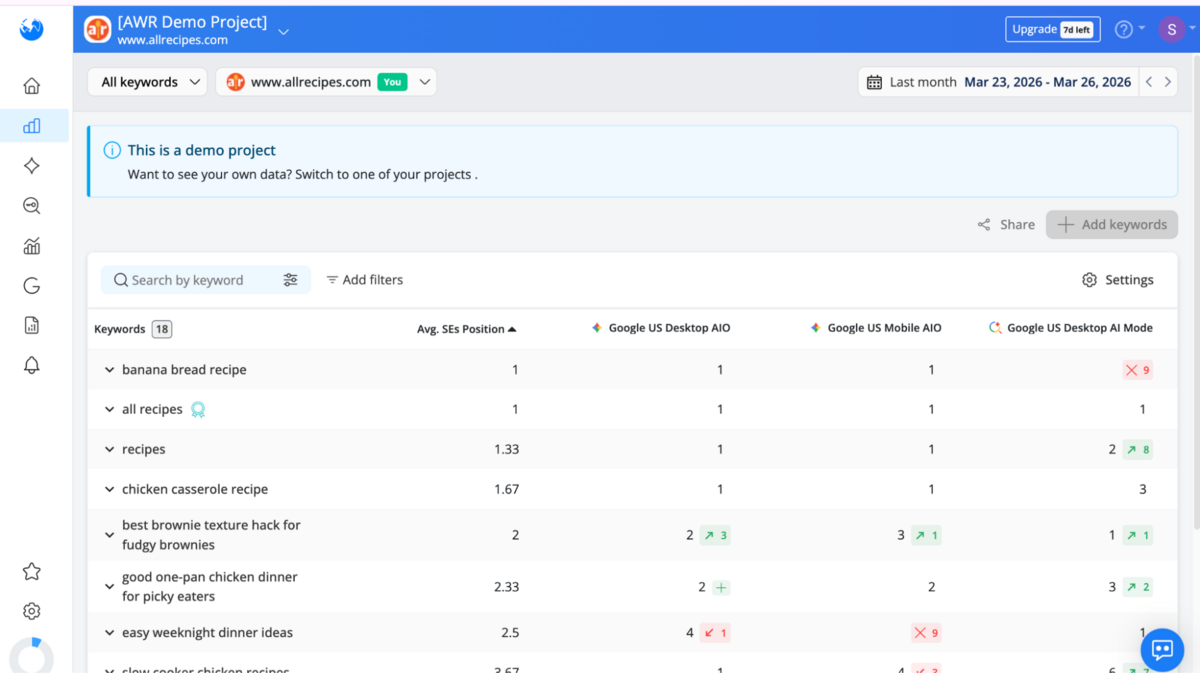
The Search Engines Comparison view displays keyword rankings across Google Desktop, Google Mobile, and Google AI Mode in a single table. Each keyword gets its own row with positions per engine and an average across all three (you can also select which country you want to see this data in).
Why is this useful?
In our testing, "Banana bread recipe" ranked 1st on Desktop AIO and Mobile AIO, but dropped to position 9 on AI Mode. "Recipes" ranked 1st on both AIO configurations but sat at position 2 on AI Mode, up 8 places. "Chocolate chip cookies recipe" lost its Desktop AIO ranking entirely (down 10) but climbed to position 10 on AI Mode (up 2).
These aren't one-off cases.
Rankings are genuinely inconsistent across different search modes now, especially with AI search entering the mix. A keyword sitting in 1st place on Google Desktop might not even appear in AI Mode results. If you're only tracking one configuration, you're missing the full picture. If you're trying to understand how AI is reshaping your website's visibility, this single table answers the question.
But knowing where you rank is only half the story. The next question is what the search results page actually looks like around your ranking, and that's where AWR's SERP analysis tools take over.
SERP Analysis
SERP analysis looks at the search results pages themselves. Not just your position, but what surrounds it. What SERP features is Google showing? How stable are the results? Who else is appearing here?
Top Sites
Top Sites shows you what the SERP actually looks like for a given keyword, and who's dominating it.
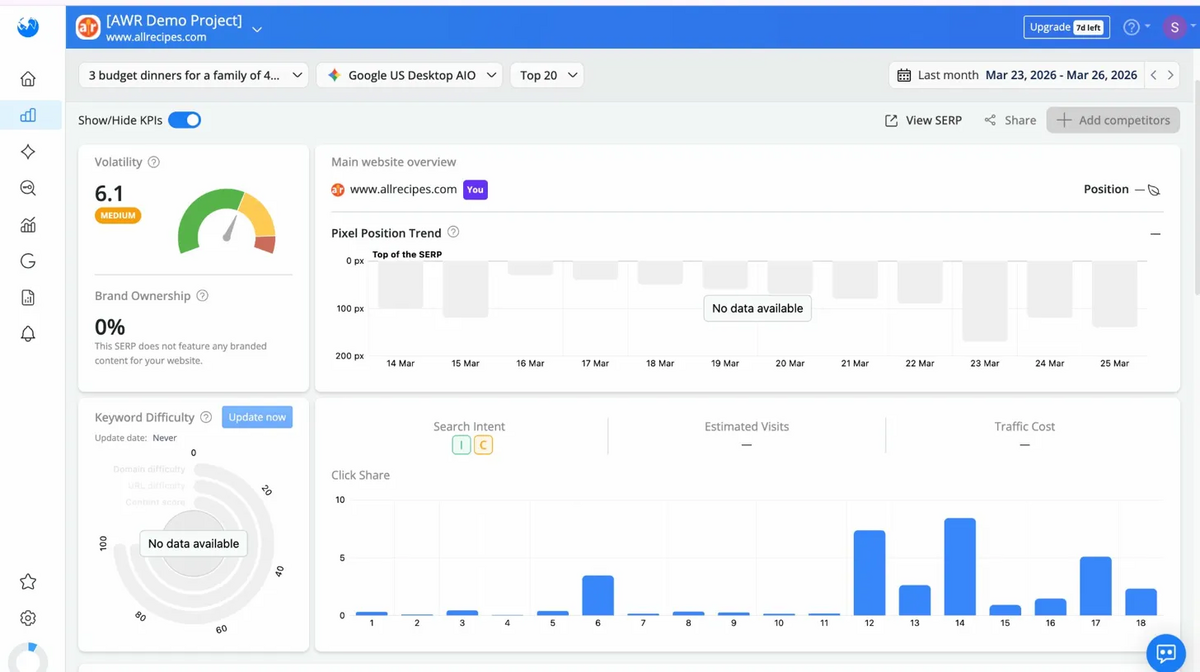
For the keyword "3 budget dinners for a family of 4" on Google US Desktop AIO, the overview showed a volatility score of 6.1 ("Medium"), brand ownership for allrecipes.com at 0%, and Click Share distribution across the top 18 positions.
Scroll down, and you see the full SERP breakdown. Every result on the page, including SERP features, is displayed in order. Position 1, for example, is an AI Overview block with 9 results inside it. Position 2 is cubbyathome.com. Position 3 is a Video block. Position 6 is People Also Ask. Position 11 is Discussions & Forums.
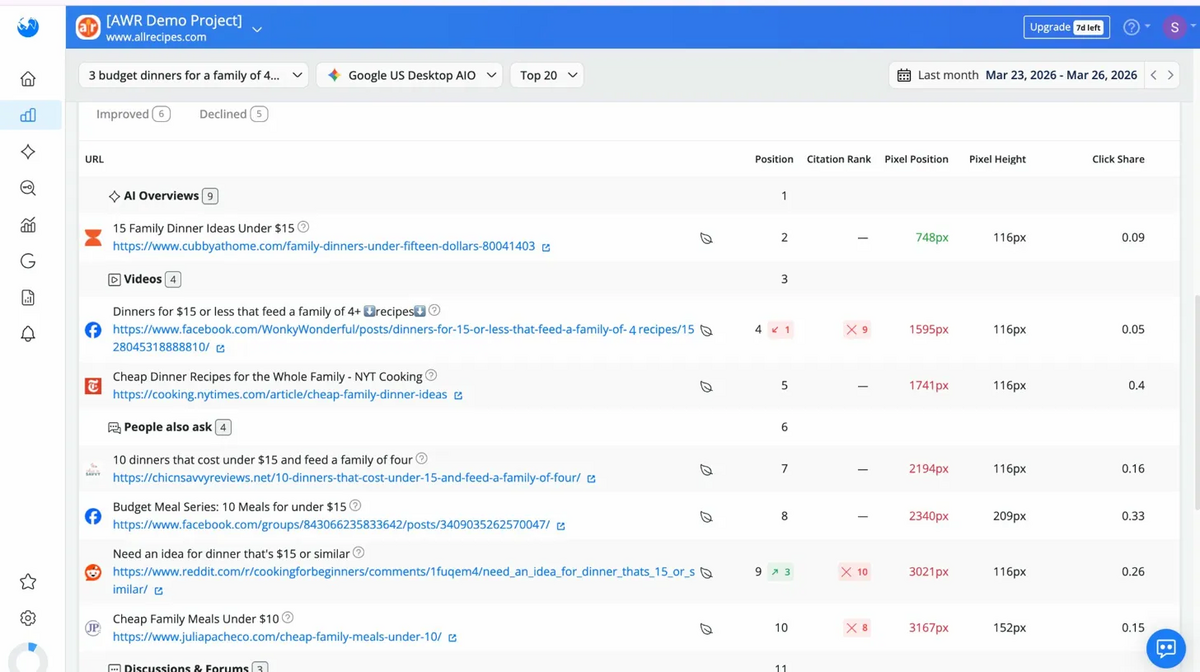
Each result shows its pixel position, pixel height, and click share. Pixel position is how far down the page a result actually sits, measured in pixels.
This matters because a traditional rank tracker tells you "you're in position 2." Pixel position tells you "your result is 748 pixels down the page." If position 1 is an AI Overview block that's 600 pixels tall, your position 2 result might sit below the fold. Same rank, but completely different visibility because of what sits in Position 1.
It's also worth noting that this metric is available in less than 20% of all SEO tools out there, so this is part of the unique value that AWR provides.
The click share data reinforces this. For example, cubbyathome.com at position 2 (pixel position 748) gets 0.09 click share. NYT Cooking at position 5 gets 0.4. The site ranked higher gets fewer clicks because it's buried under a massive AI Overview block.
Contrary to what most of us think, position doesn't always equal clicks, and this view makes that obvious.
This is useful for two things. First, competitive benchmarking: you see exactly who appears for your target keywords and how stable those positions are. Second, understanding SERP layout. When AI Overviews take position 1, and Videos take position 3, your organic result at position 2 is sandwiched between features that steal attention. Without pixel position data, you'd look at "position 2" and assume everything was fine.
In short, this section gives you a complete picture of what the SERP looks like right now. The next question is how much it's changed over time.
SERP Similarity
SERP Similarity compares the search results page between two dates. You pick a keyword, select your dates, and AWR shows you exactly what moved, what's new, and what dropped out.
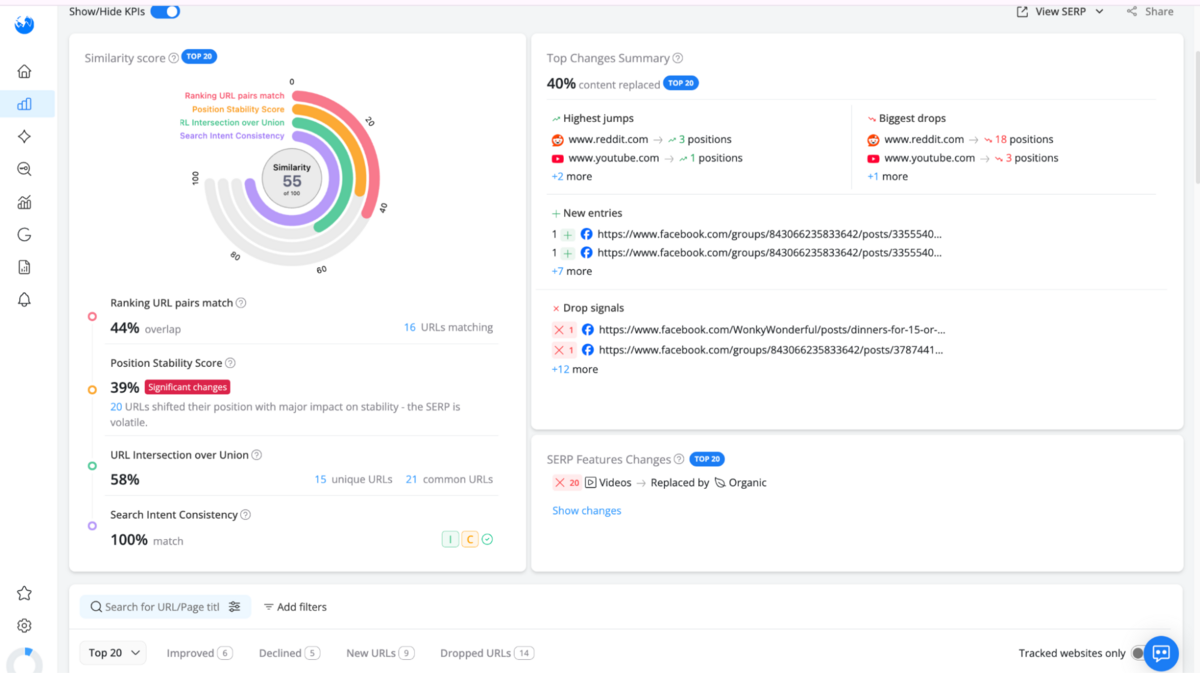
For "3 budget dinners for a family of 4," the similarity score between our two dates was 55 out of 100. In plain terms, nearly half the pages that ranked in the top 20 on the first date were gone by the second. That's a lot of movement for a short period. 9 new URLs appeared, mostly Facebook group posts. 14 URLs dropped out, again mostly social content. For this keyword, the search results are constantly churning.
The Top Changes Summary breaks down who moved and by how much.
Reddit gained 3 positions on one page but dropped 18 on a completely different page. YouTube gained 1 spot on one video but lost 3 on another. When the same domain is rising on one URL and falling on another, you know the SERP is unstable. That's useful information.
An unstable SERP is one you can break into. A stable one is harder to crack.
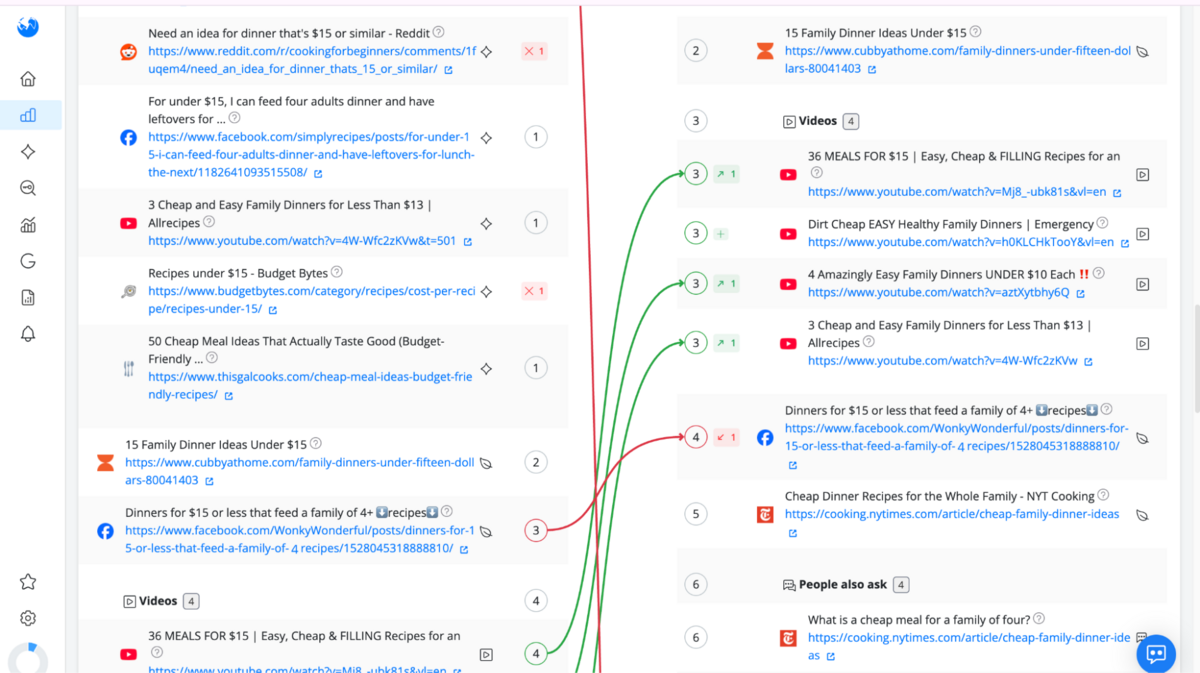
You also get to see a full side-by-side comparison in this section.
The left column shows the SERP on the earlier date. The right column shows the current SERP. Green and red lines connect URLs that moved between positions, so you can visually trace where each result went. This is the kind of comparison most people do manually by pulling two SERP screenshots and eyeballing the differences.
AWR does it in one view with visual connection lines between the dates.
For anyone trying to understand how a Google update reshuffled their target keywords, this saves a lot of time.
SERP Volatility
SERP Volatility tracks how much the results page is changing day to day. If you're watching a keyword and wondering whether a ranking drop is a one-off or part of a larger shuffle, this is what you would use to find that out.
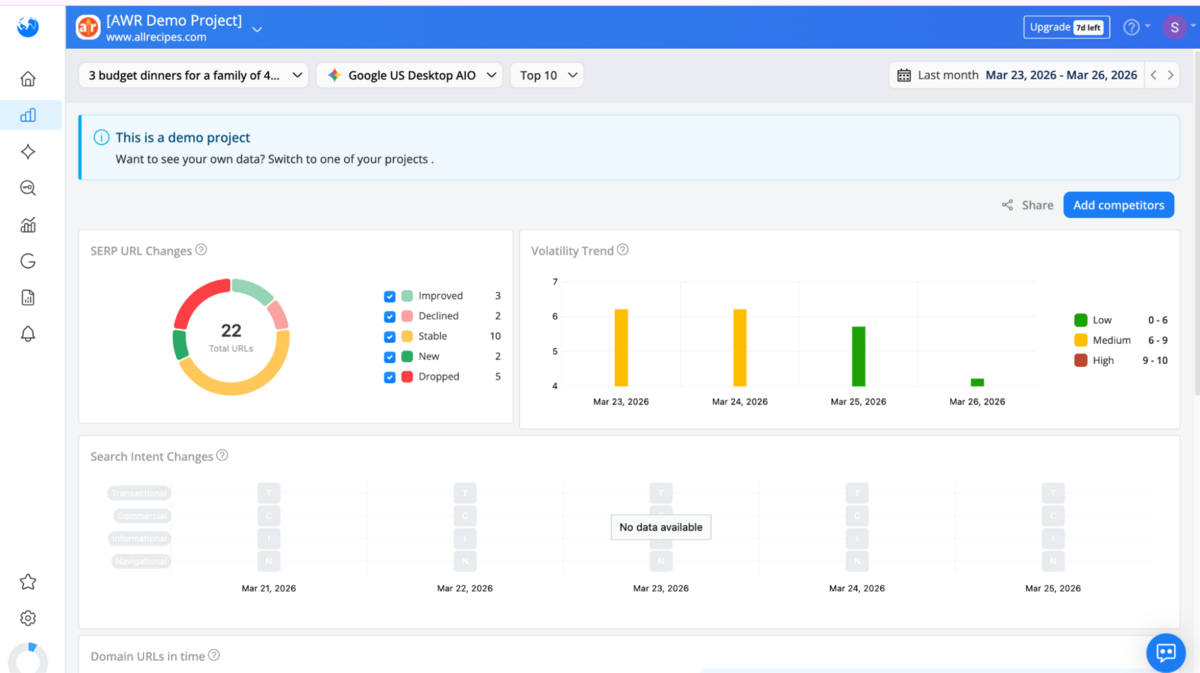
For "3 budget dinners for a family of 4," AWR tracked 22 URLs across the date range.
Of those, 10 held steady, 3 moved up, 2 moved down, 2 were brand new, and 5 disappeared entirely. The Volatility Trend chart tells the story visually. Things were moderate on March 23 and 24. Then, the SERP spiked to high volatility on March 25, meaning lots of results were shuffled at once. By March 26, it had settled back down.
If your ranking dropped on March 25, this tells you it wasn't just you. The entire SERP reshuffled. That's a very different situation from losing a position on a stable SERP, which usually means a competitor specifically outranked you.
A keyword with high volatility and lots of new entries is a SERP in flux. That's often your window to climb, because the results haven't settled yet. A keyword with low volatility and stable URLs means the top positions are locked in, and you'll need significantly stronger content or links to displace them.
Knowing which type you're looking at changes how you spend your time, and this takes it one level deeper than just looking at keyword difficulty.
SERP Features
SERP Features tells you which special result types appear for your keywords and, more importantly, whether your site owns any of them.
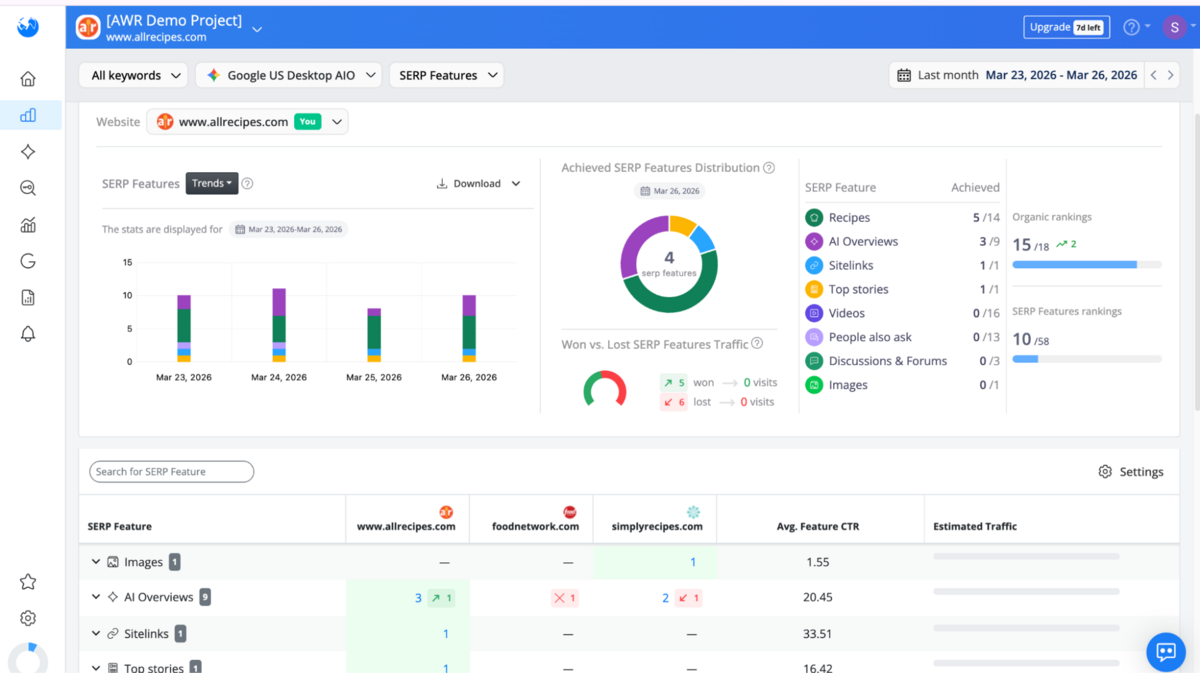
For allrecipes.com, across all keywords on Google US Desktop AIO, the distribution showed 4 SERP features owned. Recipes: 5 achieved out of 14 total. AI Overviews: 3 out of 9. Sitelinks: 1 out of 1. Videos: 0 out of 16. People Also Ask: 0 out of 13. Organic rankings sat at 15 out of 18 (up 2).
The competitive table at the bottom is where this becomes actionable. It shows SERP feature ownership across all 3 sites - allrecipes.com, foodnetwork.com, and simplyrecipes.com side by side (these are all competitors that you can define in your project). Allrecipes owns 3 AI Overview placements (up 1). Foodnetwork lost its only one. Simplyrecipes has 2 (down 1).
This level of granularity is ahead of what most rank trackers offer. If your content team is working on video optimisation or AI Overview placement, this data tells you precisely where to focus and who you're taking share from.
Competitive Intelligence
Competitive intelligence answers a very straightforward question: how are you doing compared to everyone else?
This is not just on individual keywords, but across your whole tracked portfolio. Who's gaining ground? Who's slipping? Where are the gaps you haven't spotted yet? AWR gives you two tools here, and they work best when used together.
Market Share
Market Share maps your domain against everyone else's ranking for your tracked keywords.
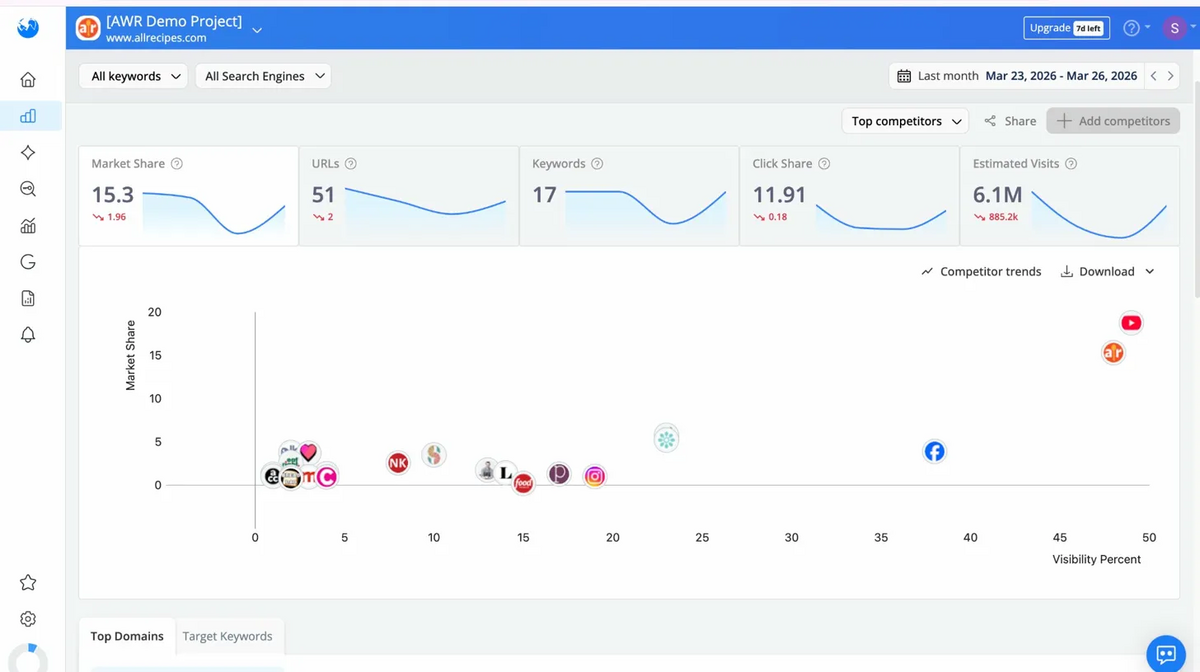
For allrecipes.com, the tool mapped 27 competing domains in a single table. Each domain shows its market share, number of ranking URLs, click share, and estimated visits. The scatter plot view maps all of them by market share against visibility, so you can see the landscape at a glance.
You can pull interesting insights on movement here.
Simplyrecipes gained over 3 points in market share during our tracking period. Allrecipes dropped nearly 2. Smittenkitchen gained almost 2 points on the strength of a single URL and one keyword. This level of data visualisation shows how one strong page can shift competitive dynamics without anyone noticing.
If you're an agency reporting monthly to a client, this table gives you the competitive story in one view. "Here's where we stand, here's who gained, here's who we need to watch." It's limited to your tracked keywords rather than the whole market.
Keyword Gap
Keyword Gap shows where your keywords overlap with competitors and where opportunities sit. Every tool has some version of this, though Semrush/Ahrefs offer much stronger iterations.
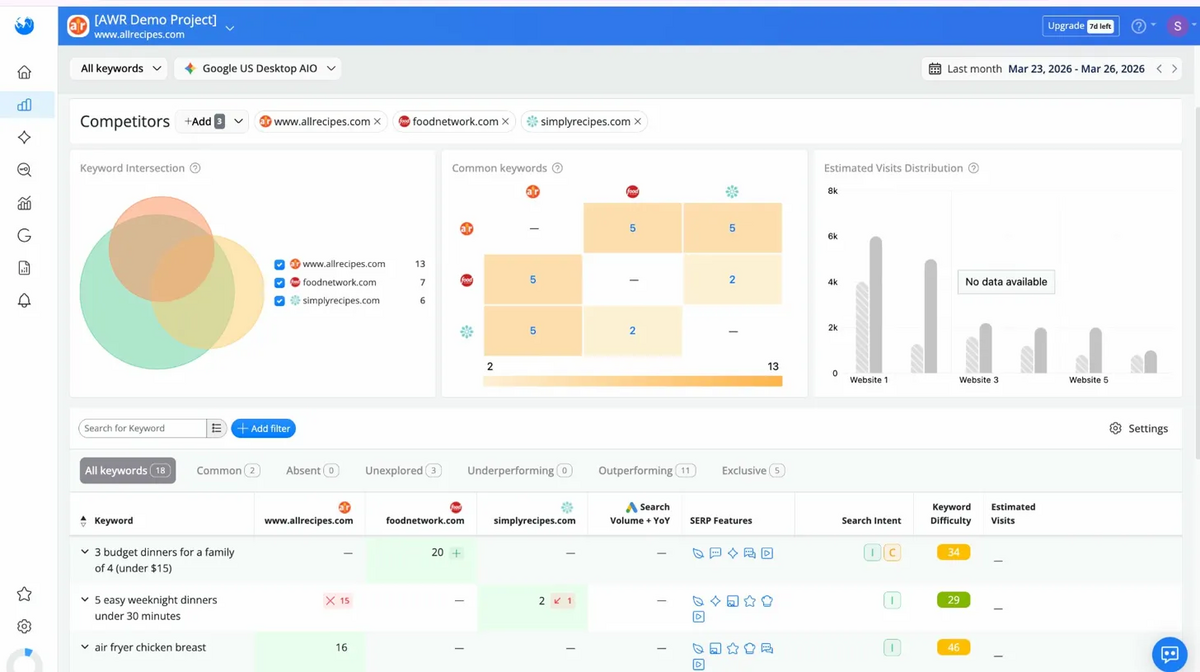
For allrecipes.com, foodnetwork.com, and simplyrecipes.com, the tool categorised every tracked keyword into four buckets: Common (keywords all three sites share), Unexplored (keywords nobody is covering well), Outperforming (keywords where allrecipes is ahead), and Exclusive (keywords only allrecipes ranks for).
The practical value depends on the size of your keyword list. If you're tracking hundreds or thousands of keywords across multiple competitors, this view quickly surfaces where you're ahead and where you're missing out.
Keyword Difficulty
Every SEO tool, including Google Ads' Keyword Planner, gives you a free difficulty score for keywords.
Most of them give you a single number and leave you to figure out what that means. AWR takes a different approach, offering much more insight than a simple score.
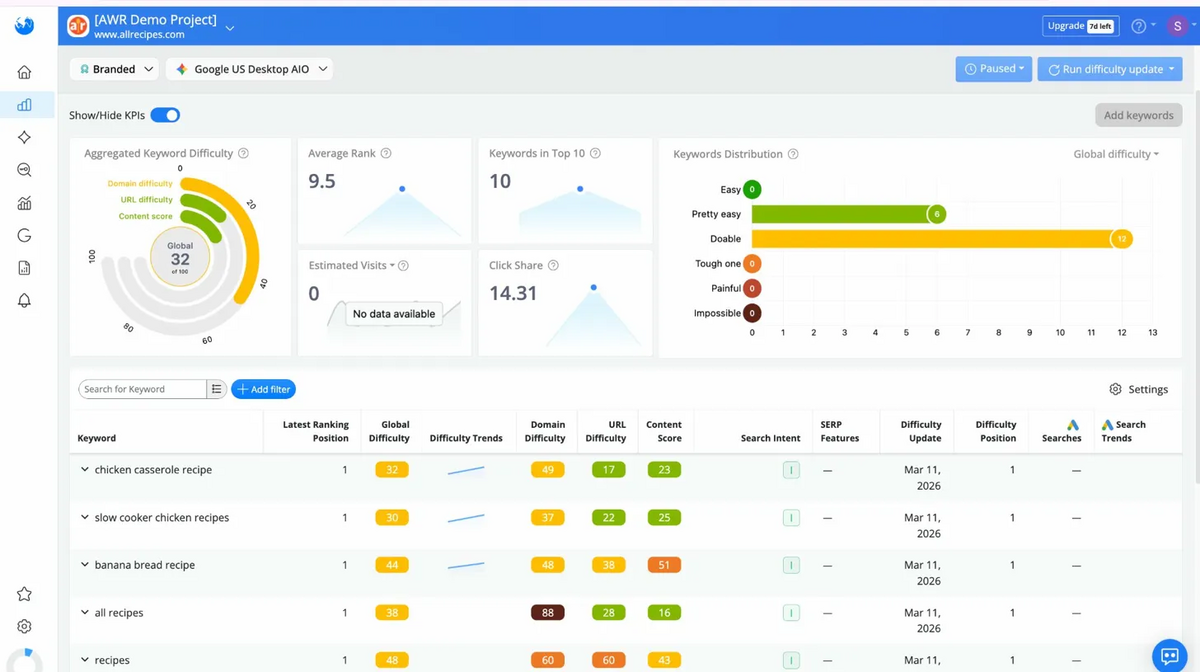
Instead of one number, AWR breaks difficulty into three separate scores: Domain Difficulty, URL Difficulty, and Content Score. This distinction matters because it tells you why a keyword is hard, not just that it is.
Here's a real example. "Banana bread recipe" has a global difficulty of 44.
The competing domains are strong (Domain Difficulty 48), and their content is strong too (Content Score 51). That's a tough keyword all round. Now compare "chicken casserole recipe" at 32 global. The competing domains are actually stronger here (Domain Difficulty 49), but their content is weak (Content Score 23). Same ballpark of difficulty, completely different opportunity. You can't beat them on authority, but you can beat them on content.
Knowing the difference between "I'm outgunned on domain authority" and "I can win by writing a better page" changes how you decide which keywords to go after.
AI Search Tracking & AI Brand Visibility
AI search tracking tells you how your brand appears in AI-generated answers. When someone asks ChatGPT or Perplexity about your industry, does your brand get mentioned? Which sources does the AI cite?
AWR has pushed into this space, and the approach is notably different from dedicated tools like Authoritas, which is one of the most sophisticated AI Search tools we've seen so far.
Keyword Performance
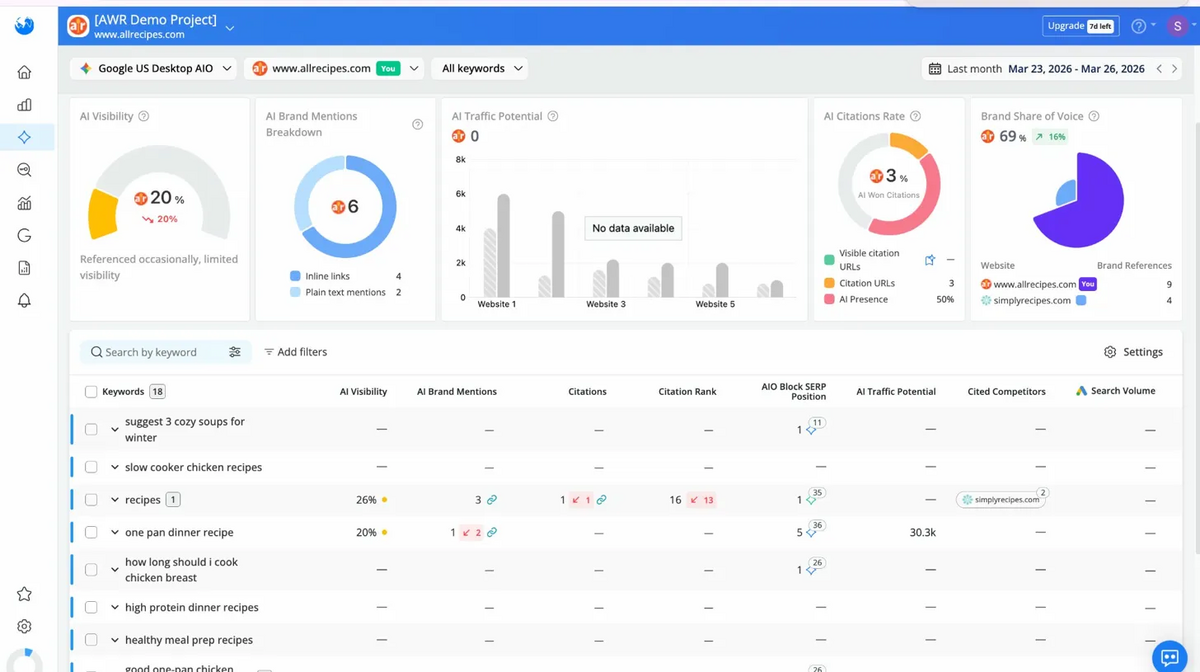
The Keyword Performance view shows your AI Visibility score, how many times AI models mentioned your brand, your citation rate, and your share of voice compared to competitors.
For allrecipes.com, AI Visibility was 20% ("Referenced occasionally, limited visibility") with a Brand Share of Voice of 69%.
The key difference from Authoritas is how the data gets collected. AWR tracks AI metrics passively. It checks how AI models respond to the keywords you're already tracking and reports what it finds. Authoritas takes the opposite approach: you actively build structured 'question flows', add buyer personas and multipliers, and run them against specific AI models on a schedule. If you'd like to learn more about how Authoritas works, we wrote a detailed review of it here.
The trade-off is straightforward.
AWR's approach is simpler and included in every paid plan at no extra cost. Authoritas is much deeper but starts at $119/month as a separate subscription. For most teams that want a basic read on how AI sees their brand alongside their regular rank tracking, AWR covers it. For brands that need to go deep on AI sentiment, source analysis, and structured testing across multiple models, Authoritas is still ahead.
Topics, Brands, and Citations
AWR breaks AI tracking further into three sub-views: Topics, Brands, and Citations.
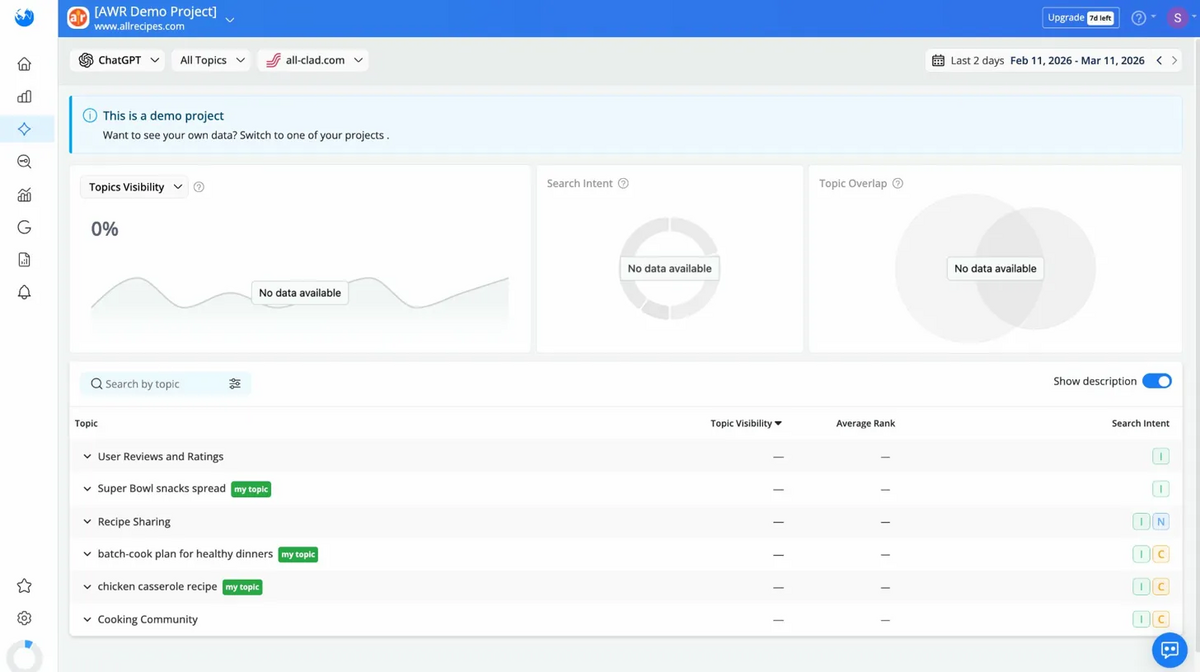
Topics was empty for our test project. No visibility data, no rankings. The categories were relevant, but none had been populated. This view needs more development before it's useful.
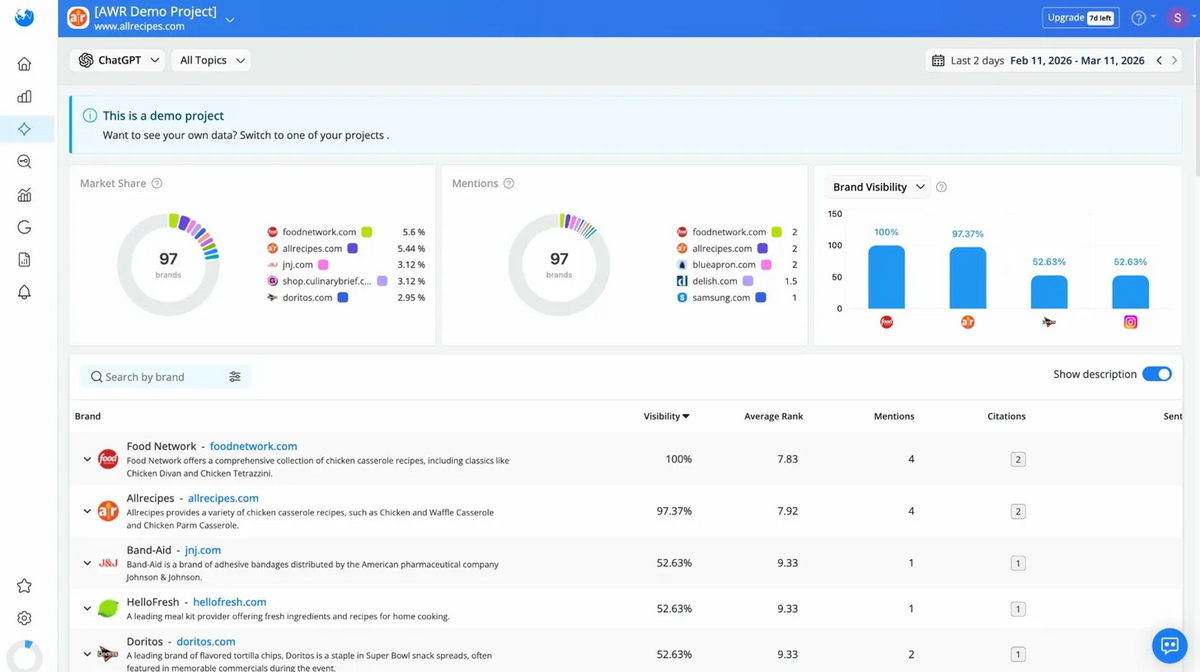
Brands was more interesting. It showed 97 brands mentioned across ChatGPT responses for our tracked keywords, with foodnetwork.com leading and allrecipes.com close behind. The issue here is accuracy. For example, in a food-related keyword set, brands like Band-Aid and Samsung appeared in the results.
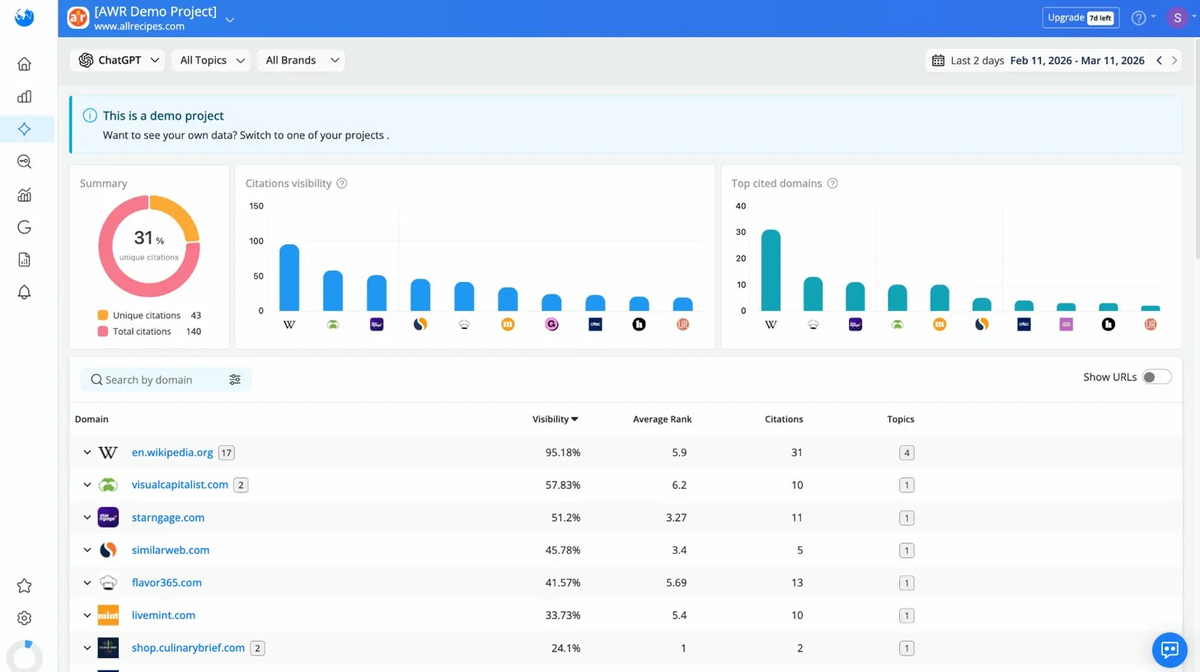
Citations was the strongest of the three. It showed which websites AI models pulled from when answering questions about our tracked keywords.
Reporting and Dashboards
Reporting is where a tool proves its value to people who don't log into it, which is generally clients, stakeholders, and leadership teams. If you can't turn your data into a clean, easy-to-interpret report, it's not very helpful. AWR does this really well.
The platform comes with pre-built dashboard templates like Monthly SEO Performance Overview and Position Tracking Report. You can also build custom dashboards from scratch here by clicking on "New Dashboard". Each dashboard is made up of widget-based charts and tables that you can rearrange, edit, and configure to show exactly what you need.
This is especially helpful for SERP & Rank Tracking, so you can see what matters for your website.
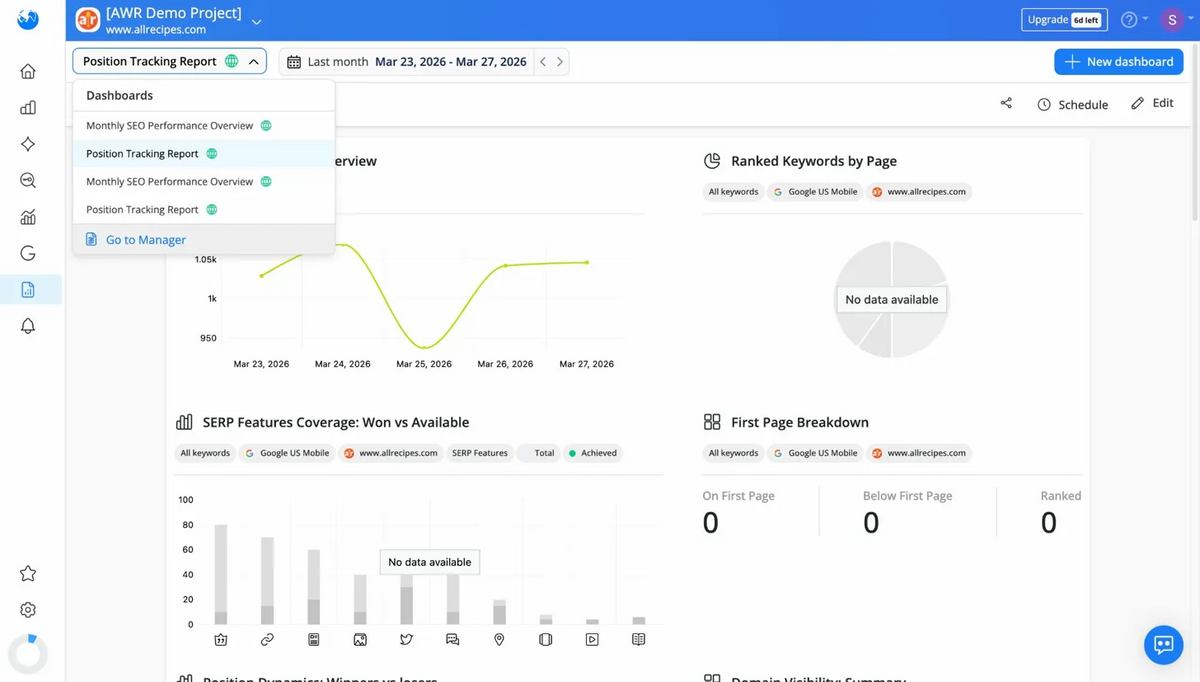
You can also schedule reports for automated delivery and export as PDF.
The UI here is well-built. It has a clean layout, readable charts, and enough spacing between each section so you don't get overwhelmed. You can also create whitelabel reports with your own or your client's brand, making it easy to directly add to your regular reporting deck or document.
Pricing
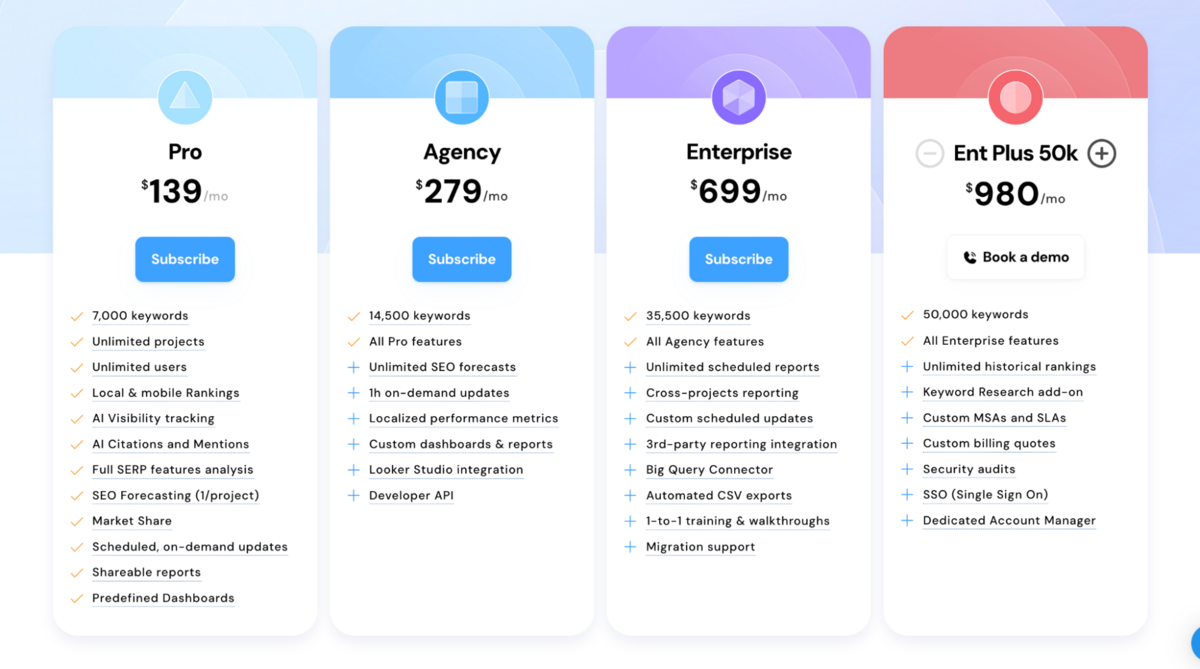
AWR has four plans, all with unlimited projects and unlimited users. No per-seat or per-project charges.
- Pro: $139/month. 7,000 keywords. AI Visibility, SERP analysis, Market Share, shareable reports.
- Agency: $279/month. 14,500 keywords. Adds 1-hour on-demand updates, custom dashboards, Looker Studio integration, and API access.
- Enterprise: $699/month. 35,500 keywords. Adds BigQuery, cross-project reporting, automated exports, and migration support.
- Ent Plus 50k: $980/month. 50,000 keywords. Adds Keyword Research add-on, SSO, and a dedicated account manager.
The keyword calculation is worth understanding.
One keyword tracked weekly on one search engine for one device equals one keyword unit. Track that same keyword daily, and it costs 7 units. Track it on desktop and mobile, and it doubles. The maths is transparent, but daily tracking across multiple configurations eats into your allowance fast.
Compared to Semrush ($199-$549/month) and Ahrefs ($129+/month), AWR is competitively priced for what it does. The difference is that Semrush and Ahrefs are all-in-one platforms covering keyword research, backlinks, site audits, and content tools. AWR is a specialist rank tracker with SERP analysis and AI visibility bolted on.
The real value play is for agencies. Unlimited projects and users on every plan means you're not paying per client. A mid-size agency tracking 10 clients on the Agency plan at $279/month is getting significantly more value per dollar than most competitors that charge per project or per seat (depending on keyword volume and tracking frequency).
The Verdict
AWR is a serious SEO intelligence platform that can compete head-on with Semrush and Ahrefs on several fronts.
The SERP analysis suite is the best we've tested in any tool this year. SERP Similarity with its side-by-side visual comparison, Volatility with day-by-day movement tracking, and Top Sites with pixel position data give you a level of search results intelligence that bigger platforms don't offer.
Data visualisation is one of its strongest areas. The data is presented in ways that make it extremely easy to answer three questions: what's happened, why has it happened, and what do you need to do next.
AI Visibility, brand mentions, and citation data sitting right next to your organic rankings at no extra cost puts AWR ahead of tools that either don't offer this or charge separately for it. As we saw earlier, AWR goes beyond keyword difficulty, position, and general SERP features to give you pixel position tracking, click share breakdowns, SERP volatility patterns, and a three-layer difficulty model that tells you why a keyword is hard, not just that it is.
These aren't surface-level additions. They fundamentally change how you make decisions, giving you deeper insight into your results, rankings, and traffic, and helping you build a more efficient strategy, whether that means targeting a SERP feature, improving position, or simply refining content.
The unlimited projects, users, and seats on every plan is something we haven't seen in any other SEO tool at this price point. Semrush charges per seat. Ahrefs charges per seat. Most mid-range tools cap projects or users behind higher tiers. AWR gives you unlimited everything from the $139/month Pro plan upwards. For agencies managing 10, 20, or 50 clients with multiple team members, that alone can save hundreds of dollars a month compared to per-seat competitors. However, please be careful of the keyword units, as you can burn through them pretty quickly if you're not being mindful about it.
Where AWR falls short is where you'd expect. No backlink analysis or link-building workflow. No in-depth keyword research. No site audit. And no content tools. However, we said this at the start of the article. AWR is a rank tracker that happens to have other SEO features (it is never going to be enough to just have AWR). It's primarily for rank tracking, and the value of the extra rank tracking features that AWR provides justifies the cost by orders of magnitude.
Think of it like the Swiss Army knife vs the chef's knife.
Semrush and Ahrefs are the Swiss Army knives. They do a bit of everything and are the best in the market. AWR is the chef's knife. It does one thing, and only one thing (rank tracking), but when you pick it up, the difference in precision is obvious.
Click here to get back to the 2026 SEO tools comparison report.
Frequently Asked Questions (FAQs)
1. What is Advanced Web Ranking?
AWR is a specialist rank tracking and SERP analysis platform built for agencies and SEO teams. It tracks keyword positions across Google Desktop, Mobile, and AI Mode, with built-in AI visibility monitoring, competitive intelligence, and reporting. It's been around since 2002.
2. How much does AWR cost?
Plans start at $139/month (Pro, 7,000 keywords) and go up to $980/month (Ent Plus 50k, 50,000 keywords). Annual billing saves 10%. Every plan includes unlimited projects, users, and seats, and there's a 30-day money-back guarantee on all plans.
3. Does AWR track AI search visibility?
Yes. Every paid plan includes AI Visibility tracking, AI brand mentions, citation tracking, and share of voice data. This sits directly inside the rank tracking view alongside your traditional organic rankings.
4. Does AWR include backlink analysis or site audits?
No. AWR is a specialist rank tracker with SERP analysis and AI visibility. It doesn't cover backlinks, site audits, or content tools. You'll need Semrush, Ahrefs, or Moz Pro alongside it for those workflows.
5. Is AWR suitable for agencies?
Yes. Every plan includes unlimited projects, users, and seats. The reporting tools support white-label branding, scheduled delivery, and PDF exports. The Agency plan adds Looker Studio integration and API access. It's built for multi-client workflows.